User User name Password  
   
Sunday 1.3.2026 / 07:52
Search AfterDawn Forums:        In English   Suomeksi   På svenska
afterdawn.com > forums > software specific discussion > nero discussion > invalid sector
Show topics
 
Forums
Forums
Invalid Sector
  Jump to:
 
Posted Message
ticctech
Junior Member
_
23. July 2006 @ 13:48 _ Link to this message    Send private message to this user   
Lately, I have been getting errors when I try to copy an image to a disk. The same error that keeps coming every now and then is "invalid sector". Can anyone tell me if this is an error with the disk I am using or is it from the file that i am trying to burn to the disk??
Advertisement
_
__
Moderator
_
23. July 2006 @ 14:45 _ Link to this message    Send private message to this user   
Hi ticctech
So the image is already on your hard drive and you are now trying to burn it?
Could be either case you mentioned. If you get a read invalid sector could be the image itself. But I'm thinking it may be more burn (media) related since it's ever now & then.
What brand of media are your using? Burn speed? Is your burner's firmware up to date?


Forum Rules
Do this before posting
Do not click this link...
ticctech
Junior Member
_
23. July 2006 @ 14:58 _ Link to this message    Send private message to this user   
The media I am using is Dataware -R 8X. I am burning at 8X. I purchased the burner just before X-mas so I think the firmware is up to date. I am leaning more to the possibility that it is the media. the only downfall is that I purchased a 200 pack of these because they went on sale at the local Future Shop. >:-(
Moderator
_
23. July 2006 @ 15:30 _ Link to this message    Send private message to this user   
Firmware may need an update so let's do this - find out the manufacturer of those datawrite and the firmware version of your drive.
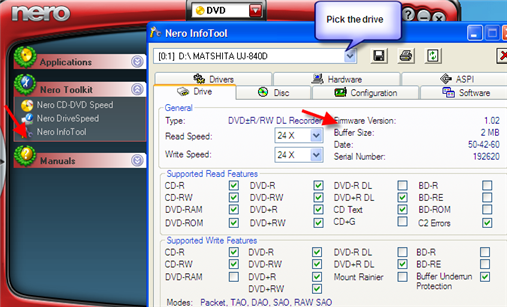
Pop a blank in the drive then go to NeroToolKit>InfoTool. Pick your drive. One the drive tab there will be a field for the firmware version.

On the disc tab it will give you the manufacturer of those discs.
If those disc show TYG02 look around the inner hub for something like this GG00xxxx (the x's represent #'s)

Post back: make, model & firmware version of drive and the manufacturer of the disc. (here's pic for illustration)


Forum Rules
Do this before posting
Do not click this link...
ticctech
Junior Member
_
23. July 2006 @ 16:45 _ Link to this message    Send private message to this user   
well, I am at work right now, but I will definately take a look and post up when I get home. Thanks for the help in advance!!!
Advertisement
_
__
 
_
Moderator
_
23. July 2006 @ 18:40 _ Link to this message    Send private message to this user   
No problem ticctech
You may just need a firmware update (there probably is a newer one).

To check the inner hub look on the back of the discs for this code if Nero shows them as TYG02.


Forum Rules
Do this before posting
Do not click this link...
afterdawn.com > forums > software specific discussion > nero discussion > invalid sector
 

Digital video: AfterDawn.com | AfterDawn Forums
Music: MP3Lizard.com
Gaming: Blasteroids.com | Blasteroids Forums | Compare game prices
Software: Software downloads
Blogs: User profile pages
RSS feeds: AfterDawn.com News | Software updates | AfterDawn Forums
International: AfterDawn in Finnish | AfterDawn in Swedish | AfterDawn in Norwegian | download.fi
Navigate: Search | Site map
About us: About AfterDawn Ltd | Advertise on our sites | Rules, Restrictions, Legal disclaimer & Privacy policy
Contact us: Send feedback | Contact our media sales team
 
  © 1999-2026 by AfterDawn Ltd.

  IDG TechNetwork