|
|
|
Power Calibration Errors and others on CD-Rs
|
|
Junior Member

|
4. August 2006 @ 14:48 |
 Link to this message

|
I'm using a fairly recently acquired Memorex DVD writer (16X, dual format, dual layer) model MX-500N (also known as model 5395-7746 code 3202-3292). WinXP dev manger lists it as Memorex 16X-DDL-IN. Sure has a lot of names! That makes it hard to find out if there are firmware updates available or not. So far I think not.
I'm using the Nero software bundled with the DVD writer which includes Nero Express V6.6.0.8, and a LOT of other Nero stuff.
I'm burning TDK CD-R rated at 52X. The package label says Manufactured in Taiwan. The Nero error log shows them as
CDR code: 00 97 26 66; OSJ entry from: CMC Magnetics Corporation
I have successfully burned at least one music CD (.wav files) at 48X and lower speeds but more recently I am successful only at 8X (lowest speed allowed by Nero). Maybe I was just lucky at 48X! At 16X I get one of several failures: Power Calibration error, Write error, or data verification error (I've been requesting verification since the writing has been suspect). Following the data verification error I looked at the CD and it looked like it had written less than 50% of the data but it claimed the write was completed successfully! Hmmmmmm......
I have also burned several Maxell DVD-Rs at 16X with video which have been fine! Used NeroVision Express 3 from the OEM bundle.
Back to the CD-R problems. I've read several other posts about power calibration errors and it seems there are many things suggested including upgrading or downgrading. Since this is an OEM bundled software suite I don't think I can upgrade or downgrade. And if I needed to use one of the "cleaners", which one would work with my software?
I used to use Roxio Easy CD/DVD Creator with my old, cheap, CD-RW drive (never had a failure in hundreds of burns). But I uninstalled the Roxio stuff before installing the Nero Suite. The Nero install instructions say to uninstall other CD/DVD recording suites (like Roxio). I also use Retrospect and I have Norton Ghost which can burn CDs and DVDs. iTunes and other apps can also burn. Are these other apps possible problems? I hope not!
I will post the Nero error log from the most recent power calibration error at 16X (tried 3 times today). Thanks for any comments and suggestions!
--Larry
WinXP Home SP3
|
|
Advertisement
|
 |
|
|
Junior Member
|
4. August 2006 @ 14:52 |
Link to this message
|
Here's the log from the Power Calibration Error:
Larry McGowan
Home
Windows XP 5.1
IA32
WinAspi: -
ahead WinASPI: File 'C:\Program Files\Ahead\Nero\Wnaspi32.dll': Ver=2.0.1.74, size=164112 bytes, created 10/26/2004 9:35:32 AM
Nero Version: 6.6.0.8 (Nero Express)
Recorder: <Memorex 16X-DDL-IN> Version: 1.A3 - HA 1 TA 0 - 6.6.0.8
Adapter driver: <atapi> HA 1
Drive buffer : 2048kB
Bus Type : via Inquiry data (1) -> ATAPI, detected: ATAPI
Connected to MMC as unknown drive with class-nr : 1
Drive is autodetected - recorder class: Std. MMC recorder
CD-ROM: <Memorex 16X-DDL-IN >Version: 1.A3 - HA 1 TA 0 - 6.6.0.8
Adapter driver: <atapi> HA 1
=== Scsi-Device-Map ===
DiskPeripheral : WDC WD2500JB-00REA0 atapi Port 0 ID 0 DMA: On
DiskPeripheral : WDC WD1200JB-00EVA0 atapi Port 0 ID 1 DMA: On
CdRomPeripheral : Memorex 16X-DDL-IN atapi Port 1 ID 0 DMA: On
=== CDRom-Device-Map ===
Memorex 16X-DDL-IN D: CDRom0
=======================
AutoRun : 1
Excluded drive IDs:
WriteBufferSize: 74448896 (0) Byte
ShowDrvBufStat : 0
BUFE : 0
Physical memory : 511MB (523760kB)
Free physical memory: 143MB (146932kB)
Memory in use : 71 %
Uncached PFiles: 0x0
Use Inquiry : 1
Global Bus Type: default (0)
Check supported media : Disabled (0)
4.8.2006
Audio CD
2:53:57 PM #1 CDADOC -1 File Cdadoc.cpp, Line 1465
Audio item log info:
Audio document burn settings:
=============================
Burn mode: DAO,
CD Text: On,
Cache disk or network files: No,
Cache small files: No,
Cache files smaller than 65536 bytes.
Audio Multisession: No
List of audio tracks:
=====================
<<Track list deleted>>
Total size: 60:14.15
2:53:57 PM #2 Text 0 File Burncd.cpp, Line 2868
Memorex 16X-DDL-IN
JustLink activated
2:53:57 PM #3 Text 0 File Reader.cpp, Line 127
Reader running
2:53:57 PM #4 Text 0 File AudioCompilationImpl.cpp, Line 842
DRM: StartDrmRecording(RealRec:1, ImageRec:0, Copies:1)
DRM: Beginning burn process.
2:53:57 PM #5 Text 0 File Writer.cpp, Line 122
Writer Memorex 16X-DDL-IN running
2:53:57 PM #6 Text 0 File Burncd.cpp, Line 3153
Turn on Disc-At-Once, using CD-R/RW media
2:53:57 PM #7 Text 0 File DlgWaitCD.cpp, Line 260
Last possible write address on media: 359845 ( 79:59.70)
Last address to be written: 270914 ( 60:14.14)
2:53:57 PM #8 Text 0 File DlgWaitCD.cpp, Line 272
Write in overburning mode: NO
2:53:57 PM #9 Text 0 File DlgWaitCD.cpp, Line 2339
Recorder: Memorex 16X-DDL-IN;
CDR code: 00 97 26 66; OSJ entry from: CMC Magnetics Corporation
ATIP Data:
Special Info [hex] 1: D0 00 98, 2: 61 1A 42 (LI 97:26.66), 3: 4F 3B 47 (LO 79:59.71)
Additional Info [hex] 1: 00 00 80 (invalid), 2: 00 00 00 (invalid), 3: 00 00 00 (invalid)
2:53:57 PM #10 Text 0 File DlgWaitCD.cpp, Line 438
>>> Protocol of DlgWaitCD activities: <<<
=========================================
2:53:57 PM #11 Text 0 File ThreadedTransferInterface.cpp, Line 830
Setup items (after recorder preparation)
<<List of setup items deleted>>
--------------------------------------------------------------
2:53:57 PM #12 Text 0 File ThreadedTransferInterface.cpp, Line 1043
Prepare recorder [Memorex 16X-DDL-IN] for write in CUE-sheet-DAO
DAO infos:
==========
MCN: ""
TOCType: 0x00; Session Closed, disc fixated
Tracks 1 to 11:
1: TRM_AUDIO_NOPRE, 2352/0x00, FilePos 0 352800 77785344, ISRC ""
2: TRM_AUDIO_NOPRE, 2352/0x00, FilePos 77785344 78138144 136018512, ISRC ""
3: TRM_AUDIO_NOPRE, 2352/0x00, FilePos 136018512 136371312 182277648, ISRC ""
4: TRM_AUDIO_NOPRE, 2352/0x00, FilePos 182277648 182630448 256445616, ISRC ""
5: TRM_AUDIO_NOPRE, 2352/0x00, FilePos 256445616 256798416 313559232, ISRC ""
6: TRM_AUDIO_NOPRE, 2352/0x00, FilePos 313559232 313912032 365159760, ISRC ""
7: TRM_AUDIO_NOPRE, 2352/0x00, FilePos 365159760 365512560 413573328, ISRC ""
8: TRM_AUDIO_NOPRE, 2352/0x00, FilePos 413573328 413926128 472065216, ISRC ""
9: TRM_AUDIO_NOPRE, 2352/0x00, FilePos 472065216 472418016 538306944, ISRC ""
10: TRM_AUDIO_NOPRE, 2352/0x00, FilePos 538306944 538659744 595161840, ISRC ""
11: TRM_AUDIO_NOPRE, 2352/0x00, FilePos 595161840 595514640 637544880, ISRC ""
DAO layout:
===========
__Start_|____Track_|_Idx_|_CtrlAdr_|_RecDep__________
-150 | lead-in | 0 | 0x01 | 0x00
-150 | 1 | 0 | 0x21 | 0x00
0 | 1 | 1 | 0x21 | 0x00
32922 | 2 | 0 | 0x21 | 0x00
33072 | 2 | 1 | 0x21 | 0x00
57681 | 3 | 0 | 0x21 | 0x00
57831 | 3 | 1 | 0x21 | 0x00
77349 | 4 | 0 | 0x21 | 0x00
77499 | 4 | 1 | 0x21 | 0x00
108883 | 5 | 0 | 0x21 | 0x00
109033 | 5 | 1 | 0x21 | 0x00
133166 | 6 | 0 | 0x21 | 0x00
133316 | 6 | 1 | 0x21 | 0x00
155105 | 7 | 0 | 0x21 | 0x00
155255 | 7 | 1 | 0x21 | 0x00
175689 | 8 | 0 | 0x21 | 0x00
175839 | 8 | 1 | 0x21 | 0x00
200558 | 9 | 0 | 0x21 | 0x00
200708 | 9 | 1 | 0x21 | 0x00
228722 | 10 | 0 | 0x21 | 0x00
228872 | 10 | 1 | 0x21 | 0x00
252895 | 11 | 0 | 0x21 | 0x00
253045 | 11 | 1 | 0x21 | 0x00
270915 | lead-out | 1 | 0x01 | 0x00
2:53:58 PM #13 Phase 36 File dlgbrnst.cpp, Line 1832
Burn process started at 16x (2,400 KB/s)
2:53:58 PM #14 Text 0 File ThreadedTransferInterface.cpp, Line 2609
Verifying disc position of item 0 (relocatable, no disc pos, no patch infos, orig at #0): write at #0
2:53:58 PM #15 Text 0 File ThreadedTransferInterface.cpp, Line 2609
Verifying disc position of item 1 (relocatable, no disc pos, no patch infos, orig at #0): write at #33072
2:53:58 PM #16 Text 0 File ThreadedTransferInterface.cpp, Line 2609
Verifying disc position of item 2 (relocatable, no disc pos, no patch infos, orig at #0): write at #57831
2:53:58 PM #17 Text 0 File ThreadedTransferInterface.cpp, Line 2609
Verifying disc position of item 3 (relocatable, no disc pos, no patch infos, orig at #0): write at #77499
2:53:58 PM #18 Text 0 File ThreadedTransferInterface.cpp, Line 2609
Verifying disc position of item 4 (relocatable, no disc pos, no patch infos, orig at #0): write at #109033
2:53:58 PM #19 Text 0 File ThreadedTransferInterface.cpp, Line 2609
Verifying disc position of item 5 (relocatable, no disc pos, no patch infos, orig at #0): write at #133316
2:53:58 PM #20 Text 0 File ThreadedTransferInterface.cpp, Line 2609
Verifying disc position of item 6 (relocatable, no disc pos, no patch infos, orig at #0): write at #155255
2:53:58 PM #21 Text 0 File ThreadedTransferInterface.cpp, Line 2609
Verifying disc position of item 7 (relocatable, no disc pos, no patch infos, orig at #0): write at #175839
2:53:58 PM #22 Text 0 File ThreadedTransferInterface.cpp, Line 2609
Verifying disc position of item 8 (relocatable, no disc pos, no patch infos, orig at #0): write at #200708
2:53:58 PM #23 Text 0 File ThreadedTransferInterface.cpp, Line 2609
Verifying disc position of item 9 (relocatable, no disc pos, no patch infos, orig at #0): write at #228872
2:53:58 PM #24 Text 0 File ThreadedTransferInterface.cpp, Line 2609
Verifying disc position of item 10 (relocatable, no disc pos, no patch infos, orig at #0): write at #253045
2:53:58 PM #25 Text 0 File Mmc.cpp, Line 16537
StartDAO : CD-Text - On
2:53:58 PM #26 Text 0 File Mmc.cpp, Line 21319
Set BUFE: JustLink -> ON
2:53:58 PM #27 Text 0 File Mmc.cpp, Line 16826
CueData, Len=192
21 00 00 41 00 00 00 00
21 01 00 00 00 00 00 00
21 01 01 00 00 00 02 00
21 02 00 00 00 07 14 48
21 02 01 00 00 07 16 48
21 03 00 00 00 0c 33 06
21 03 01 00 00 0c 35 06
21 04 00 00 00 11 0d 18
21 04 01 00 00 11 0f 18
21 05 00 00 00 18 0d 3a
21 05 01 00 00 18 0f 3a
21 06 00 00 00 1d 25 29
21 06 01 00 00 1d 27 29
21 07 00 00 00 22 1e 05
21 07 01 00 00 22 20 05
21 08 00 00 00 27 04 27
21 08 01 00 00 27 06 27
21 09 00 00 00 2c 24 08
21 09 01 00 00 2c 26 08
21 0a 00 00 00 32 33 2f
21 0a 01 00 00 32 35 2f
21 0b 00 00 00 38 0d 46
21 0b 01 00 00 38 0f 46
01 aa 01 01 00 3c 0e 0f
2:54:19 PM #28 SCSI -1106 File Cdrdrv.cpp, Line 1435
SCSI Exec, HA 1, TA 0, LUN 0, buffer 0x09EA0000
Status: 0x04 (0x01, SCSI_ERR)
HA-Status 0x00 (0x00, OK)
TA-Status 0x02 (0x01, SCSI_TASTATUS_CHKCOND)
Sense Key: 0x03 (KEY_MEDIUM_ERROR)
Sense Code: 0x73
Sense Qual: 0x03
CDB Data: 0x2A 0x00 0xFF 0xFF 0xD2 0x8E 0x00 0x02 0xAA 0x00 0x00 0x00
Sense Data: 0x70 0x00 0x03 0x00 0x00 0x00 0x00 0x0A
0x00 0x00 0x00 0x00 0x73 0x03
2:54:19 PM #29 CDR -1106 File Writer.cpp, Line 311
Power calibration error
2:54:19 PM #30 Text 0 File ThreadedTransfer.cpp, Line 228
all writers idle, stopping conversion
2:54:19 PM #31 Text 0 File ThreadedTransfer.cpp, Line 222
conversion idle, stopping reader
2:54:20 PM #32 Phase 38 File dlgbrnst.cpp, Line 1832
Burn process failed at 16x (2,400 KB/s)
2:54:20 PM #33 Text 0 File AudioCompilationImpl.cpp, Line 867
DRM: DRM burn session terminated.
2:54:20 PM #34 Text 0 File AudioCompilationImpl.cpp, Line 896
DRM: Closing entire DRM handling. Bye.
Existing drivers:
File 'Drivers\CDRALW2K.SYS': Ver=6.2.0.132 , size=24698 bytes, created 10/22/2003 9:15:02 PM
File 'Drivers\PXHELP20.SYS': Ver=2.03.28a, size=20640 bytes, created 10/26/2005 1:12:48 PM (Prassi/Veritas driver for win 2K)
File 'Drivers\InCDfs.SYS': Ver=4, 3, 12, 0, size=99200 bytes, created 1/27/2005 6:08:02 PM (InCD4 driver for win NT/2K/XP)
File 'Drivers\InCDpass.SYS': Ver=4, 3, 12, 0, size=28928 bytes, created 1/27/2005 6:07:34 PM (InCD4 driver for win NT/2K/XP)
File 'Drivers\InCDrec.SYS': Ver=4, 3, 12, 0, size=8704 bytes, created 1/27/2005 6:08:08 PM (InCD4 driver for win NT/2K/XP)
File 'Drivers\atapi.sys': Ver=5.1.2600.2180 (xpsp_sp2_rtm.040803-2158), size=95360 bytes, created 8/3/2004 10:59:42 PM (Adapter driver for rec)
Registry Keys:
HKLM\Software\Microsoft\Windows NT\CurrentVersion\WinLogon\AllocateCDROMs : 0 (Security Option)
WinXP Home SP3
|
AfterDawn Addict
|
4. August 2006 @ 16:25 |
Link to this message

|
|
|
Bigfatboy
Member
|
4. August 2006 @ 17:28 |
Link to this message
|
|
hello,
to add to the above post, i would also recommend maxell (made in japan) cd's, all of my maxell's code out as taiyo yuden
peace
|
Moderator
|
4. August 2006 @ 17:44 |
Link to this message

|
|
@larrymcg
Looks like you may have the latest firmware on your drive.
I too would recommend the Maxell -mij - Taiyo's and are great. Made in Japan Fuji's also are made by Taiyo. Usually the only 2 brands of cd's I use.
Watch the Verbatim cd's - they are usually made by CMC. My luck hasn't been that good with them.
edit: typos per usual :)
This message has been edited since posting. Last time this message was edited on 4. August 2006 @ 17:44
|
AfterDawn Addict
|
4. August 2006 @ 18:07 |
Link to this message
|
@binkie7,
Quote:
Watch the Verbatim cd's - they are usually made by CMC
Karen, Here I am blissfully using these discs and not knowing who makes them (suddenly shudders at the thought)
|
Moderator
|
4. August 2006 @ 18:23 |
Link to this message
|
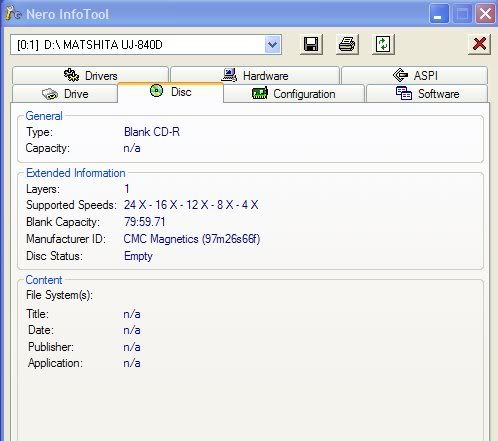
LOL - last few packs over the years have all been CMC here in the states unless you can find the data life plus cd's from Verbatim.
I get anything from burn failures to the burn speed being auto reduced.
Here's a pic of my last verb cd's:
|
AfterDawn Addict
|
4. August 2006 @ 18:45 |
Link to this message
|
@binkie7, Karen, when you run Nero Info Tool, how long does it take to display the info you have illustrated.
|
Moderator
|
4. August 2006 @ 18:52 |
Link to this message
|
|
Once I have the disc in the drive 5 secs - I just timed it.
|
AfterDawn Addict
|
4. August 2006 @ 19:09 |
Link to this message
|
|
Mine is still sitting there and has done nothing, I opened it just before my last post, strange!!
|
Junior Member
|
4. August 2006 @ 19:48 |
Link to this message
|
Gwendolyn,
It looks like the two updates you suggested are for Nero and NeroVision Express. Can I do the updates even though the ones I have are from an OEM bundle?
That bundle has lots of other apps in it also. Things like: Media Player, BackItUp, MediaHome, ShowTime, Recode, Cover Designer, PhotoShow Elite, and the Tool Kit (CD-DVD Speed, Drive Speed, InfoTool)and of course the SmartStart app. Can I update these too?
I'll try the Roxio zapper.
I find the discussions about which CDs are best interesting. No two people agree. I find lots of folks saying Verbatim and Sony (made in Japan) are the best. A response to one of my earlier posts claimed that the TDKs I'm using are also recommended. And general agreement that CMC disks are very bad. I didn't realize my TDKs were made by CMC.
In any case, I think I'll try some Maxell's or Sony's (made in Japan).
Many of my TDKs have turned into coasters!
As an experiment, after getting the Power Calibration error on a CD, I reburned the same project on that same disk at 8KB with verification and it was fine. I guess the error occurrs before the disk is turned into a coaster!
Thanks for the info,
--Larry
WinXP Home SP3
|
Moderator
|
4. August 2006 @ 20:42 |
Link to this message
|
@larrymcg
Depending on what your original oem disc of Nero came w/ the updates will be ok. You just may not have the opinions for Recode and Vision etc. Depends - some have full access of Nero - some don't.
CD's are different from DVD's - what may be a good brand for DVD's may differ for CD's. Different dye is used for CD's too for 1 thing. Wish I could give you more specifics but I'm pretty limited there.
Taiyo Yuden was one of the 1st to 'prefect' cd's and for me have stood the test of time. Many years later still playing well.
Verbatim DVD's w/ the MCC codes & dye are great but CD's may be a different story.
|
Junior Member
|
11. August 2006 @ 14:00 |
Link to this message
|
|
I've updated via the links supplied by Gwendolin. Worked fine! Thanks.
The Roxio Zap program claims it is for zapping versions 4 and 5 and should not be used if version 6 is installed. Well, I had v6 but have uninstalled it. I'm not sure whether using the zapper is OK or not. The use license starts off with these words:
----------------------------------------------
THIS PROGRAM WILL REMOVE/DAMAGE OTHER ADAPTEC AND ROXIO SOFTWARE NOT LIMITED TO BUT INCLUDING GOBACK, PHOTOSUITE, VIDEOWAVE. THIS MEANS COMPONENTS FROM THOSE PROGRAMS WILL BE REMOVED AND YOU WILL NEED TO REINSTALL THEM ONCE THIS APPLICATION HAS BEEN RUN IF THEY EXIST.
This application will ZAP files, directories and registry entries associated with Easy CD Creator 4 and 5 and should not be run on a machine which has Easy CD and DVD Creator 6 currently installed.
-----------------------------------------------
Essentially it says it will do bad stuff to apps and doesn't give a full list of them. Seems dangerous to me. Hmmmm......
There is another Roxio driver and some inCD stuff too. Some folks think the inCD stuff is evil. They are:
Cdr4_xp and Cdralw2k (noted by Gwendolin) and
inCDfs, inCDPass, incdrm, inCD rec
Suggestions??
--Larry
PS: I got some Fuji CD-R discs because they were the ones I could find that were made in Japan and sure enough they are taiyo yuden. I can write music CDs at 32X on the Fuji's.
WinXP Home SP3
|
Moderator
|
11. August 2006 @ 16:40 |
Link to this message
|
@larrymcg
For Roxio 6 here's a link for the clean tool (roxizap) for that version:
http://kb.roxio.com/content/kb/EE6000061
I don't know if version 6 will give you the same warning about other Roxio software or Adaptec.
Roxio has a driver(s) that might conflict w/ Nero - that why it's listed under Existing drivers
Funny though is Nero's InCD is listed there too.
If you are not using it you can install it too and run the clean tool for it:
http://ww2.nero.com/nero6/enu/InCD_CleanTool.html
Programs leave garbage behind even after uninstalling that can clog up the registry or still cause conflicts depnding on what's left behind.
|
Junior Member
|
12. August 2006 @ 08:00 |
Link to this message
|
|
binkie7,
It turns out that the Roxio Zapper for version 6 is actually the one for v4 and 5. It gives instructions that you should uninstall v6 and then, BEFORE rebooting, run the zapper. Well, I'd uninstalled v6 some months ago. So I forced a system restore point and then ran the Roxio zapper and the inCD clean tool. At least nothing crashed!
After doing some experimenting I'll post results.
--Larry
WinXP Home SP3
|
Moderator
|
12. August 2006 @ 14:13 |
Link to this message
|
|
@larrymcg
Txs for the info!
Sounds like Roxio needs to change the wording in the zap user license.
Keep us posted.
Glad to hear you were able to find the Taiyo Fuji cd's- not always easy esp. in my area.
|
Junior Member
|
14. August 2006 @ 19:09 |
Link to this message
|
After doing the suggested Nero updates and zapping Roxio and Cleaning out inCD, my initial test were excellent. I sucessfully recorded music CDs on the TDK media (made by CMC) with verification at 24X and 16X. I'd had nothing but failures before. And then tonight I got a Power Calib Error at 24X and verification failures at 16X on the TDK. Soooooo, I guess nothing really got better.
I did succeed again at 32X with the Fuji (made by taiyo yuden) media.
So, I'll stick with 8X with the TDK (until they are gone) and get more of the taiyo yuden discs. I see that you can get them on-line at pretty good prices. They seem to be generic but made by taiyo yuden.
Thanks for all your help,
Larry
WinXP Home SP3
|
|
Advertisement
|
|
|
Moderator
|
14. August 2006 @ 19:31 |
Link to this message
|
It looks like your power calibration errors are mainly due to the CMC TDK's.
The Taiyo Yudens you can buy online can be the 'real' deal. Just use a reputable site for them. If you are in the US here's a good one (I buy Taiyo DVD's from here)
http://supermediastore.com
|
|




