|
Games won't boot
|
|
|
roryt2000
Junior Member

|
26. August 2006 @ 23:38 |
 Link to this message

|
|
Ok, I got a brand new laser a couple months ago cause my old one died, the pot setting is at the lowest it will go. The cog wheel is just about as high as it will go. My games will boot 1 out of 10 times. This just started happening today. I have been playing it for months now with no problems. What the heck is going on...?
|
|
Advertisement
|
 |
|
|
|
roryt2000
Junior Member
|
27. August 2006 @ 01:54 |
Link to this message

|
|
Well, i turned the cog wheel up a couple clicks and it works again. I dunno tho.. the lasers new, so I shouldn't be having this problem. Does this mean its gonna happen again in another few weeks? (this is really starting to bug me)
|
AfterDawn Addict
|
27. August 2006 @ 07:11 |
Link to this message
|
|
Sounds like it. What media do you use to burn your games? Crappy media burns out your laser quicker. That sounds like what's happening here.
|
|
roryt2000
Junior Member
|
27. August 2006 @ 14:42 |
Link to this message
|
|
|
|
s2god
Member
|
27. August 2006 @ 14:45 |
Link to this message

|
|
well that would be your problem. memorex is really sucky media. go get some sony dvd-r's (taiwan/japan) or some taiyo yudens, or maxell, or verbatim. look at the sticky for the media quality. Never use memorex again, and rebackup all your .iso's that are on memorex to better quality dvd's becuase in a year they might not work on memorex.
|
|
roryt2000
Junior Member
|
27. August 2006 @ 14:55 |
Link to this message
|
|
Ok so if I start using a better brand, how much longer will my laser last? And if I already have a backup, I can just do a direct copy of it, right?
|
|
roryt2000
Junior Member
|
27. August 2006 @ 15:03 |
Link to this message
|
|
Oh, by the way (might as well not make a new thread). I just got a new DVD+-RW drive, it's a Pioneer DVR-710 and I've been trying to burn my backups with it but it's not working, whereas my other burner does. Do you think if I just get better media, it'll work?
|
|
s2god
Member
|
27. August 2006 @ 15:23 |
Link to this message
|
Im not quite sure how much longer it will last, but longer is better so ya. yes if you a copy, you can just use DVD Decrypter, and do mode>iso>read. then burn with dvd decrpter doing mode>iso>write. as for your burner, im not really good with burners and stuff. so i dont kno if the media will make a difference
|
|
roryt2000
Junior Member
|
27. August 2006 @ 15:57 |
Link to this message
|
|
If after this laser burnt out and I got another new one and then used only good media, will it last the whole 2-3 years?
|
Senior Member
|
27. August 2006 @ 16:54 |
Link to this message
|
|
There's really no telling how long it'll last.. it depends on many factors like how often you use your ps2, what media you use, the quality of the laser etc etc..
I still have my original laser that came in my PS2 and it's never given me any problems.. but I've nevere used anything less than ritek/verbatim or taiyo yuden in it really.
|
|
roryt2000
Junior Member
|
30. August 2006 @ 19:01 |
Link to this message
|
|
Ok I got Verbatim 16x DVD-R's. What's the best speed to burn them at?
|
Senior Member
|
30. August 2006 @ 19:32 |
Link to this message
|
|
My opinion I wouldn't use 16x but some ppl have used it without any problem. You would burn at 8x .
|
|
roryt2000
Junior Member
|
30. August 2006 @ 20:14 |
Link to this message
|
|
Yes! It works!
Thanks for the help. :)
|
|
roryt2000
Junior Member
|
30. August 2006 @ 21:56 |
Link to this message
|
Ok, one problem though. I'm trying to rip all the backups from the Memorex DVDs in order to burn them to the Verbatim DVDs instead, but I'm getting an error every single time while ripping:
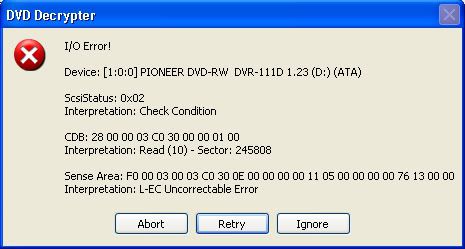
This happens with every DVD. Even if I try to copy it manually through windows, it gives me errors.
|
|
Advertisement
|
|
|
Senior Member
|
31. August 2006 @ 03:40 |
Link to this message
|
|
It looks to me like the dvd may be scratched dirty.. try cleaning it and then try again... if it still doesn't work.. use apache 3 to rip the game files and rebuild.. links in my sig for guides on how to do that :)
|


