User User name Password  
   
Monday 2.3.2026 / 00:50
Search AfterDawn Forums:        In English   Suomeksi   På svenska
afterdawn.com > forums > software specific discussion > nero discussion > burned dvd reading errors
Show topics
 
Forums
Forums
Burned DVD reading errors
  Jump to:
 
Posted Message
Riotblade
Newbie
_
28. August 2006 @ 16:42 _ Link to this message    Send private message to this user   
I have burnt around maybe 10 dvd's 3 months ago. All of them were working fine until I've tried recently. All of them would show up as a "Blank CD" in windows. I then tried them on my other computer and it works fine.

Anyone know why this happens and if there's anyway to fix them? I tried uninstalling Nero but it didn't work.

Thanks
Moderator
_
28. August 2006 @ 18:21 _ Link to this message    Send private message to this user   
Hi Riotblade
Check on make sure the burners firmware is up to date.
You can check the manufacturers website or here to see if there is a later version.
http://forum.rpc1.org/dl_search.php
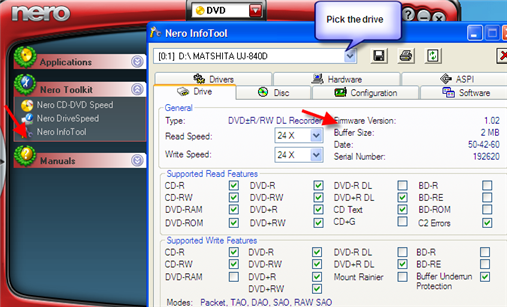
Check Nero ToolKit>Info Tool for your current version & made/model of drive (see pic below)

You can also try dvddecrypter (free) and see if it will rip them. You could rip in iso mode than use decrypter to burn the iso.
http://www.mrbass.org/dvdrip/


edit: fix pix :)


Forum Rules
Do this before posting
Do not click this link...

This message has been edited since posting. Last time this message was edited on 28. August 2006 @ 19:04

afterdawn.com > forums > software specific discussion > nero discussion > burned dvd reading errors
 

Digital video: AfterDawn.com | AfterDawn Forums
Music: MP3Lizard.com
Gaming: Blasteroids.com | Blasteroids Forums | Compare game prices
Software: Software downloads
Blogs: User profile pages
RSS feeds: AfterDawn.com News | Software updates | AfterDawn Forums
International: AfterDawn in Finnish | AfterDawn in Swedish | AfterDawn in Norwegian | download.fi
Navigate: Search | Site map
About us: About AfterDawn Ltd | Advertise on our sites | Rules, Restrictions, Legal disclaimer & Privacy policy
Contact us: Send feedback | Contact our media sales team
 
  © 1999-2026 by AfterDawn Ltd.

  IDG TechNetwork