|
!!!!EXPERIENCE NEEDED WITH HARD DRIVES!!!!
|
|
|
jar_head
Newbie

|
21. November 2006 @ 16:14 |
Link to this message

|
|
hi,
i recently bought a new computer and have been putting bit my bit money into it for parts but i also have a spare comp with two hard-drives just sitting in it and want to take the 80GB one out and put it into my current computer with a 200GB in it if any one could tell me step by step how and the configuration needed to make it work i would appreciate it very much oh and by the way my 200GB is a 7200RPM serial ATA and the other one is 80GB SATA or something i think.
|
|
Advertisement

|
 |
|
|
Senior Member
|
21. November 2006 @ 20:39 |
Link to this message

|
|
Assuming your 200Gb is going to be your primary, look in your motherboard documentation which SATA port (It might be called SATA0 or the lowest numbered SATA port) on the motherboard is the primary and connect the 200Gb drive to it. Connect the 80Gb to the Secondary SATA port (maybe SATA1 or 2, if you have more than 2 ports, let me know). Then connect the power connectors to the hard drives. You may need an adaptor as modern SATA drives use a different power connector than traditional ATA and first-generation SATA drives did.
Now boot. Your BIOS may find the drives automatically. If not, or if your system seems slow, go into the BIOS and verify that at least your 200Gb drive (SATA primary) is set up as your primary drive - usually, it will appear first in the drive listing - and that your 80Gb appears either right below it or second below it, depending perhaps on whether you have a DVD or CD drive installed. Also make sure the 200Gb drive is considered the first or second boot device (usually it will be second after the CD/DVD-ROM.)
-Do you believe you own your computer and shouldn't be told what you can run and do? Then say *NO* to Microsoft Vista!
-Since half the questions here involve media problems, here ya go: Only use Verbatim or Taiyo-Yuden discs (get your TYs from Rima.com, not Supermediastore or meritline). Forget the rest, no matter what "brand" they sell under. Always burn at 4x speed regardless of the speed rating of this discs or your drive. If you have burn problems with these then you have to update your drive's firmware. For double-layer discs, only use Verbatim DVD+R DL and burn them at 2.4x speed.
|
Member
|
22. November 2006 @ 05:36 |
Link to this message
|
|
OK it is simple all you need to do is make sure that the hard drive will work in you comp, then you set you hard drive to be a slave drive by changing the jumper to slave, plug it in, format and thats it.
|
|
jar_head
Newbie
|
24. November 2006 @ 00:21 |
Link to this message

|
|
yeah, i thought i was good at computers i even took a course exactly for this kinda stuff and installing HD. first things first i dont have motherboard documentation with my new comp so i dont know what port is used and i have completely forgoten how to acces the BIOS and configure all of the things that you stated if you could be a little bit more specific i would be grateful.
|
|
jar_head
Newbie
|
24. November 2006 @ 01:52 |
Link to this message
|
here are some pics of my 200GB and the 80GB hard drives they had different connectors so i couldent put the 80GB in and so i put it back into the old computer-
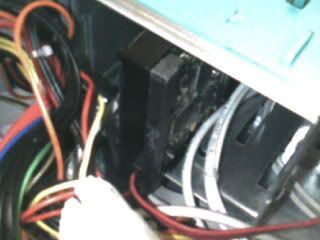
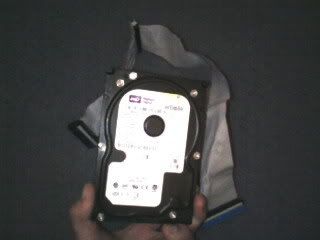
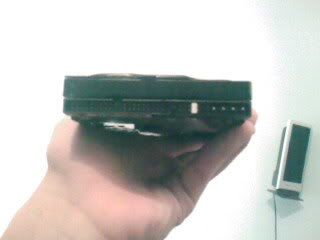
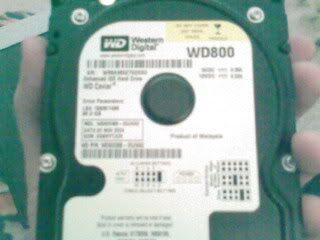
the 200GB is only show once and is the one still in the computer.(first url)
|
Senior Member
|
24. November 2006 @ 07:56 |
Link to this message
|
|
Here's a link from Western Digital regarding your drive. That WD800 is definitely a SATA, right? Then you don't even need to mess with jumpers. Look where the 200 Gb drive is plugged into the board. Look at the connector - you can unplug it if you want. What is written there on the motherboard next to the connector? Are there any similar connectors adjacent to it? What are they labelled?
You can usually get into BIOS by hitting the DEL key at bootup, during the POST (Power-On Self Test, e.g. from while the memory test is going until you get that brief screen that shows you what's install in your system.) Some systems use F2 instead of DEL. Hard drive configuration is in your "basic" or "main" CMOS setup - exactly what it's called varies greatly. It's usually the first item listed in your BIOS screen.
-Do you believe you own your computer and shouldn't be told what you can run and do? Then say *NO* to Microsoft Vista!
-Since half the questions here involve media problems, here ya go: Only use Verbatim or Taiyo-Yuden discs (get your TYs from Rima.com, not Supermediastore or meritline). Forget the rest, no matter what "brand" they sell under. Always burn at 4x speed regardless of the speed rating of this discs or your drive. If you have burn problems with these then you have to update your drive's firmware. For double-layer discs, only use Verbatim DVD+R DL and burn them at 2.4x speed.
|
Member
|
24. November 2006 @ 09:19 |
Link to this message
|
|
I dont think you can exchange them couse on of them is SATA and the 80 GB is ATA asuming that you dont have ATA conector on your motherboard but if you then it could work .
Intel Pentium 4 3.2GHz, Radeon X700Pro 256MB PCIe, SuperMicro P4SCI ATX Motherboard, 800MHz FSB, 2 x 2GB DDR2800, GB LAN, 2 x WD 250GB SATA2 Hard Drives, Wireless Microsoft Keyboard and Mouse, LG 19" LCD.
|
|
ddp
Moderator
|
24. November 2006 @ 18:02 |
Link to this message
|
|
the wd 80 gig is ata not sata. what is the make & model# of the computer or motherboard? is the 80 gig going to be a slave or master? what is it currently jumpered as?
|
Member
|
25. November 2006 @ 01:09 |
Link to this message
|
|
DDP i have heard about some adapters where you can connect a SATA harddrive into an ATA port . Now would the SATA harddrive work with the high speed ? And do you think that those adapters are realy there ?
Intel Pentium 4 3.2GHz, Radeon X700Pro 256MB PCIe, SuperMicro P4SCI ATX Motherboard, 800MHz FSB, 2 x 2GB DDR2800, GB LAN, 2 x WD 250GB SATA2 Hard Drives, Wireless Microsoft Keyboard and Mouse, LG 19" LCD.
|
|
Advertisement
|
|
|
Senior Member
|
25. November 2006 @ 06:28 |
Link to this message
|
|
They exist. You can get them at Tigerdirect, etc. But unless you don't have enough PATA ports, I'd just stick with IDE cable. PATA-to-SATA offers no speed advantage.
-Do you believe you own your computer and shouldn't be told what you can run and do? Then say *NO* to Microsoft Vista!
-Since half the questions here involve media problems, here ya go: Only use Verbatim or Taiyo-Yuden discs (get your TYs from Rima.com, not Supermediastore or meritline). Forget the rest, no matter what "brand" they sell under. Always burn at 4x speed regardless of the speed rating of this discs or your drive. If you have burn problems with these then you have to update your drive's firmware. For double-layer discs, only use Verbatim DVD+R DL and burn them at 2.4x speed.
This message has been edited since posting. Last time this message was edited on 25. November 2006 @ 06:28
|