|
The (new) Official PC building thread!
|
|
AfterDawn Addict

|
18. February 2008 @ 22:14 |
 Link to this message

|
abuzar1,
Quote:
You should have gotten a E6750, it would have overclocked just as well.
Speed wise that's true! Real World Performance, and the E8400 out performs the E6750 at the same clock speeds. The extra 2MB of L2 Cache helps as does the 42 additional instructions in the chips instruction Set! Similar speeds, but the E8400 wins the price/performance crown hands down, even when installed in an older tech Asus SLI high end MB! I've seen memory bandwidths in the mid 9200MB's range with that very motherboard! I can't wait till the prices start to come down!
Best Regards,
Russ
GigaByte 990FXA-UD5 - AMD FX-8320 @4.0GHz @1.312v - Corsair H-60 liquid CPU Cooler - 4x4 GB GSkill RipJaws DDR3/1866 Cas8, 8-9-9-24 - Corsair 400-R Case - OCZ FATAL1TY 550 watt Modular PSU - Intel 330 120GB SATA III SSD - WD Black 500GB SATA III - WD black 1 TB Sata III - WD Black 500GB SATA II - 2 Asus DRW-24B1ST DVD-Burner - Sony 420W 5.1 PL-II Suround Sound - GigaByte GTX550/1GB 970 Mhz Video - Asus VE247H 23.6" HDMI 1080p Monitor
 |
|
Advertisement
|
 |
|
|
AfterDawn Addict
2 product reviews
|
18. February 2008 @ 22:48 |
Link to this message
|
|
I was talking to GM because he spent an extra 100 and got an E6850.
|
AfterDawn Addict
|
18. February 2008 @ 22:56 |
Link to this message

|
Originally posted by abuzar1:
I was talking to GM because he spent an extra 100 and got an E6850.
An extra $57 tyvm!! :P (well before taxes...dang uncle sam!! $77 after uncle sam has his way with me.... :D)
...gm
This message has been edited since posting. Last time this message was edited on 18. February 2008 @ 23:10
|
AfterDawn Addict
2 product reviews
|
18. February 2008 @ 23:06 |
Link to this message

|
|
Could have spent that on a graphics card! lol
|
AfterDawn Addict
|
18. February 2008 @ 23:14 |
Link to this message
|
Originally posted by abuzar1:
Could have spent that on a graphics card! lol
For GAMES that I will NEVER play on the PC!! I don't think so!! :P I've re-evaluated my position on the GPU front and it makes ZERO sense for me to spend money for something that I will NEVER use. I'll use the E6850 just fine. It speeds thru encoding or whatever with ease. :D
....gm
|
AfterDawn Addict
2 product reviews
|
18. February 2008 @ 23:34 |
Link to this message
|
|
lol I guess so.
So guys I made an ad for my PC building services. I'll email it to you if you want to see, just PM me your email.
|
|
bigwill68
Suspended permanently
|
18. February 2008 @ 23:39 |
Link to this message
|
|
An extra $57 tyvm!! :P (well before taxes...dang uncle sam!! $77 after uncle sam has his way with me.... :D)
...gm
Yea uncle sam gets us everytime greens no matter what,hey what you got that e6850 oc'd at anyway? all yea good news robo got this system renewed we wiped it here at work.I brought my system in(blu bye u)..lol and hooked his hard drive up to mine the the other os corporate edition and reinstalled a fresh copy of windows xp home..he's a happy camper now no more ie7 and fire fox you know he like ie6 instead.he's all updated and headed home to put his software back on there that he had now things are right he said..lol
Done out of Here!
|
AfterDawn Addict
2 product reviews
|
18. February 2008 @ 23:52 |
Link to this message
|
|
GM has his E6850 overclocked to 3.7 ghz, while I can manage a cool 3.8 on my E6750 ;)
This message has been edited since posting. Last time this message was edited on 18. February 2008 @ 23:52
|
|
Random5
Junior Member
|
19. February 2008 @ 04:30 |
Link to this message
|
Originally posted by cincyrob:
@random5
i read some of those reviews. most of them are of people that are getting high temps from really OC'ing(4.0+ghz) or they didnt use AS5 on the cpu. idont have problems with my temps cpu=20-23c and each core about 36-46c and under load the highest it got was 60c so thats plenty cool.
but now the big red machine is down!!!!!!!!!!! wipeing the HDD reinstalling windows.
This is what i'm getting, just turned it on, no load, and the room i'm in is pretty cold (its 9 in the morning here). I'm using the stock intel fan on the processor.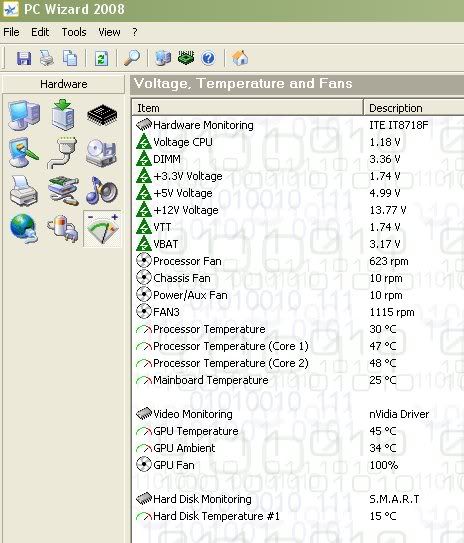
|
AfterDawn Addict
4 product reviews
|
19. February 2008 @ 09:05 |
Link to this message
|
|
So what, 17.5% VAT and import taxes on top of that?
I don't think so.
|
Junior Member
|
19. February 2008 @ 11:32 |
Link to this message
|
|
Man, I can't get my Q6600 past 3.2 ghz stable. I can get it up to 3.4 ghz and its stable-ish...but the core temps are a little higher than I'd like.
Intel Core 2 Quad Q6600...Tuniq Tower 120 w/Arctic Silver 5...Gigabyte P35C-DS3R rev 2...4GB Corsair XMS2...2 x 35GB WD Raptors in RAID 0 / 200GB WD / 250GB WD Passport / 400GB WD / 500GB WD / 1 TB WD External...Cooler Master Stacker 830 Case with Corsair HX520 PSU...20" Dell UltraSharp Monitor...Microsoft Wireless Desktop Elite
|
AfterDawn Addict
|
19. February 2008 @ 11:59 |
Link to this message
|
|
Random5,
I would be far more concerned with the 12v that's reading 13.77v! Sounds like not a very good PS to me!
Best Regards,
Russ
GigaByte 990FXA-UD5 - AMD FX-8320 @4.0GHz @1.312v - Corsair H-60 liquid CPU Cooler - 4x4 GB GSkill RipJaws DDR3/1866 Cas8, 8-9-9-24 - Corsair 400-R Case - OCZ FATAL1TY 550 watt Modular PSU - Intel 330 120GB SATA III SSD - WD Black 500GB SATA III - WD black 1 TB Sata III - WD Black 500GB SATA II - 2 Asus DRW-24B1ST DVD-Burner - Sony 420W 5.1 PL-II Suround Sound - GigaByte GTX550/1GB 970 Mhz Video - Asus VE247H 23.6" HDMI 1080p Monitor
|
AfterDawn Addict
|
19. February 2008 @ 12:13 |
Link to this message
|
Random5,
I thought the same thing but didn't post. You might try HWMonitor or Everest (Home or Pro) to see if your "readings" are the same. I used PCWizard but found that some of the readings were off or not labeled correctly.
.....gm
link for HWMonitor
link for everest home
|
AfterDawn Addict
4 product reviews
|
19. February 2008 @ 12:54 |
Link to this message
|
|
yes its true bigwill stole my thunder..lol the big red machine is back up and running. put windows XP home on it and all is good. no IE7. IE6 is working great ...
got a disc in now and burning away.
|
|
GregI6
Member
|
19. February 2008 @ 13:03 |
Link to this message
|
Originally posted by hydro_x86:
Man, I can't get my Q6600 past 3.2 ghz stable. I can get it up to 3.4 ghz and its stable-ish...but the core temps are a little higher than I'd like.
What voltage you pushing threw it?
|
AfterDawn Addict
2 product reviews
|
19. February 2008 @ 23:22 |
Link to this message
|
|
Can I have a Video card AND a video capture card?
|
|
Random5
Junior Member
|
20. February 2008 @ 02:48 |
Link to this message
|
Bugger thats not good, here is the readings from everest and HWM
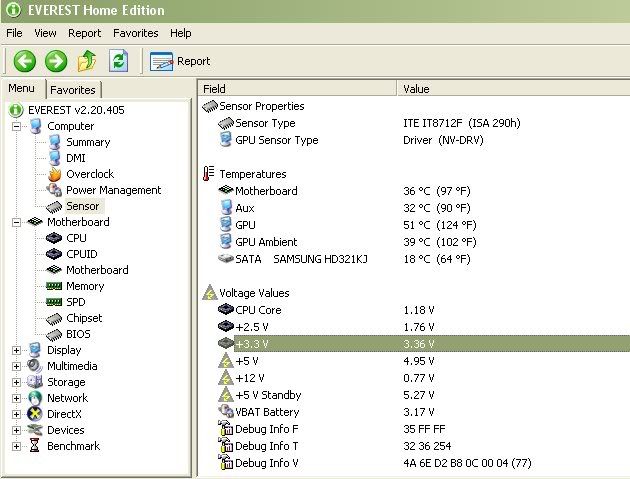
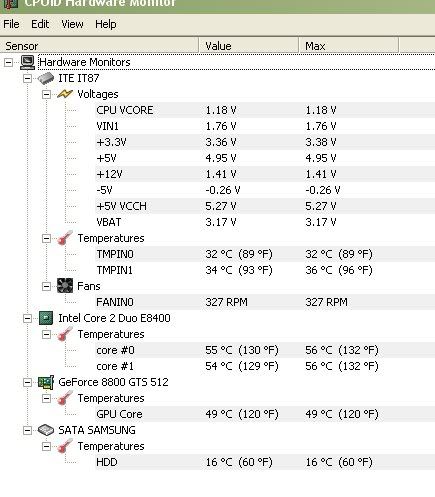
Can't make sense of this, shouldn't they both say 12V, Do I need to send this PSU back?
|
|
Random5
Junior Member
|
20. February 2008 @ 02:54 |
Link to this message
|
|
Just checked it in the bios and it says the 12V is at 12.4V.....
|
Junior Member
|
20. February 2008 @ 03:08 |
Link to this message
|
Quote:
What voltage you pushing threw it?
Right now I'm running at 3.2ghz and the voltage is set to 1.3v, it probably could go up some more. DDR2/3 voltage is +0.1. If i have Prime95 running 4 threads at 100% load my core temps don't go passed 65.
If I push the system up to 3.4ghz or faster and run the same stress test my core temps get into the 70s.
What are you running your Q660 at?
Intel Core 2 Quad Q6600...Tuniq Tower 120 w/Arctic Silver 5...Gigabyte P35C-DS3R rev 2...4GB Corsair XMS2...2 x 35GB WD Raptors in RAID 0 / 200GB WD / 250GB WD Passport / 400GB WD / 500GB WD / 1 TB WD External...Cooler Master Stacker 830 Case with Corsair HX520 PSU...20" Dell UltraSharp Monitor...Microsoft Wireless Desktop Elite
|
AfterDawn Addict
|
20. February 2008 @ 06:12 |
Link to this message
|
Random5,
Quote:
Just checked it in the bios and it says the 12V is at 12.4V.....
Even that's a bit high! But a whole lot better than the almost a volt higher, that you were showing before!!
What kind of PSU you got? How many watts? My voltages stay either at of very near nominal and my 12v is at 12.06v. If I load it down, it stays right at 12v, 11.99 to 12.06v. I had a cheap PS once before and my voltages were high and all over the map! When you loaded it down running Orthos or OCCT the 12v would fall to 11.23v. Not very good! Also not good for the electronics either as lower load voltages mean more heat! I finally fried my MB!
Best Regards,
Russ
GigaByte 990FXA-UD5 - AMD FX-8320 @4.0GHz @1.312v - Corsair H-60 liquid CPU Cooler - 4x4 GB GSkill RipJaws DDR3/1866 Cas8, 8-9-9-24 - Corsair 400-R Case - OCZ FATAL1TY 550 watt Modular PSU - Intel 330 120GB SATA III SSD - WD Black 500GB SATA III - WD black 1 TB Sata III - WD Black 500GB SATA II - 2 Asus DRW-24B1ST DVD-Burner - Sony 420W 5.1 PL-II Suround Sound - GigaByte GTX550/1GB 970 Mhz Video - Asus VE247H 23.6" HDMI 1080p Monitor
|
|
Random5
Junior Member
|
20. February 2008 @ 06:55 |
Link to this message
|
|
Bugger, bugger, bugger. And I thought it had all gone so smooth. I'm using a OCZ Technology StealthXStream 600W Active PFC. I can return it if I need to but it will take ages. Ok, few questions if the forum has time to answer them i'd be grateful.
What do the readings on everest and CPUID mean? 0.77V and 1.4V? Is that just plain wrong or does it mean something?
Is it possible that the bios reading is wrong, these are supposed to be a good power supply?
What should I do to be sure that the PS is faulty?
If the PS is running at a constant 12.4V on the 12V rail is that really bad? Is it likely to damage other components?
|
AfterDawn Addict
|
20. February 2008 @ 09:07 |
Link to this message
|
Random,
First off don't panic. Let's look at this a little deeper. ;) Can you post your BIOS "health status" readings? I bet it looks a little better in the BIOS. A few of your "values" seem to be off in both (all three) monitoring programs.
To refresh my memory what mobo are you using? I'm impressed with that Samsung HDD tho, man that thing is COOL!! My guess on your readings is the mobo is sending out "false" values due to a BIOS tweak or non-compatibility between the mobo and the monitoring progie. NOT a worry as of yet.
Get back with us on this info and we'll try to determine the bothersome party. ;)
....gm
|
AfterDawn Addict
4 product reviews
|
20. February 2008 @ 09:18 |
Link to this message
|
|
got the big red machine up and running at 3.42ghz stable. ran orthos for 11 hours and stable as can be. bumped up the vcore to 1.300v
mem up to 1170 from 1066. tried to take it up to 3.51 didnt notice any problems but it wouldnt run in orthos. so i backed it down to 3.42ghz..
kinda got a new question/problem.
my sata HDD its a 250gb. for 1 it is only showing 232gb.i know windows takes some like 7% or so,no biggie. but my free space says only 121gb's i dont have anything o her but windows and a few burning programs??? any ideas?
|
AfterDawn Addict
|
20. February 2008 @ 09:24 |
Link to this message
|
|
rob,
Which version of Windows did you install? If it had SP1 it will NOT show the full capacity of the 250GB HDD. :( You have to install a version of Windows XP with SP2. I'm not sure if there is a work around for this. I've always installed with SP2 or the HDD was an addition so I was able to set it to the proper "space". lol. Of course that was with SP2 installed. :D
Any ideas gurus?
...gm
|
|
Advertisement
|
|
|
AfterDawn Addict
4 product reviews
|
20. February 2008 @ 09:59 |
Link to this message
|
|
it was a OEM version of windows home editon. i did have to install SP1 and SP2.can i uninstall sp1?
|


