|
The (new) Official PC building thread!
|
|
AfterDawn Addict
6 product reviews

|
12. April 2008 @ 09:00 |
 Link to this message

|
Originally posted by ZoSoIV:
OH Mort hows it coming? lol
just waiting on another 4 in 3 device module and some 120mm antec tricools. I might go ahead and fire it up in the meantime. lots I could be doing while waiting on parts (load XP Pro and all my programs and software).
Rig #1 Asus Rampage Formula Mobo, Intel Core2Quad Q9450 CPU @ 3.55ghz, 2gb Corsair DDR2 1066 Dominator Ram @ 5-5-5-15, TR Ultra 120 Extreme w/ Scythe 9 blade 110 cfm 120mm Fan HSF, HIS Radeon 512mb HD3850 IceQ TurboX GPU, Corsair 620HX P/S, CM Stacker 830 Evo Case, Rig #2 Asus P5W DH Deluxe Mobo, Intel C2D E6600 CPU @ 3.6ghz, 2gb Corsair XMS2 DDR2 800 Ram @ 4-4-4-12-2t, Zalman CNPS9500LED HSF, Sapphire Radeon X850XT PE GPU, Corsair 620HX P/S, Cooler Master Mystique Case, Viewsonic 20.1" Widescreen Digital LCD Monitor, Klipsch Promedia Ultra 5.1 THX Desktop Speakers, http://valid.x86-secret.com/show_oc.php?id=348351 http://valid.x86-secret.com/show_oc.php?id=236435 |
|
Advertisement
|
|
|
|
AfterDawn Addict
|
12. April 2008 @ 11:14 |
Link to this message
|
Originally posted by Mort81:
Originally posted by ZoSoIV:
OH Mort hows it coming? lol
just waiting on another 4 in 3 device module and some 120mm antec tricools. I might go ahead and fire it up in the meantime. lots I could be doing while waiting on parts (load XP Pro and all my programs and software).
Atta boy!!! Let the kid in you out! :D I don't see how you've waited this long Morty.... I would have had it running with just the RAM, mobo, and cpu drooling to see what it would do. hehehe. j/k.... NOT possible but I love this STUFF!!!! :D
again... good luck to you....
.....gm
|
Senior Member

|
12. April 2008 @ 12:48 |
Link to this message

|
OK, heres a few links to give an idea of the mancave where I'm now sat.
I will need a small electric heater or similar during the cold winter months but in the hot humid summer this area is perfect.
Basement area before construction
http://i55.photobucket.com/albums/g147/m...es/PICT0013.jpg
The bench rests on the smooth shelf you see coming from the rocky wall , about 3 feet (thats a meter for you Sam LOL) off the floor.
After on the left side
http://i55.photobucket.com/albums/g147/m...es/PICT0071.jpg
After on the right side
http://i55.photobucket.com/albums/g147/m...es/PICT0070.jpg
Notice the power outlets on both sides of the bench, EACH has it own 20Amp connection to the main, not just one breaker split in two.
Filled with toys
http://i55.photobucket.com/albums/g147/m...es/PICT0093.jpg
Finished build with full Armor tower
http://i55.photobucket.com/albums/g147/m...es/PICT0095.jpg
Picture of how dirty my first clients machine was before I fixed it
http://i55.photobucket.com/albums/g147/m...files/dirty.jpg
Now, for benching my new machine...
I havent had time to research this problem (my bands doing a show tonight) only had this build up for a little over a day now. I've read somewhere before about having problems with Startup settings and flaky BIOS controls on some Gigabyte boards and I may be experiencing them. It could be my complete lack of familiarity with this new setup having bit my teeth on a few Asus boards. Anyway anytime I've made any change in settings it doesnt "stick". I havent even done anything major, just enough to try and get my settings to be at normal speeds. These may help explain...
Note speed and multi here, 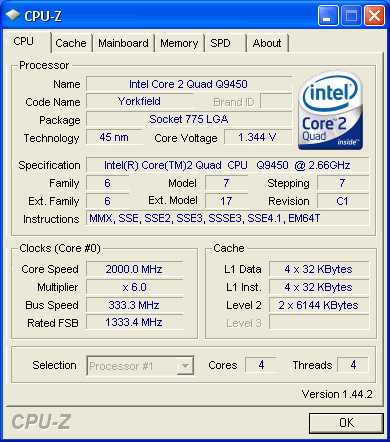
It is showing 8x multi at stock 2.66 speed in BIOS
Heres the mobo showing newest BIOS revision
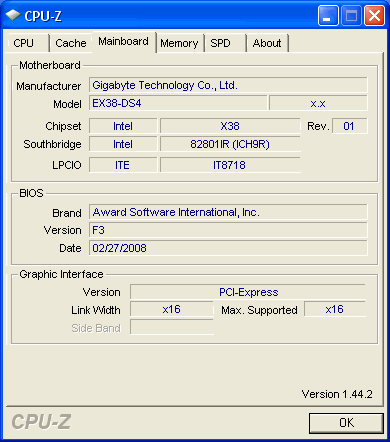
And my Memory is PC2-8500 C5 Corsair Dominator, probably shouldnt run like these speeds..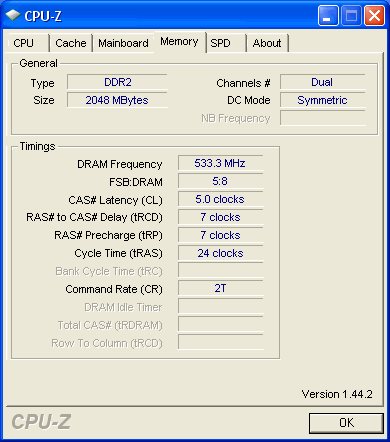
Any links to help or words of wisdom on the performance issues are appreciated.
|
Member
|
12. April 2008 @ 13:51 |
Link to this message

|
|
The first picture is due to speed stepping - and under load the multi will go back to 8x. This is the CPU EIST Function option in the BIOS I believe and is set to enabled as default.
As for the RAM you'll need to set the timings manually to get the "rated" timings - this is described on page 53 of your manual. You need to set the DRAM timing Selectable to manual and then also change all of the individual timings for the next four settings below this option. You may also need to adjust up the voltage to accomplish these timings.
Dont forget to save and exit and not just exit ;)
If its not saving after that it could be a dodgy battery.
GA-P35C-DS3R Rev 2.0 F6 - E8200 @ 3.2Ghz - 2x1GB Corsair XMS2 800Mhz@4-4-4-12 - Sapphire 2600XT 512mb GDDR3 - CM690 Dominator - Arctic Cooling Freezer 7 Pro - 250GB Maxtor and 500GB WD internal SATA HDD - 500GB Seagate eSATA and 500GB Maxtor One Touch III USB External HDD - 2 x Pioneer DVR-215DBK - Windows XP SP2 - Logitech X-540 5.1 70W RMS Speakers - Polaroid FLU-2632 Monitor
|
AfterDawn Addict
|
12. April 2008 @ 14:07 |
Link to this message
|
Mort, with Thermalright Ultra-120 am i going to need more fans than the Antec 900 has stock?
or
sammorris how does your freind has his step up with the Thermalright Ultra-120 and his Antec 900?
nice build/pics there Deadrum33 hope you get youe setting ok
 Antec 1200 Full-Tower Case/Thermaltake 750-Watt PS/ASUS SABERTOOTH Z77 Mobo/Western Digital Black WD500 500GB 7200 RPM 64MB Cache/NVIDIA GeForce 8800GTX 384-bit GDDR3 PCI Express Video Card/CORSAIR DOMINATOR PLATINUM 16GB DDR3 /Intel Core i7-3770K Ivy Bridge 3.5GHz (3.9GHz Turbo)/CORSAIR Hydro High Performance Liquid CPU Cooler/3-Asus DRW-24B1ST Sata Drives/Samsung 2493HM 24" LCD Monitior 1920x1200 resolution,5ms respone time/OS Windows 10 Pro SP1 64-bit
|
Senior Member
|
12. April 2008 @ 14:17 |
Link to this message
|
Thanks Pepp and ZOSO, I remembered what you said about the power setting Pepp after you mentioned it of course. It didnt change the display in CPU-Z but I loaded SandraSoft after and everything reported OK on that so maybe its a glitch with a new chip for CPU-Z?
I used the same method (F10 to save, press Y to confirm, then ENTER) to save that CPU EIST setting (and it stuck) as I did when I tried to set the memory timings that didnt stick. I'll have to play around some more tomorrow I guess.
|
AfterDawn Addict
|
12. April 2008 @ 14:26 |
Link to this message
|
|
Deadrum33, let us know how that CPU works out and what it OCs to
Antec 1200 Full-Tower Case/Thermaltake 750-Watt PS/ASUS SABERTOOTH Z77 Mobo/Western Digital Black WD500 500GB 7200 RPM 64MB Cache/NVIDIA GeForce 8800GTX 384-bit GDDR3 PCI Express Video Card/CORSAIR DOMINATOR PLATINUM 16GB DDR3 /Intel Core i7-3770K Ivy Bridge 3.5GHz (3.9GHz Turbo)/CORSAIR Hydro High Performance Liquid CPU Cooler/3-Asus DRW-24B1ST Sata Drives/Samsung 2493HM 24" LCD Monitior 1920x1200 resolution,5ms respone time/OS Windows 10 Pro SP1 64-bit
|
AfterDawn Addict
|
12. April 2008 @ 14:27 |
Link to this message
|
Pepp77,
Quote:
The first picture is due to speed stepping - and under load the multi will go back to 8x. This is the CPU EIST Function option in the BIOS I believe and is set to enabled as default.
He has C1E enabled which cuts the multi to 6x at idle. EIST (Speedstep) should be turned off also!
Best Regards,
Russ
GigaByte 990FXA-UD5 - AMD FX-8320 @4.0GHz @1.312v - Corsair H-60 liquid CPU Cooler - 4x4 GB GSkill RipJaws DDR3/1866 Cas8, 8-9-9-24 - Corsair 400-R Case - OCZ FATAL1TY 550 watt Modular PSU - Intel 330 120GB SATA III SSD - WD Black 500GB SATA III - WD black 1 TB Sata III - WD Black 500GB SATA II - 2 Asus DRW-24B1ST DVD-Burner - Sony 420W 5.1 PL-II Suround Sound - GigaByte GTX550/1GB 970 Mhz Video - Asus VE247H 23.6" HDMI 1080p Monitor
 |
AfterDawn Addict
6 product reviews
|
12. April 2008 @ 16:42 |
Link to this message
|
|
ZoSoIV,
you will need a fan for the TR ultra 120 extreme. I went with a sythe SFF21F 120mm.
Oh and BTW, I am on my new rig right now.
|
AfterDawn Addict
|
12. April 2008 @ 17:03 |
Link to this message
|
|
Deadrum33,
On a GigaByte MB, you have to hit Ctrl + F1 to be able to change the bus speeds or the memory settings and save them. Just hit Ctrl + F1 at the first setup screen, make your changes and then they will stick!
Best Regards,
Russ
GigaByte 990FXA-UD5 - AMD FX-8320 @4.0GHz @1.312v - Corsair H-60 liquid CPU Cooler - 4x4 GB GSkill RipJaws DDR3/1866 Cas8, 8-9-9-24 - Corsair 400-R Case - OCZ FATAL1TY 550 watt Modular PSU - Intel 330 120GB SATA III SSD - WD Black 500GB SATA III - WD black 1 TB Sata III - WD Black 500GB SATA II - 2 Asus DRW-24B1ST DVD-Burner - Sony 420W 5.1 PL-II Suround Sound - GigaByte GTX550/1GB 970 Mhz Video - Asus VE247H 23.6" HDMI 1080p Monitor
|
AfterDawn Addict
|
12. April 2008 @ 17:39 |
Link to this message
|
Originally posted by Mort81:
ZoSoIV,
you will need a fan for the TR ultra 120 extreme. I went with a sythe SFF21F 120mm.
Oh and BTW, I am on my new rig right now.
so i just can replace the side fan thats on the Antec 900 with the TR ultra 120 extreme?
Antec 1200 Full-Tower Case/Thermaltake 750-Watt PS/ASUS SABERTOOTH Z77 Mobo/Western Digital Black WD500 500GB 7200 RPM 64MB Cache/NVIDIA GeForce 8800GTX 384-bit GDDR3 PCI Express Video Card/CORSAIR DOMINATOR PLATINUM 16GB DDR3 /Intel Core i7-3770K Ivy Bridge 3.5GHz (3.9GHz Turbo)/CORSAIR Hydro High Performance Liquid CPU Cooler/3-Asus DRW-24B1ST Sata Drives/Samsung 2493HM 24" LCD Monitior 1920x1200 resolution,5ms respone time/OS Windows 10 Pro SP1 64-bit
|
AfterDawn Addict
4 product reviews
|
12. April 2008 @ 17:42 |
Link to this message
|
|
I'm not sure what that post means. A side fan isn't really that necessary for the 900, but having a fan on your CPU cooler is quite important to get air forced through the fins (sure there's plenty of ambient airflow but you need pressure to get it through the heatsink)
|
Member
|
12. April 2008 @ 17:50 |
Link to this message
|
Originally posted by theonejrs:
Deadrum33,
On a GigaByte MB, you have to hit Ctrl + F1 to be able to change the bus speeds or the memory settings and save them. Just hit Ctrl + F1 at the first setup screen, make your changes and then they will stick!
Best Regards,
Russ
Ive heard this before but I didnt need to.
GA-P35C-DS3R Rev 2.0 F6 - E8200 @ 3.2Ghz - 2x1GB Corsair XMS2 800Mhz@4-4-4-12 - Sapphire 2600XT 512mb GDDR3 - CM690 Dominator - Arctic Cooling Freezer 7 Pro - 250GB Maxtor and 500GB WD internal SATA HDD - 500GB Seagate eSATA and 500GB Maxtor One Touch III USB External HDD - 2 x Pioneer DVR-215DBK - Windows XP SP2 - Logitech X-540 5.1 70W RMS Speakers - Polaroid FLU-2632 Monitor
|
AfterDawn Addict
2 product reviews
|
12. April 2008 @ 18:07 |
Link to this message
|
|
ZoSoIV, if you have a 120mm fan in the side of you 900, then yes you can stick that on the TR Ultra 120.
Mort, glad you got it running already! Are you going to run any benches?
|
AfterDawn Addict
6 product reviews
|
12. April 2008 @ 18:17 |
Link to this message
|
Quote:
Mort, glad you got it running already! Are you going to run any benches?
no not for a while. I'll be loading in software for a while yet. It's gonna stay at stock 3.0ghz for a couple weeks until it gets good n broke in. this mobo is LOADED with features.
This message has been edited since posting. Last time this message was edited on 12. April 2008 @ 18:18
|
AfterDawn Addict
|
12. April 2008 @ 19:21 |
Link to this message
|
Originally posted by abuzar1:
ZoSoIV, if you have a 120mm fan in the side of you 900, then yes you can stick that on the TR Ultra 120
I can't remember what size fan on the side of my Antec 900,I will check, thanks for the info
Antec 1200 Full-Tower Case/Thermaltake 750-Watt PS/ASUS SABERTOOTH Z77 Mobo/Western Digital Black WD500 500GB 7200 RPM 64MB Cache/NVIDIA GeForce 8800GTX 384-bit GDDR3 PCI Express Video Card/CORSAIR DOMINATOR PLATINUM 16GB DDR3 /Intel Core i7-3770K Ivy Bridge 3.5GHz (3.9GHz Turbo)/CORSAIR Hydro High Performance Liquid CPU Cooler/3-Asus DRW-24B1ST Sata Drives/Samsung 2493HM 24" LCD Monitior 1920x1200 resolution,5ms respone time/OS Windows 10 Pro SP1 64-bit
|
|
GregI6
Member
|
12. April 2008 @ 22:09 |
Link to this message
|
Hey guys, i need an answer pretty quickly. I used ASUS Update with i think the newset 1012 BIOS. It did the 3 bars fine and then asked me to Restart. I did and before it brought up the p5k-e logo it just turned off and im now faced with a monitor goining in and out searching for a signal and the PC powered on.
What do i do?
Shut it down and switch it back on?
|
AfterDawn Addict
|
12. April 2008 @ 22:14 |
Link to this message
|
Greg16,
Quote:
What do i do?
Shut it down and switch it back on?
Try turning off the power supply and remove the plug, then let it sit for a few minutes. If that doesn't work, pull the CMOS battery for a couple of minutes and short the CMOS jumpers for a few seconds, before you re-install the battery. Hopefully you didn't frag the bios chip or it's RMA time!
Best Regards,
Russ
GigaByte 990FXA-UD5 - AMD FX-8320 @4.0GHz @1.312v - Corsair H-60 liquid CPU Cooler - 4x4 GB GSkill RipJaws DDR3/1866 Cas8, 8-9-9-24 - Corsair 400-R Case - OCZ FATAL1TY 550 watt Modular PSU - Intel 330 120GB SATA III SSD - WD Black 500GB SATA III - WD black 1 TB Sata III - WD Black 500GB SATA II - 2 Asus DRW-24B1ST DVD-Burner - Sony 420W 5.1 PL-II Suround Sound - GigaByte GTX550/1GB 970 Mhz Video - Asus VE247H 23.6" HDMI 1080p Monitor
|
|
GregI6
Member
|
12. April 2008 @ 22:18 |
Link to this message
|
|
So turn the power supply off first?
Not bother with switching PC off?
|
AfterDawn Addict
|
12. April 2008 @ 22:46 |
Link to this message
|
|
Greg16,
No, just shut it down by the power supply switch and pull the power cord out of the PS for about 5 minutes!! Damn near drove me crazy the first time it happened to me. I thought I had blown it up! LOL!!
Best Regards,
Russ
GigaByte 990FXA-UD5 - AMD FX-8320 @4.0GHz @1.312v - Corsair H-60 liquid CPU Cooler - 4x4 GB GSkill RipJaws DDR3/1866 Cas8, 8-9-9-24 - Corsair 400-R Case - OCZ FATAL1TY 550 watt Modular PSU - Intel 330 120GB SATA III SSD - WD Black 500GB SATA III - WD black 1 TB Sata III - WD Black 500GB SATA II - 2 Asus DRW-24B1ST DVD-Burner - Sony 420W 5.1 PL-II Suround Sound - GigaByte GTX550/1GB 970 Mhz Video - Asus VE247H 23.6" HDMI 1080p Monitor
|
Senior Member
|
14. April 2008 @ 16:58 |
Link to this message
|
I'm a little upset. A week after I buy a brand new CPU, theres a sale at the same place for $50 off an online order!!! http://www.microcenter.com/single_produc...duct_id=0286543
There are more sales on other items but they had the nerve to send me an email advertising it a week after I purchase it!!! I know it was a robot spamming all the names on their customers list, but still it shows my luck.
|
AfterDawn Addict
4 product reviews
|
14. April 2008 @ 17:01 |
Link to this message
|
|
It's happened to all of us at some point, it's something you have to get used to...
|
AfterDawn Addict
|
14. April 2008 @ 18:51 |
Link to this message
|
|
Deadrum ..... LOL.
I did that with a psu one time BUT it was the next day. They had another $10 off of a great price already. lol. I wrote them an email saying they really hurt my feelings and inquired if they could extend the price to me since it was only 24hrs since they sold the psu to me. lol. NO!! was their answer since I NEVER received an email from them about it. :P
OK all these folks with "new" builds.... How's things going and do you have any "stock" benchies yet?? ;)
....gm
|
Senior Member
|
14. April 2008 @ 19:36 |
Link to this message
|
|
I havent really messed with anything since my last plea for help LOL.
I did use theonejrs advice and turned off the CPU's energy features but thats about it. I will go back and play with the <CTRL>+<F1> settings later, I read that it opened advanced settings in the mobo manual but really havent moved anything else yet.
Any particular programs bench you want to see at stock??? :)
|
|
Advertisement
|
|
|
AfterDawn Addict
2 product reviews
|
14. April 2008 @ 19:47 |
Link to this message
|
|
I have another question. Since I don't have any conductive paint and I don't feel like using solder on this motherboard I didn't do the vdrop mod.
What's more important, the voltage you set in you BIOS or the one the CPU is actually getting. When I set it to 1.5 in the BIOS then it's about 1.45, 1.46 in Everest. Is it safe to increase voltage to the point where it's 1.5 in everest?
|


