Hey everyone, my brothers have moved out to college and now i have the ps2 to my self, I want to get a card, or an adapter for the S-video connector in my video card so i can hook my PC up to my PS2 and play on my computer screen.
--------------------
This is what you connect your PS2 into in the back of your computer.
--------------------
I want to be able to have something like this on the back of my computer, preferably an adapter for my S-Video i have a Radeon 9550 and the place where I want to use the S-Video to Audio/Video would be in the middle
-------------------
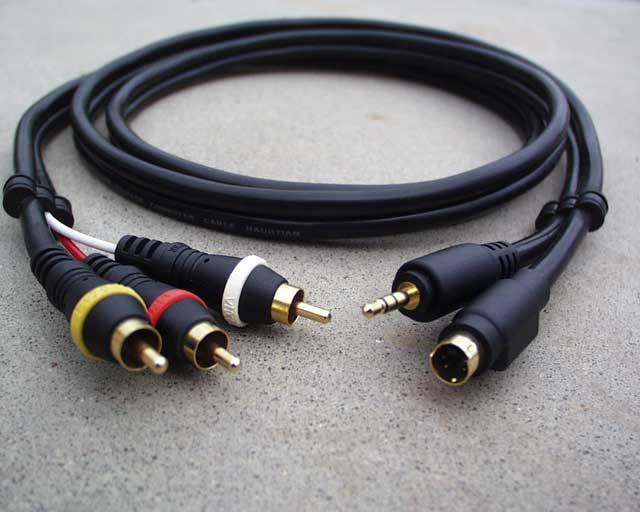
I want to be able to connect an S-video cable (male) into my compueter with the female slot of 3 A/V cable the Red/Yellow/White cables
Like that, and be able to connect them into Female Slots like the first picture, just like connecting the PS2 into a TV, but just for computers.
-------------------
So here is a basic summary:
1.I need a converter from S-Video to A/V it has to have S-video(male) and A/V(female) So i can connect my PS2 A/V cable into my computer, and play on my PC instead of my regular TV.
2. I was wondering if anyone knew where i could buy this, i saw it along time ago, but now i cant find it. thanks
------------------
Basically I need something like this but have the A/V Female so i can plug my PS2 into them.
Windows XP Home SP3
768MB RAM
AMD sempron 3000+ ~2.0GHz
Radeon 9550 250mb APG
2x Monitors
1-80gb Master HD 1-60gb Slave
nForce 2 Sound Card
"Its not the desk that is small just all the trash you leave on it"
This message has been edited since posting. Last time this message was edited on 30. November 2006 @ 16:25
That's a TV out, not TV in, you will need a capture card, and depending on how much you want to pay for one, there are a number that are good, and several that are downright crappy. An XGA box would allow you to hook your PS2 up to the monitor as a TV but not into the computer itself, if you just want to use your monitor as a screen for your ps2 and not have the ability to record ETC then that would work.
Ports In 2 F-connectors for RF TV and FM signal inputs
1 phone jack for I/R sensor
1 MiniDIN 6-pin connector with one S-Video and 1 RCA connector for Video input
1 Stereo phone jack for audio input