|
|
|
I cant burn dvd-r's
|
|
|
sethkirk
Newbie

|
3. December 2006 @ 13:41 |
 Link to this message

|
I just bought a brand new 100 pack of fuji film dvd-r's, burn speed is 1x to 16x. The first couple I copied copied really slow and the quality is poor. Now it wont even copy them. I have a sony vaio fs760/w laptop and im using DVD Shrink 3.2 with Nero, DVD Shrink backs it up fine but when it goes to the burn process it comes up with an error message, it doesnt even get the lead in wrote. Im thinking its the new dvd's but if someone could tell me why it isnt working that would be great.
Thanks!
|
|
Advertisement
|
 |
|
|
AfterDawn Addict
|
3. December 2006 @ 15:08 |
Link to this message

|
You'll have to post your Nero burn log.
99% of all problems are between the computer and the chair.
|
AfterDawn Addict
|
3. December 2006 @ 17:01 |
Link to this message

|
Depending on which version of Nero you're using, logs located here
Nero 6 history log location: Program Files>Ahead>Nero>NeroHistory.txt
Nero 7 history log location: Program Files>Nero>Nero 7>Core>NeroHistory
|
|
sethkirk
Newbie
|
3. December 2006 @ 17:22 |
Link to this message
|
I dont have a complete version of Nero. Its more like a demo but it has worked for the past year. I dont have anyway to get the burn logs... what if i posted the error message?
|
|
sethkirk
Newbie
|
4. December 2006 @ 15:52 |
Link to this message
|
Windows XP 5.1
IA32
WinAspi: -
ahead WinASPI: File 'C:\Program Files\Ahead\Nero\Wnaspi32.dll': Ver=2.0.1.74, size=164112 bytes, created 10/26/2004 6:35:34 PM
Nero API version: 6.6.0.13
Using interface version: 6.3.1.4
Installed in: C:\Program Files\Ahead\Nero\
Application: ahead\Nero - Burning Rom
Internal Version: 6, 6, 0, 13c
Recorder: <MATSHITA UJ-840D> Version: 1.01 - HA 0 TA 1 - 6.6.0.13
Adapter driver: <atapi> HA 0
Drive buffer : 2048kB
Bus Type : default (0) -> ATAPI, detected: ATAPI
=== Scsi-Device-Map ===
DiskPeripheral : TOSHIBA MK1031GAS atapi Port 0 ID 0 DMA: On
CdRomPeripheral : MATSHITA UJ-840D atapi Port 0 ID 1 DMA: On
=== CDRom-Device-Map ===
MATSHITA UJ-840D E: CDRom0
=======================
AutoRun : 1
Excluded drive IDs:
WriteBufferSize: 74448896 (0) Byte
ShowDrvBufStat : 0
BUFE : 0
Physical memory : 510MB (522672kB)
Free physical memory: 141MB (144684kB)
Memory in use : 72 %
Uncached PFiles: 0x0
Use Inquiry : 1
Global Bus Type: default (0)
Check supported media : Disabled (0)
4.12.2006
NeroAPI
8:47:21 PM #1 Phase 112 File APIProgress.cpp, Line 276
DVD-Video files reallocation started
8:47:21 PM #2 Phase 114 File APIProgress.cpp, Line 276
DVD-Video files reallocation completed (no file modified)
8:47:21 PM #3 Phase 111 File APIProgress.cpp, Line 276
DVD-Video files sorted
8:47:21 PM #4 Text 0 File Reader.cpp, Line 127
Reader running
8:47:21 PM #5 Text 0 File Writer.cpp, Line 122
Writer MATSHITA UJ-840D running
8:47:21 PM #6 Text 0 File AudioCompilationImpl.cpp, Line 842
DRM: StartDrmRecording(RealRec:1, ImageRec:0, Copies:1)
DRM: Beginning burn process.
8:47:21 PM #7 ISO9660GEN -11 File geniso.cpp, Line 3293
First writeable address = 0 (0x00000000)
8:47:22 PM #8 ISO9660GEN -11 File geniso.cpp, Line 3293
First writeable address = 0 (0x00000000)
8:47:22 PM #9 Text 0 File Burncd.cpp, Line 3167
Turn on Disc-At-Once, using DVD media
8:47:22 PM #10 Text 0 File DlgWaitCD.cpp, Line 260
Last possible write address on media: 2298495 (510:46.45, 4489MB)
Last address to be written: 2262063 (502:40.63, 4418MB)
8:47:22 PM #11 Text 0 File DlgWaitCD.cpp, Line 272
Write in overburning mode: NO
8:47:22 PM #12 Text 0 File DlgWaitCD.cpp, Line 2339
Recorder: MATSHITA UJ-840D, Media type: DVD-R
Disc Manufacturer: RITEKF - 1
Disc Application Code: 64, Disc Physical Code: 193
8:47:22 PM #13 Text 0 File DlgWaitCD.cpp, Line 438
>>> Protocol of DlgWaitCD activities: <<<
=========================================
8:47:22 PM #14 Text 0 File ThreadedTransferInterface.cpp, Line 830
Setup items (after recorder preparation)
0: TRM_DATA_MODE1 ()
2 indices, index0 (150) not provided
original disc pos #0 + 2262064 (2262064) = #2262064/502:40.64
relocatable, disc pos for caching/writing not required/ required, no patch infos
-> TRM_DATA_MODE1, 2048, config 0, wanted index0 0 blocks, length 2262064 blocks [MATSHITA UJ-840D]
--------------------------------------------------------------
8:47:22 PM #15 Text 0 File ThreadedTransferInterface.cpp, Line 1043
Prepare recorder [MATSHITA UJ-840D] for write in CUE-sheet-DAO
DAO infos:
==========
MCN: ""
TOCType: 0x00; Session Closed, disc fixated
Tracks 1 to 1:
1: TRM_DATA_MODE1, 2048/0x00, FilePos 0 0 4632707072, ISRC ""
DAO layout:
===========
__Start_|____Track_|_Idx_|_CtrlAdr_|_RecDep__________
0 | lead-in | 0 | 0x41 | 0x00
0 | 1 | 0 | 0x41 | 0x00
0 | 1 | 1 | 0x41 | 0x00
2262064 | lead-out | 1 | 0x41 | 0x00
8:47:23 PM #16 Phase 24 File APIProgress.cpp, Line 276
Caching of files started
8:47:23 PM #17 Text 0 File Burncd.cpp, Line 4051
Cache writing successful.
8:47:23 PM #18 Phase 25 File APIProgress.cpp, Line 276
Caching of files completed
8:47:23 PM #19 Phase 36 File APIProgress.cpp, Line 276
Burn process started at 1x (1,385 KB/s)
8:47:23 PM #20 Text 0 File ThreadedTransferInterface.cpp, Line 2609
Verifying disc position of item 0 (relocatable, disc pos, no patch infos, orig at #0): write at #0
8:47:23 PM #21 Text 0 File DVDR.cpp, Line 2267
Recording mode: Sequential Recording Mode for Multisession
8:47:23 PM #22 Text 0 File Mmc.cpp, Line 21469
Set BUFE: Buffer underrun protection -> ON
8:47:23 PM #23 Text 0 File DVDR.cpp, Line 2421
Start write address at LBA 0
DVD high compatibility mode: No
8:47:23 PM #24 Text 0 File Cdrdrv.cpp, Line 8438
---- DVD Structure: Physical Format Information (00h) ----
Layer: 0, Address: 0 (0 h), AGID: 0; Length: 2050
Book Type: DVD-R (2), Part Version: 5
Disc Size: 120 mm, Maximum Rate: <not specified> (F h)
Number of Layers: 1, Track Path: Parallel Track Path (PTP), Layer Type: recordable
Linear Density: 0,267 um/bit, Track Density: 0,74 um/track
Starting Physical Sector Number of Data Area: 30000 h (DVD-ROM, DVD-R/-RW, DVD+R/+RW)
End Physical Sector Number of Data Area: 30000 h
End Sector Number in Layer 0: 0 h (LBN: FFFD0000 h, 4193920 MB)
Data in Burst Cutting Area (BCA) does not exist
Start sector number of the current Border-Out: 0 h
Start sector number of the next Border-In: 0 h
Media Specific [16..63]:
00 60 00 10 20 30 40 50 - 00 00 00 21 00 00 00 00 .`...0@P...!....
00 00 00 00 00 00 00 00 - 00 00 00 00 00 00 00 00 ................
00 00 00 00 00 00 00 00 - 00 00 00 00 00 00 00 00 ................
8:47:37 PM #25 SCSI -1106 File Cdrdrv.cpp, Line 1436
SCSI Exec, HA 0, TA 1, LUN 0, buffer 0x00CE0000
Status: 0x04 (0x01, SCSI_ERR)
HA-Status 0x00 (0x00, OK)
TA-Status 0x02 (0x01, SCSI_TASTATUS_CHKCOND)
Sense Key: 0x03 (KEY_MEDIUM_ERROR)
Sense Code: 0x73
Sense Qual: 0x03
CDB Data: 0x2A 0x00 0x00 0x00 0x00 0x00 0x00 0x00 0x20 0x00 0x00 0x00
Sense Data: 0x71 0x00 0x03 0x00 0x00 0x00 0x00 0x0A
0x00 0x00 0x03 0x00 0x73 0x03
8:47:37 PM #26 CDR -1106 File Writer.cpp, Line 311
Power calibration error
8:47:37 PM #27 Text 0 File ThreadedTransfer.cpp, Line 228
all writers idle, stopping conversion
8:47:37 PM #28 Text 0 File ThreadedTransfer.cpp, Line 222
conversion idle, stopping reader
8:47:37 PM #29 Text 0 File DVDR.cpp, Line 2658
EndDAO: Last written address was -1
8:47:37 PM #30 Phase 133 File APIProgress.cpp, Line 276
Writing short lead-out
8:47:37 PM #31 SCSI -1106 File Cdrdrv.cpp, Line 1182
SCSI Exec, HA 0, TA 1, LUN 0
Status: 0x04 (0x01, SCSI_ERR)
HA-Status 0x00 (0x00, OK)
TA-Status 0x02 (0x01, SCSI_TASTATUS_CHKCOND)
Sense Key: 0x03 (KEY_MEDIUM_ERROR)
Sense Code: 0x73
Sense Qual: 0x03
CDB Data: 0x5B 0x01 0x02 0x00 0x00 0x03 0x00 0x00 0x00 0x00 0x00 0x00
Sense Data: 0x70 0x00 0x03 0x00 0x00 0x00 0x00 0x0A
0x00 0x00 0x03 0x00 0x73 0x03
8:47:37 PM #32 CDR -1106 File WriterStatus.cpp, Line 167
Power calibration error
8:47:37 PM #33 TRANSFER -24 File WriterStatus.cpp, Line 167
Could not perform end of Disc-at-once
8:47:37 PM #34 Phase 38 File APIProgress.cpp, Line 276
Burn process failed at 1x (1,385 KB/s)
8:47:37 PM #35 Text 0 File AudioCompilationImpl.cpp, Line 867
DRM: DRM burn session terminated.
8:47:37 PM #36 Text 0 File AudioCompilationImpl.cpp, Line 896
DRM: Closing entire DRM handling. Bye.
|
|
sethkirk
Newbie
|
9. December 2006 @ 14:12 |
Link to this message
|
|
Im guessing that no one can help me with this problem... So can someone atleast point me in the right direction.
|
AfterDawn Addict
|
9. December 2006 @ 14:31 |
Link to this message
|
|
One problem could be that your discs are rated at 16X burning speed and you are burning at 1X. Try burning at 8X.
99% of all problems are between the computer and the chair.
|
AfterDawn Addict
|
9. December 2006 @ 14:36 |
Link to this message
|
|
|
sethkirk
Newbie
|
9. December 2006 @ 15:48 |
Link to this message
|
|
How do I change the burn speed?
|
AfterDawn Addict
|
9. December 2006 @ 16:10 |
Link to this message
|
|
Moderator
|
9. December 2006 @ 16:24 |
Link to this message
|
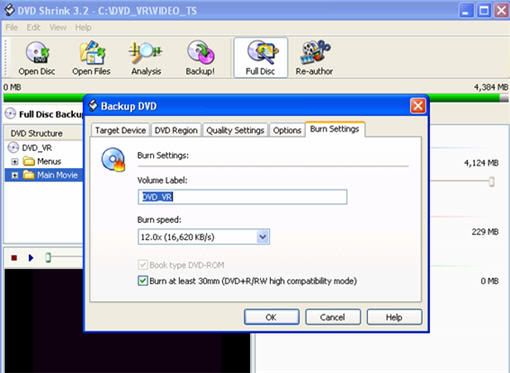
To change the burn speed in Shrink when you click backup click on the burn settings tab. (see pic below)
I have the same drive in my laptop and 16x media is pretty hit or miss on it - even Verbatim. I only use 8x Taiyo Yuden media anymore in it.
|
|
sethkirk
Newbie
|
9. December 2006 @ 17:05 |
Link to this message
|
From DVD Shrink I tried to increase the burn speed however there are only two options. Maximum and 2.4x
|
|
Advertisement
|
|
|
Moderator
|
9. December 2006 @ 18:04 |
Link to this message
|
Ok that's cause your reading and writing from the same drive- this drive will only give your the supported write speeds of the source dvd.
So you can go with the 2.4x.
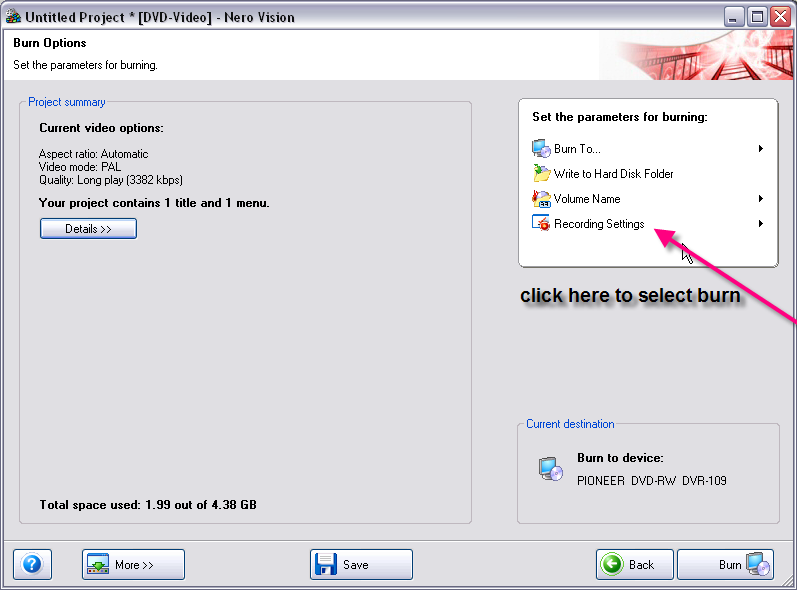
Or just have save to a hard drive folder. You can then use Nero Express or Burning Rom & add the video folder and burn.
Would just be a 2 step process. You will have burn speeds options up to 8x.
|
|