|
Tv Tuner Remote Not Working, Hauppauge Win-TV Plus
|
|
|
funnytim
Junior Member

|
15. December 2006 @ 18:49 |
Link to this message

|
|
hi guys, i recently bought a Hauppauge WinTV Plus with remote control tv tuner.
i got everything else working EXCEPT the remote..
the sender thingy's light is on, so i know i've plugged it in properly
but...when i aim the remote at the IR receiver, nothing happens. i've installed the IR software and it's running on my taskbar, but nothing happens with the remote.
and i have fresh batteries in my remote
anyone have any solutions? thxs.
|
|
Advertisement

|
|
|
|
Member
|
15. December 2006 @ 23:14 |
Link to this message
|
maybe you forget plug the sensor at the card, the cable tip is the sensor and should be place at the front,
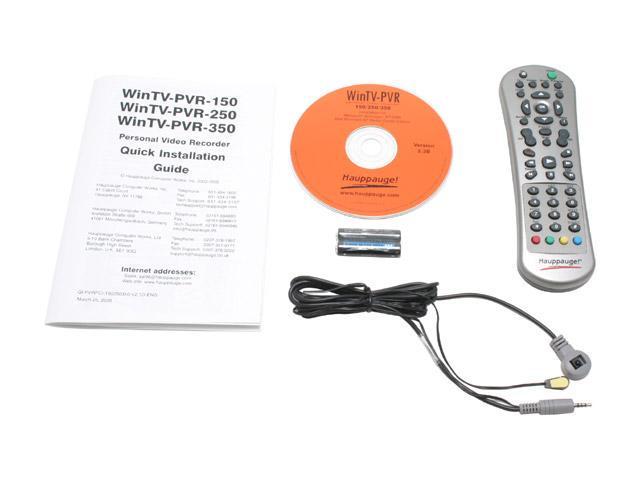
|
AfterDawn Addict
|
16. December 2006 @ 05:55 |
Link to this message
|
Originally posted by funnytim:
hi guys, i recently bought a Hauppauge WinTV Plus with remote control tv tuner.
i got everything else working EXCEPT the remote..
the sender thingy's light is on, so i know i've plugged it in properly
but...when i aim the remote at the IR receiver, nothing happens. i've installed the IR software and it's running on my taskbar, but nothing happens with the remote.
and i have fresh batteries in my remote
anyone have any solutions? thxs.
You have to activate the remote in the Hauppauge software. It should have prompted you the first time you ran the software.
Life is good!
GrandpaBruce - Vietnam Vet - 1970 - 1971
Computer: Intel Core i7-920 Nehalim;Asus P6T Deluxe V2
|
|
funnytim
Junior Member
|
16. December 2006 @ 18:40 |
 Link to this message

|
Quote:
You have to activate the remote in the Hauppauge software. It should have prompted you the first time you ran the software.
do u know how to do that?
|
AfterDawn Addict
|
17. December 2006 @ 07:05 |
Link to this message

|
Quote:
[quote]
You have to activate the remote in the Hauppauge software. It should have prompted you the first time you ran the software.
Quote:
do u know how to do that?
If you have the manual, look in there. If not, try Hauppauge's website, or it may be in WinTV 2000. I don't have it loaded right now, so I can't do any checking.
Life is good!
GrandpaBruce - Vietnam Vet - 1970 - 1971
Computer: Intel Core i7-920 Nehalim;Asus P6T Deluxe V2
This message has been edited since posting. Last time this message was edited on 17. December 2006 @ 17:52
|
|
funnytim
Junior Member
|
18. December 2006 @ 14:30 |
Link to this message
|
|
installed the stuff they (the manual) told me to....nothing...still same results....
|
AfterDawn Addict
|
19. December 2006 @ 05:30 |
Link to this message
|
Originally posted by funnytim:
installed the stuff they (the manual) told me to....nothing...still same results....
I don't know what to tell you. I don't have mine installed right now, and it will be awhile before I can get to it. Go to the Hauppauge site, and download the latest drivers for the remote. I don't know which card you have, but look at the list in the attached URL, and click on it. You will find the IR remote software. Download it, and install it.
http://www.hauppauge.com/pages/support/support.html
Life is good!
GrandpaBruce - Vietnam Vet - 1970 - 1971
Computer: Intel Core i7-920 Nehalim;Asus P6T Deluxe V2
|
|
funnytim
Junior Member
|
19. December 2006 @ 13:40 |
Link to this message
|
|
like i said....I DID ALREADY install ALL REMOTE installs there
my card's WinTV-GO-Plus
anyone else???
|
AfterDawn Addict
|
19. December 2006 @ 17:52 |
Link to this message
|
Originally posted by funnytim:
like i said....I DID ALREADY install ALL REMOTE installs there
my card's WinTV-GO-Plus
anyone else???
You're welcome. :( Open up the remote, and put the batteries in the right way. :):):) Anyone else?
Life is good!
GrandpaBruce - Vietnam Vet - 1970 - 1971
Computer: Intel Core i7-920 Nehalim;Asus P6T Deluxe V2
This message has been edited since posting. Last time this message was edited on 20. December 2006 @ 07:23
|
|
funnytim
Junior Member
|
20. December 2006 @ 18:00 |
Link to this message
|
Quote:
Originally posted by funnytim:
like i said....I DID ALREADY install ALL REMOTE installs there
my card's WinTV-GO-Plus
anyone else???
You're welcome. :( Open up the remote, and put the batteries in the right way. :):):) Anyone else?
lol..srry....i'm not stupid, the batteries are rit......xD
This message has been edited since posting. Last time this message was edited on 20. December 2006 @ 18:01
|
|
Advertisement
|
|
|
|
funnytim
Junior Member
|
26. December 2006 @ 20:37 |
Link to this message
|
|
k it works now...i exchanged the remote at the place i bought it..
|


