|
Nero 6.6.1.4 un-install and re-install problem.
|
|
|
Operative
Newbie

|
22. December 2006 @ 15:45 |
Link to this message

|
Hello,
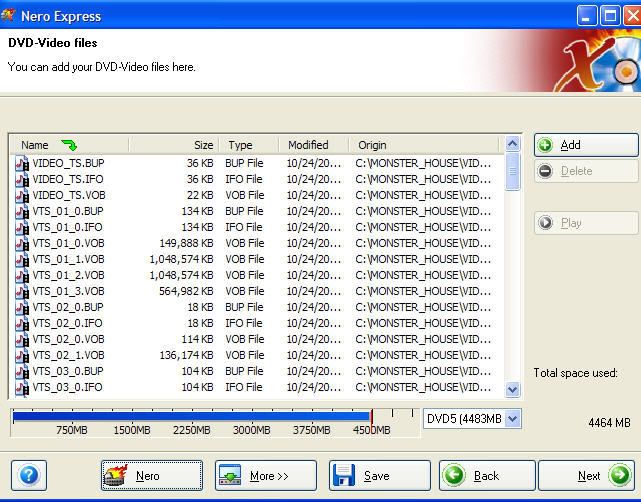
I recently un-installed nero6 and then re-installed it plus I did all the updates. But now I can't seem to do the AUDIO_TS VIDEO_TS burning option for my .VOB,.IFO,.BUP files. all I get is this option:

So whats the problem and how do I fix it?
|
|
Advertisement

|
 |
|
|
Moderator
|
22. December 2006 @ 16:32 |
Link to this message

|
|
Hi Operative
Just click on 'add' and pick the video_ts folder or the folder the movie is in. Then click next & the last screen is the burn settings.
|
|
Operative
Newbie
|
22. December 2006 @ 16:49 |
Link to this message
|
When I do that I get this

Shouldn't I get this like I always did before?

|
Moderator
|
22. December 2006 @ 17:11 |
Link to this message

|
The 1st pic is okay too - it's just showing you all the files added from the folder. The audio_ts is usually empty so no need to add that.
But it does look like you have an older interface of Nero in the 1st pic. The 2nd pic also looks like you are copying from a disc in the drive.
You can uninstall Nero - run the clean tool then reinstall Nero.
Here's a pic from mine after I add the files:
|
|
Operative
Newbie
|
23. December 2006 @ 02:11 |
Link to this message
|
|
I'm gonna try that on christmas eve to see if it works. i'm a little busy right now.
|
AfterDawn Addict
|
23. December 2006 @ 02:57 |
Link to this message
|
|
AfterDawn Addict
|
23. December 2006 @ 04:24 |
Link to this message
|
good job Garmoon, but I would go a step further after the cleaning tools.....I would use a registry cleaner then defrag the computer and reboot!! then install Nero 6.6.0.18! this way there is no lagging or lingering interfaces from the previous versions of Nero 6.
here is a great free registry cleaner, called CClean:
http://www.ccleaner.com/download/downloadpage.aspx?1
use the registry clean feature and the conflict feature! keeps my machine running great!
This message has been edited since posting. Last time this message was edited on 23. December 2006 @ 04:25
|
AfterDawn Addict
|
23. December 2006 @ 17:36 |
Link to this message
|
|
You're right IHoe! Crapcleaner is great I run it each time I finish an internet session.
Edit: I just added the ccleaner and defrag to my instructions. Thanks
This message has been edited since posting. Last time this message was edited on 23. December 2006 @ 17:41
|
|
Operative
Newbie
|
26. December 2006 @ 14:01 |
Link to this message
|
|
I'm a little confused. I can't seem to find nero6.6.0.18, do u guys mean Nero Burning ROM v6.6.0.8?
|
Moderator
|
26. December 2006 @ 14:47 |
Link to this message
|
|
Hey Operative
Nope 6.6.0.18.
See garmoon's post above for the links to download and instructions.
Package 1 has burning rom, express, tool kit etc. Package 2 has Recode, Vision, Showtime etc.
|
|
Operative
Newbie
|
26. December 2006 @ 15:00 |
Link to this message
|
The link takes me to Nero Burning ROM v7.5.9.0A not 6.6.0.18. and under older versions there is no 6.6.0.18 listed.
|
AfterDawn Addict
|
26. December 2006 @ 15:18 |
Link to this message
|
@operative
Click on the links in my post 2 above that gives packages 1 & 2 for Nero 6.6.0.18. I just checked the links, they are working. If you get something else, your browser is not working properly.
|
|
Operative
Newbie
|
26. December 2006 @ 16:18 |
Link to this message
|
|
Ok I get it now. I thought I had to download 6.6.0.18 and then packages 1 & 2, but now I realize that the packages are 6.6.0.18
|
AfterDawn Addict
|
26. December 2006 @ 16:49 |
Link to this message
|
|
|
|
Advertisement
|
|
|
|
Operative
Newbie
|
26. December 2006 @ 17:06 |
Link to this message
|
|
Thanks for all the help guys. It's confusing being a newbie to burning programs, spec, and etc...
|





