|
burning
|
|
Junior Member

|
27. December 2006 @ 13:22 |
 Link to this message

|
|
got 2 problems,first started to download RIP IT FOR ME+DVD SHRINK AND IMAGEBURN managed the first two but imageburn bit of a proplem,clicked on the download link and came to a mirror link but nothing is happening,could anyone tell me where to get this softwear from,the other proplem ive downloaded FIXVT but don't quiet understand the use of it.I've read the forum on it but am i to open the disk drive double click on it,click on the vid ts files and then click on dvd,any help will be most welcome
|
|
Advertisement
|
 |
|
|
Moderator
|
27. December 2006 @ 16:59 |
Link to this message

|
Hi mackum
Check out this great RipIt4Me guide by alkohol. Has links to download all the programs and a step by step on installing, setting up and using RipIt4Me.
Give it a go and let us know.
This message has been edited since posting. Last time this message was edited on 27. December 2006 @ 16:59
|
Junior Member
|
28. December 2006 @ 03:20 |
Link to this message
|
|
thanks binkie got it straight away
|
Moderator
|
28. December 2006 @ 04:27 |
Link to this message

|
|
Not a problem mackum
Happy Burning!
|
Junior Member
|
28. December 2006 @ 08:02 |
Link to this message
|
i've used the ripping sotfwear that you told me it went great till DVD Shrink started to encode the files but stopped and came up with a notice saying
FAILED TO READ FILE C:/MI3/VTS 06-2 VOB
THE PARAMETER IS IN CORRECT
still can't back up my dvds,been on 2 days now nothing seems to work for some reason are they putting something on the disc to stop all this coping
I'm trying to put my new MISSION IMPOSSIBLE 3 dvd onto my new sandisk sansa mp3 but to no avil
any more help would be appreciated
|
Moderator
|
28. December 2006 @ 08:30 |
Link to this message
|
No nothing copy proection wise out that several programs you can use can't handle.
MI3 has nothing special on it so I' surprised Shrink is giving you an error esp. after running it thru RipIt4Me's process.
Have Nero Recode by chance? Could kill 2 birds with 1 stone by using Recode digital & converting the files from RipIt4Me already on your hard drive.
Are you doing full dvd back up or just movie only? Since you're putting it on a mp3 player do movie only if your not.
In Shrink click on 'reauthor'. Then open the folder from RipIt4Me.
Under 'Main Movie' on the right drag over file listed under it.
|
Junior Member
|
29. December 2006 @ 06:59 |
Link to this message
|
i just need to put the main movie on, if i change the settings in dvd dec to not splitting the files and then use DVD Shrink will that work
|
Junior Member
|
29. December 2006 @ 08:24 |
Link to this message
|
what version of Nero do i need
|
Moderator
|
29. December 2006 @ 10:32 |
Link to this message
|
Do you have a full version Nero now?
Either Nero 6 or 7 has Recode Digital option.
You would use that to convert the files to mpeg4 which you can then transfer to the sansa.
I use it to transfer movies to an iPod but as long as the sansa can play video should be no different.
|
Junior Member
|
29. December 2006 @ 11:10 |
Link to this message
|
i havw Nero 6.3 full version and Nero oem suite.i willhave a go installing Nero 6 and see if that works
thanks
|
Moderator
|
29. December 2006 @ 11:22 |
Link to this message
|
Ok - for the full version update to 6.6.0.18. Here's the links:
Package 1
Package 2 (recode, vision)
Then in Recode use the 'recode main movie to Nero digital'. Import the movie saved on your hard drive. Under fit to target you can either use cd or custom. For custom type in 1200 ( Nero 7 has an option for iPod and this is what the size usually is approx)
Then click next and under destination pick hard disk folder.
|
Junior Member
|
30. December 2006 @ 03:21 |
Link to this message
|
managed to find Nero 6 but when i click on the links you sent in your last post the page won't turn over.What are these liks for,and also if the Nero converts the movie into mpeg4 will it go straight on to my mp3 player.Manage to put a little movie on off my phone but that was in quicktime ,now that i've installed Nero everthing has been changed to Nero showtime files ,now they won't play saying that mp4 decoding is not available.could you please advise me on a little more,thanks
|
Junior Member
|
30. December 2006 @ 03:51 |
Link to this message
|
i've just opened up my Nero and found Nero RECODE DVD VIDEO or Nero CONVERT DVD VIDEO MOVIES TO Nero DIGITAL.I've clicked on to recode,then a box has come up with dvd backup,clcked on import dvd and then on the folder on the hard drive what shrink had done,then in the other window a box came up with the menu of the film,clicked on main movie only and set the custom box to 1200 but now whats happened it sayiny the file is to big and shows a red line if i change the target to dvd then it disappears,im going to click on next and see what happens
|
Moderator
|
30. December 2006 @ 08:21 |
Link to this message
|
Ok - if your set the target as DVD the file will be much bigger.
Does your sansa play dvd's like the iPod? How much space does it have?
When installing Nero by default - unless you uncheck them- it becomes the 'player/opener' of the different file types.
It might just be easier to uninstall Nero then reinstall but when you get to the end of the install click on 'deselect all' for the file assocs. under both tabs.
|
Junior Member
|
30. December 2006 @ 08:59 |
Link to this message
|
managed to get the new Nero downloads and did untick all the boxes.The sansa is a 8 gb player and now when i open Nero on encode i click on add files and they won't open now in the Nero window,thanks for your patiience but is starting to piss me offgoing to leave for a day try again later,
|
Moderator
|
30. December 2006 @ 09:56 |
Link to this message
|
Ok check the sansa and make sure it accepts mp4 video- that's Nero digitals output.
Still trying to do MI3?
After you uninstalled Nero then reinstalled - reboot the pc.
|
Junior Member
|
30. December 2006 @ 12:12 |
Link to this message
|
hi binkie7
the sansa players
AVI/MPEG-1+2/MPEG-MPG-MPE-VOB
MPEG-4 IN AVI FORMAT
DAT-ASF-QUICK TIME MOVIE- MENU-WMV
been trying tokyo drift using rip it4me,dvd dec,and shrink,copy onto my hard drive no proplem,thats working great,but when i use Nero i keep getting a box up saying that i need DVD VIDEO PLUGIN REQUIRED
very grateful for your help
|
Moderator
|
30. December 2006 @ 13:19 |
Link to this message
|
Ok if you're getting the dvd plug in message sounds like you're not using the 'full' version. You'll need to have the serial # for the full version listed in SmartStart product center.
In the bottom right hand side of SmartStart you'll see an icon w/ a flame on it. Click on that then the serial # tab. You can check serial # there and add/remove one.
Stills fails - uninstall Nero again, run the clean tool. Reboot
Run a registry cleaner like the free ccleaner. Use the cleaner and issues options.
Reinstall Nero, use the full version serial # and when you get to the end of the install deselect all the audio/video file associations.
I sure hope the Nero's digital works with the sansa - it does for the iPod so I'm still thinking it should.
|
Junior Member
|
5. January 2007 @ 01:43 |
Link to this message
|
hi binkie 7 sorry haven't been in touch had flu just getting over it,done nothing since we last spoke,the only thing i've done is downloaded them 2 links that you gave me,saved them to my desktop,uninstalled Nero and ran them 2 files,when told to put code in i put the code in that i've got on my disc and it all opened,ive unistalled Nero again and ran the first link but can't find anything that relates to you saying about clicking on the SMART START
|
Moderator
|
5. January 2007 @ 14:32 |
Link to this message
|
Hey mackum
Install both packages - the 2nd package has recode.
Just make sure you use the full version serial #.
Look for the icon w/ a flame in it in the bottom right hand corner
Click on it and look like this - click on the serial # tab. Here you can check the serial #, add or delete one.
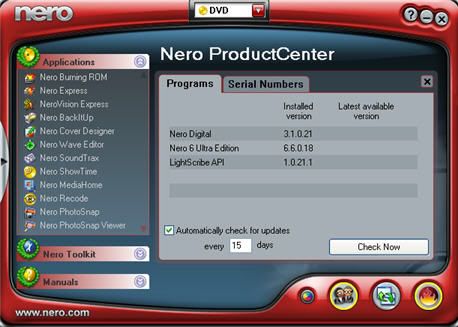
Hope your over the flu.
|
Junior Member
|
6. January 2007 @ 06:53 |
Link to this message
|
|
done everything you said opened the serial tab and the serial number i've got has got a sign like a no entry sign after it and nothing else,it has a enter now button underneath,but i dont have another serial no to put in
|
Moderator
|
6. January 2007 @ 10:49 |
Link to this message
|
Ok - as long as you entered the serial number for the full version you have you should have Recode w/ Nero Digital.
After you installed Nero - reboot.
Are you able to add the files in Recode?
|
Junior Member
|
6. January 2007 @ 11:11 |
Link to this message
|
|
no matter which one i go on a pop up keeps comming up saying i need the plugins
|
Moderator
|
6. January 2007 @ 12:22 |
Link to this message
|
Hmmm at a loss here - with the full version you shouldn't get this message.
Here's a guide though from Sansa - looks like the player comes w/ software to convert (?) and transfer to it:guide
|
|
Advertisement
|
|
|
Junior Member
|
7. January 2007 @ 02:08 |
Link to this message
|
thanks for your help,can put other movies on in different format that ive done off my phone and digi camera,have used the sansa guide to convert,but its the VOB files off the dvd thats causing the problem,they go on the sansa all seperate were i need them to be all one,or do you no of another way to covert the VOB files to a different format such as AVI , thanks
|



