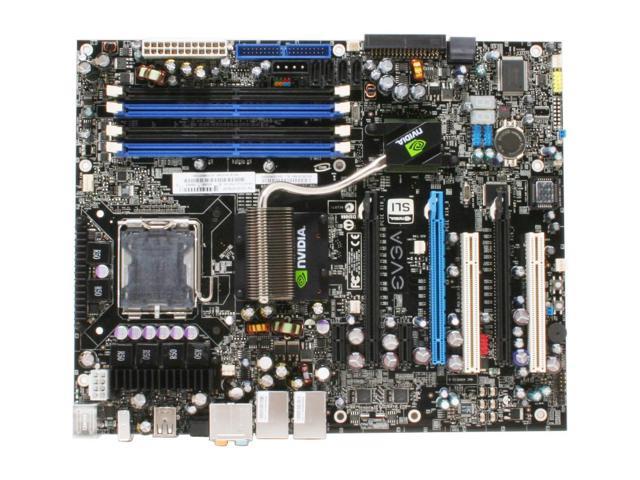
My problem is im not sure where everything goes, I tried looking at the manual and theres still alot of spots on the motherboard not filled. Im wondering if anyone has the same setup and can take a couple pics for me?? Because I had it running, installed windows and it takes a while to start windows, sometimes it lags. I mean I have a 7950 gt video card, 2 gigs mem so I shouldnt have a problem at all. Any help is appreciated, thanks.
I am actually in the process of getting a new motherboard and a Big Thyphoon heatsink/fan because the networking didnt work for some reason, no lights.
By the way it was all bought brand new, so I knew what I had bought. Like I said though this is my first time putting one together. I would just like to see the finished product from someone elses picture so I can compare and make sure I put the things in the right area.
now looking at this, i would have my ram in the 2 blue slots, my gcard in the black pcix16 slot on the left and the xfi in the white pci on the left.
now there are the 3 psu sockets, the ide(dvd drive) and satas(harddrive) which you will also be using and then the lights and switch header pins which i cant find any info on as i need to register my product with them to get the right info.
you want to make sure the hard drive goes to sata #1(should say which in the manual) to stop any hang ups there. the lights and switch pins should also be in there too, fidly job but you only need to do it once if you get it right.
the cpu fan connects to a 3 pin header (somwere near the cpu) and this will only go on 1 way.
all the plugs and sockets will only go in one way so if it seem too tight dont force it try the other way.
if everythings in right and you still get hang ups it could be somthing in the bios, or maybe a driver/patch from evga coould fix it.
Thanks for the information!! Yeah I will just wait for the replacement MB to come in and ill try and get it together.
But like I said I had it up and running, installed windows, installed the drivers, and everything seemed to be working fine except for the internet, which is why its being replaced. But is there anything in BIOS where I can make sure everything is running okay?? Because it looked like it was all connected, I had the 250 gigs, 2 gigs ram, XFX sound card, but I didnt know how to check out the graphics card. Reguardless I still want to know why it would lag, like a program would freeze up, windows takes a bit to start up. I duno I just dont want to waste all the $$ I put in this -__-