|
Nero Start Smart vs Nero 7
|
|
Member

|
15. February 2007 @ 20:33 |
Link to this message

|
I've been wondering about this for a while but is Nero Start Smart better than Nero 7? Or are they basically the same?
|
|
Advertisement

|
 |
|
|
AfterDawn Addict
|
15. February 2007 @ 20:49 |
Link to this message

|
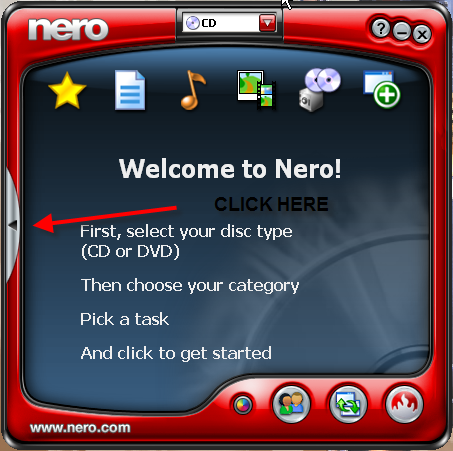
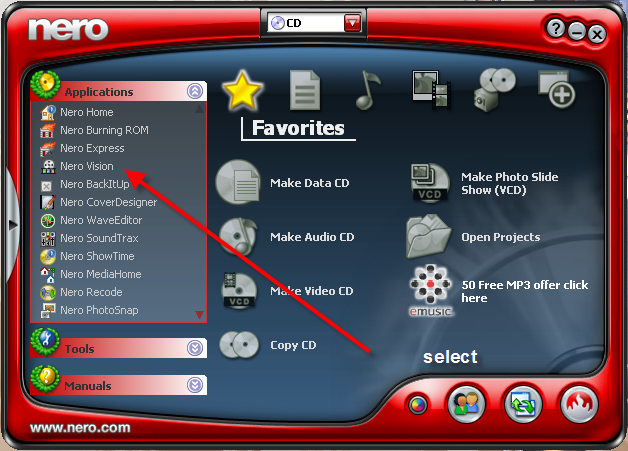
Nero StartSmart is basically used to open programs from Nero...if you click on StartSmart you can then select the prog you choose.
This message has been edited since posting. Last time this message was edited on 15. February 2007 @ 21:15
|
Member
|
16. February 2007 @ 11:50 |
Link to this message

|
Well, I use Nero StartSmart when burning DVD's. Am just wondering what the difference is.
|
AfterDawn Addict
|
16. February 2007 @ 12:21 |
Link to this message
|
As mentioned Nero StartSmart just launches the actual program you desire, such as NeroVision
Nero Burning Rom
Nero Express
Nero Recode etc.
Nero StartSmart is NOT a program, the ONLY programs within Nero are the ones listed in the StartSmart picture illustrated, under Applications.
At the top, in the centre you have the choice of CD/DVD....CD....DVD
|
Member
|
16. February 2007 @ 12:57 |
Link to this message
|
LOL, oh ok.. Sorry for misunderstanding it. :D How would you know then what version it is? Am not the one who downloaded the Nero so I don't know what version it is. I went to its folder and its properties but I still couldn't find what version it is.
|
AfterDawn Addict
|
16. February 2007 @ 13:35 |
Link to this message
|
|
Member
|
16. February 2007 @ 21:00 |
Link to this message
|
Thanks a lot mate! :D How come u guys don't recommend using Nero 6?
|
AfterDawn Addict
|
16. February 2007 @ 21:50 |
Link to this message
|
Nero 6 is OK. If you do have Nero 6 then I just recommend updating it to the version packages I mentioned previously.
The primary reason for this is that the last two or three versions of Nero 6 will not autoburn with Shrink. When Shrink tries to open the later versions you get a TRF error and it won't work.
They also come with the Yahoo toolbar which is just a stupid add-on that has nothing to do with what you would get Nero for in the first place.
I use my Nero 7 on this computer and have Nero 6 on my other. It does a lot of stuff besides burn; Recode is the updated version of DVD Shrink minus the ripper, written by the same guy. Vision is great for slideshows and downloaded movies. Nero CD-DVD speed is useful for checking the quality of your burns. Just to name a few.
|
Member
|
17. February 2007 @ 09:16 |
Link to this message
|
So just you know, I have Nero 6.6.1.4. Is that any good? What is the Shrink anyway? Is that the program where you deduce the size of the movie file?
Oh, you can actually check the quality of your burn even if its not yet done? Tell me how.. Thanks :D
|
AfterDawn Addict
|
17. February 2007 @ 12:21 |
Link to this message
|
|
Member
|
17. February 2007 @ 13:27 |
Link to this message
|
Thanks for letting me know. Actually, Am thinking to download Nero 7. Any thought about that?
whoa! I didn't know that my current Nero contain some bugs. It works fine though. :D
Anyway, I really don't need the DVD Shrink because all the movies that I download always fit perfectly :D
|
AfterDawn Addict
|
17. February 2007 @ 23:32 |
Link to this message
|
If your Nero is working OK then it's up to you if you want to stay with it. We've given you some information and you are aware of potential problems and the recommended fixes.
Nero 6 is no longer being developed so if you want to have the latest and greatest Nero then you need 7.
|
Member
|
18. February 2007 @ 09:08 |
Link to this message
|
Ok thanks. I'll probably switch to 7. The thing is, if I download Nero 7, will it be a different file from my previous Nero? I mean will it just be upgraded or I need to delete Nero 6 first?
|
AfterDawn Addict
|
18. February 2007 @ 12:09 |
Link to this message
|
This message has been edited since posting. Last time this message was edited on 18. February 2007 @ 12:09
|
Member
|
18. February 2007 @ 15:06 |
Link to this message
|
|
My sig is too big? Thanks..
|
AfterDawn Addict
|
18. February 2007 @ 18:45 |
Link to this message
|
|
Yah, your sig is over 171,000 bytes. Max is 50,000 bytes (50KB)
|
Member
|
18. February 2007 @ 19:54 |
Link to this message
|
|
How do u guys know the size of your sig? Can u guys let me pass? pls..
|
AfterDawn Addict
|
18. February 2007 @ 20:02 |
Link to this message
|
|
Right click on your sig, go to properties.
We dont make the rules, just telling you before the mods do. You might like to go to the Safety Valve and look for a thread...Need a Sig ..someone there should be able to help you reduce it to the correct size
|
Member
|
18. February 2007 @ 21:21 |
Link to this message
|
|
Do u know how to make is smaller by any chance?
|
AfterDawn Addict
|
18. February 2007 @ 22:54 |
Link to this message
|
Quote:
You might like to go to the Safety Valve and look for a thread...Need a Sig ..someone there should be able to help you reduce it to the correct size
I wouldnt have a clue!!
|
AfterDawn Addict
|
19. February 2007 @ 04:44 |
Link to this message
|
|
Member
|
19. February 2007 @ 18:44 |
Link to this message
|
hey, is Nero 7 found here in afterdawn has a keygen? Just wanna know..
BTW, I downloaded Nero 7.5.9.0 and Am shocked! You know why? Its because of the size of it! The size is actually 315mb! Am like whoa!!! Are u serious?
Is this right? I mean, Nero 6 is only 47mb I think. BTW, since its too big, by any chance, does it contain transcoding AVI.file to dvd? Cuz I acutally bought a program called WinAvi video converter and I thought that if Nero 7 already has a converter along in its package, then I'll probably stick with Nero 6
This message has been edited since posting. Last time this message was edited on 19. February 2007 @ 19:25
|
Member
|
19. February 2007 @ 20:04 |
Link to this message
|
I could not install Nero 7 for these reasons:
1. Cannot create Setup\NPS.dll
2. Cannot create SetupX.exe
3. Cannot create Nero.msi
I saw this while trying the extract Nero 7. Is it because I haven't un-installed my Nero 6 version?
*I'll be waiting for a good comment before I totally delete Nero 7.
This message has been edited since posting. Last time this message was edited on 19. February 2007 @ 20:05
|
Member
|
19. February 2007 @ 20:13 |
Link to this message
|
wow, ok never mind. I just have to remove Nero 6 first so that I could install Nero 7. Am such a dumbass..
I'll update u guys later if its works better.
|
|
Advertisement
|
|
|
Member
|
19. February 2007 @ 21:39 |
Link to this message
|
oh crap. What is this stupid thing called Nero Search? I want to delete this toolbar immediately on my desktop. I only managed to not show it physically on my desktop. But I want to remove it out of my system completely though.
Can you help me where this Nero Search toolbar is located. By that, I mean what folder it is so that I could delete it completely.
THANKS! :D
|





