User User name Password  
   
Thursday 12.3.2026 / 06:19
Search AfterDawn Forums:        In English   Suomeksi   På svenska
afterdawn.com > forums > software specific discussion > nero discussion > nero start smart vs nero 7
Show topics
 
Forums
Forums
Nero Start Smart vs Nero 7
  Jump to:
 
Posted Message
AfterDawn Addict
_
21. February 2007 @ 17:19 _ Link to this message    Send private message to this user   
One of Nero's drawbacks is all the crap they add that I guess someone out there likes...

I know I always do a custom install and do not install Nero Home or Nero Scout. I also do not let Nero have any of my file extensions.

As far as the Nero Search feature goes I didn't uninstall it. I just disabled it in the toolbar menu.

Right click taskbar > Toolbars > uncheck Nero Search.

Now I'm curious so I may look for the program files or whatever. I'll probably crash Nero if I touch it though. Nero seems to fall apart at the slightest provocation!


My website- http://www.dvdplusvideo.com featuring Guides by Alkohol, bbmayo, ScubaPete and me.
Advertisement
_
__
Member
_
21. February 2007 @ 18:27 _ Link to this message    Send private message to this user   
what dismays me the most is the fact that the program itself is freakin' huge.(417mb) I also don't like many of its feature's. You know that Nero photo snap viewer? How can I disable it? Cuz I like it when I view pictures in the "Microsoft office picture manager".(the default one). And methinks that its a waste of memory.

Also, when I have a media file, instead of having the deafault icon, which I believe is the "play button" of windows media player, it shows the Nero media icon.(the icon that shows a cd). Well, I really don't like that.

And oh, before I forget, can anyone here tell me what files in the Nero Package is not useful. In other words, files that are trash and ready to be uninstalled? Cuz, I really wanna save space as much as I can.
Any thoughts?

This message has been edited since posting. Last time this message was edited on 21. February 2007 @ 18:30

Member
_
24. February 2007 @ 19:06 _ Link to this message    Send private message to this user   
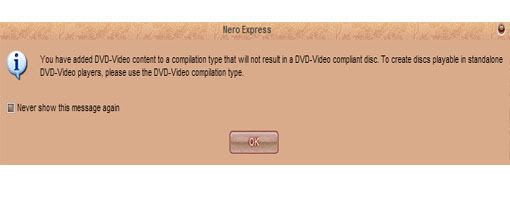
Ok, guys, I decrypted a dvd and when Am trying to add the all the files decrypted into the data "make a data DVD", it says something like this:


Am using dual layer 8.5gb DVD+R cd. Urgent help is indeed needed..
AfterDawn Addict
_
24. February 2007 @ 19:24 _ Link to this message    Send private message to this user   
If you are intending to make a DVD thats watchable on a standalone player the you select...Make DVD (NOT DATA DVD)

The message is self explanatory!!


guide by ScubaPete http://www.dvdplusvideo.com/tutorial007.html Nero guide by alkohol http://www.dvdplusvideo.com/Guides/alkohol_guide3.html

New RipIt4Me + DVD Shrink + ImgBurn guid <==== Rip any DVDs http://forums.afterdawn.com/thread_view.cfm/422740 Guides by bbmayo..... http://webpages.charter.net/bacitup/
AfterDawn Addict
_
24. February 2007 @ 19:36 _ Link to this message    Send private message to this user   
@schwaber

If you're trying to backup DVDs to DL Discs, Nero is not the program to use. You want to download free ImgBurn and write the ISO and burn the ISO with Imgburn. It will even select the best layer break. Use VerbatimDL discs and burn slow at 2.4X. You'll also need your encryption breaker program, that you were using with Nero, Like DVDFabDecrypter, AnyDVD or Ripit4me.


LOCOENG's Abstraction
Imgburn-
http://www.imgburn.com

Guides:

Burning DVD Video files directly to double layer media with ImgBurn
http://forum.imgburn.com/index.php?showtopic=1780

Creating a single layer ISO on your hard drive using ImgBurn
http://forum.imgburn.com/index.php?showtopic=1778

Creating a double layer ISO on your hard drive using ImgBurn
http://forum.imgburn.com/index.php?showtopic=1777

ImgBurn Build Mode, An Overview
http://forum.imgburn.com/index.php?showtopic=1779


Member
_
24. February 2007 @ 21:34 _ Link to this message    Send private message to this user   
I actually manage to fix it before u guys suggested. Sorry if I was kinda late to notify u guys..
Advertisement
_
__
 
_
AfterDawn Addict
_
25. February 2007 @ 04:47 _ Link to this message    Send private message to this user   
No problem, the important thing is it's working on your machine.


Related links
Download Nero from here.
How to burn DVDs with Nero? Read our guide from here.
Support AfterDawn and purchase your copy of Nero from here!
 
Related forum topics Posts Last post Forum room
My Nero 6 OEM not compatable with Windows 8.1 4 2. June 2014 Windows - Software discussion
nero 2014 3 24. May 2014 Nero discussion
need to download Nero 9 5 9. May 2014 Nero discussion
read errors on disc verify in nero 12 2 3. May 2014 Nero discussion
I lose sound when I join files on Nero 12 Platinum? 9 29. April 2014 Nero discussion
Nero 12 activation 3 15. January 2014 Nero discussion
Help with NERO burning BluRay 2 22. December 2013 Nero discussion
DVD-DL Media keeps failing with Nero Platinum 12 6 7. December 2013 Nero discussion
A better way to burn Blu Ray disks...than using Nero! 3 30. October 2013 Blu-ray
which version of Nero to get for windows 7 OS ?? 2 26. October 2013 Nero discussion

 
afterdawn.com > forums > software specific discussion > nero discussion > nero start smart vs nero 7
 

Digital video: AfterDawn.com | AfterDawn Forums
Music: MP3Lizard.com
Gaming: Blasteroids.com | Blasteroids Forums | Compare game prices
Software: Software downloads
Blogs: User profile pages
RSS feeds: AfterDawn.com News | Software updates | AfterDawn Forums
International: AfterDawn in Finnish | AfterDawn in Swedish | AfterDawn in Norwegian | download.fi
Navigate: Search | Site map
About us: About AfterDawn Ltd | Advertise on our sites | Rules, Restrictions, Legal disclaimer & Privacy policy
Contact us: Send feedback | Contact our media sales team
 
  © 1999-2026 by AfterDawn Ltd.

  IDG TechNetwork