|
|
|
End of disc-at-once
|
|
|
DraXxus
Newbie

|
14. March 2007 @ 18:20 |
 Link to this message

|
I keep getting a "could not perform end of disc-at-once error on my Nero. I have tried everything i could find on this but nothing seems to work...I have the log if anyone could please help me it would be great.
LOG
Windows XP 5.1
IA32
WinAspi: File 'Wnaspi32.dll': Ver=4.71 (0002), size=45056 bytes, created 7/17/2002 9:20:56 AM
ahead WinASPI: File 'C:\Program Files\Ahead\nero\Wnaspi32.dll': Ver=2.0.1.74, size=164112 bytes, created 10/26/2004 11:35:32 AM
Nero Version: 6.6.0.13
Internal Version: 6, 6, 0, 13c
(Nero Express)
Recorder: <HL-DT-ST DVDRAM GSA-4167B>Version: DL11 - HA 0 TA 3 - 6.6.0.13
Adapter driver: <nvata> HA 0
Drive buffer : 2048kB
Bus Type : default (0) -> ATAPI, detected: ?
CD-ROM: <LITE-ON COMBO SOHC-5236V>Version: R$0A - HA 0 TA 2 - 6.6.0.13
Adapter driver: <nvata> HA 0
=== Scsi-Device-Map ===
CdRomPeripheral : LITE-ON COMBO SOHC-5236V nvata Port 0 ID 2 DMA: Off
CdRomPeripheral : HL-DT-ST DVDRAM GSA-4167B nvata Port 0 ID 3 DMA: Off
DiskPeripheral : ST3120827AS nvata Port 1 ID 0 DMA: Off
CdRomPeripheral : QW5363O KUI399P 1.0 a428v88s Port 3 ID 0 DMA: Off
CdRomPeripheral : QW5363O KUI399P 1.0 a428v88s Port 3 ID 1 DMA: Off
CdRomPeripheral : QW5363O KUI399P 1.0 a428v88s Port 3 ID 2 DMA: Off
CdRomPeripheral : QW5363O KUI399P 1.0 a428v88s Port 3 ID 3 DMA: Off
=== CDRom-Device-Map ===
LITE-ON COMBO SOHC-5236V D: CDRom0
HL-DT-ST DVDRAM GSA-4167B E: CDRom1
QW5363O KUI399P F: CDRom2
QW5363O KUI399P G: CDRom3
QW5363O KUI399P H: CDRom4
QW5363O KUI399P I: CDRom5
=======================
AutoRun : 1
Excluded drive IDs:
WriteBufferSize: 83886080 (0) Byte
ShowDrvBufStat : 0
BUFE : 0
Physical memory : 2046MB (2095536kB)
Free physical memory: 1462MB (1497952kB)
Memory in use : 28 %
Uncached PFiles: 0x0
Use Inquiry : 1
Global Bus Type: default (0)
Check supported media : Disabled (0)
14.3.2007
ISO compilation
7:04:57 AM #1 Text 0 File Isodoc.cpp, Line 6194
Iso document burn settings
------------------------------------------
Determine maximum speed : FALSE
Simulate : FALSE
Write : TRUE
Finalize CD : FALSE
Multisession : TRUE
Multisession type: : Start multisession
Burning mode : DAO
Mode : 1
ISO Level : 1 (Max. of 11 = 8 + 3 char)
Character set : ISO 9660
Joliet : TRUE
Allow pathdepth more than 8 directories : TRUE
Allow more than 255 characters in path : TRUE
Write ISO9660 ;1 file extensions : TRUE
7:04:57 AM #2 Text 0 File Reader.cpp, Line 127
Reader running
7:04:57 AM #3 Text 0 File Writer.cpp, Line 122
Writer HL-DT-ST DVDRAM GSA-4167B running
7:04:57 AM #4 ISO9660GEN -11 File geniso.cpp, Line 3293
First writeable address = 0 (0x00000000)
7:04:57 AM #5 Text 0 File Burncd.cpp, Line 3167
Turn on Disc-At-Once, using DVD media
7:04:57 AM #6 Text 0 File DlgWaitCD.cpp, Line 260
Last possible write address on media: 2298495 (510:46.45, 4489MB)
Last address to be written: 618079 (137:21.04, 1207MB)
7:04:57 AM #7 Text 0 File DlgWaitCD.cpp, Line 272
Write in overburning mode: NO (enabled: CD)
7:04:57 AM #8 Text 0 File DlgWaitCD.cpp, Line 2339
Recorder: HL-DT-ST DVDRAM GSA-4167B, Media type: DVD-R
Disc Manufacturer: SONY16 - D1
Disc Application Code: 64, Disc Physical Code: 193
7:04:57 AM #9 Text 0 File DlgWaitCD.cpp, Line 438
>>> Protocol of DlgWaitCD activities: <<<
=========================================
7:04:57 AM #10 Text 0 File ThreadedTransferInterface.cpp, Line 830
Setup items (after recorder preparation)
0: TRM_DATA_MODE1 ()
2 indices, index0 (150) not provided
original disc pos #0 + 618080 (618080) = #618080/137:21.5
relocatable, disc pos for caching/writing not required/ required, no patch infos
-> TRM_DATA_MODE1, 2048, config 0, wanted index0 0 blocks, length 618080 blocks [HL-DT-ST DVDRAM GSA-4167B]
--------------------------------------------------------------
7:04:59 AM #11 Text 0 File ThreadedTransferInterface.cpp, Line 1043
Prepare recorder [HL-DT-ST DVDRAM GSA-4167B] for write in CUE-sheet-DAO
DAO infos:
==========
MCN: ""
TOCType: 0x00; Session Closed, disc fixated
Tracks 1 to 1:
1: TRM_DATA_MODE1, 2048/0x00, FilePos 0 0 1265827840, ISRC ""
DAO layout:
===========
__Start_|____Track_|_Idx_|_CtrlAdr_|_RecDep__________
0 | lead-in | 0 | 0x41 | 0x00
0 | 1 | 0 | 0x41 | 0x00
0 | 1 | 1 | 0x41 | 0x00
618080 | lead-out | 1 | 0x41 | 0x00
7:04:59 AM #12 Phase 24 File dlgbrnst.cpp, Line 1832
Caching of files started
7:04:59 AM #13 Text 0 File Burncd.cpp, Line 4051
Cache writing successful.
7:04:59 AM #14 Phase 25 File dlgbrnst.cpp, Line 1832
Caching of files completed
7:04:59 AM #15 Phase 36 File dlgbrnst.cpp, Line 1832
Burn process started at 16x (22,160 KB/s)
7:04:59 AM #16 Text 0 File ThreadedTransferInterface.cpp, Line 2609
Verifying disc position of item 0 (relocatable, disc pos, no patch infos, orig at #0): write at #0
7:04:59 AM #17 Text 0 File DVDR.cpp, Line 2267
Recording mode: Sequential Recording Mode
7:04:59 AM #18 Text 0 File Mmc.cpp, Line 21469
Set BUFE: Buffer underrun protection -> ON
7:04:59 AM #19 Text 0 File DVDR.cpp, Line 2421
Start write address at LBA 0
DVD high compatibility mode: Yes
7:04:59 AM #20 Text 0 File Cdrdrv.cpp, Line 8438
---- DVD Structure: Physical Format Information (00h) ----
Layer: 0, Address: 0 (0 h), AGID: 0; Length: 2050
Book Type: DVD-R (2), Part Version: 5
Disc Size: 120 mm, Maximum Rate: <not specified> (F h)
Number of Layers: 1, Track Path: Parallel Track Path (PTP), Layer Type: recordable
Linear Density: 0,267 um/bit, Track Density: 0,74 um/track
Starting Physical Sector Number of Data Area: 30000 h (DVD-ROM, DVD-R/-RW, DVD+R/+RW)
End Physical Sector Number of Data Area: 26127F h
End Sector Number in Layer 0: 0 h (LBN: FFFD0000 h, 4193920 MB)
Data in Burst Cutting Area (BCA) does not exist
Start sector number of the current Border-Out: 2FE10 h
Start sector number of the next Border-In: 2FFA0 h
Media Specific [16..63]:
00 60 00 10 20 30 40 50 - 00 00 00 21 00 00 00 00 .`...0@P...!....
00 02 FE 10 00 02 FF A0 - 00 00 00 00 00 00 00 00 ................
00 00 00 00 00 00 00 00 - 00 00 00 00 00 00 00 00 ................
7:05:29 AM #21 SCSI -1093 File Cdrdrv.cpp, Line 1436
SCSI Exec, HA 0, TA 3, LUN 0, buffer 0x03800000
Status: 0x04 (0x01, SCSI_ERR)
HA-Status 0x00 (0x00, OK)
TA-Status 0x02 (0x01, SCSI_TASTATUS_CHKCOND)
Sense Key: 0x03 (KEY_MEDIUM_ERROR)
Sense Code: 0x02
Sense Qual: 0x00
CDB Data: 0x2A 0x00 0x00 0x00 0x00 0x00 0x00 0x00 0x20 0x00 0x00 0x00
Sense Data: 0x70 0x00 0x03 0x00 0x00 0x00 0x00 0x10
0x36 0x30 0x00 0x0C 0x02 0x00
7:05:29 AM #22 CDR -1093 File Writer.cpp, Line 311
No seek complete
7:05:29 AM #23 Text 0 File ThreadedTransfer.cpp, Line 228
all writers idle, stopping conversion
7:05:30 AM #24 Text 0 File ThreadedTransfer.cpp, Line 222
conversion idle, stopping reader
7:05:30 AM #25 Text 0 File DVDR.cpp, Line 2658
EndDAO: Last written address was -1
7:05:30 AM #26 CDR -1093 File WriterStatus.cpp, Line 167
No seek complete
7:05:30 AM #27 TRANSFER -24 File WriterStatus.cpp, Line 167
Could not perform end of Disc-at-once
7:05:30 AM #28 Phase 38 File dlgbrnst.cpp, Line 1832
Burn process failed at 16x (22,160 KB/s)
Existing drivers:
File 'Drivers\CDRALW2K.SYS': Ver=8.0.0.212 , size=2560 bytes, created 1/25/2007 8:19:00 PM
File 'Drivers\ASPI32.SYS': Ver=4.71 (0002), size=16877 bytes, created 7/17/2002 8:53:02 AM
File 'Drivers\PXHELP20.SYS': Ver=3.00.43J, size=36624 bytes, created 1/25/2007 8:19:00 PM (Prassi/Veritas driver for win 2K)
File 'Drivers\nvata.sys': Ver=5.10.2600.0534 built by: WinDDK, size=92800 bytes, created 5/17/2005 4:45:08 AM (Adapter driver for rec)
Registry Keys:
HKLM\Software\Microsoft\Windows NT\CurrentVersion\WinLogon\AllocateCDROMs : 0 (Security Option)
|
|
Advertisement
|
 |
|
|
Moderator
|
14. March 2007 @ 19:26 |
Link to this message
|
Hi DraXxus
Here's a few suggestions:
Recorder: <HL-DT-ST DVDRAM GSA-4167B>Version: DL11
Update the firmware - the latest is DL13.
CdRomPeripheral : LITE-ON COMBO SOHC-5236V nvata Port 0 ID 2 DMA: Off
CdRomPeripheral : HL-DT-ST DVDRAM GSA-4167B nvata Port 0 ID 3 DMA: Off
DiskPeripheral : ST3120827AS nvata Port 1 ID 0 DMA: Off
Check and make sure all your drives are in DMA - Nero doesn't report report Nvidia correctly so this may not be an issue.
Here's a guide to get you in the right direction - link
Burn process failed at 16x
Take the burn speed down to 8x.
File 'Drivers\CDRALW2K.SYS'
Still failing - Roxio and Nero don't always play well so you can uninstall Roxio and run the Zap Tool.
Nero Version: 6.6.0.13
Nero can use an update to - update to 6.6.0.18
Package 1
Package 2.
Give those a go and let us know.
|
|
DraXxus
Newbie
|
15. March 2007 @ 02:12 |
Link to this message

|
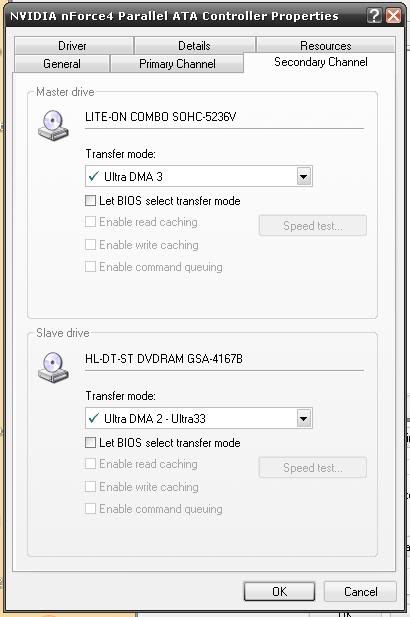
I tried all of those things, except i am not sure about my DMA settings i have a nvidia chipset and setting it is different then everything i have found online ill post a screenshot let me know if i did it right.
|
AfterDawn Addict
|
15. March 2007 @ 02:44 |
Link to this message
|
|
binkie7, wont be on until tomorrow, so in her absence. Nvidia drivers I have found normally show DMA as off....do the other recommendations, try again and report back.
|
|
DraXxus
Newbie
|
15. March 2007 @ 04:43 |
Link to this message
|
|
I tried everything else on the list no good couldnt burn even at 4x
|
Moderator
|
15. March 2007 @ 16:21 |
Link to this message
|
|
@gwen
Txs!!
@DraXxus
You good to go on the DMA - check the primary tab too just in case - dma like its listed in this screen shot should show the same way.
Sony discs are usually pretty decent - are these the only discs that have been giving you a problem?
Post the new log too so we can have a look.
|
|
DraXxus
Newbie
|
15. March 2007 @ 17:30 |
Link to this message
|
I have gone threw about half a stack of of them before this started again...heres the log.
Windows XP 5.1
IA32
WinAspi: File 'Wnaspi32.dll': Ver=4.71 (0002), size=45056 bytes, created 7/17/2002 9:20:56 AM
ahead WinASPI: File 'C:\Program Files\Ahead\nero\Wnaspi32.dll': Ver=2.0.1.74, size=164112 bytes, created 11/2/2004 12:54:32 PM
Nero Version: 6.6.0.18
Internal Version: 6, 6, 0, 18e
(Nero Express)
Recorder: <HL-DT-ST DVDRAM GSA-4167B>Version: DL13 - HA 0 TA 3 - 6.6.0.18
Adapter driver: <nvata> HA 0
Drive buffer : 2048kB
Bus Type : default (0) -> ATAPI, detected: ?
CD-ROM: <QW5363O KUI399P >Version: 1.0 - HA 3 TA 0 - 6.6.0.18
Adapter driver: <avzono0k> HA 3
=== Scsi-Device-Map ===
CdRomPeripheral : LITE-ON COMBO SOHC-5236V nvata Port 0 ID 2 DMA: Off
CdRomPeripheral : HL-DT-ST DVDRAM GSA-4167B nvata Port 0 ID 3 DMA: Off
DiskPeripheral : ST3120827AS nvata Port 1 ID 0 DMA: Off
CdRomPeripheral : QW5363O KUI399P 1.0 avzono0k Port 3 ID 0 DMA: Off
CdRomPeripheral : QW5363O KUI399P 1.0 avzono0k Port 3 ID 1 DMA: Off
CdRomPeripheral : QW5363O KUI399P 1.0 avzono0k Port 3 ID 2 DMA: Off
CdRomPeripheral : QW5363O KUI399P 1.0 avzono0k Port 3 ID 3 DMA: Off
=== CDRom-Device-Map ===
LITE-ON COMBO SOHC-5236V D: CDRom0
HL-DT-ST DVDRAM GSA-4167B E: CDRom1
QW5363O KUI399P F: CDRom2
QW5363O KUI399P G: CDRom3
QW5363O KUI399P H: CDRom4
QW5363O KUI399P I: CDRom5
=======================
AutoRun : 1
Excluded drive IDs:
WriteBufferSize: 83886080 (0) Byte
ShowDrvBufStat : 0
BUFE : 0
Physical memory : 2046MB (2095536kB)
Free physical memory: 1409MB (1443104kB)
Memory in use : 31 %
Uncached PFiles: 0x0
Use Inquiry : 1
Global Bus Type: default (0)
Check supported media : Disabled (0)
15.3.2007
ISO compilation
10:29:48 PM #1 Text 0 File Isodoc.cpp, Line 6359
Iso document burn settings
------------------------------------------
Determine maximum speed : FALSE
Simulate : FALSE
Write : TRUE
Finalize CD : FALSE
Multisession : TRUE
Multisession type: : Start multisession
Burning mode : DAO
Mode : 1
ISO Level : 1 (Max. of 11 = 8 + 3 char)
Character set : ISO 9660
Joliet : TRUE
Allow pathdepth more than 8 directories : TRUE
Allow more than 255 characters in path : TRUE
Write ISO9660 ;1 file extensions : TRUE
10:29:48 PM #2 Text 0 File Reader.cpp, Line 127
Reader running
10:29:48 PM #3 Text 0 File Writer.cpp, Line 122
Writer HL-DT-ST DVDRAM GSA-4167B running
10:29:48 PM #4 ISO9660GEN -11 File geniso.cpp, Line 3309
First writeable address = 0 (0x00000000)
10:29:48 PM #5 Text 0 File Burncd.cpp, Line 3233
Turn on Disc-At-Once, using DVD media
10:29:49 PM #6 Text 0 File DlgWaitCD.cpp, Line 270
Last possible write address on media: 2298495 (510:46.45, 4489MB)
Last address to be written: 618079 (137:21.04, 1207MB)
10:29:49 PM #7 Text 0 File DlgWaitCD.cpp, Line 282
Write in overburning mode: NO (enabled: CD)
10:29:49 PM #8 Text 0 File DlgWaitCD.cpp, Line 2483
Recorder: HL-DT-ST DVDRAM GSA-4167B, Media type: DVD-R
Disc Manufacturer: SONY16 - D1
Disc Application Code: 64, Disc Physical Code: 193
10:29:49 PM #9 Text 0 File DlgWaitCD.cpp, Line 448
>>> Protocol of DlgWaitCD activities: <<<
=========================================
10:29:49 PM #10 Text 0 File ThreadedTransferInterface.cpp, Line 838
Setup items (after recorder preparation)
0: TRM_DATA_MODE1 ()
2 indices, index0 (150) not provided
original disc pos #0 + 618080 (618080) = #618080/137:21.5
relocatable, disc pos for caching/writing not required/ required, no patch infos
-> TRM_DATA_MODE1, 2048, config 0, wanted index0 0 blocks, length 618080 blocks [HL-DT-ST DVDRAM GSA-4167B]
--------------------------------------------------------------
10:29:50 PM #11 Text 0 File ThreadedTransferInterface.cpp, Line 1051
Prepare recorder [HL-DT-ST DVDRAM GSA-4167B] for write in CUE-sheet-DAO
DAO infos:
==========
MCN: ""
TOCType: 0x00; Session Closed, disc fixated
Tracks 1 to 1:
1: TRM_DATA_MODE1, 2048/0x00, FilePos 0 0 1265827840, ISRC ""
DAO layout:
===========
__Start_|____Track_|_Idx_|_CtrlAdr_|_RecDep__________
0 | lead-in | 0 | 0x41 | 0x00
0 | 1 | 0 | 0x41 | 0x00
0 | 1 | 1 | 0x41 | 0x00
618080 | lead-out | 1 | 0x41 | 0x00
10:29:50 PM #12 Phase 24 File dlgbrnst.cpp, Line 1832
Caching of files started
10:29:50 PM #13 Text 0 File Burncd.cpp, Line 4122
Cache writing successful.
10:29:50 PM #14 Phase 25 File dlgbrnst.cpp, Line 1832
Caching of files completed
10:29:50 PM #15 Phase 36 File dlgbrnst.cpp, Line 1832
Burn process started at 8x (11,080 KB/s)
10:29:50 PM #16 Text 0 File ThreadedTransferInterface.cpp, Line 2661
Verifying disc position of item 0 (relocatable, disc pos, no patch infos, orig at #0): write at #0
10:29:50 PM #17 Text 0 File DVDR.cpp, Line 2571
Recording mode: Sequential Recording Mode
10:29:50 PM #18 Text 0 File Mmc.cpp, Line 21774
Set BUFE: Buffer underrun protection -> ON
10:29:50 PM #19 Text 0 File DVDR.cpp, Line 2726
Start write address at LBA 0
DVD high compatibility mode: Yes
10:29:50 PM #20 Text 0 File Cdrdrv.cpp, Line 8892
---- DVD Structure: Physical Format Information (00h) ----
Layer: 0, Address: 0 (0 h), AGID: 0; Length: 2050
Book Type: DVD-R (2), Part Version: 2.0x (5), Extended Part Version: 2.1 (33)
Disc Size: 120 mm, Maximum Rate: <not specified> (F h)
Number of Layers: 1, Track Path: Parallel Track Path (PTP), Layer Type: recordable
Linear Density: 0,267 um/bit, Track Density: 0,74 um/track
Starting Physical Sector Number of Data Area: 30000 h (DVD-ROM, DVD-R/-RW, DVD+R/+RW)
End Physical Sector Number of Data Area: 26127F h
End Sector Number in Layer 0: 0 h (LBN: FFFD0000 h, 4193920 MB)
Data in Burst Cutting Area (BCA) does not exist
Start sector number of the current Border-Out: 2FE10 h
Start sector number of the next Border-In: 2FFA0 h
Media Specific [16..63]:
00 60 00 10 20 30 40 50 - 00 00 00 21 00 00 00 00 .`...0@P...!....
00 02 FE 10 00 02 FF A0 - 00 00 00 00 00 00 00 00 ................
00 00 00 00 00 00 00 00 - 00 00 00 00 00 00 00 00 ................
10:30:12 PM #21 SCSI -1093 File Cdrdrv.cpp, Line 1436
SCSI Exec, HA 0, TA 3, LUN 0, buffer 0x0BEA0000
Status: 0x04 (0x01, SCSI_ERR)
HA-Status 0x00 (0x00, OK)
TA-Status 0x02 (0x01, SCSI_TASTATUS_CHKCOND)
Sense Key: 0x03 (KEY_MEDIUM_ERROR)
Sense Code: 0x02
Sense Qual: 0x00
CDB Data: 0x2A 0x00 0x00 0x00 0x00 0x00 0x00 0x00 0x20 0x00 0x00 0x00
Sense Data: 0x70 0x00 0x03 0x00 0x00 0x00 0x00 0x10
0x36 0x30 0x00 0x0C 0x02 0x00
10:30:12 PM #22 CDR -1093 File Writer.cpp, Line 311
No seek complete
10:30:12 PM #23 Text 0 File ThreadedTransfer.cpp, Line 228
all writers idle, stopping conversion
10:30:12 PM #24 Text 0 File ThreadedTransfer.cpp, Line 222
conversion idle, stopping reader
10:30:13 PM #25 Text 0 File DVDR.cpp, Line 2969
EndDAO: Last written address was -1
10:30:13 PM #26 CDR -1093 File WriterStatus.cpp, Line 167
No seek complete
10:30:13 PM #27 TRANSFER -24 File WriterStatus.cpp, Line 167
Could not perform end of Disc-at-once
10:30:13 PM #28 Phase 38 File dlgbrnst.cpp, Line 1832
Burn process failed at 8x (11,080 KB/s)
Existing drivers:
File 'Drivers\ASPI32.SYS': Ver=4.71 (0002), size=16877 bytes, created 7/17/2002 8:53:02 AM
File 'Drivers\PXHELP20.SYS': Ver=3.00.43J, size=36624 bytes, created 1/25/2007 8:19:00 PM (Prassi/Veritas driver for win 2K)
File 'Drivers\nvata.sys': Ver=5.10.2600.0534 built by: WinDDK, size=92800 bytes, created 5/17/2005 4:45:08 AM (Adapter driver for rec)
Registry Keys:
HKLM\Software\Microsoft\Windows NT\CurrentVersion\WinLogon\AllocateCDROMs : 0 (Security Option)
|
Moderator
|
15. March 2007 @ 18:11 |
Link to this message

|
|
Ok 2 more suggestions for you. You're still getting the No seek complete error.
Try cleaning the lens of the drive. You can use a dvd lens cleaner or try blowing some canned air to try and clean off the lens.
Try different media. Look for Verbatim or made in Japan Fuji or Maxell.
|
|
DraXxus
Newbie
|
20. March 2007 @ 02:12 |
Link to this message
|
|
Tried both of those still no luck...you don't think my burner crapped the bed on me do you?
|
Moderator
|
20. March 2007 @ 15:19 |
Link to this message
|
|
Maybe if nothing really changed pc wise since this problem started happening.
But 1st I would try different discs - get some Verbatims and see how they do. It may just be the discs.
|
AfterDawn Addict
|
20. March 2007 @ 17:27 |
Link to this message
|
Quote:
Last possible write address on media: 2298495 (510:46.45, 4489MB)
Last address to be written: 618079 (137:21.04, 1207MB)
What are you trying to burn that's only 1280mb long?
Have you tried burning something else, a movie?
This message has been edited since posting. Last time this message was edited on 20. March 2007 @ 17:28
|
|
DraXxus
Newbie
|
20. March 2007 @ 17:49 |
Link to this message
|
|
@Binkie: I am having trouble believing that the discs are the problem because i have burnt on everything no problem these sony discs, some fuji ones and some other brands i have never had any problems until now
@ Garmoon: I was trying to burn the Command and Conquer demo do a disc so my friend wouldnt have to download it (56k) and yeah I have tried to burn a movie and i wouldn't work either...
|
Moderator
|
20. March 2007 @ 18:34 |
Link to this message
|
Well DraXxus can't hurt to try say some Verbatim s - or if you have some of the others ones around. Up to you.
Anything else change pc since this problem started? Try any other burning program besides Nero?
Hate to say get a new burner and that not do the trick so we try to rule out as much as possible.
|
AfterDawn Addict
|
20. March 2007 @ 19:03 |
Link to this message
|
Yeah I think you can rule out discs, if you've tried the ones you say and nothing works.
Try this: Do you have ImgBurn or DVD Decrypter? Let one of them build an ISO of the 1280mb file and then burn the ISO with the same program. That way Nero's taken out of equation. If that works you'll know Nero's corrupted.
|
|
DraXxus
Newbie
|
21. March 2007 @ 02:04 |
Link to this message
|
Its not Nero because i can burn with my other drive (only cds) and my burner wont burn with my CopyXtoDVD
And binkie i only say that because i am just another lazy american that doesnt want to go to the store if i dont have too
|
Moderator
|
21. March 2007 @ 15:21 |
Link to this message
|
lol - I'm another lazy one too - hate shopping.
Check out supermediastore.
I buy most of my discs there. Taiyo Yuden.
For pc hardware. media, drives etc check out newegg
Anything else change pc wise since this started?
Keeping up on the pc maintenance bit (defrag, registry cleaner, cirus scan etc.)?
|
|
DraXxus
Newbie
|
25. March 2007 @ 12:54 |
Link to this message
|
|
Finally got my hands on some verbatims and still no luck...same error again...
|
Moderator
|
25. March 2007 @ 16:11 |
Link to this message
|
|
Dang - ok
If northing's really changed on the pc since this started happening and you are keeping up on the maintenance - may just be the drive itself.
To see if it is the drive do you have another pc that you can try in?
Best way to rule if it's the drive or not.
|
|
DraXxus
Newbie
|
27. March 2007 @ 13:49 |
Link to this message
|
|
Put it in my other computer worked fine...Then put it back in mine and poof it works again...no idea what i did but it works fine now thanks for all your help.
|
|
Advertisement
|
|
|
Moderator
|
27. March 2007 @ 16:57 |
Link to this message
|
|
Not a problem - glad something did the trick - even if we don't know exactly what is was :)
Maybe a loose connection - oh well your back in burning business on this pc.
|
|





