|
beeping sound when rebooting with tnt2 card
|
|
Member

|
2. April 2007 @ 21:47 |
Link to this message

|
|
ok this is driving me nuts so i decided its time to seek some advice to maybe get me in the right direction, but first the basics,
i pulled my old pc (hp pavilion 6653c 533mhz celeron 382mb ram...)out of the closet to use for old dos and win98 games, i also have an old video card (pci nvidia tnt2 riva m64 32mb ram)that spent a couple years in this same pc without problems, but now that i have win98 installed and go ahead and put the card in something strange keeps happening,
whenever i reboot (the proper way thru windows) before the bios screen even has time to pop up the computer lets out 3 beeps and just sits there idle, no signal to the monitor. but once i turn it off and on it boots up just fine and works normal (can play reasonably intense games no problems) but if i want to reboot with windows the same thing always happens.
now if i just mash the button on the pc and abrubtly shutdown that way then when i turn it on it boots up great, seems to only happen when windows reboots, and ive tested it with win98, 2000, and xp same results...ive tried putting the card in all of the pci slots, but same result.
this pc/card worked well together just over a year ago, any ideas on what may have happened or things i can try? any help would be greatly appreciated...thanx people.
|
|
Advertisement
|
|
|
|
|
Indochine
Senior Member
|
2. April 2007 @ 23:34 |
 Link to this message

|
|
Maybe the CMOS battery is dead or nearly so? Is the old PC keeping time OK? Maybe you need to go into the BIOS and check a few things.
On m'a dit que je suis nul à l'oral, que je n'peux pas mieux faire !
|
|
ddp
Moderator
|
3. April 2007 @ 06:42 |
 Link to this message

|
|
does the hp have onboard video besides the pci videocard? use a pencil eraser on the gold contacts on the card's slot connector to remove oxidation & reseat the card. try another slot to see if still does the same.
|
Member
|
3. April 2007 @ 10:50 |
Link to this message
|
|
not sure about the battery, time always seems to be ok....i have also reset the bios a few times, i will try cleaning the contacts with an eraser see if that helps, i have blown the slots out with an air can several times also...ok thanx for the input guys...
oh and yes there is onboard video, its intel 810, like 1 mb onboard ram...is there something i should be doing to disable this? because as i said it used to work...ok thanx for all the help so far.
|
|
Indochine
Senior Member
|
3. April 2007 @ 10:59 |
Link to this message
|
|
There is usually an option in the BIOS to disable onboard video.
On m'a dit que je suis nul à l'oral, que je n'peux pas mieux faire !
|
Member
|
3. April 2007 @ 11:14 |
Link to this message
|
|
i checked that out the other day, all i remember finding was an option to switch from 1mb to 512, but i will have another good look.
|
|
Indochine
Senior Member
|
3. April 2007 @ 11:16 |
Link to this message
|
|
It could even be a jumper on the motherboard...
On m'a dit que je suis nul à l'oral, que je n'peux pas mieux faire !
|
Member
|
3. April 2007 @ 11:20 |
Link to this message
|
|
you know now that i didnt think about....i dont know if youve ever seen an old pavilion case but its impossible to see the motherboard (such a mess in there and so small) but i will pull the mb out and have a look...also when i get back to that pc i'll figure out what the mb is and maybe we can find a manual or something, thanx for the help.
|
Member
|
3. April 2007 @ 11:37 |
Link to this message
|
ok so i was just looking thru hp site http://h10025.www1.hp.com/ewfrf/wc/docum...2&lang=en#N1738
and it states that my pc can only support 256 mb ram (2x 128, yet i have installed a 256 and 128 stick....the bios recognizes it fine (i upgraded the bios a couple years ago so im sure its pretty much up to date) and windows sees it just fine, could this be my trouble? suppose it couldnt hut trying the ram independantly.
|
|
Indochine
Senior Member
|
3. April 2007 @ 11:45 |
Link to this message
|
|
If it has onboard video, doesn't that use system RAM? My Shuttle does. I can choose in the BIOS how much it takes, from 8 MB up to 128 MB. (I still think you should look in there.) Maybe if you have unsupported RAM configuration, it could affect the video somehow?
On m'a dit que je suis nul à l'oral, que je n'peux pas mieux faire !
|
Member
|
3. April 2007 @ 11:57 |
Link to this message
|
|
well im glad i have some ideas to check into now...i believe it has 1 mb onboard ram and not sure how much of system ram it uses...will be messing with it a bit later tonight, thanx a bunch for the insight, will post back later when i know more.
|
|
ddp
Moderator
|
3. April 2007 @ 12:57 |
Link to this message
|
|
onboard video uses main ram as few boards had dedicated ram for onboard video
|
Member
|
3. April 2007 @ 13:56 |
Link to this message
|
check your ram then clean the contacts with pencil eraser,

|
Member
|
3. April 2007 @ 16:32 |
Link to this message
|
just had the pc completely apart, cleaned the ram and video card contacts with an eraser...searched the board could not find a jumper anywhere, not even near the battery, took the battery out for a few minutes, tried using one stick of ram at a time in both slots...im lost, wish i had another video card to test...maybe i will pick something up off ebay...any suggestions for an old pci card with a tv out that can handle slightly older games as well as the tnt2? thanx for all ur help.
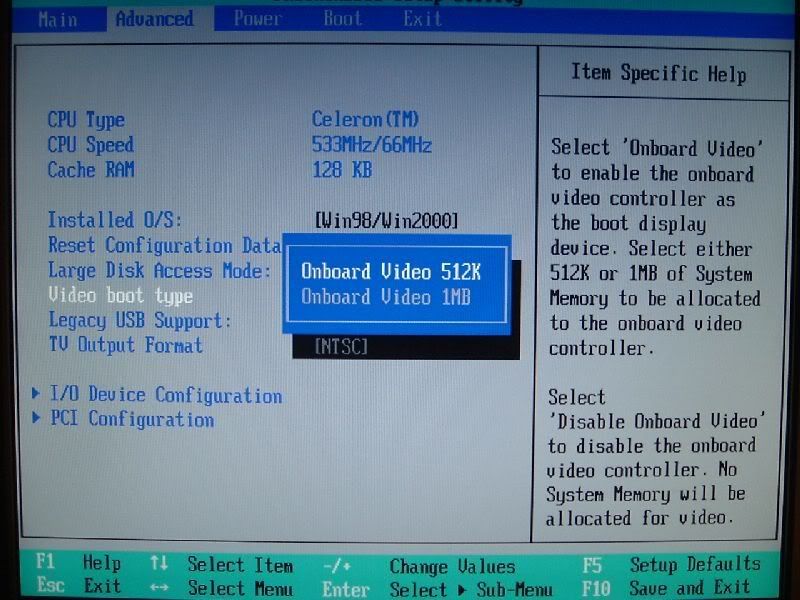
oh and the only option for video in the bios is to change onboard video from 512 to 1 mb...strange thing though on the right it says select disable onboard video to disable or something like that but when i actually cycle thru the option itself it only shows me 512 and 1mb...i dont know if that makes sense...i could snap a pic with my digi cam later...
ok here it is, if hp stripped that option out on purpose thats just retarded....
This message has been edited since posting. Last time this message was edited on 3. April 2007 @ 22:11
|
|
ddp
Moderator
|
4. April 2007 @ 12:41 |
Link to this message
|
|
try 512k as ran into that with a customer whose pc had only pci slots & wouldn't play his newer games, this in a new computer too. if 512k doesn't work than try 1meg.
|
Member
|
4. April 2007 @ 12:52 |
Link to this message
|
|
ive tried em both...if win98 didnt need to reboot so much from freezes and blue screens and such this problem wouldnt be so annoying...shes got alot (i mean alot!!) of miles on her so guess im lucky she works at all, one thing though the sink on the nvidia card gets pretty hot, to hot to touch for more than a few seconds....but when playing games and video the computer never blue screens or reboots (always get the blue screens at retarded instances like when browsing the web)...if only there was a dos emulator for xp worth a shit, dosbox dosent play any of my old games decent at all...i appreciate everyones help though, afterdawn has helped me thru much confusion.
|
|
Advertisement
|
|
|
Senior Member
1 product review
|
6. April 2007 @ 21:12 |
Link to this message
|
|
Reformat the PC with 98 again or if you choose XP both will work on it.
This will help you alot.
as you will be able to work without being interupted you will never solve it this way.
Once you do that come post back and then will start from scartch.
OK?
|


