User User name Password  
   
Sunday 15.3.2026 / 18:55
Search AfterDawn Forums:        In English   Suomeksi   På svenska
afterdawn.com > forums > software specific discussion > nero discussion > change burn speed video-ts
Show topics
 
Forums
Forums
change burn speed video-TS
  Jump to:
 
Posted Message
BISH
Member
_
8. April 2007 @ 11:58 _ Link to this message    Send private message to this user   
Is it possible to change the write speed after I add the video files
when creating a dvd using Nero-7.After I add the files it just gives
me the option to burn and the only thing I can change is the number of copies.
Thanks
Advertisement
_
__
AfterDawn Addict
_
8. April 2007 @ 14:30 _ Link to this message    Send private message to this user   
You will have to be a bit more specific, there are many apps in Nero 7...for instance heres an example if you are using NeroVision


guide by ScubaPete http://www.dvdplusvideo.com/tutorial007.html Nero guide by alkohol http://www.dvdplusvideo.com/Guides/alkohol_guide3.html

New RipIt4Me + DVD Shrink + ImgBurn guid <==== Rip any DVDs http://forums.afterdawn.com/thread_view.cfm/422740 Guides by bbmayo..... http://webpages.charter.net/bacitup/
BISH
Member
_
8. April 2007 @ 15:02 _ Link to this message    Send private message to this user   
Hi what i am doing is burning files that i have converted to dvd format i open Nero express then open video/pictures then i use dvd-video files to add the files then i burn them but they burn at 12x and the discs i am using are 8x and lately some have been failing so i want to burn at a slower speed.
Thanks
AfterDawn Addict
_
8. April 2007 @ 15:34 _ Link to this message    Send private message to this user   
Well this poses a problem for me as I NEVER use Express and I currently do not have any files I can use to try it so I cannot assist any further, good luck.


guide by ScubaPete http://www.dvdplusvideo.com/tutorial007.html Nero guide by alkohol http://www.dvdplusvideo.com/Guides/alkohol_guide3.html

New RipIt4Me + DVD Shrink + ImgBurn guid <==== Rip any DVDs http://forums.afterdawn.com/thread_view.cfm/422740 Guides by bbmayo..... http://webpages.charter.net/bacitup/
BISH
Member
_
8. April 2007 @ 15:37 _ Link to this message    Send private message to this user   
Thanks anyway
AfterDawn Addict
_
8. April 2007 @ 16:14 _ Link to this message    Send private message to this user   
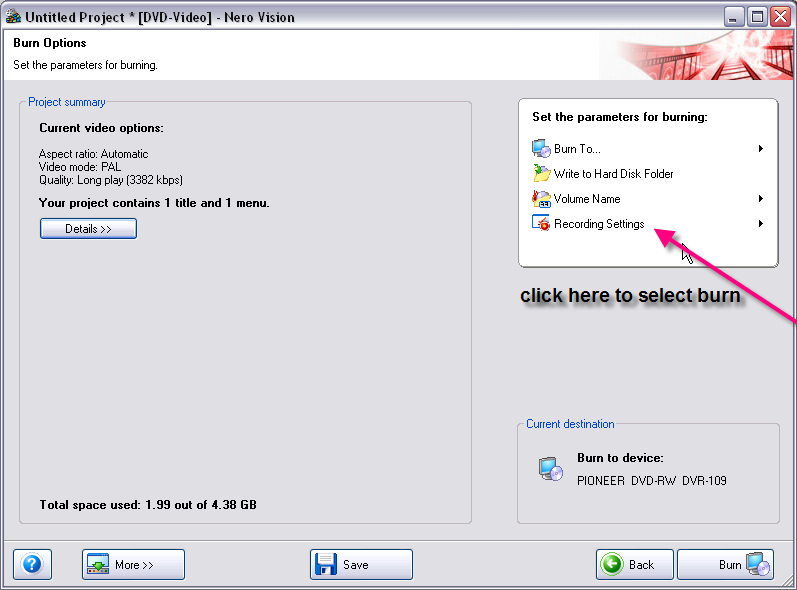
When you get to the burn stage you can select your burn speed as shown...to locate this click on small triangle in centre left


guide by ScubaPete http://www.dvdplusvideo.com/tutorial007.html Nero guide by alkohol http://www.dvdplusvideo.com/Guides/alkohol_guide3.html

New RipIt4Me + DVD Shrink + ImgBurn guid <==== Rip any DVDs http://forums.afterdawn.com/thread_view.cfm/422740 Guides by bbmayo..... http://webpages.charter.net/bacitup/
Advertisement
_
__
 
_
BISH
Member
_
9. April 2007 @ 02:10 _ Link to this message    Send private message to this user   
Thanks again great to get it sorted.
afterdawn.com > forums > software specific discussion > nero discussion > change burn speed video-ts
 

Digital video: AfterDawn.com | AfterDawn Forums
Music: MP3Lizard.com
Gaming: Blasteroids.com | Blasteroids Forums | Compare game prices
Software: Software downloads
Blogs: User profile pages
RSS feeds: AfterDawn.com News | Software updates | AfterDawn Forums
International: AfterDawn in Finnish | AfterDawn in Swedish | AfterDawn in Norwegian | download.fi
Navigate: Search | Site map
About us: About AfterDawn Ltd | Advertise on our sites | Rules, Restrictions, Legal disclaimer & Privacy policy
Contact us: Send feedback | Contact our media sales team
 
  © 1999-2026 by AfterDawn Ltd.

  IDG TechNetwork