|
|
|
Nero Ess. (Vision) burn process Crash and Lockup
|
|
|
Disturbia
Newbie

|
8. April 2007 @ 18:20 |
 Link to this message

|
|
Hello
My problem occurs after I have added my films and begin the burning process. During the Transcoding of the first film of six in the movie, with approximately 10 min left, the program just stalls out and locks up. The clock on for total time left, however continues to count.
Can any one help me please? Thank you
|
|
Advertisement
|
 |
|
|
AfterDawn Addict
|
8. April 2007 @ 20:25 |
Link to this message

|
If you are using Nero 7 then which version are you using..example 7.0.0.0??
|
AfterDawn Addict
|
8. April 2007 @ 21:09 |
Link to this message
|
Nero 7 "Essentials" (and other Nero OEMs) = basic garbage that Nero uses to advertise it's software with.
You will usually get it with a burner purchase or it can be found on the Internet for $5-10.00.
It is usually lacking certain key features to make it functional, like the DVD-Video plug-in. Without it, you cannot burn DVDs.
They make many of versions of "Essentials" and the available features vary according to what the burner manufacturer opted for when he bought the software from Ahead.
If you did get an "Essentials" CD, look on it's sleeve or the disc itself for any limitations the software has. You may have lucked out and gotten one with the DVD-Video plug-in and the audio codecs. Doubtful. They just want you to buy the "real" version for $79.99.
This is from Nero's DVD-Video Plug-in page:
Quote:
Important Information
The functionalities of the DVD-Video Plug-in are included in Nero 7 Ultra Edition Enhanced as well as in the Nero 6 retail package.
The plug-in can only be used for Nero 7 Essentials or a Nero 6 OEM version which came bundled with hardware.
Nero 6.0.0.9 or higher and Nero Vision are required for the plug-in.
Please note that your purchase cannot be cancelled or refunded. Purchase the DVD-Video Plug-in only if your computer fulfills the stated minimum requirements.
Why can the plug-in only be used with Essentials? Because it was not included in the first place.
This message has been edited since posting. Last time this message was edited on 8. April 2007 @ 21:16
|
|
Disturbia
Newbie
|
9. April 2007 @ 20:03 |
Link to this message
|
Gwendolin & Frank,
I am using the Nero Essentials OEM, Nero Vision 4.5.0.26, and I have downloaded the DVD Plug in.
I tried it again tonight and had the same problem, the program feezes up about 3/4 of the way through the trans coding of the frst menu item of 6 on the dvd movie I made. I am so frustated not being able burn the dvd after investing all of the time to make the movie.
I would be grateful for any help of sugestions you may offer
Thank you
|
|
Disturbia
Newbie
|
10. April 2007 @ 18:07 |
Link to this message
|
|
Hi Guys
I am still having a freeze up issue, please see below.
any advice? How would I retrieve a log to post for your review
|
AfterDawn Addict
|
10. April 2007 @ 19:04 |
Link to this message
|
The info I want is the actual Nero version, not the NeroVision number...it will be something like 7.0.0.0
Log located here
Program Files>Nero>Nero 7>Core>NeroHistory
This message has been edited since posting. Last time this message was edited on 10. April 2007 @ 19:05
|
|
Disturbia
Newbie
|
10. April 2007 @ 19:41 |
Link to this message
|
The Nero version is 7.2.3.4, I've also pasted the Log below,
Thanks for you help
4C87-2006-3015-E11K-055X-X6E0-0970-4026-2K9C-4678*
Windows XP 5.1
IA32
WinAspi: -
ahead WinASPI: File 'C:\Program Files\Nero\Nero 7\Core\Wnaspi32.dll': Ver=2.0.1.74, size=164112 bytes, created 11/2/2004 1:54:32 PM
NT-SPTI used
Nero Version: 7.2.3.4
Internal Version: 7, 2, 3, 4
(Nero Express)
Recorder: <SONY DVD RW DRU-830A> Version: SS22 - HA 1 TA 0 - 7.2.3.4
Adapter driver: <USB 2.0> HA 1
Drive buffer : 2048kB
Bus Type : via Inquiry data (1) -> ATAPI, detected: ?
Connected to MMC as unknown drive with class-nr : 1
Drive is autodetected - recorder class: Std. MMC recorder
CD-ROM: <SONY DVD RW DRU-830A >Version: SS22 - HA 1 TA 0 - 7.2.3.4
Adapter driver: <USB 2.0> HA 1
=== Scsi-Device-Map ===
DiskPeripheral : FUJITSU MHT2040AH atapi Port 0 ID 0 DMA: On
CdRomPeripheral : QSI CDRW/DVD SBW242U atapi Port 1 ID 0 DMA: Off
=== CDRom-Device-Map ===
SONY DVD RW DRU-830A D: CDRom0
=======================
AutoRun : 1
Excluded drive IDs:
WriteBufferSize: 74448896 (0) Byte
BUFE : 0
Physical memory : 511MB (523496kB)
Free physical memory: 177MB (181444kB)
Memory in use : 65
Uncached PFiles: 0x0
Use Inquiry : 1
Global Bus Type: default (0)
Check supported media : Disabled (0)
4.2.2007
CD-ROM (ISO)
8:57:27 PM #1 Text 0 File Isodoc.cpp, Line 6427
Iso document burn settings
------------------------------------------
Determine maximum speed : FALSE
Simulate : FALSE
Write : TRUE
Finalize CD : FALSE
Multisession : TRUE
Multisession type: : Start multisession
Burning mode : TAO
Mode : 1
ISO Level : 1 (Max. of 11 = 8 + 3 char)
Character set : ISO 9660
Joliet : TRUE
Allow pathdepth more than 8 directories : TRUE
Allow more than 255 characters in path : TRUE
Write ISO9660 ;1 file extensions : TRUE
8:57:27 PM #2 Text 0 File Burncd.cpp, Line 3086
SONY DVD RW DRU-830A
Power-Burn activated
8:57:27 PM #3 Text 0 File ThreadedTransfer.cpp, Line 531
ReadBuffer-Pipe got 72704KB of Memory
8:57:27 PM #4 Text 0 File Reader.cpp, Line 124
Reader running
8:57:27 PM #5 Text 0 File Writer.cpp, Line 113
Writer D: SONY DVD RW DRU-830A running
8:57:27 PM #6 ISO9660GEN -11 File Geniso.cpp, Line 3312
First writeable address = 0 (0x00000000)
8:57:27 PM #7 Text 0 File Burncd.cpp, Line 3400
Turn on Track-At-Once, using CD-R/RW media
8:57:28 PM #8 Text 0 File DlgWaitCD.cpp, Line 290
Last possible write address on media: 359847 ( 79:59.72)
Last address to be written: 1175 ( 0:17.50)
8:57:28 PM #9 Text 0 File DlgWaitCD.cpp, Line 302
Write in overburning mode: NO (enabled: CD)
8:57:28 PM #10 Text 0 File DlgWaitCD.cpp, Line 2737
Recorder: SONY DVD RW DRU-830A;
CDRW code: 00 97 25 30; OSJ entry from: INFODISC Technology Co., Ltd.
ATIP Data:
Special Info [hex] 1: B3 00 CE, 2: 61 19 1E (LI 97:25.30), 3: 4F 3B 49 (LO 79:59.73)
Additional Info [hex] 1: 24 1A D8, 2: 26 B2 4A, 3: 00 80 80 (invalid)
8:57:28 PM #11 Text 0 File DlgWaitCD.cpp, Line 474
>>> Protocol of DlgWaitCD activities: <<<
=========================================
8:57:28 PM #12 Text 0 File ThreadedTransferInterface.cpp, Line 847
Setup items (after recorder preparation)
0: TRM_DATA_MODE1 ()
2 indices, index0 (150) not provided
original disc pos #0 + 1176 (1176) = #1176/0:15.51
relocatable, disc pos for caching/writing not required/ required, no patch infos
-> TRM_DATA_MODE1, 2048, config 0, wanted index0 0 blocks, length 1174 blocks [D: SONY DVD RW DRU-830A]
--------------------------------------------------------------
8:57:28 PM #13 Text 0 File ThreadedTransferInterface.cpp, Line 1059
Prepare recorder [D: SONY DVD RW DRU-830A] for write in TAO
DAO infos:
==========
MCN: ""
TOCType: 0x00; Session Closed, disc not fixated
Tracks 1 to 1:
1: TRM_DATA_MODE1, 2048/0x00, FilePos 0 307200 2715648, ISRC ""
DAO layout:
===========
__Start_|____Track_|_Idx_|_CtrlAdr_|_RecDep__________
-150 | lead-in | 0 | 0x41 | 0x00
-150 | 1 | 0 | 0x41 | 0x00
0 | 1 | 1 | 0x41 | 0x00
1176 | lead-out | 1 | 0x41 | 0x00
8:57:28 PM #14 Text 0 File ThreadedTransferInterface.cpp, Line 1127
Removed 2 run-out blocks from end of track 1. Length: 1176 -> 1174.
8:57:28 PM #15 Text 0 File SCSIPassThrough.cpp, Line 39
SPTILockVolume - completed successfully for FCTL_LOCK_VOLUME
8:57:28 PM #16 Phase 24 File dlgbrnst.cpp, Line 1730
Caching of files started
8:57:28 PM #17 Text 0 File Burncd.cpp, Line 4231
Cache writing successful.
8:57:28 PM #18 Phase 25 File dlgbrnst.cpp, Line 1730
Caching of files completed
8:57:28 PM #19 Phase 36 File dlgbrnst.cpp, Line 1730
Burn process started at 10x (1,500 KB/s)
8:57:28 PM #20 SPTI -1189 File SCSIPassThrough.cpp, Line 291
D: CdRom0: SCSIStatus(x02) WinError(0) NeroError(-1189)
Sense Key: 0x05 (KEY_ILLEGAL_REQUEST)
Sense Code: 0x30
Sense Qual: 0x02
CDB Data: 0xAD 00 00 00 00 00 00 FF 40 00 00 00
Sense Area: 0x70 00 05 00 00 00 00 0A 00 00 00 00 30 02
Buffer x0b62c200: Len x4000
8:57:28 PM #21 Text 0 File ThreadedTransferInterface.cpp, Line 2707
Verifying disc position of item 0 (relocatable, disc pos, no patch infos, orig at #0): write at #0
8:57:28 PM #22 Text 0 File MMC.cpp, Line 22040
Set BUFE: Power-Burn -> ON
8:57:37 PM #23 Text 0 File ThreadedTransfer.cpp, Line 228
all writers idle, stopping conversion
8:57:41 PM #24 Text 0 File MMC.cpp, Line 16851
<SONY DVD RW DRU-830A > start Close Session
8:58:16 PM #25 Phase 37 File dlgbrnst.cpp, Line 1730
Burn process completed successfully at 10x (1,500 KB/s)
Existing drivers:
File 'Drivers\ADPU160M.SYS': Ver=v3.60a (Lab01_N(johnstra).010529-2218), size=101888 bytes, created 7/16/2003 3:23:54 PM
File 'Drivers\PXHELP20.SYS': Ver=2.02.57a, size=17168 bytes, created 7/30/2003 2:02:00 AM (Prassi/Veritas driver for win 2K)
Registry Keys:
HKLM\Software\Microsoft\Windows NT\CurrentVersion\WinLogon\AllocateCDROMs : 0 (Security Option)
====== *** Nero Burning ROM, History File *** ======
4C87-2006-3015-E11K-055X-X6E0-0970-4026-2K9C-4678*
Windows XP 5.1
IA32
WinAspi: -
ahead WinASPI: File 'C:\Program Files\Nero\Nero 7\Core\Wnaspi32.dll': Ver=2.0.1.74, size=164112 bytes, created 11/2/2004 1:54:32 PM
NT-SPTI used
Nero Version: 7.2.3.4
Internal Version: 7, 2, 3, 4
(Nero Express)
Recorder: < Image Recorder> Version: Not available - HA -1 TA 0 - 7.2.3.4
Adapter driver: <Virtual Device> HA -1
Drive buffer :
CD-ROM: <QSI CDRW/DVD SBW242U>Version: UD25 - HA 1 TA 0 - 7.2.3.4
Adapter driver: <IDE> HA 1
=== Scsi-Device-Map ===
DiskPeripheral : FUJITSU MHT2040AH atapi Port 0 ID 0 DMA: On
CdRomPeripheral : QSI CDRW/DVD SBW242U atapi Port 1 ID 0 DMA: On
=== CDRom-Device-Map ===
QSI CDRW/DVD SBW242U D: CDRom0
=======================
AutoRun : 1
Excluded drive IDs:
WriteBufferSize: 74448896 (0) Byte
BUFE : 0
Physical memory : 511MB (523496kB)
Free physical memory: 92MB (94888kB)
Memory in use : 81
Uncached PFiles: 0x0
Use Inquiry : 1
Global Bus Type: default (0)
Check supported media : Disabled (0)
26.2.2007
Super Video CD
12:00:25 AM #1 Text 0 File VCDDoc.cpp, Line 1420
VideoCD document burn settings
------------------------------------------
Compilation type : SVCD
Menu : Enable
Picture in separate folder : TRUE
Folder name :PICTURES
Use CD-I : TRUE
CD-I configuration : CONTROLS=ALL
CURCOL=YELLOW
PSDCURCOL=RED
PSDCURSHAPE=ARROW
CENTRTRACK=2
AUTOPLAY=AUTO_ON
DUALCHAN=DUAL_ON
TIMECODE_X=64
TIMECODE_Y=100
LOTID_X=64
LOTID_Y=64
ALBUM=STANDARD
Encoding bitrate mode : User defined (kb/s)
12:00:25 AM #2 Phase 82 File dlgbrnst.cpp, Line 1730
Encoding video
12:00:25 AM #3 Text 0 File VCDCompilationImpl.cpp, Line 547
Using Nero Video Converter version 0.00
12:00:25 AM #4 Text 0 File AVIVCDFileItem.cpp, Line 979
Encoding C:\Documents and Settings\Todd\Desktop\NVEExport.avi to C:\DOCUME~1\Todd\LOCALS~1\Temp\NER31.tmp
ScalingType: 1 Video: yes Audio: yes
File size: 205298772 bytes
Resolution: 720x576 25 Hz
Frames: 1425
12:00:25 AM #5 Text 0 File AVIVCDFileItem.cpp, Line 992
Playing time: 57.000000 s
Requested rate: 300 KB/s
iVideoRate=2500501
iAudioRate=224
Estimated size: 8550 blocks
12:00:46 AM #6 Phase 40 File dlgbrnst.cpp, Line 1417
Aborted by user
12:00:47 AM #7 Text 0 File AVIVCDFileItem.cpp, Line 1024
Encoding done
12:00:47 AM #8 Text 0 File AVIVCDFileItem.cpp, Line 1088
Temporary file C:\DOCUME~1\Todd\LOCALS~1\Temp\NER31.tmp deleted
12:00:47 AM #9 Text 0 File VCDDoc.cpp, Line 2902
SVCD options:
-----------------------------------------------------
Create standard compliant CD: YES
Encoding resolution: NTSC
Encoding bitrate mode: 0
Fit to size in min: 74
Video directory: MPEG2
ENTRIES.SVD file ID: ENTRYVCD
-----------------------------------------------------
Existing drivers:
File 'Drivers\ADPU160M.SYS': Ver=v3.60a (Lab01_N(johnstra).010529-2218), size=101888 bytes, created 7/16/2003 3:23:54 PM
File 'Drivers\PXHELP20.SYS': Ver=2.02.57a, size=17168 bytes, created 7/30/2003 2:02:00 AM (Prassi/Veritas driver for win 2K)
Registry Keys:
HKLM\Software\Microsoft\Windows NT\CurrentVersion\WinLogon\AllocateCDROMs : 0 (Security Option)
====== *** Nero Burning ROM, History File *** ======
4C87-2006-3015-E11K-055X-X6E0-0970-4026-2K9C-4678*
1A4C-0800-0000-2866-9802-6074
Windows XP 5.1
IA32
WinAspi: -
ahead WinASPI: File 'C:\Program Files\Nero\Nero 7\Core\Wnaspi32.dll': Ver=2.0.1.74, size=164112 bytes, created 11/2/2004 2:54:32 PM
NT-SPTI used
Nero API version: 7.2.3.4
Using interface version: 7.0.5.6
Installed in: C:\Program Files\Nero\Nero 7\Core\
Application: ahead\NeroVision
Internal Version: 7, 2, 3, 4
Recorder: <SONY DVD RW DRU-830A> Version: SS22 - HA 1 TA 2 - 7.2.3.4
Adapter driver: <USB 2.0> HA 1
Drive buffer : 2048kB
Bus Type : via Inquiry data (1) -> ATAPI, detected: ?
Connected to MMC as unknown drive with class-nr : 1
Drive is autodetected - recorder class: Std. MMC recorder
=== Scsi-Device-Map ===
DiskPeripheral : FUJITSU MHT2040AH atapi Port 0 ID 0 DMA: On
CdRomPeripheral : QSI CDRW/DVD SBW242U atapi Port 1 ID 0 DMA: On
=== CDRom-Device-Map ===
QSI CDRW/DVD SBW242U D: CDRom0
SONY DVD RW DRU-830A E: CDRom2
=======================
AutoRun : 1
Excluded drive IDs:
WriteBufferSize: 74448896 (0) Byte
BUFE : 0
Physical memory : 511MB (523496kB)
Free physical memory: 74MB (75864kB)
Memory in use : 85
Uncached PFiles: 0x0
Use Inquiry : 1
Global Bus Type: default (0)
Check supported media : Disabled (0)
14.3.2007
NeroAPI
10:17:16 PM #1 Phase 111 File APIProgress.cpp, Line 278
DVD-Video files sorted
10:17:16 PM #2 Text 0 File ThreadedTransfer.cpp, Line 531
ReadBuffer-Pipe got 262144KB of Memory
10:17:16 PM #3 Text 0 File Reader.cpp, Line 124
Reader running
10:17:16 PM #4 Text 0 File Writer.cpp, Line 113
Writer E: SONY DVD RW DRU-830A running
10:17:17 PM #5 ISO9660GEN -11 File Geniso.cpp, Line 3312
First writeable address = 0 (0x00000000)
10:17:17 PM #6 ISO9660GEN -11 File Geniso.cpp, Line 3312
First writeable address = 0 (0x00000000)
10:17:17 PM #7 Text 0 File Burncd.cpp, Line 3400
Turn on Disc-At-Once, using DVD media
10:17:17 PM #8 Text 0 File DlgWaitCD.cpp, Line 290
Last possible write address on media: 2298495 (510:46.45, 4489MB)
Last address to be written: 140159 ( 31:08.59, 273MB)
10:17:17 PM #9 Text 0 File DlgWaitCD.cpp, Line 302
Write in overburning mode: NO (enabled: CD)
10:17:17 PM #10 Text 0 File DlgWaitCD.cpp, Line 2737
Recorder: SONY DVD RW DRU-830A, Media type: DVD-RW
Disc Manufacturer: OPTODI - SCW004
Disc Application Code: 2, Disc Physical Code: 214
10:17:17 PM #11 Text 0 File DlgWaitCD.cpp, Line 474
>>> Protocol of DlgWaitCD activities: <<<
=========================================
10:17:17 PM #12 Text 0 File ThreadedTransferInterface.cpp, Line 847
Setup items (after recorder preparation)
0: TRM_DATA_MODE1 ()
2 indices, index0 (150) not provided
original disc pos #0 + 140160 (140160) = #140160/31:8.60
relocatable, disc pos for caching/writing not required/ required, no patch infos
-> TRM_DATA_MODE1, 2048, config 0, wanted index0 0 blocks, length 140160 blocks [E: SONY DVD RW DRU-830A]
--------------------------------------------------------------
10:17:17 PM #13 Text 0 File ThreadedTransferInterface.cpp, Line 1059
Prepare recorder [E: SONY DVD RW DRU-830A] for write in CUE-sheet-DAO
DAO infos:
==========
MCN: ""
TOCType: 0x00; Session Closed, disc fixated
Tracks 1 to 1:
1: TRM_DATA_MODE1, 2048/0x00, FilePos 0 0 287047680, ISRC ""
DAO layout:
===========
__Start_|____Track_|_Idx_|_CtrlAdr_|_RecDep__________
0 | lead-in | 0 | 0x41 | 0x00
0 | 1 | 0 | 0x41 | 0x00
0 | 1 | 1 | 0x41 | 0x00
140160 | lead-out | 1 | 0x41 | 0x00
10:17:17 PM #14 Text 0 File SCSIPassThrough.cpp, Line 39
SPTILockVolume - completed successfully for FCTL_LOCK_VOLUME
10:17:17 PM #15 Phase 24 File APIProgress.cpp, Line 278
Caching of files started
10:17:17 PM #16 Text 0 File Burncd.cpp, Line 4231
Cache writing successful.
10:17:17 PM #17 Phase 25 File APIProgress.cpp, Line 278
Caching of files completed
10:17:17 PM #18 Phase 36 File APIProgress.cpp, Line 278
Burn process started at 4x (5,540 KB/s)
10:17:20 PM #19 Text 0 File ThreadedTransferInterface.cpp, Line 2707
Verifying disc position of item 0 (relocatable, disc pos, no patch infos, orig at #0): write at #0
10:17:20 PM #20 Text 0 File DVDR.cpp, Line 2877
Recording mode: Sequential Recording Mode
10:17:20 PM #21 Text 0 File DVDR.cpp, Line 3033
Start write address at LBA 0
DVD high compatibility mode: Yes
10:17:20 PM #22 Text 0 File Cdrdrv.cpp, Line 8995
---- DVD Structure: Physical Format Information (00h) ----
Media Type: 0, Layer: 0, Address: 0 (0 h), AGID: 0; Length: 2050
Book Type: DVD-RW (3), Extended Part Version: 1.2 (18)
Disc Size: 120 mm, Maximum Rate: <not specified> (F h)
Number of Layers: 1, Track Path: Parallel Track Path (PTP), Layer Type: recordable
Linear Density: 0,267 um/bit, Track Density: 0,74 um/track
Starting Physical Sector Number of Data Area: 30000 h (DVD-ROM, DVD-R/-RW, DVD+R/+RW)
End Physical Sector Number of Data Area: 0 h
End Sector Number in Layer 0: 0 h (LBN: FFFD0000 h, 4193920 MB)
Data in Burst Cutting Area (BCA) does not exist
Start sector number of the current Border-Out: 0 h
Start sector number of the next Border-In: 0 h
Media Specific [16..63]:
00 20 10 00 00 00 00 00 - 00 00 03 12 00 00 00 00 ................
00 00 00 00 00 00 00 00 - 00 00 00 00 00 00 00 00 ................
00 00 00 00 00 00 00 00 - 00 00 00 00 00 00 00 00 ................
10:17:37 PM #23 Text 0 File Cdrdrv.cpp, Line 1224
22:17:37.249 - E: SONY DVD RW DRU-830A : Queue again later
10:18:36 PM #24 Text 0 File WriterStatus.cpp, Line 116
<E: SONY DVD RW DRU-830A> start writing Lead-Out at LBA 140160 (22380h), length 0 blocks
10:18:36 PM #25 Text 0 File ThreadedTransfer.cpp, Line 228
all writers idle, stopping conversion
10:18:36 PM #26 Text 0 File DVDR.cpp, Line 3273
EndDAO: Last written address was 140159
10:18:36 PM #27 Phase 181 File APIProgress.cpp, Line 278
Writing lead-out...
10:18:36 PM #28 Text 0 File DVDR.cpp, Line 3306
Estimated time for 30mm Borders: 3min 01sec
10:21:07 PM #29 Phase 37 File APIProgress.cpp, Line 278
Burn process completed successfully at 4x (5,540 KB/s)
Existing drivers:
File 'Drivers\ADPU160M.SYS': Ver=v3.60a (Lab01_N(johnstra).010529-2218), size=101888 bytes, created 7/16/2003 4:23:54 PM
File 'Drivers\PXHELP20.SYS': Ver=2.02.57a, size=17168 bytes, created 7/30/2003 3:02:00 AM (Prassi/Veritas driver for win 2K)
Registry Keys:
HKLM\Software\Microsoft\Windows NT\CurrentVersion\WinLogon\AllocateCDROMs : 0 (Security Option)
====== *** NeroAPI, History File *** ======
|
|
boggs
Newbie
|
10. April 2007 @ 20:47 |
Link to this message
|
Originally posted by gwendolin:
If you are using Nero 7 then which version are you using..example 7.0.0.0??
Hello, this is Darren and I need help with Nero 6 light scribe. I can't find Nero for dummies so I have to check other resources.. On the edit screen I want to place a full image on the disk but it will only allow a small band of print on the disc. I can make text as large as I want but when it comes to images, that little band is all you see. If you look close you can see the rest in background but it will not allow me to place the image in the foreground instead plus I don't know what I am doing which may have mentioned earlier. Is ther any advice you can give? Thanks in advance,
Darren
regehr1@msn.com
|
AfterDawn Addict
|
11. April 2007 @ 00:25 |
Link to this message
|
|
|
Disturbia
Newbie
|
11. April 2007 @ 17:53 |
Link to this message

|
Is the Nero download from filehippo that you advise using the full suite of products or just the burning ROM? Is this a trial release?
Thanks for all of your help
|
AfterDawn Addict
|
11. April 2007 @ 18:19 |
Link to this message
|
|
It is a FULL release.
|
|
Disturbia
Newbie
|
11. April 2007 @ 18:33 |
Link to this message
|
|
Can I use the serial number from my Nero Essentials as the key for the download?
Thanks again, this board has been a great coach
|
AfterDawn Addict
|
11. April 2007 @ 18:38 |
Link to this message
|
|
Cant see any reason why not.
|
|
Disturbia
Newbie
|
11. April 2007 @ 18:50 |
Link to this message
|
|
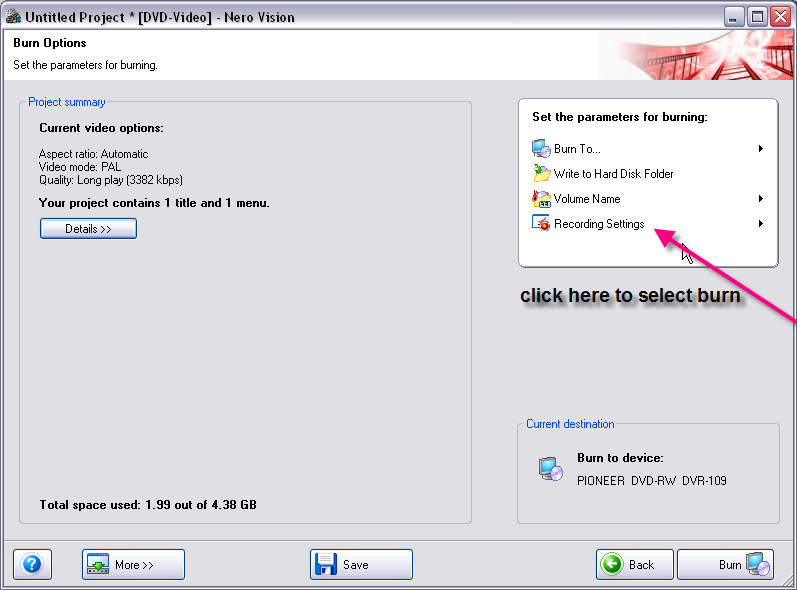
Thanks, where is the control option to slow down the burn speed, so I can swith it to 4x?
|
|
Advertisement
|
|
|
AfterDawn Addict
|
11. April 2007 @ 23:34 |
Link to this message
|
Each Nero app is different, heres NeroVision
|
|





