|
Ethernet controller problem.. ive tried EVERYTHING(obviously exaggerating)
|
|
|
ClevrAC2G
Junior Member

|
10. April 2007 @ 20:56 |
Link to this message

|
|
i have a dell dimension 4550
got the system specs if you need em...
basically.. my networking adapter doesnt work.
in device manager, it shows the lil yellow questionmark next to the ethernet controller in the network adapters section like usual.. ive downloaded the drivers from the euro dell site for my model computer and tried installing them each rebooting between tries.. no success.
its an on board network device.. ive tried installing a linksys networking card, but for that didnt work either.. im not sure what the problem was there.
i need the ethernet controller to work so i can network my pc to my xbox..
advice?
solutions?
I am the clever, 2smooth, vocabulary savvy, flowtastic epistolarian known as Andrew C. Greenferd.
But you can call me Andy.
:)
G for short..
This message has been edited since posting. Last time this message was edited on 10. April 2007 @ 20:58
|
|
Advertisement

|
 |
|
|
|
bagofcrap
Junior Member
|
11. April 2007 @ 02:52 |
Link to this message

|
|
try going into device manager, click on your device with the yellow exclamation mark, right click on it and press update driver, then manually point it to the folder where you downloaded the drivers.
|
|
ClevrAC2G
Junior Member
|
11. April 2007 @ 10:09 |
Link to this message
|
|
tried that.
it wont even let me select the folder.. like, it will, but the ok box shows up transparent..unclickable. lol
I am the clever, 2smooth, vocabulary savvy, flowtastic epistolarian known as Andrew C. Greenferd.
But you can call me Andy.
:)
G for short..
|
|
ClevrAC2G
Junior Member
|
12. April 2007 @ 13:35 |
Link to this message

|
|
help..... anyone.....
I am the clever, 2smooth, vocabulary savvy, flowtastic epistolarian known as Andrew C. Greenferd.
But you can call me Andy.
:)
G for short..
|
AfterDawn Addict
|
12. April 2007 @ 15:55 |
Link to this message
|
Originally posted by ClevrAC2G:
tried that.
it wont even let me select the folder.. like, it will, but the ok box shows up transparent..unclickable. lol
It's time to get rid of the viruses and malware/spyware that you have on your computer.
Life is good!
GrandpaBruce - Vietnam Vet - 1970 - 1971
Computer: Intel Core i7-920 Nehalim;Asus P6T Deluxe V2
|
|
bagofcrap
Junior Member
|
12. April 2007 @ 16:00 |
Link to this message
|
|
this doesnt look like malware/spyware.
it is obviously a driver issue.
the box to manually select a driver. you arnt pointing it to an empty folder are you, just move the drivers to the desktop for ease sake, then try again and select desktop, that should make sure there is nothing wrong with the location
|
|
ClevrAC2G
Junior Member
|
12. April 2007 @ 22:04 |
Link to this message
|
|
tried that.. but ill try again right now, just for the sake of covering all grounds.
i have no virus' or malware(whatever the eff that is..)
my computer is completly clean, its never even been connected to the internet since i installed the OS..
I am the clever, 2smooth, vocabulary savvy, flowtastic epistolarian known as Andrew C. Greenferd.
But you can call me Andy.
:)
G for short..
|
|
bagofcrap
Junior Member
|
13. April 2007 @ 03:05 |
Link to this message
|
|
you may have a problem where it thinks that the current driver, the one that isnt working is the most up to date one, and so is ignoring the other that you downloaded
Go to device manager and right click on the ethernet controller and press uninstall.
once it has finished press Scan for hardware changes and it should start the wizard for installing new hardware.
|
|
ClevrAC2G
Junior Member
|
13. April 2007 @ 13:18 |
Link to this message
|
|
there is no driver installed at all..
it begins the wizard everytime i reboot.
should i try reinstalling the chipset and then installing the driver?
cuz thats what worked for the problem i had with the audio card,it was basically the same story..
but could someone tell me which driver is the right one..
i have a dell dimension 4550 and it has an onboard network adapter.
I am the clever, 2smooth, vocabulary savvy, flowtastic epistolarian known as Andrew C. Greenferd.
But you can call me Andy.
:)
G for short..
|
|
bagofcrap
Junior Member
|
13. April 2007 @ 13:25 |
Link to this message
|
|
what is the name of the controller in device manager
|
|
scorpNZ
AfterDawn Addict
4 product reviews
|
13. April 2007 @ 13:30 |
Link to this message
|
|
Mine being an HP i'm going to assume a dell also has it's own recovery console since off the shelf PC's these days don't come with the OS,but instead use a serperate partition for application recovery.
In the "all programs list" is there anything that says "pc tools","pc help" etc,if not just click on all the links in the list or and any sub links that refer to "application recovery" this function gives the option of reinstalling your original drivers and some software,by rights the ethernet adaptor should be there
Also what had you done before the ether became non useable
This message has been edited since posting. Last time this message was edited on 13. April 2007 @ 13:34
|
|
bagofcrap
Junior Member
|
13. April 2007 @ 13:32 |
Link to this message
|
|
|
|
scorpNZ
AfterDawn Addict
4 product reviews
|
13. April 2007 @ 13:39 |
Link to this message
|
|
Yes a reformat will wipe the hdd clean,if however a reformat was not performed there should be two or more partitions in "my computer" showing
This message has been edited since posting. Last time this message was edited on 13. April 2007 @ 13:39
|
|
bagofcrap
Junior Member
|
13. April 2007 @ 13:57 |
Link to this message
|
|
if you havnt reinstalled then the drivers for the device should already be on there, tell me, when you go onto the properties of the ethernet controller in device manager.
what is the ERROR in device status
|
|
ClevrAC2G
Junior Member
|
13. April 2007 @ 19:12 |
Link to this message
|
it says code 1
heres some screen shots..
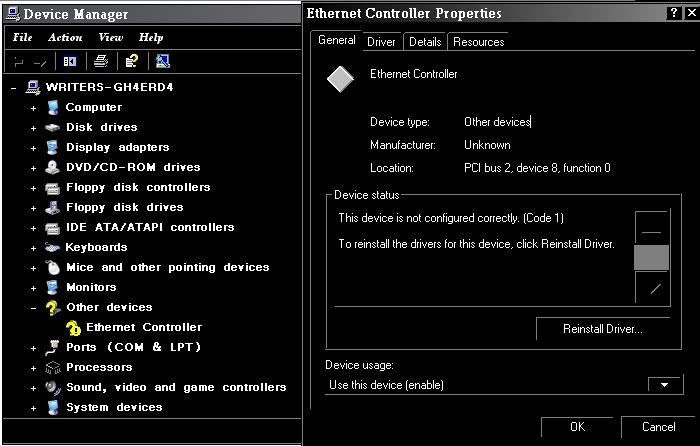
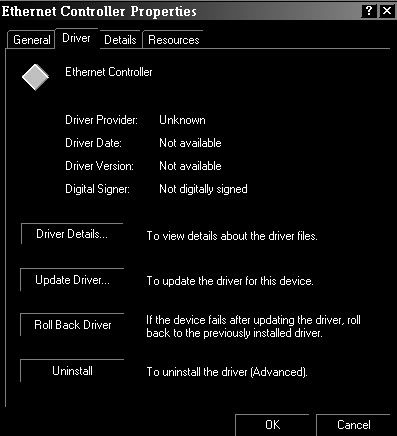
I am the clever, 2smooth, vocabulary savvy, flowtastic epistolarian known as Andrew C. Greenferd.
But you can call me Andy.
:)
G for short..
|
|
ClevrAC2G
Junior Member
|
14. April 2007 @ 13:07 |
Link to this message
|
|
*desperation*
I am the clever, 2smooth, vocabulary savvy, flowtastic epistolarian known as Andrew C. Greenferd.
But you can call me Andy.
:)
G for short..
|
|
ddp
Moderator
|
14. April 2007 @ 18:38 |
Link to this message
|
|
which driver did you try, broadcom netxtreme gigabyte, dell truemobile 1180 wireless usb or intel 10/100?
|
|
ClevrAC2G
Junior Member
|
14. April 2007 @ 19:14 |
Link to this message
|
|
i tried the two brodcom ones..
actually.. i tried all of them i think, but 2 of them didnt work..
I am the clever, 2smooth, vocabulary savvy, flowtastic epistolarian known as Andrew C. Greenferd.
But you can call me Andy.
:)
G for short..
This message has been edited since posting. Last time this message was edited on 14. April 2007 @ 19:15
|
|
ddp
Moderator
|
14. April 2007 @ 19:18 |
Link to this message
|
|
suppose to use the intel 10/100 driver as the specs on the board has that.
|
AfterDawn Addict
|
14. April 2007 @ 19:21 |
Link to this message
|
|
put the downloaded driver in the root of c-drive then from device manager direct it to the driver..
|
|
ClevrAC2G
Junior Member
|
14. April 2007 @ 19:53 |
Link to this message
|
|
Thank you.(ddp)
i love the way you came in with ease to solve my problem, when no one else could give me the least bit of help(no offense to those who gave effort)
its funny how simple that was too.. the lom thing even had a list of instructions.. now my computer is fully functional, completing my computer-xbox network.
thank you.
everything is almost perfect now :)))))))
I am the clever, 2smooth, vocabulary savvy, flowtastic epistolarian known as Andrew C. Greenferd.
But you can call me Andy.
:)
G for short..
This message has been edited since posting. Last time this message was edited on 14. April 2007 @ 19:53
|
|
bagofcrap
Junior Member
|
15. April 2007 @ 06:23 |
Link to this message
|
|
hang on here lol, the link i gave you was to the intel 10/100 ones which was for your board
|
|
ddp
Moderator
|
15. April 2007 @ 07:22 |
Link to this message
|
|
teach & learn
|
|
Advertisement
|
|
|
|
ClevrAC2G
Junior Member
|
17. April 2007 @ 14:41 |
Link to this message
|
|
im sorry..
thank you to you too.
lol
I am the clever, 2smooth, vocabulary savvy, flowtastic epistolarian known as Andrew C. Greenferd.
But you can call me Andy.
:)
G for short..
|


