well i downloaded some firmware but i cant install it i got these instructions off the d link site but its not working. I do what it says but for the setting where it says the hardware part it does not have the option that it says(CTS/RTS) handshaking.
heres the settings i have for the Flow Control
Quote: How to load firmware via serial port Print
Below are the steps for resetting the router and re-flushing the firmware using serial connection.
Note that this method is only applicable to the routers with serial ports. If the router does not have serial port and has console port intead, you will not be able to load the binary firmware. In this case contact our Warranty Department.
- Using Hyperterminal to load firmware.
If something went wrong and you can not access the router via WEB interface any more try to load the binary firmware file (it is located under Binary Firmware folder of the firmware file set):
http://www.dlink.com.au/tech/
Extract the binary (.bin) file and use Hyperterminal to upload it into the router. Here is how to do that:
Run Hyperterminal (you can find this program in Windows under Start > Programs > Accessories > Communications). Create new conection using COM1 or COM2 (whichever port you connected the cable to). Use the following settings: 9600 baud, 8 bit data word, 1 stop bit, No parity and Hardware (CTS/RTS) handshaking.
Press enter and you should get a prompt like
192.168.0.1>
Apply the following command:
]xmodem
Now transfer file to the router. This is done by Clicking on Transfer > Send File > then selecting the .BIN file (Binary Firmware) and selecting xmodem from the Protocol List. Then Click Send.
The xmodem transfer takes around 33 minutes, after which it prompts you to type quit to boot.
Image relocated - type quit to boot
]quit
After reboot you will get the prompt again. Apply 'config save' command to make sure that all the settings and files which have just been uploaded are retained permanently or you may have to go back and do another xmodem transfer:
192.168.0.1>config save
Update may take some time, please wait until it finishes. Then just do restart:
192.168.0.1>restart
The router should restart in normal operation mode.
i also tried it too witt the other settings but it wont let me type commands and shit to so i cant do nothing.
does anyone know an easier way to install or know how i can fix this.
help would be appreciated thx in advance.
PS also i did not transfer the file or try that without doing any commands. woudl it work or would it fuk up my router if i just transferd the file?
why are you trying to install firmware the difficult way ?, all that's needed with most routers is to save the firmware to your PC and use the router's gui to update the firmware. (my D-Link 504-T is no exception to this).
Originally posted by creaky:why are you trying to install firmware the difficult way ?, all that's needed with most routers is to save the firmware to your PC and use the router's gui to update the firmware. (my D-Link 504-T is no exception to this).
dude thats not my router my router is DSL-604+ model but and i cant seem to find instructions for installing using GUI w/e that is. plz respond appreciate the post though man.
also the d-link site has no info for installing firmware i found this firmware on a random site and wanna install it.
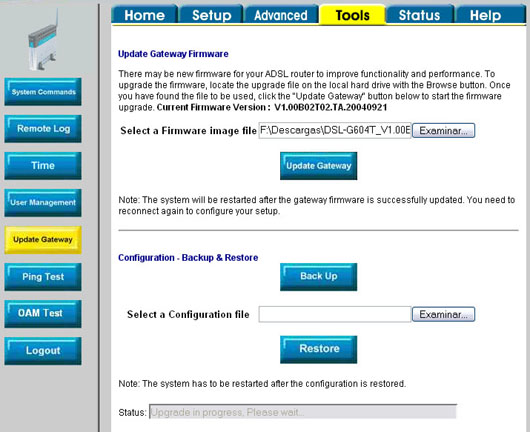
i realise there's probably different varieties of D-Link 604, however the firmware update method should be very similar regardless of which one you have. for instance -
i cant use that man cause my login doesnt work its *bleep* bs ive tried to fix it for years i reseted the router and everything my version is known to not be able to change settings though cause i searched and tons of other ppl had same problem with this router and couldnt log in. i tried every login admin admin and everything.