|
|
|
help,problems with burning
|
|
|
crash183
Newbie

|
15. April 2007 @ 15:20 |
 Link to this message

|
this is what i tried to do.....dvdfab decrypter,then fixvts,however when i open up fixvts it doesnt show me any VOB files,so i havent been able to use this program..so then i use dvdshrink...then nero[cant use imageburn even with Nero uninstalled and yes i have the right version of imageburn]so then i try to burn with Nero 7.8.
then i used the Nero clean up tool[on Nero not the movie project]
and reinstalled Nero updated version.also updated firmware on my driver this is the error code im getting back...
====== *** NeroAPI, History File *** ======
Windows XP 5.1
IA32
WinAspi: -
ahead WinASPI: File 'C:\Program Files\Nero\Nero 7\Core\Wnaspi32.dll': Ver=2.0.1.74, size=169792 bytes, created 3/14/2007 11:43:16 AM
NT-SPTI used
Nero API version: 7.8.5.0
Using interface version: 7.5.0.0
Installed in: C:\Program Files\Nero\Nero 7\Core\
Application: Ahead\Nero Recode
Internal Version: 7, 8, 5, 0
Recorder: <SONY DVD RW DW-U14A> Version: 2.0c - HA 1 TA 0 - 7.8.5.0
Adapter driver: <IDE> HA 1
Drive buffer : 8192kB
Bus Type : default (0) -> ATAPI, detected: ?
=== Scsi-Device-Map ===
DiskPeripheral : WDC WD1600BB-98DWA0 atapi Port 0 ID 0 DMA: On
CdRomPeripheral : SONY DVD RW DW-U14A atapi Port 1 ID 0 DMA: On
CdRomPeripheral : HL-DT-ST DVD-ROM GDR8162B atapi Port 1 ID 1 DMA: On
=== CDRom-Device-Map ===
SONY DVD RW DW-U14A E: CDRom0
HL-DT-ST DVD-ROM GDR8162B F: CDRom1
=======================
AutoRun : 1
Excluded drive IDs:
WriteBufferSize: 74448896 (0) Byte
BUFE : 0
Physical memory : 511MB (523628kB)
Free physical memory: 208MB (213476kB)
Memory in use : 59
Uncached PFiles: 0x0
Use Inquiry : 1
Global Bus Type: default (0)
Check supported media : Disabled (0)
14.4.2007
NeroAPI
11:48:34 AM #1 Text 0 File SCSIPTICommands.cpp, Line 411
LockMCN - completed sucessfully for IOCTL_STORAGE_MCN_CONTROL
11:48:34 AM #2 Text 0 File DlgWaitCD.cpp, Line 307
Last possible write address on media: 2298495 (510:46.45, 4489MB)
Last address to be written: -1 ( 0:00.-1, 0MB)
11:48:34 AM #3 Text 0 File DlgWaitCD.cpp, Line 319
Write in overburning mode: NO
11:48:34 AM #4 Text 0 File DlgWaitCD.cpp, Line 2949
Recorder: SONY DVD RW DW-U14A, Media type: DVD-R
Disc Manufacturer: Prodis - cF02
Disc Application Code: 64, Disc Physical Code: 193
11:48:34 AM #5 Text 0 File DlgWaitCD.cpp, Line 493
>>> Protocol of DlgWaitCD activities: <<<
=========================================
11:48:34 AM #6 Text 0 File SCSIPTICommands.cpp, Line 209
SPTILockVolume - completed successfully for FCTL_LOCK_VOLUME
11:48:34 AM #7 SPTI -1066 File SCSIPassThrough.cpp, Line 179
CdRom0: SCSIStatus(x02) WinError(0) NeroError(-1066)
Sense Key: 0x05 (KEY_ILLEGAL_REQUEST)
Sense Code: 0x24
Sense Qual: 0x00
CDB Data: 0xAC 00 00 00 00 00 00 00 00 64 00 00
Sense Area: 0x70 00 05 00 00 00 00 12 00 00 00 00 24 00 00 CC 00 01
Buffer x097f0740: Len x648
11:48:34 AM #8 Text 0 File BurnAtOnceRecorder.cpp, Line 1028
Estimated filesystem size: 592
11:48:34 AM #9 Phase 36 File APIProgress.cpp, Line 285
Burn process started at 1x (1,385 KB/s)
11:48:38 AM #10 Text 0 File BurnAtOnceRecorder.cpp, Line 1727
Buffering files started
11:48:38 AM #11 Text 0 File BurnAtOnceRecorder.cpp, Line 1433
Buffering VIDEO_TS.VOB
11:48:38 AM #12 Text 0 File BurnAtOnceRecorder.cpp, Line 2626
Finished buffering file VIDEO_TS.VOB of size 81920 bytes (40 sectors)
11:48:38 AM #13 Text 0 File BurnAtOnceRecorder.cpp, Line 2693
Finished writing file VIDEO_TS.VOB of size 81920 bytes (40 sectors)
11:48:38 AM #14 Text 0 File BurnAtOnceRecorder.cpp, Line 2706
Buffering files finished successfully
11:48:38 AM #15 SPTI -1066 File SCSIPassThrough.cpp, Line 179
CdRom0: SCSIStatus(x02) WinError(0) NeroError(-1066)
Sense Key: 0x05 (KEY_ILLEGAL_REQUEST)
Sense Code: 0x24
Sense Qual: 0x00
CDB Data: 0xAC 00 00 00 00 00 00 00 00 64 00 00
Sense Area: 0x70 00 05 00 00 00 00 12 00 00 00 00 24 00 00 CC 00 01
Buffer x09939900: Len x648
11:48:38 AM #16 Text 0 File DVDR.cpp, Line 3192
Recording mode: Sequential Recording Mode for Multisession
11:48:38 AM #17 Text 0 File DVDR.cpp, Line 3348
Start write address at LBA 0
DVD high compatibility mode: No
11:48:38 AM #18 SPTI -1066 File SCSIPassThrough.cpp, Line 179
CdRom0: SCSIStatus(x02) WinError(0) NeroError(-1066)
Sense Key: 0x05 (KEY_ILLEGAL_REQUEST)
Sense Code: 0x24
Sense Qual: 0x00
CDB Data: 0xAC 00 00 00 00 00 00 00 00 64 00 00
Sense Area: 0x70 00 05 00 00 00 00 12 00 00 00 00 24 00 00 CC 00 01
Buffer x098195c0: Len x648
11:48:38 AM #19 Text 0 File Cdrdrv.cpp, Line 9856
---- Disc Structure: Physical Format Information (00h) ----
Media Type: 0, Layer: 0, Address: 0 (0 h), AGID: 0; Length: 2050
Book Type: DVD-R (2), Part Version: 2.0x (5), Extended Part Version: 0.0 (0)
Disc Size: 120 mm, Maximum Rate: <not specified> (F h)
Number of Layers: 1, Track Path: Parallel Track Path (PTP), Layer Type: recordable
Linear Density: 0,267 um/bit, Track Density: 0,74 um/track
Starting Physical Sector Number of Data Area: 30000 h (DVD-ROM, DVD-R/-RW, DVD+R/+RW)
End Sector Number in Layer 0: 0 h (LBN: FFFD0000 h, 4193920 MB)
Data in Burst Cutting Area (BCA) does not exist
Revision number of maximum recording speed: -
Revision number of minimum recording speed: -
Revision number table of recording speed: - - - - - - -
Class: 0
Start sector number of the current Border-Out: 0 h
Start sector number of the next Border-In: 0 h
Media Specific [16..63]:
00 00 00 00 00 00 00 00 - 00 00 00 00 00 00 00 00 ................
00 00 00 00 00 00 00 00 - 00 00 00 00 00 00 00 00 ................
00 00 00 00 00 00 00 00 - 00 00 00 00 00 00 00 00 ................
11:48:38 AM #20 Text 0 File BurnAtOnceRecorder.cpp, Line 689
Reserved fragment at 0. Length: 688
11:48:38 AM #21 Text 0 File BurnAtOnceRecorder.cpp, Line 1910
Reserved start fragment at 0
11:48:38 AM #22 Text 0 File BurnAtOnceRecorder.cpp, Line 689
Reserved fragment at 688. Length: 32
11:48:38 AM #23 Text 0 File BurnAtOnceRecorder.cpp, Line 1427
Writing VTS_01_0.VOB at sector 720
11:48:38 AM #24 Text 0 File BurnAtOnceRecorder.cpp, Line 2693
Finished writing file VTS_01_0.VOB of size 14336 bytes (7 sectors)
11:48:38 AM #25 Text 0 File BurnAtOnceRecorder.cpp, Line 1427
Writing VTS_01_1.VOB at sector 727
11:48:38 AM #26 Text 0 File BurnAtOnceRecorder.cpp, Line 2693
Finished writing file VTS_01_1.VOB of size 14336 bytes (7 sectors)
11:48:38 AM #27 Text 0 File BurnAtOnceRecorder.cpp, Line 1427
Writing VTS_01_0.BUP at sector 734
11:48:38 AM #28 Text 0 File BurnAtOnceRecorder.cpp, Line 2693
Finished writing file VTS_01_0.BUP of size 18432 bytes (9 sectors)
11:49:28 AM #29 Text 0 File BurnAtOnceRecorder.cpp, Line 1427
Writing VTS_01_0.IFO at sector 688
11:50:57 AM #30 CDR -1106 File SessionUtils.cpp, Line 49
Power calibration error
E: SONY DVD RW DW-U14A
11:50:57 AM #31 Text 0 File BurnAtOnceRecorder.cpp, Line 726
Failed to release fragment at 688
11:50:57 AM #32 Text 0 File BurnAtOnceRecorder.cpp, Line 2656
Failed to release fragment at 688
11:50:57 AM #33 Phase 179 File APIProgress.cpp, Line 285
Writing file to disc failed
11:50:57 AM #34 Text 0 File BurnAtOnceRecorder.cpp, Line 3710
Disc info:
Partitions: 2
#0: Start: 0, Size: 672
#1: Start: 688, Size: 16
11:50:57 AM #35 Text 0 File SCSIPTICommands.cpp, Line 254
SPTIDismountVolume - completed successfully for FSCTL_DISMOUNT_VOLUME
11:50:57 AM #36 Text 0 File SCSIPTICommands.cpp, Line 411
UnLockMCN - completed sucessfully for IOCTL_STORAGE_MCN_CONTROL
11:50:57 AM #37 Text 0 File Cdrdrv.cpp, Line 11214
DriveLocker: UnLockVolume completed
11:51:01 AM #38 Phase 38 File APIProgress.cpp, Line 285
Burn process failed at 1x (1,385 KB/s)
Existing drivers:
File 'Drivers\CDRALW2K.SYS': Ver=8.0.0.212 , size=2560 bytes, created 11/3/2005 4:00:00 AM
File 'Drivers\PXHELP20.SYS': Ver=3.00.33a, size=36528 bytes, created 10/3/2006 12:21:48 PM (Prassi/Veritas driver for win 2K)
|
|
Advertisement
|
|
|
|
Moderator

|
15. April 2007 @ 16:44 |
Link to this message
|
Here's a guide for FixVTS that may help - link.
You don't always need to use it after ripping with DVDFab - if you get an error encoding with Shrink then you can run the files thru FixVTS.
Recorder: <SONY DVD RW DW-U14A> Version: 2.0c
Looks like there's a newer firmware - 2.0e
Disc Manufacturer: Prodis - cF02
Okay media but may be the problem. You can try some better stuff like Verbatim, Taiyo Yuden or made in Japan Sony, Fuji or Maxell.
For this drive though I'd look for 8x media max - 16x media may be hit or miss w/ it.
Burn process failed at 1x
Take it up to 4x - the max this drive will do.
File 'Drivers\CDRALW2K.SYS'
Still failing - Roxio and Nero don't always play well so you can uninstall Roxio and run the zap tool
|
Senior Member
|
15. April 2007 @ 16:45 |
Link to this message

|
Disc Manufacturer: Prodis - cF02
maybe you can try better(compatible) media, like Verbatims or Taiyo Yudens
Burn process started at 1x (1,385 KB/s)
Do you have any higher burn speeds available, this is way too slow
File 'Drivers\CDRALW2K.SYS': Ver=8.0.0.212 , size=2560 bytes, created 11/3/2005 4:00:00 AM
This is a roxio driver, could conflict with Nero, heres a tool to get rid of it
http://www.softpedia.com/get/Tweak/Uninstallers/Roxio-Zap.shtml
edit
ah, hello binkie, beat me to the punch
maybe that newer firmawre update will help with the burn speed
 "When I look at the smiles on all the childrens faces, I just know theyre about to jab me with something."
- Homer Simpson This message has been edited since posting. Last time this message was edited on 15. April 2007 @ 16:47
|
|
crash183
Newbie
|
15. April 2007 @ 16:48 |
Link to this message
|
|
how do you check the speed?or where do you check it?
also i just updated the firmware,and i found a verbatium dvd
|
Senior Member
|
15. April 2007 @ 16:52 |
Link to this message
|
IF using express here

if using burning Rom here

"When I look at the smiles on all the childrens faces, I just know theyre about to jab me with something."- Homer Simpson
|
Moderator
|
15. April 2007 @ 16:55 |
Link to this message
|
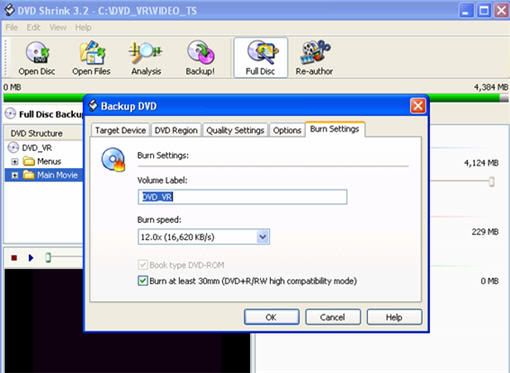
In Shrink when you click on 'backup' in the burn settings tab you can change the speed.
@300bowler - Howdy!
|
|
crash183
Newbie
|
17. April 2007 @ 16:00 |
Link to this message

|
|
after the update and using verbatium dvd i burned the movie no problem,i need to pick up some more dvds and try to burn one more that was giving me problems to know for sure,thanks for everyones help.
|
|
Advertisement
|
|
|
Moderator
|
17. April 2007 @ 16:22 |
Link to this message
|
|
You're welcome crash183
Keep us posted on how the new discs work out - see if you can get 8x or lower for this drive.
|
|



