|
File Renamed Itself, Now I Can't Delete It!! Help!!!
|
|
|
Hiei3
Inactive

|
19. April 2007 @ 11:59 |
 Link to this message

|
I downloaded a song file, and when I went to open it, it instead renamed itself. I asked a friend of mine, and this happened to them once too. The only difference is, they could delete theirs. I can't delete mine.
I tried to play the song. It instead renamed itself to some long porn title. I can't open the file, move it to another folder, delete it, anything. When I rightclick, I only get a few options. Open, Print, Edit, View, Open With..., and Send To ->. I tried to open it with Paint Shop Pro 7. It basically just opened a browser of my Desktop. I tried to open it with Microsoft Paint. It said: "C:\Documents and Settings\home\Desktop.bmp was not found." The only thing to click is "Ok". I tried to open it in Notepad, and it said "Access is denied". I tried to use a program called Unlocker. It didn't work either. Please help me. Thanks a lot.
Here's a picture of what I see. I blurred the name because I don't know who all could be looking at this, and if there are younger people looking at it, the title, like I said, is a porn one. All I downloaded was a song, and it renamed itself and made itself basically unable to function.

|
|
Advertisement
|
 |
|
|
|
Indochine
Senior Member
|
20. April 2007 @ 00:31 |
Link to this message

|
|
Run a virus check straight away.
On m'a dit que je suis nul à l'oral, que je n'peux pas mieux faire !
|
|
Reitfor
Suspended due to non-functional email address
|
20. April 2007 @ 02:37 |
Link to this message

|
|
Virus! *Coughs* And a rough one.
Firmware Database: Psp-TA-082>2.71>3.11 changed 2.00>1.5>3.10OE-A>3.30OE-A>1.5>3.30OE-A>1.5>3.40OE-A
|
|
Sythun
Newbie
|
20. April 2007 @ 03:32 |
Link to this message
|
|
Ouch thats one nasty virus, well thats what you get for downloading music i guess?
|
|
Indochine
Senior Member
|
20. April 2007 @ 03:49 |
Link to this message
|
Originally posted by Sythun:
well thats what you get for downloading music i guess?
That's what you get for not learning how your computer works and what you can do to protect it.
On m'a dit que je suis nul à l'oral, que je n'peux pas mieux faire !
|
|
Reitfor
Suspended due to non-functional email address
|
20. April 2007 @ 04:37 |
Link to this message
|
|
You should always get protection. Besides learn to enter sites and learn to NOT enter certain sites.Get an antivirus and a good one. Your comp needs a good protection.
Firmware Database: Psp-TA-082>2.71>3.11 changed 2.00>1.5>3.10OE-A>3.30OE-A>1.5>3.30OE-A>1.5>3.40OE-A
|
|
Hiei3
Inactive
|
20. April 2007 @ 06:40 |
Link to this message
|
|
Well we have virus protection. It usually catches everything. I dunno what's different about this one. But soon our computer will be reformatted, so everything's going to be back to day one. I'm running the virus scan anyway. I dunno, I'm definately not going to trust LimeWire anymore.
|
|
Reitfor
Suspended due to non-functional email address
|
20. April 2007 @ 07:11 |
Link to this message
|
|
Pfft... That thing sucks big time. Also .exe files in Limewire and a not 99.9 percent virus but a 100%.
Firmware Database: Psp-TA-082>2.71>3.11 changed 2.00>1.5>3.10OE-A>3.30OE-A>1.5>3.30OE-A>1.5>3.40OE-A
|
|
Indochine
Senior Member
|
20. April 2007 @ 07:21 |
Link to this message
|
Originally posted by Hiei3:
Well we have virus protection. It usually catches everything. I dunno what's different about this one. But soon our computer will be reformatted, so everything's going to be back to day one. I'm running the virus scan anyway. I dunno, I'm definately not going to trust LimeWire anymore.
Did you not see the .exe extension?
On m'a dit que je suis nul à l'oral, que je n'peux pas mieux faire !
|
|
maherant
Newbie
|
20. April 2007 @ 07:32 |
Link to this message
|
|
Too bad , as already said , get some anti virus.. good luck!
|
|
Hiei3
Inactive
|
20. April 2007 @ 08:27 |
Link to this message
|
Quote:
Originally posted by Hiei3:
Well we have virus protection. It usually catches everything. I dunno what's different about this one. But soon our computer will be reformatted, so everything's going to be back to day one. I'm running the virus scan anyway. I dunno, I'm definately not going to trust LimeWire anymore.
Did you not see the .exe extension?
There is no exe extension. It apparently reads it as "Desktop.bmp". I can't even get into the properties to see if there's a hidden exe. How can I find the exe extension?
|
|
Indochine
Senior Member
|
20. April 2007 @ 08:37 |
Link to this message
|
|
Do you have "hide known file extensions" checked in Folder Options?
On m'a dit que je suis nul à l'oral, que je n'peux pas mieux faire !
|
|
Hiei3
Inactive
|
20. April 2007 @ 08:43 |
Link to this message
|
Originally posted by Indochine:
Do you have "hide known file extensions" checked in Folder Options?
Well, the thing is, this problem file isn't in a folder. It's on my Desktop. Is there a way to see the file extensions, even if it's on my desktop? Remember, I can't even move it to a different folder.
|
|
bkf
Suspended due to non-functional email address
|
20. April 2007 @ 09:04 |
Link to this message
|
|
May I ask a couple of questions.
I did not see in the post where an .exe was seen.
What was the orginal extension of the orginal file?
What is the Filename and extension of the file that you have now.
Is it 7 charctors long without an extension?
Im doing some research and this problem fits one of the profiles.
I did find a program that would remove it if it is what I think it is. These files have something to do with hidding and windows API.
It's a trickey one but was not hard to rid. Ill have to go back and checks all my posts to find the program. Stupit me I did not book mark it.
It was just before Kodaguy came along to AD. Was with another good virus fighter that has gotten off line for a while. He could not even figure it out so I spent two days on it in research and offered up a program I never even seen before but it worked.
This message has been edited since posting. Last time this message was edited on 20. April 2007 @ 09:19
|
|
Indochine
Senior Member
|
20. April 2007 @ 09:05 |
Link to this message
|
Quote:
Well, the thing is, this problem file isn't in a folder. It's on my Desktop. Is there a way to see the file extensions, even if it's on my desktop? Remember, I can't even move it to a different folder.
Your desktop is a folder.
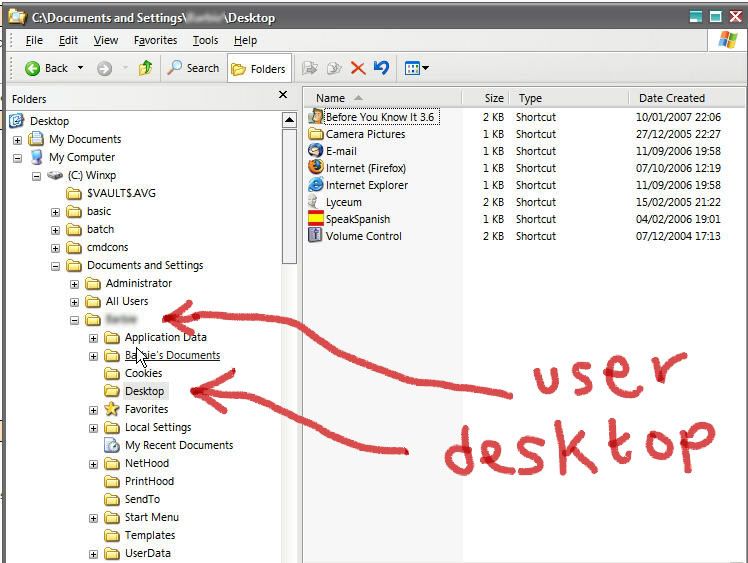
If you are the only user, it may be under "All users". Select details view & uncheck "hide known extensions" in Folder Options.
On m'a dit que je suis nul à l'oral, que je n'peux pas mieux faire !
|
|
Hiei3
Inactive
|
20. April 2007 @ 09:19 |
Link to this message
|
Quote:
[quote]Well, the thing is, this problem file isn't in a folder. It's on my Desktop. Is there a way to see the file extensions, even if it's on my desktop? Remember, I can't even move it to a different folder.
Your desktop is a folder.
If you are the only user, it may be under "All users". Select details view & uncheck "hide known extensions" in Folder Options.[/quote]
[p]
Okay. Well now when I look at my desktop I see all the file extensions. But the problem file is still ".jpg". I'll probably just have to wait until we reformat the computer to get this thing fixed.
This message has been edited since posting. Last time this message was edited on 20. April 2007 @ 10:39
|
|
bkf
Suspended due to non-functional email address
|
20. April 2007 @ 09:27 |
Link to this message
|
|
A song file is not a .jpg
Where did the .jpg come from?
Am I missing something here?
Im trying to help but some of this makes no sense.
|
|
Indochine
Senior Member
|
20. April 2007 @ 09:33 |
Link to this message
|
|
Hiei3, you didn't need to quote the picture! You could edit it out. We have a jpg that is (or isn't) a bmp, but it is supposed to be a song file!
On m'a dit que je suis nul à l'oral, que je n'peux pas mieux faire !
This message has been edited since posting. Last time this message was edited on 20. April 2007 @ 09:34
|
|
Indochine
Senior Member
|
20. April 2007 @ 09:34 |
Link to this message
|
Originally posted by bkf:
some of this makes no sense.
I think you hit the nail on the head.
On m'a dit que je suis nul à l'oral, que je n'peux pas mieux faire !
|
|
Hiei3
Inactive
|
20. April 2007 @ 09:34 |
Link to this message
|
Originally posted by bkf:
A song file is not a .jpg
Where did the .jpg come from?
Am I missing something here?
Im trying to help but some of this makes no sense.
Well, as I said in my first post. It was an .mp3 I believe when I downloaded it. I could be wrong. But it was SOME song file, because it had the Windows Media Player icon. When I doubleclicked it to open it, it renamed itself to some long title .jpg (which also changed the icon it uses to Paint Shop Pro 7).
ADDITION: Sorry I didn't edit the picture out. Didn't give it a second thought. And I know this doesn't make much sense. I'm just telling you guys what happened. =/
This message has been edited since posting. Last time this message was edited on 20. April 2007 @ 09:37
|
|
Indochine
Senior Member
|
20. April 2007 @ 09:39 |
Link to this message
|
Quote:
When I doubleclicked it to open it, it renamed itself to some long title .jpg (which also changed the icon it uses to Paint Shop Pro 7).
Have you done that virus check yet?
On m'a dit que je suis nul à l'oral, que je n'peux pas mieux faire !
|
|
Hiei3
Inactive
|
20. April 2007 @ 09:41 |
Link to this message
|
|
Started it a little bit ago. Shouldn't take TOO long hopefully.
|
|
bkf
Suspended due to non-functional email address
|
20. April 2007 @ 09:48 |
Link to this message
|
Quote:
Originally posted by bkf:
A song file is not a .jpg
Where did the .jpg come from?
Am I missing something here?
Im trying to help but some of this makes no sense.
Well, as I said in my first post. It was an .mp3 I believe when I downloaded it. I could be wrong. But it was SOME song file, because it had the Windows Media Player icon. When I doubleclicked it to open it, it renamed itself to some long title .jpg (which also changed the icon it uses to Paint Shop Pro 7).
ADDITION: Sorry I didn't edit the picture out. Didn't give it a second thought. And I know this doesn't make much sense. I'm just telling you guys what happened. =/
Don't worry about. Now it's making more sense. A payloaded .mp3 file. commen as dirt. Now to figure out what to do. What do you want to do? Where are we headed? What problems is this causing you? The symptons tell alot about the problem.
This message has been edited since posting. Last time this message was edited on 20. April 2007 @ 09:51
|
|
Indochine
Senior Member
|
20. April 2007 @ 09:48 |
Link to this message
|
Originally posted by Hiei3:
Started it a little bit ago. Shouldn't take TOO long hopefully.
Self-renaming files are BAD NEWS.
On m'a dit que je suis nul à l'oral, que je n'peux pas mieux faire !
|
|
Advertisement
|
|
|
|
bkf
Suspended due to non-functional email address
|
20. April 2007 @ 09:53 |
Link to this message
|
Quote:
Originally posted by Hiei3:
Started it a little bit ago. Shouldn't take TOO long hopefully.
Self-renaming files are BAD NEWS.
But not the end of the world :-)
Now we look for what got changed internally.
Will wait on scan and you will be required to make even more based on results.
This message has been edited since posting. Last time this message was edited on 20. April 2007 @ 09:54
|


