User User name Password  
   
Monday 16.3.2026 / 12:08
Search AfterDawn Forums:        In English   Suomeksi   På svenska
afterdawn.com > forums > software specific discussion > nero discussion > can't play help
Show topics
 
Forums
Forums
Can't play Help
  Jump to:
 
Posted Message
cmckee
Newbie
_
19. April 2007 @ 15:37 _ Link to this message    Send private message to this user   
Can someone please help me every time a copy a dvd I can't play it on my stand alone dvd player. This has happen a number of time it will play on my computer but not my dvd player. Someone please help I have mess up a lot of dvd.

Cmckee
Advertisement
_
__
Moderator
_
19. April 2007 @ 16:27 _ Link to this message    Send private message to this user   
Are you converting and burning like avi's w/ Vision or are you doing backups of original dvd's?

What brand of discs are you using? Like Sony +R 16x. Could be a compatibility issue w/ the media.

Burn speed used? Take it down a notch and see if that helps - or burn at 1/2 the rated speed of the media.

Firmware up to date on the burner?


Forum Rules
Do this before posting
Do not click this link...
cmckee
Newbie
_
19. April 2007 @ 17:49 _ Link to this message    Send private message to this user   
I'm doing a backups of original and I' using hp DVD+R and the burn speed used was 8 not sure if the firmware is up to date where do I update the firmware. Thanks
Moderator
_
19. April 2007 @ 18:46 _ Link to this message    Send private message to this user   
Ok does the dvd player support +R media? (most do now a days)
If you have the make & model you can check it here:
VideoHelp

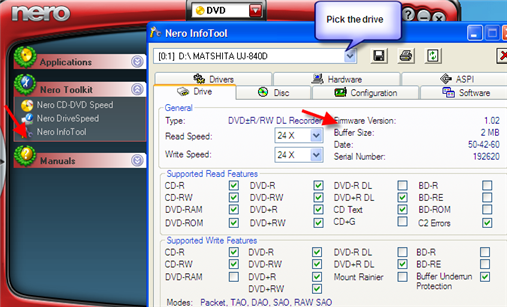
To check the firmware version in SmartStart go to tools (or toolkit in Nero 6) - InfoTool
In the drive tab there's a field there for the firmware version.
You can check the burners manufacturer's site or here. Just put in the make or model.
Can always post back the info here too and we can check.

HP uses different manufacturers so the one that made these may not be compatible with the player.
Your best bet may just be to switch the media to something that's more compatible like Verbatim, Taiyo Yuden or made in japan Sony, Fuji or Maxell.


Forum Rules
Do this before posting
Do not click this link...
cmckee
Newbie
_
20. April 2007 @ 08:28 _ Link to this message    Send private message to this user   
I ready don't have the make and model it came with the computer is there any way that i can go to hp website and download the firmware would it be there. I ready done know much about this can of thing. Can you make it where I can understand.

Thanks
cmckee
Advertisement
_
__
 
_
Moderator
_
20. April 2007 @ 14:33 _ Link to this message    Send private message to this user   
Yes you can check HP's website and see if there is an update.
Your pc from HP may have HP Total Care that you can look up any updates for the pc.

Here's a pick on Nero InfoTool's drive tab.
In the drop down the make & model of the burner will be listed and you'll see the firmware version.
You can post back that info if you like and we can check & see if there is a newer version.


Forum Rules
Do this before posting
Do not click this link...
afterdawn.com > forums > software specific discussion > nero discussion > can't play help
 

Digital video: AfterDawn.com | AfterDawn Forums
Music: MP3Lizard.com
Gaming: Blasteroids.com | Blasteroids Forums | Compare game prices
Software: Software downloads
Blogs: User profile pages
RSS feeds: AfterDawn.com News | Software updates | AfterDawn Forums
International: AfterDawn in Finnish | AfterDawn in Swedish | AfterDawn in Norwegian | download.fi
Navigate: Search | Site map
About us: About AfterDawn Ltd | Advertise on our sites | Rules, Restrictions, Legal disclaimer & Privacy policy
Contact us: Send feedback | Contact our media sales team
 
  © 1999-2026 by AfterDawn Ltd.

  IDG TechNetwork