User User name Password  
   
Tuesday 27.1.2026 / 14:42
Search AfterDawn Forums:        In English   Suomeksi   På svenska
afterdawn.com > forums > pc hardware > other pc hardware > recylcing ram?
Show topics
 
Forums
Forums
Recylcing RAM?
  Jump to:
 
Posted Message
iamdavid
Newbie
_
25. April 2007 @ 08:15 _ Link to this message    Send private message to this user   
Can i take the ram out of an old pc and plop it into my current one?
Advertisement
_
__
Auslander
AfterDawn Addict
_
25. April 2007 @ 08:26 _ Link to this message    Send private message to this user   
if it's compatible, yeah. but odds are, if it's coming out of an old pc and going in a new one, it's slower ram and maybe of a different type. not really worth it.


iamdavid
Newbie
_
25. April 2007 @ 08:35 _ Link to this message    Send private message to this user   
they're both old pc's, is there a way to check?
AfterDawn Addict
_
25. April 2007 @ 11:24 _ Link to this message    Send private message to this user   
Originally posted by iamdavid:
they're both old pc's, is there a way to check?
You could look at the motherboard manuals to see if both computers use the same RAM, or you could take the RAM out and look at it to see if they are the same.

Life is good!
GrandpaBruce - Vietnam Vet - 1970 - 1971
Computer: Intel Core i7-920 Nehalim;Asus P6T Deluxe V2
Senior Member

1 product review
_
26. April 2007 @ 04:50 _ Link to this message    Send private message to this user   
or use cpuz.


BadBone
Suspended due to non-functional email address
_
26. April 2007 @ 14:56 _ Link to this message    Send private message to this user   
Like GrandpaBW said, take the memory out of both computers and make sure they look the same

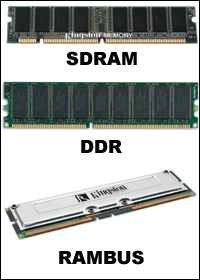
look at the notches on the bottom of them and make sure they line up. and look for writings on the memories. SDRAM will not work on a computer that uses DDR.


if they are the same then look at the memory chips and see the speeds and sizes of each. Since you say that it is an older computer i am assuming that they are SDRAM chips (will have 2 notches) look for writings along the line "xxx MHz or xxx FSB", SDRAMs come in bus speeds of 33 MHz, 66 MHz, 100 MHz and 133 Mhz. Pick out the ones that have the highest speeds, and also note the sizes in MB (32, 64, 128, 256, 512 Mb)

Hope this helps

You never know what you can do until you try

This message has been edited since posting. Last time this message was edited on 26. April 2007 @ 14:57

iamdavid
Newbie
_
27. April 2007 @ 13:29 _ Link to this message    Send private message to this user   
yeah it helps, but is there any way i can check w/out taking it apart?
ffg7
Member
_
27. April 2007 @ 15:23 _ Link to this message    Send private message to this user   
nope as software can't tell difference. what is the make & model# of the computers or motherboards so can see what they are using for ram?
Senior Member

1 product review
_
27. April 2007 @ 17:35 _ Link to this message    Send private message to this user   
Of course you can tell with software.
http://www.cpuid.com/cpuz.php
Download CPUz of there and extract it and just run it and click on the memory tab at the top.
Then it says TYPE:ie. SDRAM
SIZE:ie. 512mb
There is where it tells you what ram you have.


Advertisement
_
__
 
_
Senior Member

1 product review
_
27. April 2007 @ 18:32 _ Link to this message    Send private message to this user   
Double Post!


This message has been edited since posting. Last time this message was edited on 27. April 2007 @ 18:33

afterdawn.com > forums > pc hardware > other pc hardware > recylcing ram?
 

Digital video: AfterDawn.com | AfterDawn Forums
Music: MP3Lizard.com
Gaming: Blasteroids.com | Blasteroids Forums | Compare game prices
Software: Software downloads
Blogs: User profile pages
RSS feeds: AfterDawn.com News | Software updates | AfterDawn Forums
International: AfterDawn in Finnish | AfterDawn in Swedish | AfterDawn in Norwegian | download.fi
Navigate: Search | Site map
About us: About AfterDawn Ltd | Advertise on our sites | Rules, Restrictions, Legal disclaimer & Privacy policy
Contact us: Send feedback | Contact our media sales team
 
  © 1999-2026 by AfterDawn Ltd.

  IDG TechNetwork