|
I was burning fine with nero also amd I now get this message that says nero burning has been aborted
|
|
|
Florence1
Junior Member

|
18. July 2007 @ 15:59 |
 Link to this message

|
when I click on nero it pops up but it doesn't have the thing make your own DVD. I don't understand it it worked fine a week ago
|
|
Advertisement

|
|
|
|
Senior Member
|
18. July 2007 @ 16:19 |
Link to this message
|
When you unistalled nero, did you run the clean tools again?
|
|
Florence1
Junior Member
|
18. July 2007 @ 16:21 |
Link to this message

|
|
no I didn't run the clean tools thing again do you think I need to
|
Senior Member
|
18. July 2007 @ 17:02 |
Link to this message
|
Yes. Every time you uninstall Nero, your should run the Clean Tools.
Nero might not be operating correctly because something might have gotten messed up in your registry. When you uninstall Nero, the uninstall program does not remove everything from the registry. When you reinstall, Nero "sees" the items in the registry and does not overwrite them.
Sorry to tell you Florence, I'd recommend you uninstall Nero again, run the Clean tools, run ccleaner, defrag and then reinstall.
|
|
Florence1
Junior Member
|
18. July 2007 @ 18:05 |
Link to this message
|
ok hobbit112 I uninstalled nero ran ccleaner drfraged and rebooted then reinstalled nero and still don't have the make your own DVD thing....Florence
|
Senior Member
|
18. July 2007 @ 18:43 |
Link to this message

|
And you ran the Nero Clean tools too? Its available here link it you didn't keep it the first time.
If that still doesn't work, can you get to NeroVision Express from the Start Button? (START - ALL PROGRAMS - NERO - NERO DIGITAL - NERO VISION EXPRESS)
This message has been edited since posting. Last time this message was edited on 18. July 2007 @ 18:45
|
|
Florence1
Junior Member
|
18. July 2007 @ 18:56 |
Link to this message
|
ok I did the nero clean tool thing and reinstalled nero again and nero pops up but I still don't have the make your own DVD video thing...Florence
I guess this is hopeless
|
Senior Member
|
18. July 2007 @ 19:34 |
Link to this message
|
Thought of something.
You are saying the Nero Smart Start window is now opening. Look at the top middle and make sure that it states either CD/DVD or DVD.
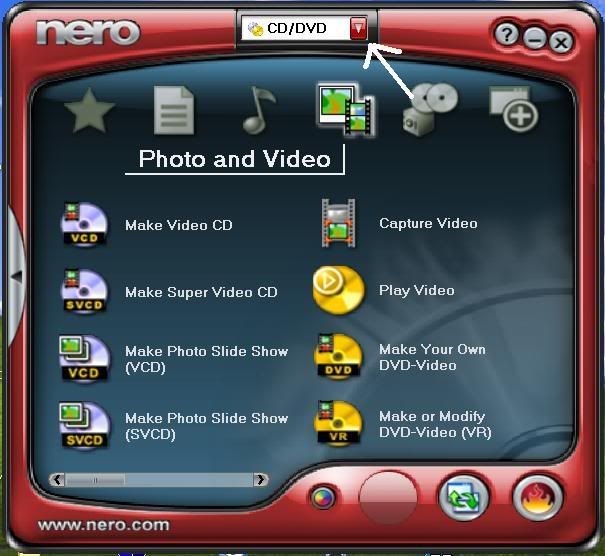
If it is set to only CD, the "Make You Own DVD" option will not appear.
|
|
Florence1
Junior Member
|
18. July 2007 @ 20:30 |
Link to this message
|
ok when I bring up nero on the same thing as the picture you sent I get Nero CD/DVD
Photo and Video
Make video CD
Make super video CD
Burn DVD video files
these are the things that show up
on the picture of nero you sent is
make video CD
make super video CD
make photo slide show (VCD)
make photo slide show (SVCD)
capture video
play video
make your own DVD-video
make or modify DVD-video (VR)
so why am I missing the other things on my nero???
I have done everything you said too do....Florence
I hate not knowing what to do
|
Senior Member
|
19. July 2007 @ 03:16 |
Link to this message
|
Looks like you don't have Nero Vision installed. When you reinstalled Nero did you remember to reinstall the 2nd package? Here's the link for it if you don't have it anymore.
|
|
Florence1
Junior Member
|
19. July 2007 @ 07:12 |
Link to this message
|
|
I have done everything you said and it doesn't seem to download package 2 why is that
|
Senior Member
|
19. July 2007 @ 07:24 |
Link to this message
|
|
|
Senior Member
|
19. July 2007 @ 07:58 |
Link to this message
|
Florence,
Try this:
Can you get to Nero Express from the Start Button? (START - ALL PROGRAMS - NERO - NERO OEM - NERO EXPRESS)
|
|
Florence1
Junior Member
|
19. July 2007 @ 08:08 |
Link to this message
|
yes i can get to nero from the start menu
|
|
Florence1
Junior Member
|
19. July 2007 @ 15:34 |
Link to this message
|
I can get to nero from the start menu but I get the same results
why won't it let me download package 2 of nero
|
Senior Member
|
19. July 2007 @ 16:17 |
Link to this message
|
I'm trying to check some things out.
Did you do anything to your computer between when nero worked and now?
Did you add any software and/or hardware?
|
|
Florence1
Junior Member
|
19. July 2007 @ 17:10 |
Link to this message
|
no I didn't do anything except for taking a wireless mouse off my computer. what would be causing nero don't to reinstall right
|
Senior Member
|
19. July 2007 @ 23:36 |
Link to this message
|
Just reinstall it from the link like I said uninstall it the normal way first with its own uninstaller or go ad and remove programs do it that way then run Nero clean too then install the version from the link which includes vision there isn?t a 2nd package for vision its all in one
|
|
Florence1
Junior Member
|
20. July 2007 @ 05:29 |
Link to this message
|
killalot there is 2 packages for nero hobbit112 has been helping me and sent me both packages for nero so did my daughter for some reason my computer won't download the package 2
|
Senior Member
|
20. July 2007 @ 05:57 |
Link to this message
|
Well that?s news to me because when I went on Nero?s site for the hell of me I couldn?t find a second package for Nero 7 only found Nero 7 download which included Nero vision
|
|
Florence1
Junior Member
|
20. July 2007 @ 05:59 |
Link to this message
|
killalot I DO NOT HAVE NERO 7 I HAVE NERO 6 I DO NOT WANT TO NOW OR ANYTIME WANT TO UPGRADE TO NERO 7 SO PLEASE STOP TELLING ME ABOUT NERO 7 I GET MORE HELP FROM HOBBIT112
|
Senior Member
|
20. July 2007 @ 06:01 |
Link to this message
|
Originally posted by hobbit112:
Looks like you don't have Nero Vision installed. When you reinstalled Nero did you remember to reinstall the 2nd package? Here's the link for it if you don't have it anymore.
This link is only to patch vision you still need vision installed before you can run this patch
|
Senior Member
|
20. July 2007 @ 06:06 |
Link to this message
|
Originally posted by Florence1:
killalot I DO NOT HAVE NERO 7 I HAVE NERO 6 I DO NOT WANT TO NOW OR ANYTIME WANT TO UPGRADE TO NERO 7 SO PLEASE STOP TELLING ME ABOUT NERO 7 I GET MORE HELP FROM HOBBIT112
Well I am sorry trying to help didn?t realise you had Nero 6 ill keep my thoughts to my self and if I do work out why you cant do it guess what ? Yes correct
|
|
Florence1
Junior Member
|
20. July 2007 @ 06:14 |
Link to this message
|
hobbit112 I fixed nero 6 I finally got the package 2 to download so now nero has all its programs
|
|
Advertisement
|
|
|
Senior Member
|
20. July 2007 @ 11:38 |
Link to this message
|
Good for you Florence!
I'm glad you got it back up and running. I was looking into another possible situation where Nero Vision would not be present on the start menu, glad it wasn't that!
|




