|
Glitches + (Nero Log)
|
|
|
EmmyJay5
Junior Member

|
28. July 2007 @ 08:26 |
 Link to this message

|
Hey everyone,
I'm new and have read through some of the threads and have finally made a coaster into a DVD... however, I have been unable to get rid of the glitches.
Burner :: Lite-On (brand new).
My software :: Nero 7 Essentials.
My DVD :: hp invent dvd+r 16x 4.7GB (I have about 70 of these)
Any help, the sooner the better. AIM is EmmyJay5
---------------------------------------------------------------------
NEWBIE STATS:
Brand New LITE-ON DVD Writer MODEL LH-20A1P33C-EP0N.
DISCS - HP Inevnt DVD+R 16x (DVD 5).
Nero Vision 4 Essentials :: make a dvd-video :: version 4.9.7.2
PROBLEM: Won't burn at anything less than 16x, no matter what I change it to!
This message has been edited since posting. Last time this message was edited on 1. August 2007 @ 19:01
|
|
Advertisement

|
|
|
|
AfterDawn Addict
|
28. July 2007 @ 09:14 |
Link to this message

|
Quote:
Disc Manufacturer ID: CMC MAG,
Change to something that says 'Made in Japan' on the package or 'Verbatim'
Quote:
Burn process completed successfully at 16x
Burning speed too high, try 4x.
And there is new firmware for the burner here, although the disks and burning speed are the probable cause.
http://forum.rpc1.org/dl_firmware.php?download_id=2342
|
|
EmmyJay5
Junior Member
|
28. July 2007 @ 09:32 |
Link to this message

|
Quote:
Change to something that says 'Made in Japan' on the package or 'Verbatim'
'm not sure what you're talking about and why it is a problem? How would I change this?
Quote:
Burning speed too high, try 4x.
I've tried to change it a million times. This is my process...
OPEN NeroSmart Start Essentials.
OPEN Make your own DVD-Video.
Right before i'm about to burn...
On the right side I changed the RECORDING SETTING to anything lower.
I click BURN, and every time I get the same result, 16x!
What's the proper way to change the burning speed? Can it be done permanently as well?
Thanks
Emmy Jay 5
NEWBIE STATS:
Brand New LITE-ON DVD Writer MODEL LH-20A1P33C-EP0N.
DISCS - HP Inevnt DVD+R 16x (DVD 5).
Nero Vision 4 Essentials :: make a dvd-video :: version 4.9.7.2
PROBLEM: Won't burn at anything less than 16x, no matter what I change it to!
This message has been edited since posting. Last time this message was edited on 28. July 2007 @ 09:35
|
AfterDawn Addict
|
28. July 2007 @ 10:37 |
Link to this message
|
It always want to burn at maximum, but if you insert the blank DVD before starting Nero it will allow the range of speeds for that particular disk.
|
|
EmmyJay5
Junior Member
|
28. July 2007 @ 10:40 |
Link to this message
|
|
I tried that and it doesn't change the fact that it wants to burn at 16x. Idk why it won't let me change it. I think I'm setting it to x4 but the log always ends up saying x16.
NEWBIE STATS:
Brand New LITE-ON DVD Writer MODEL LH-20A1P33C-EP0N.
DISCS - HP Inevnt DVD+R 16x (DVD 5).
Nero Vision 4 Essentials :: make a dvd-video :: version 4.9.7.2
PROBLEM: Won't burn at anything less than 16x, no matter what I change it to!
|
|
EmmyJay5
Junior Member
|
28. July 2007 @ 11:35 |
Link to this message
|
I think I found a solution to changing my burning speed from 16x to 4x. I opened "my computer,"
right-clicked on the burning drive,
clicked "properties,"
clicked "recording" tab,
selected 4x.
I'm currently burning a "test" DVD. When I clicked the recording speed in NERO, it was still set at MAX. I moved it to 4x too. I'm hoping it will register properly now.
However, if I leave NERO set at max now, will it use the maximum I set for the burning drive, which is now 4x?
NEWBIE STATS:
Brand New LITE-ON DVD Writer MODEL LH-20A1P33C-EP0N.
DISCS - HP Inevnt DVD+R 16x (DVD 5).
Nero Vision 4 Essentials :: make a dvd-video :: version 4.9.7.2
PROBLEM: Won't burn at anything less than 16x, no matter what I change it to!
|
AfterDawn Addict
|
28. July 2007 @ 11:53 |
Link to this message
|
I don't know.
I thought the setting you speak of was for XP's drag and drop to CD burning speed.
Mine is set for 16x, but I can still change DVD and CD speeds in Nero.
If it doesn't work, save the Nero compilation to the hard disk folder, download IMGBurn and use it to burn the compilation.The speed can be set to 4x and should show some improvement.
http://www.imgburn.com/
Run ImgBurn
Mode > 'Build'
Output > 'Device'
File > 'Browse for Folder', highlight on the 'VIDEO_TS' folder, > 'OK'
Set speed 4x and click the green write button.
|
|
EmmyJay5
Junior Member
|
31. July 2007 @ 15:59 |
Link to this message
|
|
-------------------------------
NEWBIE STATS:
Brand New LITE-ON DVD Writer MODEL LH-20A1P33C-EP0N.
DISCS - HP Inevnt DVD+R 16x (DVD 5).
Nero Vision 4 Essentials :: make a dvd-video :: version 4.9.7.2
PROBLEM: Won't burn at anything less than 16x, no matter what I change it to!
This message has been edited since posting. Last time this message was edited on 1. August 2007 @ 19:06
|
AfterDawn Addict
|
31. July 2007 @ 16:50 |
Link to this message
|
|
Try a different brand of disk - 'Verbatim' or something that says 'made in japan' on the package.
|
|
EmmyJay5
Junior Member
|
1. August 2007 @ 13:55 |
Link to this message
|
I don't have verbatim in any stores near me. Is it because the highest speed it records at is 2.4x... i think that's what I read. If I buy DVDs that have to be burned at slower speeds will that be one way to resolve my issue?
I hate 16x HP-Invent. Can you list the best ones because it doesn't tell me the DVDs max speed on these websites.
Thanx
NEWBIE STATS:
Brand New LITE-ON DVD Writer MODEL LH-20A1P33C-EP0N.
DISCS - HP Inevnt DVD+R 16x (DVD 5).
Nero Vision 4 Essentials :: make a dvd-video :: version 4.9.7.2
PROBLEM: Won't burn at anything less than 16x, no matter what I change it to!
|
AfterDawn Addict
|
1. August 2007 @ 14:04 |
Link to this message
|
|
The disks you are using are made by CMC.
CMC disks are often cited as the reason for an unsuccessful burn.
It's easier to change the media to conduct a test than anything else.
Try Maxell or Ritek labels.
|
|
EmmyJay5
Junior Member
|
1. August 2007 @ 19:05 |
Link to this message
|
Originally posted by attar:
I don't know.
I thought the setting you speak of was for XP's drag and drop to CD burning speed.
Mine is set for 16x, but I can still change DVD and CD speeds in Nero.
If it doesn't work, save the Nero compilation to the hard disk folder, download IMGBurn and use it to burn the compilation.The speed can be set to 4x and should show some improvement.
http://www.imgburn.com/
Run ImgBurn
Mode > 'Build'
Output > 'Device'
File > 'Browse for Folder', highlight on the 'VIDEO_TS' folder, > 'OK'
Set speed 4x and click the green write button.
I tried IMGburn and the ISO file burned with minimal glitches. HOWEVER, my problem is with the sound being off by a second or so in the last 30 minutes of any DVD I burn. I've burned 2 different ones with the same exact problem. As an ISO burn, how can I fix this? I am still looking forward to the day where I can just urn in NERO though.
NEWBIE STATS:
Brand New LITE-ON DVD Writer MODEL LH-20A1P33C-EP0N.
DISCS - HP Inevnt DVD+R 16x (DVD 5).
Nero Vision 4 Essentials :: make a dvd-video :: version 4.9.7.2
PROBLEM: Won't burn at anything less than 16x, no matter what I change it to!
|
|
EmmyJay5
Junior Member
|
1. August 2007 @ 21:21 |
Link to this message
|
Originally posted by attar:
It always want to burn at maximum, but if you insert the blank DVD before starting Nero it will allow the range of speeds for that particular disk.
I somewhat successfully burned at a lower speed using this advice. Log included. HOWEVER, I am still receiving glitches. What is the next step in fixing this problem? ALSO, if I try to IMGburn process again. how do I fix the audio glitches as mentioned in my previous post. I do not receive audio glitches when I burn straight from NERO, rather glitches as a whole... skipping and freezing.
A resolution for both NERO and/or IMGburn is needed.
Thank you
LOG DELETED
NEWBIE STATS:
Brand New LITE-ON DVD Writer MODEL LH-20A1P33C-EP0N.
DISCS - HP Inevnt DVD+R 16x (DVD 5).
Nero Vision 4 Essentials :: make a dvd-video :: version 4.9.7.2
PROBLEM: Won't burn at anything less than 16x, no matter what I change it to!
This message has been edited since posting. Last time this message was edited on 6. August 2007 @ 22:52
|
|
EmmyJay5
Junior Member
|
1. August 2007 @ 23:02 |
Link to this message
|
|
Do you have to restart the computer everytime you go to burn at 2.4x because I went to burn again and it burned at 16x. The sound is messed up now everytime I burn... the last 30 minutes.
NEWBIE STATS:
Brand New LITE-ON DVD Writer MODEL LH-20A1P33C-EP0N.
DISCS - HP Inevnt DVD+R 16x (DVD 5).
Nero Vision 4 Essentials :: make a dvd-video :: version 4.9.7.2
PROBLEM: Won't burn at anything less than 16x, no matter what I change it to!
|
AfterDawn Addict
|
2. August 2007 @ 01:53 |
Link to this message
|
Quote:
Do you have to restart the computer everytime you go to burn at 2.4x because I went to burn again and it burned at 16x. The sound is messed up now everytime I burn... the last 30 minutes.
You shouldn't have to restart to change burning speed and you are still using CMC disks.
|
|
EmmyJay5
Junior Member
|
2. August 2007 @ 11:48 |
Link to this message
|
I plan on getting Maxell today. I can't wait until this coaster nightmare is over. Also I am going to get -R because my friend suggested that they were more compatible over +R. Do you agree, before I go out and buy another pack of bad CDs. LoLz
NEWBIE STATS:
Brand New LITE-ON DVD Writer MODEL LH-20A1P33C-EP0N.
DISCS - HP Inevnt DVD+R 16x (DVD 5).
Nero Vision 4 Essentials :: make a dvd-video :: version 4.9.7.2
PROBLEM: Won't burn at anything less than 16x, no matter what I change it to!
|
AfterDawn Addict
|
2. August 2007 @ 12:44 |
Link to this message
|
|
I use Maxell -R and have no problems with them.
|
|
EmmyJay5
Junior Member
|
6. August 2007 @ 22:57 |
Link to this message
|
|
_-------------------
NEWBIE STATS:
Brand New LITE-ON DVD Writer MODEL LH-20A1P33C-EP0N.
DISCS - HP Inevnt DVD+R 16x (DVD 5).
Nero Vision 4 Essentials :: make a dvd-video :: version 4.9.7.2
PROBLEM: Won't burn at anything less than 16x, no matter what I change it to!
This message has been edited since posting. Last time this message was edited on 8. August 2007 @ 20:27
|
AfterDawn Addict
|
7. August 2007 @ 01:01 |
Link to this message
|
Your log looks OK, as you said only thing is burn speed. As you are using NeroVision ...just before you select BURN you can change your burn speed from here.
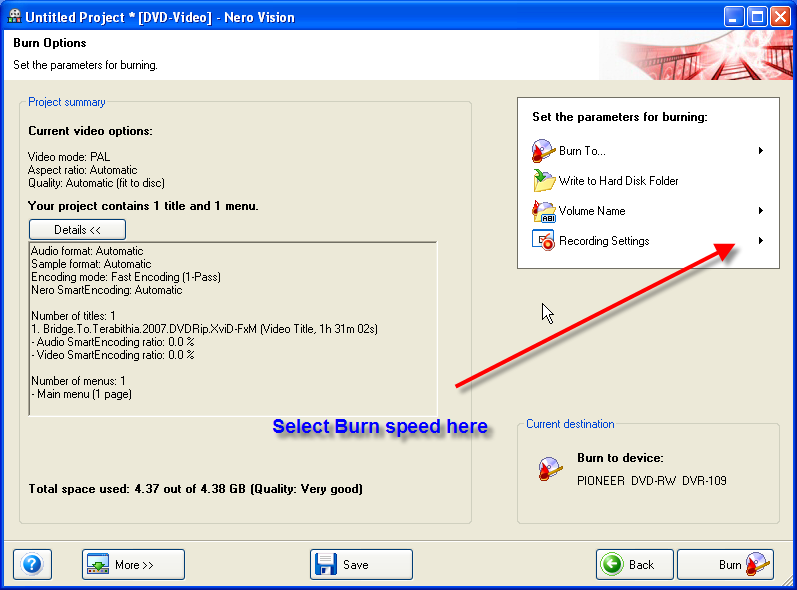
|
|
EmmyJay5
Junior Member
|
7. August 2007 @ 11:58 |
Link to this message
|
I do that, but it doesn't save it. Once I click burn it reverts back to 16x. I don't know why. Personally, the HP Invent discs were more successful at burning, even with glitches.
The log still says that there are other errors, and I don't know what that means. So at this point it's not the 16x, because I have gotten much further burning at 16x tahn I am being allowed with the Maxell discs. What does the rest of the log suggest, because an OK log is definitely not a successful log.
At any rate, I'm starting to think maybe it's down to getting more memory. If I get 1GB instead of the 500 whatever I have of memory... I should be able to burn at 16x and then it wouldn't even matter, right?
NEWBIE STATS:
Brand New LITE-ON DVD Writer MODEL LH-20A1P33C-EP0N.
DISCS - HP Inevnt DVD+R 16x (DVD 5).
Nero Vision 4 Essentials :: make a dvd-video :: version 4.9.7.2
PROBLEM: Won't burn at anything less than 16x, no matter what I change it to!
This message has been edited since posting. Last time this message was edited on 7. August 2007 @ 12:02
|
AfterDawn Addict
|
7. August 2007 @ 13:25 |
Link to this message
|
Quote:
02:47:55] NeroVision 2:46:00 AM #25 CDR -1135 File Writer.cpp, Line 303
[02:47:55] NeroVision Write error
This is the ONLY error in the log, as I said other than this it looks OK......definately the "speed" issue....you have ample amount of memory.
|
|
LRdisco2
Newbie
|
8. August 2007 @ 05:07 |
Link to this message
|
Excuse my ignorance, being new to NERO myself, could this be an issue with NERO Burn Rights?
If the speed setting keeps reverting back to 16X no matter what speed is chosen could it be because the user doesn't have permission to make changes?
|
AfterDawn Addict
|
8. August 2007 @ 08:09 |
Link to this message
|
@LRdisco2 I checked my machine.
Nero Burn Rights is included in the Nero Tools selection of 'StartSmart' on my pc.
I have a user on my PC who does not have burn rights and if they attempt to use a function that requires burning, then a message pops up referring back to the Administrator - so you don't even get to select the speed.
|
Senior Member
|
8. August 2007 @ 09:06 |
Link to this message
|
here is an easy fix
use IMGburn to burn
since obviously there is something wrong with your nero if it wont let burn at a lower speed, so when using nero vision have it write to the HDD then manually burn with IMGburn
or
try installing a different version of nero.
also the audio sync problem could be happening while the encoding part is with nero vision.
 "When I look at the smiles on all the childrens faces, I just know theyre about to jab me with something."
- Homer Simpson |
|
Advertisement
|
|
|
|
EmmyJay5
Junior Member
|
8. August 2007 @ 12:14 |
Link to this message
|
Originally posted by attar:
@LRdisco2 I checked my machine.
Nero Burn Rights is included in the Nero Tools selection of 'StartSmart' on my pc.
I have a user on my PC who does not have burn rights and if they attempt to use a function that requires burning, then a message pops up referring back to the Administrator - so you don't even get to select the speed.
While I do have an Administrator account on my computer, I installed it. My bro-in-law "fixed" my comp once and decided to make an account that I couldn't log into. Is it possible that the controls of any program I use revert back to administrator even though I downloaded the program myself.
Also, this is another version of the program that I got off the computer, so it has to be something greater than the program but less than the burner because I had one succesful(with glitches) burn of 2.4x when using the HP discs. I had just restarted the comp, put the disc in and then followed procedures and it burned but still had glitches. The second time I put the disc in and followed procedures it didn't work though.
I've tried using IMG BURN, but since it is through the Nero software, I get glitches anyway. It comes down to Nero... but since I've used more than one version it also has to be something with my computer. I'm going to try and get Roxio. ANyone have any suggestions with which version of Roxio I should get?
Emmy
NEWBIE STATS:
Brand New LITE-ON DVD Writer MODEL LH-20A1P33C-EP0N.
DISCS - HP Inevnt DVD+R 16x (DVD 5).
Nero Vision 4 Essentials :: make a dvd-video :: version 4.9.7.2
PROBLEM: Won't burn at anything less than 16x, no matter what I change it to!
|



