|
Cleaning computer fan
|
|
|
chloett11
Suspended due to non-functional email address

|
13. August 2007 @ 19:16 |
 Link to this message

|
|
I just notice that my computer is starting to make noise when I turn on the computer (noise only last for two second or so) I starting to think maybe I shiould check and clean my fan but the problem is I don't know how since I have never done it before. I ask a couple of people on how to do it and they suggested using the compress air (didn't tell me how to use it) to blow out the dust but I was wondering is there a different way (like useing a cloth, a Q-tip or blow out the dust myself) to clean out the dust partical since I was told to go somewhere space out outdoor if I using the compress air since it going to be dust and the can itself have chemical but the thing is I living in third frloor or a families house so I don't want to carry it all the way downstair and there are kid (my nephhew live downloaad stair with my sester and oftenly come up to play) so I don't want my to be expose to such partical since he also have asma.
|
|
Advertisement
|
|
|
|
AfterDawn Addict
|
13. August 2007 @ 19:34 |
Link to this message

|
Originally posted by chloett11:
I just notice that my computer is starting to make noise when I turn on the computer (noise only last for two second or so) I starting to think maybe I shiould check and clean my fan but the problem is I don't know how since I have never done it before. I ask a couple of people on how to do it and they suggested using the compress air (didn't tell me how to use it) to blow out the dust but I was wondering is there a different way (like useing a cloth, a Q-tip or blow out the dust myself) to clean out the dust partical since I was told to go somewhere space out outdoor if I using the compress air since it going to be dust and the can itself have chemical but the thing is I living in third frloor or a families house so I don't want to carry it all the way downstair and there are kid (my nephhew live downloaad stair with my sester and oftenly come up to play) so I don't want my to be expose to such partical since he also have asma.
Use compressed air. You don't have to be concerned with it. Don't do it with other people around, if you feel uneasy about it.
Life is good!
GrandpaBruce - Vietnam Vet - 1970 - 1971
Computer: Intel Core i7-920 Nehalim;Asus P6T Deluxe V2
|
AfterDawn Addict
4 product reviews
|
14. August 2007 @ 03:45 |
 Link to this message
|
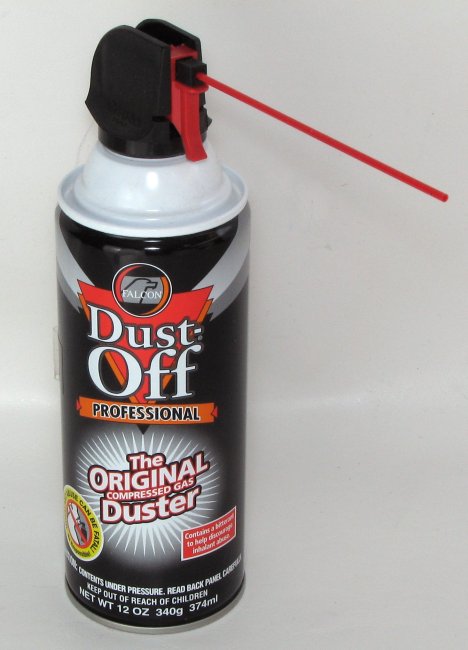
Compressed air can be got in a canned form. You use it in the same way you'd spray any aerosol like anti-perspirant or air freshener. They usually come with straw-like tubes to direct the air to a certain place. Find a place that's clogged up with dust then (with the PC off of course!) spray on it for a couple of seconds. You could then turn the PC on it's side, or upside down, to spray the dust out of the case. Just wait a couple of minutes for it to settle before letting asthmatics into the room again.
This is the sort of thing you're after:
|
Senior Member
1 product review
|
14. August 2007 @ 07:29 |
Link to this message
|
Originally posted by sammorris:
Compressed air can be got in a canned form. You use it in the same way you'd spray any aerosol like anti-perspirant or air freshener. They usually come with straw-like tubes to direct the air to a certain place. Find a place that's clogged up with dust then (with the PC off of course!) spray on it for a couple of seconds. You could then turn the PC on it's side, or upside down, to spray the dust out of the case. Just wait a couple of minutes for it to settle before letting asthmatics into the room again.
This is the sort of thing you're after:
if the air does not get it all off, then use a paint brush.
|
|
chloett11
Suspended due to non-functional email address
|
14. August 2007 @ 07:36 |
Link to this message
|
|
If I do use the the compress air do I stick the straw all the way inside of the computer or leave it like that and start spraying.
|
AfterDawn Addict
4 product reviews
|
14. August 2007 @ 07:38 |
Link to this message
|
|
You want to have the end of the straw about an inch away from the area you're spraying.
|
|
ddp
Moderator
|
14. August 2007 @ 17:25 |
Link to this message
|
|
that noise has nothing to do with dust but lack of lubrication. remember the tin man in the wizard of oz? that is what you have to do but 1st isolate which fan is causing the noise as in cpu fan, videocard fan, psu fan(s), case fan(s) or hard drive fan(s).
|
AfterDawn Addict
4 product reviews
|
15. August 2007 @ 02:25 |
Link to this message
|
|
Mmm, come to think of it, ddp's right, it's typically a fan bearing. Turn on the PC with one fan unplugged, or stopped with your fingers, and try and work out which one it is. (Turn the PC off before you plug it back in and unplug the next one)
|
|
kaledrr
Member
|
18. August 2007 @ 13:40 |
Link to this message
|
|
i also opend my pc. did some cleaning.
here is the stuff
W40 for the fans ( it was making noise)
compresed air for inside the pc
I removed every fan and major parts like hdd and remvable meteal(case parts)
spraid the fans with 40. washed the metal.
then used the comreed inside the case.
problem, when i sprayd the motherboard. i thouched it and felt their is still dust in it.
anyone .
|
|
ddp
Moderator
|
18. August 2007 @ 13:52 |
Link to this message
|
|
i use a 25mm\1" wide paint brush to clean off the dust off the motherboard, cards, ram & drives. have to replace it as getting to be to short as is worn down in length.
|
|
kaledrr
Member
|
19. August 2007 @ 01:48 |
Link to this message
|
|
i had two fan on front(same brand, same time to instaled 2 yars ago).
I cleaned one with compresed air, and the 2nd with wd40.
1st fan, cleaned, but later i noticet there are still some dust left.
wd40,the 2nd fan look like almost brand new.
|
|
Advertisement
|
|
|
AfterDawn Addict
4 product reviews
|
19. August 2007 @ 04:15 |
Link to this message
|
|
Good ole' WD,you can't beat it!
|


