|
|
|
Help purrrrleaaasseee?!!
|
|
|
Bear08
Junior Member

|
30. August 2007 @ 10:29 |
Link to this message

|
Hello people. I posted a thread last night with regards to Nero not burning any discs,
http://forums.afterdawn.com/thread_view.cfm/555101
I have now tried to copy a dvd through dvdshrink and the same occured, it failed to burn. And again, it basically froze my computer up. I realise dvdshrink is not Nero so dont know is anyone can help me, but this is the fail log. I notice that both the Nero fail log and dvdshrink fail log has both 'KEY_HARDWARE_ERROR' and ' DMA-driver error, CRC error'
Could this be a dvd writer issue? Or any hardware fault at all?? Any help would be gratefully received as im all out of ideas!!! Like I said on last nights thread, everything was perfect three days ago when using both of these programmes!!! :@
Windows XP 6.0
IA32
WinAspi: -
ahead WinASPI: File 'C:\Program Files\Nero\Nero 7\Core\Wnaspi32.dll': Ver=2.0.1.74, size=169792 bytes, created 14/03/2007 12:43:16
NT-SPTI used
Nero API version: 7.9.6.0
Using interface version: 6.0.0.0
Installed in: C:\Program Files\Nero\Nero 7\Core\
Application: ahead\Nero - Burning Rom
Internal Version: 7, 9, 6, 0
Recorder: <Optiarc DVD RW AD-7170S> Version: 1.02 - HA 1 TA 0 - 7.9.6.0
Adapter driver: <IDE> HA 1
Drive buffer : 2048kB
Bus Type : default (0) -> ATAPI, detected: ?
=== Scsi-Device-Map ===
=== CDRom-Device-Map ===
Optiarc DVD RW AD-7170S F: CdRom0
=======================
AutoRun : 1
Excluded drive IDs:
WriteBufferSize: 83886080 (0) Byte
BUFE : 0
Physical memory : 2046MB (2095936kB)
Free physical memory: 1100MB (1126400kB)
Memory in use : 46 %
Uncached PFiles: 0x0
Use Inquiry : 1
Global Bus Type: default (0)
Check supported media : Disabled (0)
30.8.2007
NeroAPI
19:03:14 #1 Phase 111 File APIProgress.cpp, Line 285
DVD-Video files sorted
19:03:15 #2 Text 0 File SCSIPTICommands.cpp, Line 424
LockMCN - completed sucessfully for IOCTL_STORAGE_MCN_CONTROL
19:03:15 #3 Text 0 File AudioCompilationImpl.cpp, Line 838
DRM: StartDrmRecording(RealRec:1, ImageRec:0, Copies:1)
DRM: Beginning burn process.
19:03:15 #4 ISO9660GEN -11 File Geniso.cpp, Line 3343
First writeable address = 0 (0x00000000)
19:03:15 #5 ISO9660GEN -11 File Geniso.cpp, Line 3343
First writeable address = 0 (0x00000000)
19:03:15 #6 Text 0 File Burncd.cpp, Line 3508
Turn on Disc-At-Once, using DVD media
19:03:47 #7 Text 0 File DlgWaitCD.cpp, Line 307
Last possible write address on media: 2298495 (510:46.45, 4489MB)
Last address to be written: 2286127 (508:01.52, 4465MB)
19:03:47 #8 Text 0 File DlgWaitCD.cpp, Line 319
Write in overburning mode: NO
19:03:47 #9 Text 0 File DlgWaitCD.cpp, Line 2964
Recorder: Optiarc DVD RW AD-7170S, Media type: DVD-R
Disc Manufacturer: MCC 02 - RG20
Disc Application Code: 64, Disc Physical Code: 193
19:03:47 #10 Text 0 File DlgWaitCD.cpp, Line 493
>>> Protocol of DlgWaitCD activities: <<<
=========================================
Insert empty disc to write to.
(Medium in drive: unknown. Medium required by compilation: DVD R/RW, DVD R DL, DVD-RAM.)
19:03:47 #11 Text 0 File ThreadedTransferInterface.cpp, Line 793
Setup items (after recorder preparation)
0: TRM_DATA_MODE1 ()
2 indices, index0 (150) not provided
original disc pos #0 + 2286128 (2286128) = #2286128/508:1.53
relocatable, disc pos for caching/writing not required/ required
-> TRM_DATA_MODE1, 2048, config 0, wanted index0 0 blocks, length 2286128 blocks [F: Optiarc DVD RW AD-7170S]
--------------------------------------------------------------
19:03:47 #12 Text 0 File ThreadedTransferInterface.cpp, Line 995
Prepare [F: Optiarc DVD RW AD-7170S] for write in CUE-sheet-DAO
DAO infos:
==========
MCN: ""
TOCType: 0x00; Session Closed, disc fixated
Tracks 1 to 1: Idx 0 Idx 1 Next Trk
1: TRM_DATA_MODE1, 2048/0x00, FilePos 0 0 4681990144, ISRC ""
DAO layout:
===========
___Start_|____Track_|_Idx_|_CtrlAdr_|_____Size_|______NWA_|_RecDep__________
0 | lead-in | 0 | 0x41 | 0 | 0 | 0x00
0 | 1 | 0 | 0x41 | 0 | 0 | 0x00
0 | 1 | 1 | 0x41 | 2286128 | 0 | 0x00
2286128 | lead-out | 1 | 0x41 | 0 | 0 | 0x00
19:03:47 #13 Text 0 File SCSIPTICommands.cpp, Line 215
SPTILockVolume - completed successfully for FSCTL_LOCK_VOLUME
19:03:47 #14 Text 0 File Burncd.cpp, Line 4294
Caching options: cache CDRom or Network-No, small files-Yes (<32KB)
19:03:47 #15 Phase 24 File APIProgress.cpp, Line 285
Caching of files started
19:03:47 #16 Text 0 File Burncd.cpp, Line 4413
Cache writing successful.
19:03:47 #17 Phase 25 File APIProgress.cpp, Line 285
Caching of files completed
19:03:47 #18 Phase 36 File APIProgress.cpp, Line 285
Burn process started at 12x (16,620 KB/s)
19:03:47 #19 Text 0 File ThreadedTransferInterface.cpp, Line 2721
Verifying disc position of item 0 (relocatable, disc pos, no patch infos, orig at #0): write at #0
19:03:47 #20 Text 0 File DVDR.cpp, Line 3225
Recording mode: Sequential Recording Mode
19:03:47 #21 Text 0 File DVDR.cpp, Line 3381
Start write address at LBA 0
DVD high compatibility mode: Yes
19:03:47 #22 Text 0 File Cdrdrv.cpp, Line 9869
---- Disc Structure: Physical Format Information (00h) ----
Media Type: 0, Layer: 0, Address: 0 (0 h), AGID: 0; Length: 2050
Book Type: DVD-R (2), Part Version: 2.0x (5), Extended Part Version: 0.0 (0)
Disc Size: 120 mm, Maximum Rate: <not specified> (F h)
Number of Layers: 1, Track Path: Parallel Track Path (PTP), Layer Type: recordable
Linear Density: 0,267 um/bit, Track Density: 0,74 um/track
Starting Physical Sector Number of Data Area: 30000 h (DVD-ROM, DVD-R/-RW, DVD+R/+RW)
End Sector Number in Layer 0: 0 h (LBN: FFFD0000 h, 4193920 MB)
Data in Burst Cutting Area (BCA) does not exist
Revision number of maximum recording speed: -
Revision number of minimum recording speed: -
Revision number table of recording speed: - - - - - - -
Class: 0
Start sector number of the current Border-Out: 2FE10 h
Start sector number of the next Border-In: 2FFA0 h
Media Specific [16..63]:
00 00 00 00 00 00 00 00 - 00 00 00 00 00 00 00 00 ................
00 02 FE 10 00 02 FF A0 - 00 00 00 00 00 00 00 00 ................
00 00 00 00 00 00 00 00 - 00 00 00 00 00 00 00 00 ................
19:03:47 #23 Text 0 File ThreadedTransfer.cpp, Line 269
Pipe memory size 83836800
19:03:48 #24 Text 0 File Cdrdrv.cpp, Line 1352
19:03:48.248 - F: Optiarc DVD RW AD-7170S : Queue again later
19:04:39 #25 SPTI -1502 File SCSIPassThrough.cpp, Line 179
CdRom0: SCSIStatus(x02) WinError(0) NeroError(-1502)
Sense Key: 0x04 (KEY_HARDWARE_ERROR)
Sense Code: 0x08
Sense Qual: 0x03
CDB Data: 0x2A 00 00 00 82 40 00 00 20 00 00 00
Sense Area: 0x70 00 04 00 00 00 00 0A 00 00 00 00 08 03
Buffer x1d1d04c0: Len x10000
0x00 00 01 BA 44 01 CD 18 DD 4F 01 89 C3 F8 00 00
0x01 E0 07 EC 81 00 00 A7 FF C8 B7 1B 26 04 00 C4
0x01 D8 0E 89 80 30 01 39 65 00 E8 9A 01 68 0E 80
19:04:39 #26 CDR -1502 File Writer.cpp, Line 303
DMA-driver error, CRC error
F: Optiarc DVD RW AD-7170S
19:14:00 #27 Text 0 File DVDR.cpp, Line 3783
EndDAO: Last written address was 33343 (823Fh)
19:14:00 #28 Phase 38 File APIProgress.cpp, Line 285
Burn process failed at 12x (16,620 KB/s)
19:14:00 #29 Text 0 File AudioCompilationImpl.cpp, Line 863
DRM: DRM burn session terminated.
19:14:00 #30 Text 0 File AudioCompilationImpl.cpp, Line 892
DRM: Closing entire DRM handling. Bye.
19:14:00 #31 Text 0 File SCSIPTICommands.cpp, Line 261
SPTIDismountVolume - completed successfully for FSCTL_DISMOUNT_VOLUME
19:14:05 #32 Text 0 File Cdrdrv.cpp, Line 11185
DriveLocker: UnLockVolume completed
19:14:05 #33 Text 0 File SCSIPTICommands.cpp, Line 424
UnLockMCN - completed sucessfully for IOCTL_STORAGE_MCN_CONTROL
Existing drivers:
File 'Drivers\ADPU160M.SYS': Ver=6.4.645.100 (NT.051018-1332), size=98408 bytes, created 02/11/2006 10:50:35
Registry Keys:
HKLM\Software\Microsoft\Windows NT\CurrentVersion\WinLogon
|
|
Advertisement
|
  |
|
|
AfterDawn Addict
|
30. August 2007 @ 13:23 |
Link to this message
|
|
You were advised in your last thread to Slow your burn so far you havent, so try at 4X
|
|
Bear08
Junior Member
|
30. August 2007 @ 13:35 |
Link to this message

|
On Nero the Burn process I always set to 4x.......I didnt know you could change the burn settings in dvdshrink.......?! I noticed it set to 12x but like I said, didnt know I could change that. Like I said, the above log was the dvdshrink log!!!
But with it happening both with Nero and Dvdshrink, isnt that a weird coincidence? Especially with all working fine not three days ago, without me changing anything!!!
|
|
jezchrizt
Newbie
|
30. August 2007 @ 14:11 |
Link to this message
|
dvdshrink isnt a burner your obviously using nero to burn the output of dvdshrink
|
|
Bear08
Junior Member
|
30. August 2007 @ 14:17 |
Link to this message
|
ok. Im with you now.
I did a firmware update on my dvd writer and when attempting to burn through nero, it only now gives me the choice to burn at 4x or 2x no higher!! So I find it strange it attempts to burn at 12x when copying through dvdshrink!!
But this still is not helping me. Is this a Nero conflict or my dvd writer??? Seems that no one has an answer for this burning problem!! For it to just happen after weeks of it working 100% fine is just weird to me!! Guess I will just try reinstalling Vista and or dvd writer and go from there!!
|
AfterDawn Addict
|
30. August 2007 @ 14:21 |
Link to this message
|
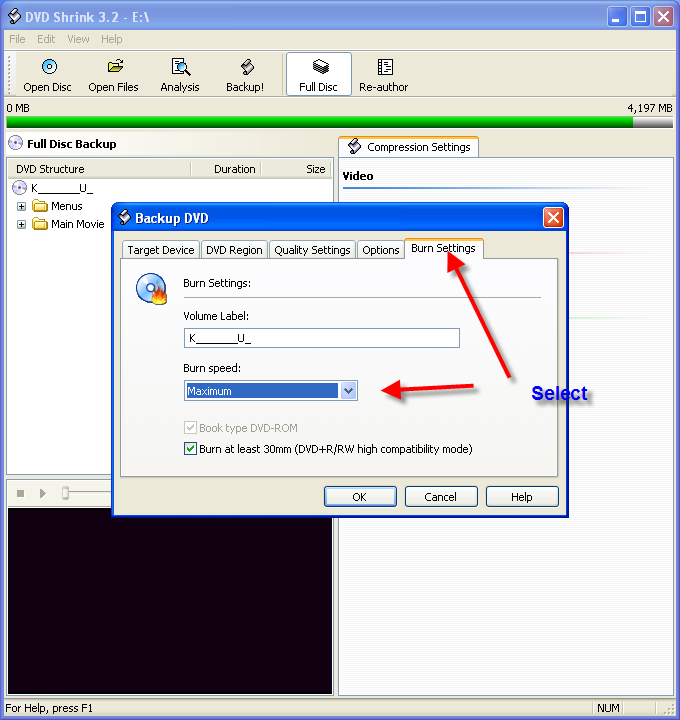
After you select Back Up in DVD Shrink, you will get this screen. Here you can choose your burn speed as illustrated
|
|
Bear08
Junior Member
|
30. August 2007 @ 14:29 |
Link to this message
|
Ah ok, I will try doing that with DVDshrink and will report back.
This still does not help with burning through Nero though! Thats the major problem im experiencing!! :-S
|
|
jezchrizt
Newbie
|
30. August 2007 @ 14:32 |
Link to this message
|
dvd shrink is well out of date and will not work with most new movies , buy clonedvd which updates persistently to deal with new types of protection.
|
AfterDawn Addict
|
30. August 2007 @ 14:33 |
Link to this message
|
By what I can tell from reading your thread you are using DVD Shrink (possibly to fit the movie or whatever) to a DVD5 and then DVD Shrink will auto burn using Nero.....this is what I have displayed in the Photo example.
Nero is burning the project once you have used DVD Shrink
So I DONT understand your statement of
Quote:
This still does not help with burning through Nero though
|
|
Bear08
Junior Member
|
30. August 2007 @ 14:54 |
Link to this message
|
Sorry. Yes I see what your saying and I didnt make much sense. I just meant that generally I use the main Nero programme to burn all my dvds and its annoying me as I can get it working at all!
Ok, I just attempted to burn my film on dvdshrink again, at 4x to no avail. Again, basically froze my computer down until it failed so figure its a hardware problem?!
Heres the failed log from just a second ago.....
Windows XP 6.0
IA32
WinAspi: -
ahead WinASPI: File 'C:\Program Files\Nero\Nero 7\Core\Wnaspi32.dll': Ver=2.0.1.74, size=169792 bytes, created 14/03/2007 12:43:16
NT-SPTI used
Nero API version: 7.9.6.0
Using interface version: 6.0.0.0
Installed in: C:\Program Files\Nero\Nero 7\Core\
Application: ahead\Nero - Burning Rom
Internal Version: 7, 9, 6, 0
Recorder: <Optiarc DVD RW AD-7170S> Version: 1.02 - HA 1 TA 0 - 7.9.6.0
Adapter driver: <IDE> HA 1
Drive buffer : 2048kB
Bus Type : default (0) -> ATAPI, detected: ?
=== Scsi-Device-Map ===
=== CDRom-Device-Map ===
Optiarc DVD RW AD-7170S F: CdRom0
=======================
AutoRun : 1
Excluded drive IDs:
WriteBufferSize: 83886080 (0) Byte
BUFE : 0
Physical memory : 2046MB (2095936kB)
Free physical memory: 951MB (974384kB)
Memory in use : 53 %
Uncached PFiles: 0x0
Use Inquiry : 1
Global Bus Type: default (0)
Check supported media : Disabled (0)
30.8.2007
NeroAPI
23:33:35 #1 Phase 111 File APIProgress.cpp, Line 285
DVD-Video files sorted
23:33:35 #2 Text 0 File SCSIPTICommands.cpp, Line 424
LockMCN - completed sucessfully for IOCTL_STORAGE_MCN_CONTROL
23:33:35 #3 Text 0 File AudioCompilationImpl.cpp, Line 838
DRM: StartDrmRecording(RealRec:1, ImageRec:0, Copies:1)
DRM: Beginning burn process.
23:33:35 #4 ISO9660GEN -11 File Geniso.cpp, Line 3343
First writeable address = 0 (0x00000000)
23:33:35 #5 ISO9660GEN -11 File Geniso.cpp, Line 3343
First writeable address = 0 (0x00000000)
23:33:36 #6 Text 0 File Burncd.cpp, Line 3508
Turn on Disc-At-Once, using DVD media
23:35:22 #7 Text 0 File DlgWaitCD.cpp, Line 307
Last possible write address on media: 2298495 (510:46.45, 4489MB)
Last address to be written: 2286111 (508:01.36, 4465MB)
23:35:22 #8 Text 0 File DlgWaitCD.cpp, Line 319
Write in overburning mode: NO
23:35:22 #9 Text 0 File DlgWaitCD.cpp, Line 2964
Recorder: Optiarc DVD RW AD-7170S, Media type: DVD-R
Disc Manufacturer: MCC 02 - RG20
Disc Application Code: 64, Disc Physical Code: 193
23:35:22 #10 Text 0 File DlgWaitCD.cpp, Line 493
>>> Protocol of DlgWaitCD activities: <<<
=========================================
Disc not writeable. Insert writeable disc.
(Medium in drive: DVD-R. Medium required by compilation: DVD R/RW, DVD R DL, DVD-RAM.)
23:35:22 #11 Text 0 File ThreadedTransferInterface.cpp, Line 793
Setup items (after recorder preparation)
0: TRM_DATA_MODE1 ()
2 indices, index0 (150) not provided
original disc pos #0 + 2286112 (2286112) = #2286112/508:1.37
relocatable, disc pos for caching/writing not required/ required
-> TRM_DATA_MODE1, 2048, config 0, wanted index0 0 blocks, length 2286112 blocks [F: Optiarc DVD RW AD-7170S]
--------------------------------------------------------------
23:35:22 #12 Text 0 File ThreadedTransferInterface.cpp, Line 995
Prepare [F: Optiarc DVD RW AD-7170S] for write in CUE-sheet-DAO
DAO infos:
==========
MCN: ""
TOCType: 0x00; Session Closed, disc fixated
Tracks 1 to 1: Idx 0 Idx 1 Next Trk
1: TRM_DATA_MODE1, 2048/0x00, FilePos 0 0 4681957376, ISRC ""
DAO layout:
===========
___Start_|____Track_|_Idx_|_CtrlAdr_|_____Size_|______NWA_|_RecDep__________
0 | lead-in | 0 | 0x41 | 0 | 0 | 0x00
0 | 1 | 0 | 0x41 | 0 | 0 | 0x00
0 | 1 | 1 | 0x41 | 2286112 | 0 | 0x00
2286112 | lead-out | 1 | 0x41 | 0 | 0 | 0x00
23:35:22 #13 Text 0 File SCSIPTICommands.cpp, Line 215
SPTILockVolume - completed successfully for FSCTL_LOCK_VOLUME
23:35:22 #14 Text 0 File Burncd.cpp, Line 4294
Caching options: cache CDRom or Network-No, small files-Yes (<32KB)
23:35:22 #15 Phase 24 File APIProgress.cpp, Line 285
Caching of files started
23:35:22 #16 Text 0 File Burncd.cpp, Line 4413
Cache writing successful.
23:35:22 #17 Phase 25 File APIProgress.cpp, Line 285
Caching of files completed
23:35:23 #18 Phase 36 File APIProgress.cpp, Line 285
Burn process started at 4x (5,540 KB/s)
23:35:23 #19 Text 0 File ThreadedTransferInterface.cpp, Line 2721
Verifying disc position of item 0 (relocatable, disc pos, no patch infos, orig at #0): write at #0
23:35:23 #20 Text 0 File DVDR.cpp, Line 3225
Recording mode: Sequential Recording Mode
23:35:23 #21 Text 0 File DVDR.cpp, Line 3381
Start write address at LBA 0
DVD high compatibility mode: Yes
23:35:23 #22 Text 0 File Cdrdrv.cpp, Line 9869
---- Disc Structure: Physical Format Information (00h) ----
Media Type: 0, Layer: 0, Address: 0 (0 h), AGID: 0; Length: 2050
Book Type: DVD-R (2), Part Version: 2.0x (5), Extended Part Version: 0.0 (0)
Disc Size: 120 mm, Maximum Rate: <not specified> (F h)
Number of Layers: 1, Track Path: Parallel Track Path (PTP), Layer Type: recordable
Linear Density: 0,267 um/bit, Track Density: 0,74 um/track
Starting Physical Sector Number of Data Area: 30000 h (DVD-ROM, DVD-R/-RW, DVD+R/+RW)
End Sector Number in Layer 0: 0 h (LBN: FFFD0000 h, 4193920 MB)
Data in Burst Cutting Area (BCA) does not exist
Revision number of maximum recording speed: -
Revision number of minimum recording speed: -
Revision number table of recording speed: - - - - - - -
Class: 0
Start sector number of the current Border-Out: 2FE10 h
Start sector number of the next Border-In: 2FFA0 h
Media Specific [16..63]:
00 00 00 00 00 00 00 00 - 00 00 00 00 00 00 00 00 ................
00 02 FE 10 00 02 FF A0 - 00 00 00 00 00 00 00 00 ................
00 00 00 00 00 00 00 00 - 00 00 00 00 00 00 00 00 ................
23:35:23 #23 Text 0 File ThreadedTransfer.cpp, Line 269
Pipe memory size 83836800
23:35:24 #24 Text 0 File Cdrdrv.cpp, Line 1352
23:35:24.164 - F: Optiarc DVD RW AD-7170S : Queue again later
23:37:38 #25 SPTI -1502 File SCSIPassThrough.cpp, Line 179
CdRom0: SCSIStatus(x02) WinError(0) NeroError(-1502)
Sense Key: 0x04 (KEY_HARDWARE_ERROR)
Sense Code: 0x08
Sense Qual: 0x03
CDB Data: 0x2A 00 00 04 01 20 00 00 20 00 00 00
Sense Area: 0x70 00 04 00 00 00 00 0A 00 00 00 00 08 03
Buffer x0cb18580: Len x10000
0x00 00 01 BA 44 36 7F 88 4C A3 01 89 C3 F8 00 00
0x01 E0 07 EC 81 00 00 A2 82 40 C1 86 82 4F FE 91
0x26 1E 7B 01 D8 5A 4D DD A1 98 0F AC DE 2B 81 19
23:37:38 #26 CDR -1502 File Writer.cpp, Line 303
DMA-driver error, CRC error
F: Optiarc DVD RW AD-7170S
23:50:03 #27 Text 0 File DVDR.cpp, Line 3783
EndDAO: Last written address was 262431 (4011Fh)
23:50:03 #28 Phase 38 File APIProgress.cpp, Line 285
Burn process failed at 4x (5,540 KB/s)
23:50:03 #29 Text 0 File AudioCompilationImpl.cpp, Line 863
DRM: DRM burn session terminated.
23:50:03 #30 Text 0 File AudioCompilationImpl.cpp, Line 892
DRM: Closing entire DRM handling. Bye.
23:50:03 #31 Text 0 File SCSIPTICommands.cpp, Line 261
SPTIDismountVolume - completed successfully for FSCTL_DISMOUNT_VOLUME
23:50:07 #32 Text 0 File Cdrdrv.cpp, Line 11185
DriveLocker: UnLockVolume completed
23:50:07 #33 Text 0 File SCSIPTICommands.cpp, Line 424
UnLockMCN - completed sucessfully for IOCTL_STORAGE_MCN_CONTROL
Existing drivers:
File 'Drivers\ADPU160M.SYS': Ver=6.4.645.100 (NT.051018-1332), size=98408 bytes, created 02/11/2006 10:50:35
Registry Keys:
HKLM\Software\Microsoft\Windows NT\CurrentVersion\WinLogon
|
|
jezchrizt
Newbie
|
30. August 2007 @ 15:12 |
Link to this message

|
Disc not writeable. Insert writeable disc.
(Medium in drive: DVD-R. Medium required by compilation: DVD R/RW, DVD R DL, DVD-RAM.)
from this i gather your dvd burner does not take dvd-r- only dvd+
|
|
Bear08
Junior Member
|
30. August 2007 @ 23:48 |
Link to this message
|
No. I had an old disc that was already a coaster in the drive by mistake. I then put in a empty one.
I have been burning on these discs using the drive for the past few weeks with no trouble until this problem occured!!
|
Senior Member
|
31. August 2007 @ 03:29 |
Link to this message
|
|
Optiarc DVD RW AD-7170S F: CdRom0
My brother had that drive said was a peace of shit very fussy about brands of disk better to go and buy a new dvdrw drive the amount of money your waste on disk?s will pay for the new drive get one now for under £20
|
|
Bear08
Junior Member
|
31. August 2007 @ 04:05 |
Link to this message
|
|
I'm starting to think it is a problem with the drive itself!! I mean it was brand new, worked 100% perfectly for 2 weeks and then wont burn zilch now.
Cheers for your input killalot
|
|
Advertisement
|
|
|
Senior Member
|
31. August 2007 @ 04:23 |
Link to this message
|
My brother did update the firmware for it which did help but said it was a horrible drive to work with like I said very fussy about brands of disk even after the firmware update still chucked errors in when it felt like it if money isn?t a problem like I said go and get a new burner under £20 these days pioneer or Lg brands like that cant go wrong with, all the best.
|
|



