User User name Password  
   
Tuesday 17.3.2026 / 17:01
Search AfterDawn Forums:        In English   Suomeksi   På svenska
afterdawn.com > forums > software specific discussion > nero discussion > nero vision resolution problem...
Show topics
 
Forums
Forums
Nero vision resolution problem...
  Jump to:
 
Posted Message
dr3546
Newbie
_
27. October 2007 @ 17:13 _ Link to this message    Send private message to this user   
Hello, I initially posted this in the wrong forum, but I am trying to make a dvd and everytime I add the video files they show up as a resolution of 704x480 and I need them to be the standard tv size (640x480?) because every time i play the video on my dvd player, it cuts off subtitles. I have tried using a program to resize the video, but it doesn't help, because I think they are already the standard size. Anyone else have this problem or know how to fix this?

I would like to add that as far as the actualy burning goes, I don't have any problems, the videos play fine its just that the resolution is odd and cuts off the bottom. Anyone know whatI am talking about?

Thanks

This message has been edited since posting. Last time this message was edited on 27. October 2007 @ 17:20

Advertisement
_
__
Moderator
_
27. October 2007 @ 23:58 _ Link to this message    Send private message to this user   
Hi dr3546
Try changing the aspect ratio In Vision and see if that helps.
By default Nero is set to auotmatic. In Vision go to more>video options>dvd video tab. Change the aspect ratio to 4:3.


Forum Rules
Do this before posting
Do not click this link...
AfterDawn Addict
_
30. October 2007 @ 18:42 _ Link to this message    Send private message to this user   
Are these vids with burned in subs (hard coded)?

Looking for a new burner? Check here.
http://www.cdfreaks.com/reviews/
The reviews also help to determine which media gives the best results.
dr3546
Newbie
_
31. October 2007 @ 20:46 _ Link to this message    Send private message to this user   
I've tried putting the aspect as 4:3 but it doesn't help. The subtitles are burned with the video, you can't remove them I don't think. Could it be the program I am converting with? This is kind of unrelated. but a 30 min mpeg-2 video that is about 300-400 MB ends up being 1.4 GB is that what it normally does or would thatalso be the program?

thanks.
Moderator
_
1. November 2007 @ 19:37 _ Link to this message    Send private message to this user   
I don't think there's much you can do about hard coded subs besides maybe playing w/ the settings on the tv - I could be wrong though.

The file size increasing is normal - you're converting the avi.wmv etc to a dvd compliant file.


Forum Rules
Do this before posting
Do not click this link...
dr3546
Newbie
_
1. November 2007 @ 21:11 _ Link to this message    Send private message to this user   
Alright, Is there a file type I can convert it to so it doesnt take up so much space on the disc? Because it's not the actual file thats so large, it increases once i put it in nero, is that just because it has to convert it?
Moderator
_
1. November 2007 @ 21:26 _ Link to this message    Send private message to this user   
Yes when you convert from a format like avi to mpeg2 (what Vision converts the file to) it will increase in size.

If these are avi's and your dvd player supports DivX then you could burn them as a data disc. Would stay in the same format and no increase in size.


Forum Rules
Do this before posting
Do not click this link...
AfterDawn Addict
_
3. November 2007 @ 02:41 _ Link to this message    Send private message to this user   
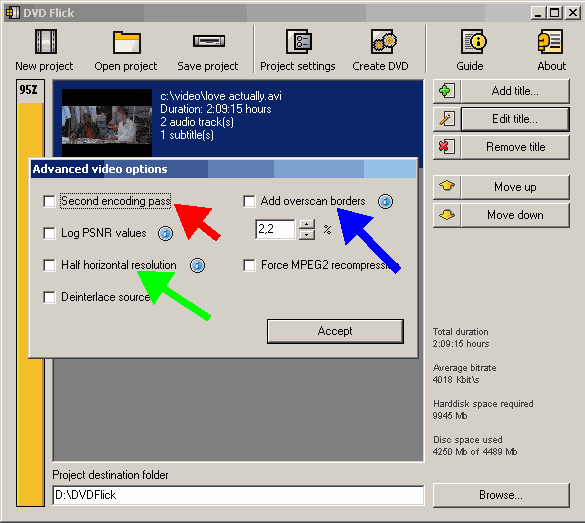
If you want DVD compliant files, use DVD Flick. What you need to do is add some borders around the whole video. The size will depend on the overscan of your TV.

Look here and experiment, note the blue arrow.


Looking for a new burner? Check here.
http://www.cdfreaks.com/reviews/
The reviews also help to determine which media gives the best results.
dr3546
Newbie
_
15. November 2007 @ 22:25 _ Link to this message    Send private message to this user   
Thanks for the help, it's been a while since you all replied, but do you maybe know how i could find out the overscan of my tv? I guess I could just experiment too.
thanks
Advertisement
_
__
 
_
Moderator
_
15. November 2007 @ 23:42 _ Link to this message    Send private message to this user   
Hmmm check your display settings or your tv remote may have the options too.
Try MysticE suggestions & give DVD Flick a go.


Forum Rules
Do this before posting
Do not click this link...
Related links
Download Nero from here.
How to burn DVDs with Nero? Read our guide from here.
Support AfterDawn and purchase your copy of Nero from here!
 
Related forum topics Posts Last post Forum room
My Nero 6 OEM not compatable with Windows 8.1 4 2. June 2014 Windows - Software discussion
nero 2014 3 24. May 2014 Nero discussion
need to download Nero 9 5 9. May 2014 Nero discussion
read errors on disc verify in nero 12 2 3. May 2014 Nero discussion
I lose sound when I join files on Nero 12 Platinum? 9 29. April 2014 Nero discussion
Nero 12 activation 3 15. January 2014 Nero discussion
Help with NERO burning BluRay 2 22. December 2013 Nero discussion
DVD-DL Media keeps failing with Nero Platinum 12 6 7. December 2013 Nero discussion
A better way to burn Blu Ray disks...than using Nero! 3 30. October 2013 Blu-ray
which version of Nero to get for windows 7 OS ?? 2 26. October 2013 Nero discussion

 
afterdawn.com > forums > software specific discussion > nero discussion > nero vision resolution problem...
 

Digital video: AfterDawn.com | AfterDawn Forums
Music: MP3Lizard.com
Gaming: Blasteroids.com | Blasteroids Forums | Compare game prices
Software: Software downloads
Blogs: User profile pages
RSS feeds: AfterDawn.com News | Software updates | AfterDawn Forums
International: AfterDawn in Finnish | AfterDawn in Swedish | AfterDawn in Norwegian | download.fi
Navigate: Search | Site map
About us: About AfterDawn Ltd | Advertise on our sites | Rules, Restrictions, Legal disclaimer & Privacy policy
Contact us: Send feedback | Contact our media sales team
 
  © 1999-2026 by AfterDawn Ltd.

  IDG TechNetwork