All, I'm trying too burn a DVD video of my daughters volleyball games. I'm using the latest version of Nero and Nero Vision 5. I can get everything set the way I want everything seems to be working perfectly but when the Nero is encoding the videos every so often there is a blank/black screen (like a skip in the video) inserted in to the final burn. I can see this blank/black screen being put into the video during the encoding process. When you watch the video on the DVD this blank/black screen becomes very interruptive and is a nusense. I've tried changing different encoding settings to no avail. Does or has anyone experienced this before, and do you have a resolution for this? Please help. Thanks in advance for your help...
Wow that sounds very strange. I haven't heard of this one before. Which version of Nero are you running? The "best" and most reliable version is 7.10.1.0 which includes Nero Vision 4, I myself downgraded from 5 to 4 only to get GREAT results. Here is something that might help from the Nero site...
It is likely that the problem is caused by faulty filter implementation.
Go through the following steps to rectify this issue:
1. Rename the folder "Ahead" in folder:
"C:\Program Files\Common Files\" into "Ahead_2". When reinstalling Nero, the folder "Ahead" will be created again. The Nero's DirectShow filters and Codecs will also be installed and registered again. As soon as the folder "Ahead" is once again created in the directory "C:\ Program Files\Common files\" the directory "Ahead_2" can be erased.
2. Erase the contents of the following folder:
"C:\Documents and Settings\All Users\Application Data\Ahead\NeroDigital"
"C:\Documents and Settings\All Users\Application Data\Ahead\NeroRecode"
"C:\Documents and Settings \"USERNAME"\Application Data\Ahead\NeroVision\NVFACache"
3. Make sure that you have your Nero 7 serial number ready.
The serial number is structured as follows:
1Cxx-xxxx-xxxx-xxxx-xxxx-xxxx-xxxx.
It can be found on a sticker on the jewel case.
If Nero is installed on your computer the serial number can be found as follows:
a) Open Nero StartSmart and go into Nero ProductCenter by clicking on the "Nero" logo in the top left corner. Click on the index box "Serial Numbers" to view the serial number.
b) Alternatively, you can find the serial number in the Registry:
Open the "Registry" by clicking on ?Start? in Windows, clicking on ?Run?, typing in "regedit" into the field "Open" and verifying with "OK"
The serial number is found in the following directory:
"HHKEY_LOCAL_MACHINE\Software\ahead\Installation\Families\Nero 7\Info"
Find the entry ?serial7?, double-click on ?serial7?, the serial number can be found here.
4. The General CleanTool should be used before reinstalling Nero to completely remove all Nero entries from your computer. The General CleanTool can only be implemented if you are logged in as Administrator.
Warning: all Nero plug-ins will be removed as well!
Download the General-Cleantool and extract it on the hard drive by using WinZIP or WinRAR. Start the General-Cleantool by double-clicking on the .exe file. Choose:
Clean All
Clean
Deinstallation of all Nero products.
Restart the PC. All Nero entries in the Registry are erased.
5. Afterwards, reinstall Nero 7.10.1.0 by downloading the current Nero version from our website. Enter your serial number during the installation process.
6. The folder "Ahead" was created again in the directory
"C:\Program Files\Common Files\" Folder "Ahead_2" can now be erased if you haven?t already done so.
2Shay - I've tried what you suggest in your first post already. As a matter of fact I've done this a few times, on two different computers, this doesn't resolve the issue. I'm using Nero 8.1.1.0 with Nero Vision 5. I would love to try and down grade but I do not have version 7.10.1.0. I'll see if I can locate a copy of this version. I'll post my log file for you to see when I return home from work. I do not know how you can figure anything out from that? I all looks like one big mess to me :-(
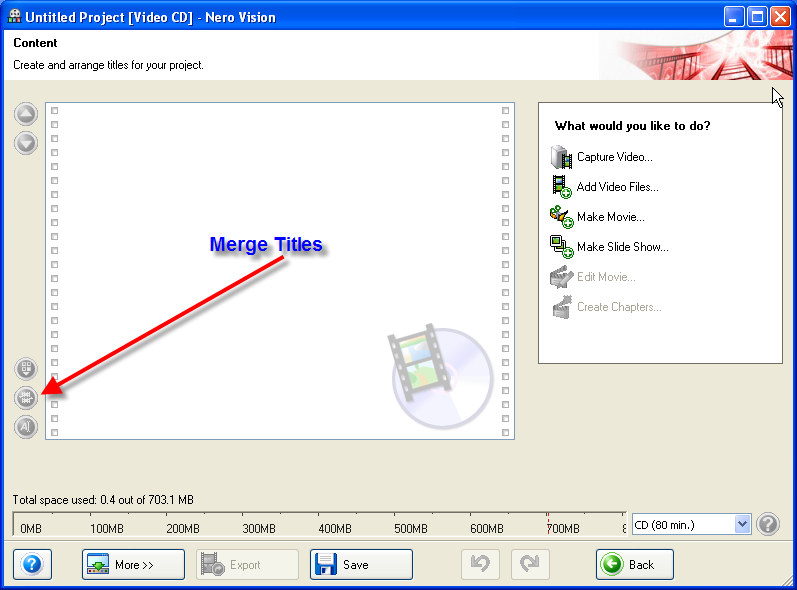
gwendolin - No I'm using the merge title function in Nerovision. I didn't even know that option existed. Should I try it? What will it do for me?
I appreciate your responses to help me out with this. Thanks.