|
NERO RECODE
|
|
|
valkilm
Account closed as per user's own request

|
25. December 2007 @ 08:19 |
Link to this message

|
Friends,
First let me introduce myself: I'm new here and I'm from the Azores islands - Portugal.
I have the Windows Vista Home Premium on a laptop Toshiba A200-1AS Satellite.
I have downloaded the Nero 8 trial and using the Nero Recode to copy an entire DVD to DVD using a DVD+R DL disc (8,5GB) for a movie I have taken out the protections just to test, at around 23% of the recording the Nero Recode gives an error: Out of Memory.
I have 2Gb or RAM memory installed, but the Nero Recode when starting recording it starts to consume up and up my RAM until it reaches 97% (more or less) of the usage of the RAM and ofcourse it craches with this Out of Memory error.
Before I had 2X 512 MB and upgraded to 2X1GB of RAM. I was advised to format the laptop using a complete Windows Vista Home Premium and not the recovy cd that comes with the laptop.
Does any one has a solution for this?
Thank you
|
|
Advertisement
|
 |
|
|
|
laddyboy
AfterDawn Addict
|
25. December 2007 @ 10:08 |
Link to this message

|
|
I don't think you're running out of computer memory. What did you use to rip the original DVD to your HDD or are you processing directly from the original DVD? What did you do to remove the protections?
|
|
valkilm
Account closed as per user's own request
|
26. December 2007 @ 15:22 |
 Link to this message
|
Hi,
I used the "DVDFab HD Decrypter 4" and passed it to a folder with the full original movie size...
Then I opened the Nero Recode and imported the full DVD and tryied to burn it (as I did before sucessfully) and then when burning the dual layer DVD+R the RAM memory starts rising and rising until it reaches almost 100% and then at this time gives this out of memory error...
|
|
valkilm
Account closed as per user's own request
|
26. December 2007 @ 16:06 |
Link to this message

|
Originally posted by valkilm:
Hi,
I used the "DVDFab HD Decrypter 4" and passed it to a folder with the full original movie size...
Then I opened the Nero Recode and imported the full DVD and tried to burn it (as I did before sucessfully) and then when burning the dual layer DVD+R the RAM memory starts rising and rising until it reaches almost 100% and then at this time gives this out of memory error...
I tried to use the DVD Shrink but for this new Spider Man 3 it doesn't work as it's not updated anymore...
|
Senior Member
|
26. December 2007 @ 17:23 |
Link to this message
|
A little question? If your burning to a DL why not let decrypter burn it or Nero Burning Rom instead of recode?Post a log of your burn. Chris
|
|
laddyboy
AfterDawn Addict
|
26. December 2007 @ 19:59 |
Link to this message
|
ChrisC586 is correct. You wouldn't want to use Recode unless you were shrinking to fit a DVD9 or reauthoring only the main title. If you strip the protection with DVDFab HD Decrypter, then use ImgBurn to burn the disk. You may have to specify the layer break for ImgBurn.
The easiest way to backup a protected DL disk is to use AnyDVD running in the background. Use the ISO Read mode of DVD Decrypter to rip the disk to your HDD and then the ISO Write mode to burn the ripped image file to disk.
http://www.slysoft.com/en/anydvd.html
http://www.mrbass.org/dvdrip/
|
|
Amir89
Senior Member
|
28. December 2007 @ 02:10 |
Link to this message
|
Ditto that.
Use AnyDVD.
Best DVD Decrypting software period.
Don't use anything else.
Make sure it's running in the background while you burn.
And if your copying a DVD movie to a DVD that are the same size, just copy the entire disc, don't bother with recode.
|
|
valkilm
Account closed as per user's own request
|
29. December 2007 @ 07:27 |
Link to this message
|
Friends,
I will try as you say, thank you.
I spoke with a friend that told me that Nero Recode should never consume RAM memory as it's consuming mine...He told me that it might be a bug with Nero Recode, or the fact I have upgraded from 1 gb to 2gb of RAM...or Vista!!
Strange is that before I managed to use Nero Recode without problems...
|
|
laddyboy
AfterDawn Addict
|
29. December 2007 @ 12:49 |
Link to this message
|
You might try uninstalling Nero, running the Clean Tool, and then reinstalling. I had lots of problems with Nero 8 and went back to Nero 7 on my Vista system. I generally use other software other than Nero most of the time, finding it works better overall.
|
Senior Member
|
29. December 2007 @ 19:02 |
Link to this message
|
valkilm hi :)
laddyboy says
Quote:
The easiest way to backup a protected DL disk is to use AnyDVD running in the background. Use the ISO Read mode of DVD Decrypter to rip the disk to your HDD and then the ISO Write mode to burn the ripped image file to disk.
he is absolutely right.
here's a small guide on how to do it (easy peasy)
also decrypter handles the layer break better than most
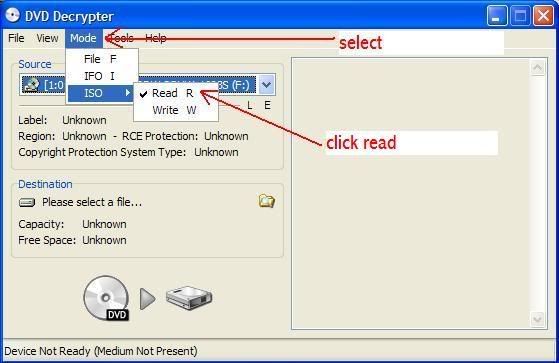
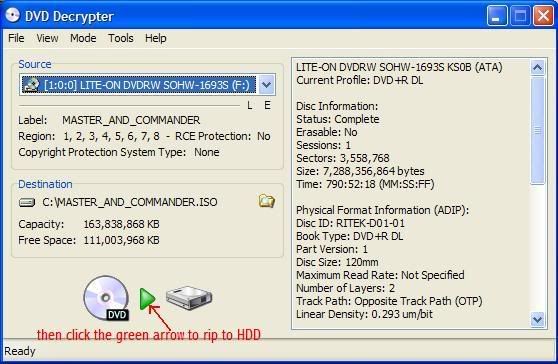
after it is ripped to HDD
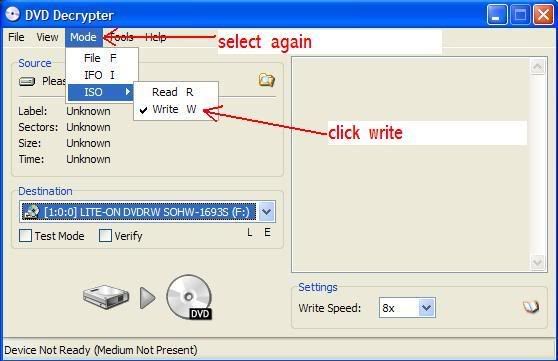
if it does not auto select the file you have just ripped
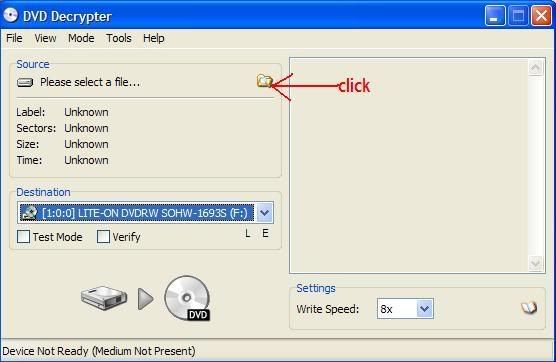
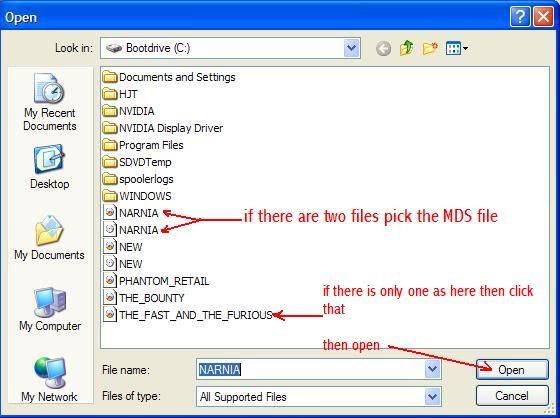
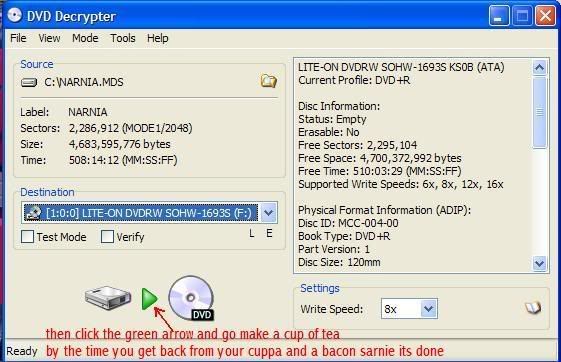
 gif by ireland
we cant help if you wont help yourself |
|
Amir89
Senior Member
|
30. December 2007 @ 02:52 |
Link to this message
|
Well you never know this could be a problem with Nero 8, maybe some kind of glitch, memory leak, etc...
Just as a test you should try running Nero 7 and see if it happens with that.
|
|
jenlow
Newbie
|
30. December 2007 @ 05:12 |
Link to this message
|
I've had the same problem with the out of memory error on Shrink. I don't think its recode or shrink causing the problem. I think it was a problem with DVDFab HD Decrypter 4 not taking the RipGuard protection out of the ripped DVD.
4.0.3.0 (Dec 26, 2007)
- Merry Christmas!
- New: Added support for a new copy protection as found on "Rush Hour 3", (US).
- New: Added support for a new CORE X2 protection as found on "Next", (R2, Czech).
The new CORE X2 is really hard to beat, but DVDFab can handle it now.
- New: Improved DVD structure cleaning module. Now DVDFab output is more compatible with other DVD programs.
- New: Improved PathPlayer to determine some special paths.
- New: Added more protection info in "Settings -> Info" window.
- New: Added devices "ZUNE, NDS, Xbox 360 and PS3" to navigation bar.
- New: Updated language files.
- Fix: DVD Shrink "Out of memory" error when copying DVD in certain cases.
- Fix: A corrupt data problem when copying chapter range of "Main Movie".
- Fix: DVDFab will not run when Window Media Player is not installed.
- Fix: A crash problem when clicking "Settings" button in certain cases.
- Fix: A crash problem when using command line interface.
- Fix: Several minor problems.
Please update to the latest version of DVDFab HD Decrypter 4 to resolve this problem.
|
|
amy924
Newbie
|
30. April 2008 @ 20:19 |
Link to this message
|
I can't take credit for this info because I got the suggestion from an older afterdawn forum.
http://forums.afterdawn.com/thread_view.cfm/348001
I run Vista with 4g memory. When using nero recode (with or without the burn at once feature) I would always get the out of memory error. Here is a way around it.
You need to change your virtual memory.
For Vista users, go to Control Panel/Performance Information and Tools/Advanced Tools, then Adjust the Appearance and Performance of WIndows, select the Advanced tab, click the change button under Virtual Memory, select Custom Size and make the initial size 512 and max size 512. Then select Ok and Apply.
You have to unselect the burn at once feature and let the file compile first, after that is done, the disc will start burning. I have tried burn at once, and it never works. This is the only way I can get something to burn when using nero recode.
Hope this helps.
|
|
Advertisement
|
|
|
AfterDawn Addict
|
1. May 2008 @ 10:59 |
Link to this message
|
Nothing here to see, move along folks.
 This message has been edited since posting. Last time this message was edited on 1. May 2008 @ 11:01
|


