User User name Password  
   
Wednesday 21.1.2026 / 17:44
Search AfterDawn Forums:        In English   Suomeksi   På svenska
afterdawn.com > forums > pc hardware > other pc hardware > video cards hmmmm?
Show topics
 
Forums
Forums
VIDEO CARDS hmmmm?
  Jump to:
 
Posted Message
Page:12Next >
bpanther
Member
_
7. January 2008 @ 21:26 _ Link to this message    Send private message to this user   
i bought a geforce nvidia 6200 xfx low profile compatible AGP 8X 256mb ddr2 video card and when i instal it and run the cd all go's great untill i go to set the resolution and i get a restart or a blue screen saying failed or had to be shut down why is this doing it when setting resolution to 1025 by 768 is this not a good video card ???? is it better the ati radeon 9250 with 128 mb pci ??

SJC
Advertisement
_
__
AfterDawn Addict

2 product reviews
_
7. January 2008 @ 21:54 _ Link to this message    Send private message to this user   
What exactly are you doing when it blue screens? Does it only do it while changing the resolution? Does it blue screen when maybe if you just leave the game on. It might be overheating. Have you tried to overclock it?
bpanther
Member
_
7. January 2008 @ 22:23 _ Link to this message    Send private message to this user   
no only happens when changing resolutions and i just bought it its totally brand new never used i just installed it for the 1st time and it blue screens saying needs to shut down

SJC
AfterDawn Addict

2 product reviews
_
7. January 2008 @ 22:27 _ Link to this message    Send private message to this user   
Did you change anything else? i suggest you un-install the driver and then get the latest drivers from here. Those drivers are only for XP. I assume you have XP and not Vista?

http://www.nvidia.com/object/winxp_169.21_whql.html
bpanther
Member
_
7. January 2008 @ 22:41 _ Link to this message    Send private message to this user   
yes i have xp and whats wrong with the drivers on the supplied cd??

SJC
AfterDawn Addict
_
7. January 2008 @ 22:50 _ Link to this message    Send private message to this user   
cd drivers are usually outdated. especially since the 6200 is starting to get old.

ps2: v7 scph-39001 - independence exploit - hdloader 0.8c - maxtor 300gb hdd
(+[__]%) psp slim ta-085v1: 6.60 PRO B10
wii (powered by bootmii/priiloader): 4.1u - d2x v10beta53-alt (base 56) - configurable usb loader v70r51/devolution r188 - wd scorpio black 7200rpm 320gig w/ ams venus ds2 enclosure

got a whole lot more to list . . .
bpanther
Member
_
7. January 2008 @ 22:52 _ Link to this message    Send private message to this user   
ok ill try the driver later tonight that u supplied but it wont be for a bit but i will keep in contact if it works for me or not ty for now --keep in touch bye for now

SJC
bpanther
Member
_
7. January 2008 @ 23:30 _ Link to this message    Send private message to this user   
WOW ty it worked great and do u have any recommended settings like screen refresh rate? anisotropic filtering etc things like that

SJC
AfterDawn Addict
_
7. January 2008 @ 23:39 _ Link to this message    Send private message to this user   
with refresh rate, have the "hide modes monitor can't display" checked, and choose the highest refresh rate from the list; most likely 72-75Hz will be max.

ps2: v7 scph-39001 - independence exploit - hdloader 0.8c - maxtor 300gb hdd
(+[__]%) psp slim ta-085v1: 6.60 PRO B10
wii (powered by bootmii/priiloader): 4.1u - d2x v10beta53-alt (base 56) - configurable usb loader v70r51/devolution r188 - wd scorpio black 7200rpm 320gig w/ ams venus ds2 enclosure

got a whole lot more to list . . .
AfterDawn Addict

2 product reviews
_
7. January 2008 @ 23:46 _ Link to this message    Send private message to this user   
What game are you trying to play. Try to set your refresh rate as high as you can. I mean that would usually solve the tearing problem so you don't have to enable vsync. I guess with a card like that modern games wont run fast enough to cause tearing.

Anyway what games are you typing to play? Go ahead and download fraps. It shows you how many frames per second you are getting. Try to set your settings in games as high as you can with the frames getting too low.

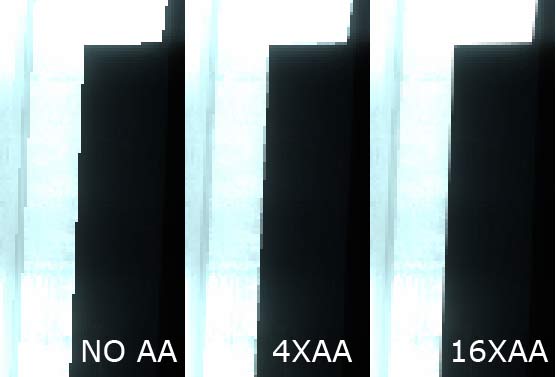
Anisotropic filtering, and Anti-Aliasing are ways to make the edges of things in games look smoother. Here is what the difference might be like.


See how it smooths it over? When you look at a full view picture of the game everything will be smoothed over like that if you enable Anti-Aliasing or Anisotropic filtering. Of course enabling it will lower your frames so you have to find a good balance.

This message has been edited since posting. Last time this message was edited on 7. January 2008 @ 23:52

bpanther
Member
_
7. January 2008 @ 23:56 _ Link to this message    Send private message to this user   
thanks guys the vid looks awsome just like HD more viberant more colour just more every thing even my ram show 1 gig now b4 it never did on my ATI vid card BY the way im playing "Monster Madness" and ty u so much life savers and my headaches are gone- does any one know how to get your floppy drive to stop coming up and saying press f1 to continue after i disconected and removed it so far i removed it from 1st boot drive then what do i do so it bootes normal instead of looking for the floppy?

SJC
AfterDawn Addict

2 product reviews
_
8. January 2008 @ 00:02 _ Link to this message    Send private message to this user   
It seems like a recent game and it uses Unreal Engine 3 so you probably cant turn up the setting much.

Also I don't really know about the floppy drive. Just set your 1 boot device to your HDD and you will be fine.
bpanther
Member
_
8. January 2008 @ 00:07 _ Link to this message    Send private message to this user   
ill try that thanks

SJC
bpanther
Member
_
8. January 2008 @ 20:36 _ Link to this message    Send private message to this user   
what kinda settings are recommended for the colour correction it seems like i cant get my colour settings set? looks very dark

SJC
AfterDawn Addict

2 product reviews
_
8. January 2008 @ 20:47 _ Link to this message    Send private message to this user   
If you right click on your desktop the Nvidia control panel thing should be one of the options. Click on that and then configure your display through that. It will take you through all the steps.
bpanther
Member
_
8. January 2008 @ 20:59 _ Link to this message    Send private message to this user   
ya but what is your preference in there?

SJC
AfterDawn Addict

2 product reviews
_
8. January 2008 @ 21:05 _ Link to this message    Send private message to this user   
I just set it to what it tells me. I don't have an Nvidia card anymore, and I never configured my display with this ATI one. It's fine the way it is right now.
bpanther
Member
_
8. January 2008 @ 21:07 _ Link to this message    Send private message to this user   
ok well i think its set pretty good so far i set it up more but ya i never got a opinion b4 about the 2 cards if u look earlier in our conversation i ask what card is better the radeon one or the g force card i have now?? lmao

SJC
AfterDawn Addict

2 product reviews
_
8. January 2008 @ 21:11 _ Link to this message    Send private message to this user   
The 6200 is better.
bpanther
Member
_
8. January 2008 @ 21:13 _ Link to this message    Send private message to this user   
ok ty i thought so now do i have to update driver every so often for this card like i had cuz the cd was out of date?

SJC
AfterDawn Addict

2 product reviews
_
8. January 2008 @ 21:14 _ Link to this message    Send private message to this user   
Drivers on CDs are almost Always out of date. Just check every so often. It's good to update drivers.
bpanther
Member
_
8. January 2008 @ 21:18 _ Link to this message    Send private message to this user   
good to know oh ya i almost forgot -it looks like the DVI adapter is disabled cuz i have a adapter for my vga to plug in the dvi and it wont work unless i plug direct into the vga

SJC
AfterDawn Addict

2 product reviews
_
8. January 2008 @ 23:00 _ Link to this message    Send private message to this user   
I'm sorry I didn't really understand. If your DVI port not working?
bpanther
Member
_
8. January 2008 @ 23:44 _ Link to this message    Send private message to this user   
i have a dvi and a vga and a s video ports on the card-- when i put the dvi adapter on the vga plug to plug into the dvi it does not respond only responds when i plug the vga direct

SJC
Advertisement
_
__
 
_
AfterDawn Addict

2 product reviews
_
8. January 2008 @ 23:54 _ Link to this message    Send private message to this user   
It's probably because the VGA is set up as the primary port. Right click on your desktop and go to properties. Then click on the settings tab. See where it says display and it has a drop down thing? Well you can select the second display(the DVI port) and make that one your primary if you want.
 
Page:12Next >
afterdawn.com > forums > pc hardware > other pc hardware > video cards hmmmm?
 

Digital video: AfterDawn.com | AfterDawn Forums
Music: MP3Lizard.com
Gaming: Blasteroids.com | Blasteroids Forums | Compare game prices
Software: Software downloads
Blogs: User profile pages
RSS feeds: AfterDawn.com News | Software updates | AfterDawn Forums
International: AfterDawn in Finnish | AfterDawn in Swedish | AfterDawn in Norwegian | download.fi
Navigate: Search | Site map
About us: About AfterDawn Ltd | Advertise on our sites | Rules, Restrictions, Legal disclaimer & Privacy policy
Contact us: Send feedback | Contact our media sales team
 
  © 1999-2026 by AfterDawn Ltd.

  IDG TechNetwork