|
"will not fit on disc" message from Nero Vision 4
|
|
|
pirate81
Newbie

|
21. February 2008 @ 12:48 |
 Link to this message

|
After trasncoding it says "will not fit onto disc" or something like that. Here's the log file.
I think this is the whole log file. If not, please tell me where it starts.
====== *** NeroAPI, History File *** ======
*took out the serial numbers*
Windows XP 5.1
IA32
WinAspi: -
ahead WinASPI: File 'C:\Program Files\Nero\Nero 7\Core\Wnaspi32.dll': Ver=2.0.1.74, size=164112 bytes, created 11/2/2004 12:54:32 PM
NT-SPTI used
Nero API version: 7.7.5.1
Using interface version: 7.5.0.0
Installed in: C:\Program Files\Nero\Nero 7\Core\
Application: ahead\NeroVision
Internal Version: 7, 7, 5, 1
Recorder: <BENQ DVD DD DW1620> Version: B7H9 - HA 1 TA 0 - 7.7.5.1
Adapter driver: <IDE> HA 1
Drive buffer : 2048kB
Bus Type : default (0) -> ATAPI, detected: ?
=== Scsi-Device-Map ===
DiskPeripheral : WDC WD800JB-00JJC0 atapi Port 0 ID 0 DMA: On
DiskPeripheral : WDC WD100AA atapi Port 0 ID 1 DMA: On
CdRomPeripheral : BENQ DVD DD DW1620 atapi Port 1 ID 0 DMA: On
CdRomPeripheral : LITE-ON COMBO SOHC-5232K atapi Port 1 ID 1 DMA: Off
=== CDRom-Device-Map ===
BENQ DVD DD DW1620 F: CDRom0
LITE-ON COMBO SOHC-5232K G: CDRom1
=======================
AutoRun : 1
Excluded drive IDs:
WriteBufferSize: 83886080 (0) Byte
BUFE : 0
Physical memory : 1023MB (1047792kB)
Free physical memory: 549MB (562988kB)
Memory in use : 46
Uncached PFiles: 0x0
Use Inquiry : 1
Global Bus Type: default (0)
Check supported media : Disabled (0)
21.2.2008
NeroAPI
7:48:47 AM #1 Phase 111 File APIProgress.cpp, Line 285
DVD-Video files sorted
7:48:48 AM #2 Text 0 File SCSIPTICommands.cpp, Line 411
LockMCN - completed sucessfully for IOCTL_STORAGE_MCN_CONTROL
7:48:48 AM #3 ISO9660GEN -11 File Geniso.cpp, Line 3334
First writeable address = 0 (0x00000000)
7:48:49 AM #4 ISO9660GEN -11 File Geniso.cpp, Line 3334
First writeable address = 0 (0x00000000)
7:48:49 AM #5 Text 0 File Burncd.cpp, Line 3465
Turn on Disc-At-Once, using DVD media
9:02:53 AM #6 Text 0 File DlgWaitCD.cpp, Line 306
Last possible write address on media: 2295103 (510:01.28, 4482MB)
Last address to be written: 2405951 (534:39.26, 4699MB)
9:02:53 AM #7 Text 0 File DlgWaitCD.cpp, Line 318
Write in overburning mode: NO (enabled: CD)
9:02:53 AM #8 Text 0 File DlgWaitCD.cpp, Line 2912
Recorder: BENQ DVD DD DW1620
Medium not present
9:02:53 AM #9 Text 0 File DlgWaitCD.cpp, Line 490
>>> Protocol of DlgWaitCD activities: <<<
=========================================
Not enough free discspace.
(Medium in drive: DVD+R. Medium required by compilation: DVD R/RW, DVD+R DL.)
9:02:53 AM #10 Text 0 File SCSIPTICommands.cpp, Line 411
UnLockMCN - completed sucessfully for IOCTL_STORAGE_MCN_CONTROL
Existing drivers:
File 'Drivers\CDRALW2K.SYS': Ver=8.0.0.212 , size=2560 bytes, created 10/4/2006 9:42:42 PM
File 'Drivers\PXHELP20.SYS': Ver=3.00.41a, size=36560 bytes, created 9/27/2006 4:53:22 PM (Prassi/Veritas driver for win 2K)
Registry Keys:
HKLM\Software\Microsoft\Windows NT\CurrentVersion\WinLogon\AllocateCDROMs : 0 (Security Option)
====== *** NeroAPI, History File *** ======
|
|
Advertisement
|
 |
|
|
Senior Member
7 product reviews
|
21. February 2008 @ 13:17 |
Link to this message
|
pirate81,
Nero is telling you to use a dual layer disc. You're trying to write data which all in all cannot be contained onto a DVD+R.
What you can do is to opt to write the compilation to a disk folder first. Here's how: On the final screen called Burn Options, prior to pressing the Burn button in NeroVision, select Write to Hard Disk Folder from the menu in the upper right-hand side. Next, unwrap the offshoot files in DVD Shrink to compress the size. Finally, burn with Nero.
|
AfterDawn Addict
|
21. February 2008 @ 18:11 |
Link to this message

|
|
|
pirate81
Newbie
|
27. February 2008 @ 08:21 |
Link to this message
|
|
Now it seems to be doing this for every movie I try. Old Movies that were'nt dula layer movies are doing it too. Any ideas?
|
AfterDawn Addict
|
27. February 2008 @ 08:26 |
Link to this message
|
first get rid of this BAD A$$ MOFO roxio driver!:
File 'Drivers\CDRALW2K.SYS': Ver=8.0.0.212 , size=2560 bytes, created 10/4/2006 9:42:42 PM
unistall app from PC, then use this to get rid of registry
http://www.softpedia.com/get/Tweak/Uninstallers/Roxio-Zap.shtml
------------
your project is TOO BIG!!!
Last possible write address on media: 2295103 (510:01.28, 4482MB)
Last address to be written: 2405951 (534:39.26, 4699MB) <---- WOW DADDY
set output to 4300meg in options/preferences etc
------------
Dma is off on this drive = CdRomPeripheral : LITE-ON COMBO SOHC-5232K atapi Port 1 ID 1 DMA: Off
------------
booktype +R to dvd-rom aids compatibility for play back too
Nothing here to see, move along folks.
 This message has been edited since posting. Last time this message was edited on 27. February 2008 @ 08:32
|
|
pirate81
Newbie
|
27. February 2008 @ 10:08 |
Link to this message

|
Sry but did u not read what I wrote? Its happening with different movies. They cant ALL be dual Layer movies. Why would there be a roxio driver in nero?
|
Senior Member
|
27. February 2008 @ 13:37 |
Link to this message
|
|
@pirate81,
Everyone are giving you good advice. Follow them and it should resolve your problem.
nasayin
|
Senior Member
7 product reviews
|
27. February 2008 @ 14:10 |
Link to this message
|
|
@ pirate81,
Have you tried any of the suggested fix at all?
|
AfterDawn Addict
|
28. February 2008 @ 04:11 |
Link to this message
|
Originally posted by pirate81:
Sry but did u not read what I wrote? Its happening with different movies. They cant ALL be dual Layer movies. Why would there be a roxio driver in nero?
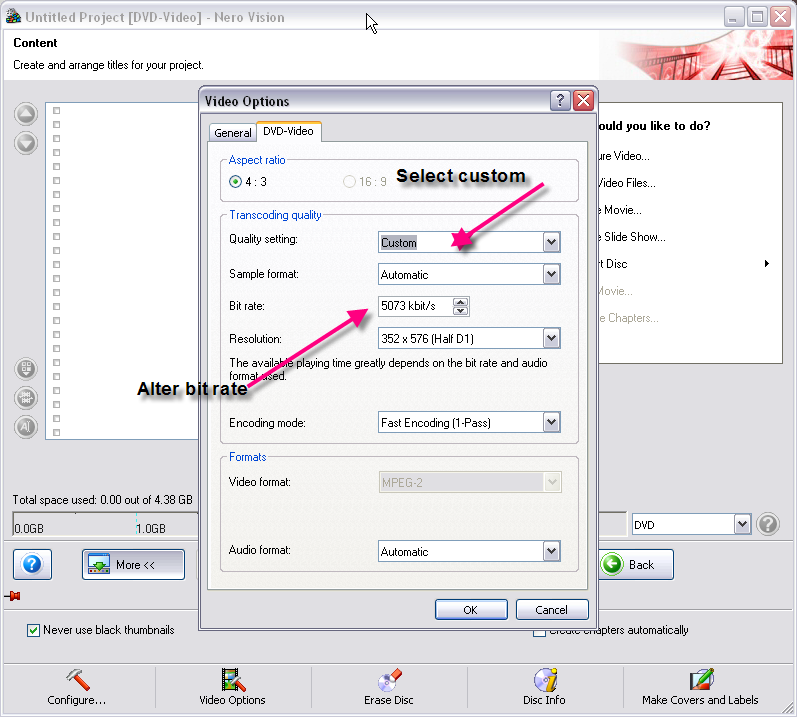
just over size like mentioned could be down to bitrate, your only slightly over dvd-r size, couldnt find a custom setting box in nero, only what gwendolin's picture shows, so...
i would chuck files in dvd shrink and set 4300meg, easy
Nothing here to see, move along folks.
|
AfterDawn Addict
|
28. February 2008 @ 04:36 |
Link to this message
|
Located here
|
AfterDawn Addict
|
28. February 2008 @ 06:48 |
Link to this message
|
gwendolin, setting own bitrate doesnt set output size so could end bigger maybe?????
fit to disc maybe more closer to fit?
Nothing here to see, move along folks.
This message has been edited since posting. Last time this message was edited on 28. February 2008 @ 06:49
|
|
pirate81
Newbie
|
28. February 2008 @ 12:29 |
Link to this message
|
|
Ok that roxio zap profgram disappears after clicking it to open so that fix isnt working.
|
Senior Member
|
28. February 2008 @ 12:35 |
Link to this message
|
nasayin
|
AfterDawn Addict
|
28. February 2008 @ 16:06 |
Link to this message
|
Quote:
gwendolin, setting own bitrate doesnt set output size so could end bigger maybe?????
If he is talking about the problem of fitting a movie that once converted, will not fit to a standard DVD5, then by altering the bit rate you can in fact make it fit...you have to fiddle with the bitrate until you get it right...I reduce bitrate, click OK and then check to see if it fits..if not I reduce it again and repeat process until it does.
|
|
Advertisement
|
|
|
AfterDawn Addict
|
28. February 2008 @ 16:13 |
Link to this message
|
|
gotcha buddy ;-]
Nothing here to see, move along folks.
|