|
Problem with menu in nero vision
|
|
|
dmfighter
Newbie

|
6. April 2008 @ 21:49 |
 Link to this message

|
ok i am trying to make a dvd project, burning avi files of tv episodes using nero vision. i also am using dvd shrink to fit a large number of episodes onto a dvd-r instead of a dvd-9 dual layer. Ive got the right number of episodes to fit on a dvd-r with dvd shrink, and it burns fine, but i noticed something. I save the nero vision to hard disk, then open it up in dvdshrink. when i see what the menus look like, in dvdshrink and on the dvd-r i burn it on, the menus aren't full screen. The sides of the menus, and the episodes that i play have black borders on the sides,( like widescreen but the black areas go up and down, with the menu and episodes playing in between and cutting out part of the episodes) how can i fix this, because previous projects that i did in nero vision came out fine, with the menu and episodes covering the whole screen? also, is there any other programs that can make burning avi files and making menus easier than nero vision?
please and thanks
A,J
|
|
Advertisement
|
 |
|
|
AfterDawn Addict
|
7. April 2008 @ 05:31 |
Link to this message

|
|
what you got set in video-options/dvd-video/aspect ratio? is it auto?
Nothing here to see, move along folks.
 |
|
dmfighter
Newbie
|
7. April 2008 @ 15:48 |
Link to this message

|
|
how do i check that, exactly?
A,J
|
AfterDawn Addict
|
8. April 2008 @ 02:51 |
Link to this message
|
easyer app is dvd flick beta
-----------------------------------------

Nothing here to see, move along folks.
|
|
dmfighter
Newbie
|
9. April 2008 @ 09:42 |
Link to this message
|
heres what it looks like burned
IMG]http://i106.photobucket.com/albums/m273/dmfighter/IMG00308.jpg[/IMG]
IMG]http://i106.photobucket.com/albums/m273/dmfighter/IMG00308.jpg[/IMG]
in the second pic , you can see the black bar that is on the sides of the menu screen. they stay there when i play the episodes
how do i change to get rid of that? how did i get it in the first place?
A,J
|
|
dmfighter
Newbie
|
9. April 2008 @ 10:08 |
Link to this message
|
this was the second one
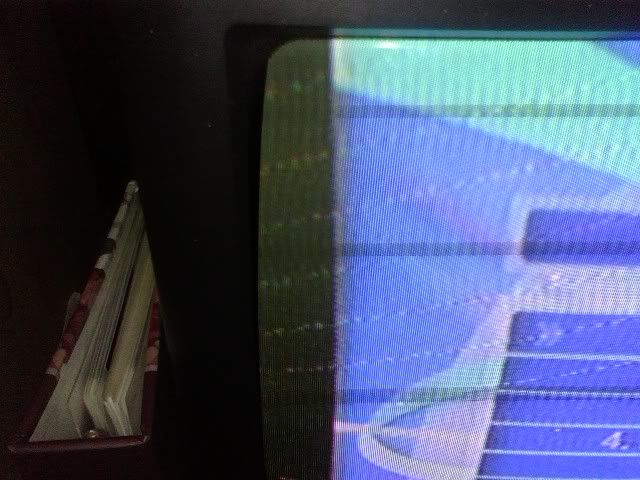
A,J
|
AfterDawn Addict
|
9. April 2008 @ 12:08 |
Link to this message
|
this is an odd one, its got to be a setting either tv or in nero?
Nothing here to see, move along folks.
|
|
dmfighter
Newbie
|
9. April 2008 @ 15:00 |
Link to this message
|
this was nero 8, apparently.
and its nero, because when viewing the menu in dvdshrink, you see the same thing. i just burned it so i can show it on tv. it works but i just need to get rid of the screen issue
A,J
|
|
dmfighter
Newbie
|
10. April 2008 @ 16:22 |
Link to this message
|
A,J
|
|
dmfighter
Newbie
|
14. April 2008 @ 15:37 |
Link to this message
|
|
anyone?
A,J
|
AfterDawn Addict
|
14. April 2008 @ 15:42 |
Link to this message
|
hmm no... really not sure on this, i would of guessed file before encode? but not sure...
have you give dvd flick a try? so as to see if its nero the prob?
Nothing here to see, move along folks.
This message has been edited since posting. Last time this message was edited on 14. April 2008 @ 15:43
|
|
dmfighter
Newbie
|
15. April 2008 @ 00:30 |
Link to this message
|
dvd flick doesnt work for me,is ther any other programs that can turn my avi files into an iso file or a video ts, and create a menu 2?
A,J
|
AfterDawn Addict
|
15. April 2008 @ 00:52 |
Link to this message
|
Nothing here to see, move along folks.
|
|
XMayhemX
Member
|
15. April 2008 @ 01:13 |
Link to this message
|
Can you make dvd menus with these programs?
Im having hard time with nero vision myself...
|
AfterDawn Addict
|
15. April 2008 @ 01:18 |
Link to this message
|
convertxtodvd does.
i use for episodes and inserting sub files too
very good although the menu maker needs improvment for ease of use
i just rename files before dropping in then there used for menu
and just change TITLE to say Simpsons etc, and use there templates
easy.
------------
also dvd flick beta does menus...
Nothing here to see, move along folks.
This message has been edited since posting. Last time this message was edited on 15. April 2008 @ 01:45
|
|
XMayhemX
Member
|
15. April 2008 @ 13:46 |
Link to this message
|
i used ConvertXtoDVD. No hang ups, no crashes unlike nero vision!!!!
I cant find anything about it in the forums, even under dvd authoring so i wil ask here since we were talking about it.
So now i have the files..VOB, BUP, IFO Is there anyway to preview them before i burn them?
|
|
XMayhemX
Member
|
15. April 2008 @ 14:24 |
Link to this message
|
Man i wish i could edit my posts.., instead of making new ones..
So i can "sort of" see a preview of my vob files in dvd shrink. I may have to use dvd shrink cuz i made a dvd-9 and now i must burn to a dvd+RW.
Weird thing.. In ConvertXtoDVD i made a disc with 7 episodes of my fav tv show. A Title main, and then 7 tilesets, 1 for each of the 7 episodes. But, according to DVD Shrink, the name of the whole dvd structure is episode 1, not my main title.. weird huh?
|
AfterDawn Addict
|
15. April 2008 @ 14:31 |
Link to this message
|
|
probably volume label the one seen in my computer looking at the drive
but yeah menu needs a better easier one to navigate but a good app
WELL DONE!
Nothing here to see, move along folks.
|
|
XMayhemX
Member
|
15. April 2008 @ 14:31 |
Link to this message
|
oh nm im an idiot....
under that window is a play button.. i pushed it.. and WOW.. im impressed... much nicer fade, and warp, in and out of screen, effects.
Very cool... ive been farting around with nero vision when i could of made my other disc look like this???? omg...
this is awesome! I love the chapters sceen with video menus also...
|
AfterDawn Addict
|
15. April 2008 @ 14:32 |
Link to this message
|
You can view a DVD folder compilation by using a media player like 'VLC'.
'File' 'Open Directory', locate the folder and, if you have a menu, it will start there and let you select the entries.
|
AfterDawn Addict
|
15. April 2008 @ 14:32 |
Link to this message
|
enjoy
play button? where got screen pic? convertx or dvd shrink?
Nothing here to see, move along folks.
This message has been edited since posting. Last time this message was edited on 15. April 2008 @ 14:38
|
|
XMayhemX
Member
|
15. April 2008 @ 14:46 |
Link to this message
|
in dvd shrink.. there is a play button under the dvd structure box.. so each little folder or title in the project it shows a screnshot and plays the menuvideo. I think i messed up on the 7 episodes tho.. Each seperate episode menu has seperate videos also i didnt specify.. so it plays like random 3-5 second clips.
|
|
XMayhemX
Member
|
15. April 2008 @ 14:51 |
Link to this message
|
i wont know for sure if it came out how i wanted unless i burn it.. but i wil find that media player "VLC" to get a better preview of it.. I may need to redo the disc and tinker with the menus and stuff
So it has a main menu.. with a intro video i specified.. then menus for each episode.. then menus for each chapter within those menus.. Sort of confusing.. I made it without prior knowledge or manual reading of ConvertXtoDVD. Just a quick test.. sort of thing..
I wil try to find "VLC" now... for a better preview
|
AfterDawn Addict
|
15. April 2008 @ 14:59 |
Link to this message
|
kool
im not happy with convertxtodvd menu, its buggy
i type stuff go somewhere else and its gone! type again re type bleh!
so i raname files before dropping into it, that sort episodes name and i just add title name to 1 of there templates - easy.
makes life easy as i dont care much for menus been there done that, but on a few clips its needed.
Nothing here to see, move along folks.
|
|
Advertisement
|
|
|
|
XMayhemX
Member
|
15. April 2008 @ 16:16 |
Link to this message
|
So i like the dvd menus and everything from ConvertXtoDVD that i wanna redo a dvd i made with Nero Vision.
I have the dvd i made with NeroVision in my drive now. How do i change the VOB/IFO/BUP files on it back into their original avi's? If its possible.. Is this what they call ripping? Should i ask on the ripping forum?
|


