|
Graphics Display Driver Errors?
|
|
Newbie

|
26. June 2008 @ 17:40 |
Link to this message

|
Sorry if this is in the wrong thread..
I have a Windows Vista laptop (Hp 2600 Series) and for some reason I
have problems with my "Graphics Display Driver" or so my display settings say. My laptop can't play any of the Vista screensavers and it won't let me play games neither, if my computer goes to screensaver mode theres an error that says:
"The screensaver can't run because it requires a newer video card or one that's compatible with Direct3D"
This all just started yesterday, i accidently clicked a combination of buttons "ctrl alt.." and one other button. Then my display turned black and my screen got enlarged, so i clicked "alt tab" to get my display back correctly. So, i went to personalize > display settings to see what was up with my screen.
And this came up (after clicking display settings):
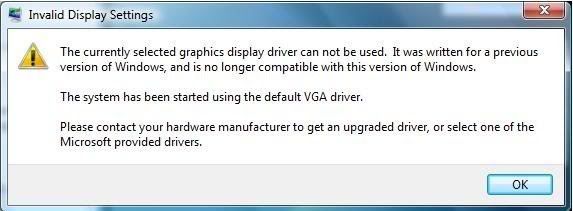
After i clicked "Ok"
These were my display settings:
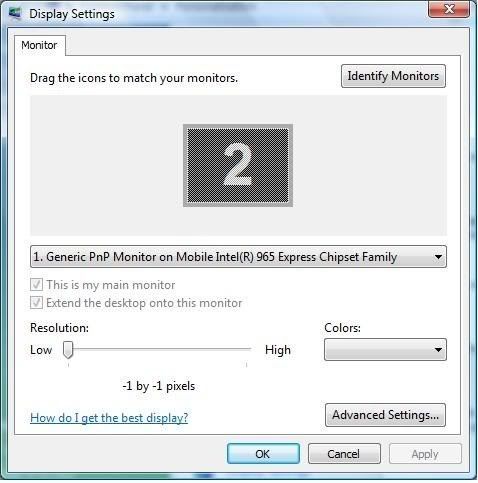
From what i remember (last time i looked at the settings) there were 2 monitors in gray (monitor 1 and monitor 2) now as you can see there is only a monitor 2. The resolution used to be 1024x768 (or 1280x1024) but in the picture its listed as -1 by -1 pixels. I can't change the resolution, color, nor anything else if its on option 1 -
"1.) Generic PnP Monitor on Mobile Intel(R) 965 Express Chipset Family"
If i remember correctly, shouldn't it have the name on my graphics card listed somewhere on Option 1?
If i change it to option 2 - show below:
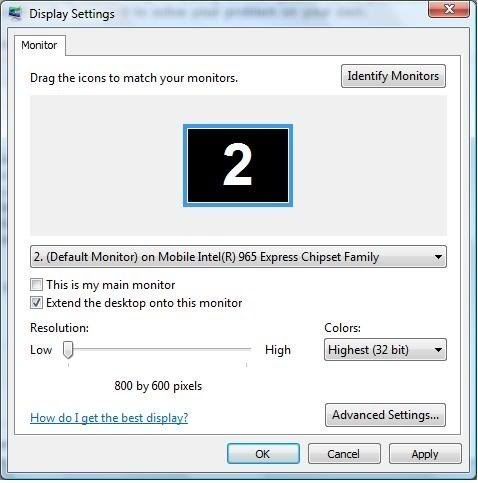
I could fiddle with the listed options but i cant change the resolution (its locked at 800x600) as for the color Highest(32 bit) is the only selection.
Anyone think they could help me get my display settings back to normal? Please and thank you.
PS: I used a lot of spacing in between so its easier for you guys to read, hope that helps^^
|
|
Advertisement

|
 |
|
|
|
ddp
Moderator
|
26. June 2008 @ 17:47 |
Link to this message
|
|
moved to correct forum as not a resource center issue.
|
Newbie
|
30. June 2008 @ 23:34 |
Link to this message

|
|
bump. help please?
|
|
ddp
Moderator
|
1. July 2008 @ 16:53 |
Link to this message
|
|
have you tried system restore to before you did the goofup?
|
Newbie
|
2. July 2008 @ 23:20 |
Link to this message

|
|
I was going to try System Restore, but my Restore Point doesn't go that for back. The furthest Restore point is a driver installation - which was a couple of days after the problem occurred. So, i have no idea of how to go that far back if it isn't listed for a Restore Point.
|
AfterDawn Addict
4 product reviews
|
3. July 2008 @ 06:58 |
Link to this message
|
|
what was this driver installation?
|
AfterDawn Addict
|
3. July 2008 @ 12:09 |
Link to this message
|
Originally posted by Syphreal:
I was going to try System Restore, but my Restore Point doesn't go that for back. The furthest Restore point is a driver installation - which was a couple of days after the problem occurred. So, i have no idea of how to go that far back if it isn't listed for a Restore Point.
Go to HP's website, download the latest drivers for your video card/chip, and install them.
Before doing that, go to device manager, and try to update the driver there. Your original driver may be in the list.
Life is good!
GrandpaBruce - Vietnam Vet - 1970 - 1971
Computer: Intel Core i7-920 Nehalim;Asus P6T Deluxe V2
This message has been edited since posting. Last time this message was edited on 3. July 2008 @ 12:10
|
Newbie
|
3. July 2008 @ 18:20 |
Link to this message
|
Originally posted by sammorris:
what was this driver installation?
It was the "Mobile Intel 965 Express Chipset Family Video Driver" and I've tried updating the Graphics/Video Driver, but when i try to install it, it says it isn't compatible because my computer isn't a Vista or Vista 64-bit.
Device Manager says that my driver is already up to date, so are there anymore ideas?
EDIT: This is where i got the updates: http://h10025.www1.hp.com/ewfrf/wc/softw...3548267&lang=en
This is the message i get if i try to install the graphics driver:
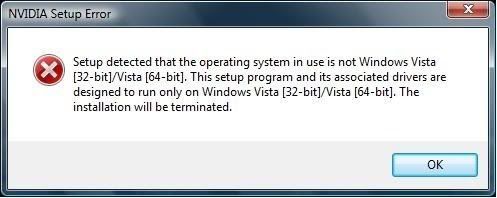
This message has been edited since posting. Last time this message was edited on 3. July 2008 @ 18:54
|
AfterDawn Addict
4 product reviews
|
3. July 2008 @ 18:56 |
Link to this message
|
|
You're not using the version of the 2615US that has the Geforce 8000 graphics in it are you?
|
Newbie
|
6. July 2008 @ 21:36 |
Link to this message
|
Originally posted by sammorris:
You're not using the version of the 2615US that has the Geforce 8000 graphics in it are you?
That's probably why it won't install; i thought all the same versions use the same graphics card. But is there any solution to the main problem? Or would i have to reformat?
|
|
Advertisement
|
|
|
AfterDawn Addict
4 product reviews
|
7. July 2008 @ 05:46 |
Link to this message
|
|
Well, try the other graphics driver from the site, the one for the geforce 8000 series, see if that works.
|


