|
pc lock up
|
|
AfterDawn Addict
1 product review

|
2. August 2008 @ 19:04 |
Link to this message

|
nate
Go into divice manager, right click on the USB drives and unintally them. That's right choose uninstall. In fact uninstall anything else that doesn't seem to work at the same time. Be certain not to choose reboot until you've done most of it. Then when you've chosen uninstall then reboot and see what happens. Don't worry no harm will be dones.
" Please Read!!! Post your questions only in This Thread or they will go unanswered:
Help with development of BD RB: Donations at: http://www.jdobbs.com/. |
|
Advertisement

|
|
|
|
|
nate2005
Member

|
2. August 2008 @ 19:56 |
Link to this message

|
ok i did that and still doesnt work. When i plug in a usb device it says the usb device has malfunctioned and than it installs as unknown device. there is no yellow exlamation point in device manager either
intel Q6600 3GB ram 640 GB hard drives
EVGA 7900GT super OC'D 256MB pci express
|
AfterDawn Addict
1 product review
|
2. August 2008 @ 20:06 |
Link to this message
|
|
Nate
Is this a 32 bit or 64 bit version of Vista?
This is an issue with Windows Vista. I don't know if there is currently a fix for it since I don't have access to your stuff, but I would recommend that you surf a bit and see if there is a fix.
" Please Read!!! Post your questions only in This Thread or they will go unanswered:
Help with development of BD RB: Donations at: http://www.jdobbs.com/. |
|
nate2005
Member
|
2. August 2008 @ 20:16 |
Link to this message
|
its 32bit version of vista and it vista ultimate. I have surfed around for a while anything i do find it doesnt work. my mom isnt too thrilled about it either considerin her printer uses the usb slot. When you go into my computer where it shows your hard drive and what not under the devices under the hard drive it only shows the dvd drive. So i assume that is why the usb slots arnt working. Usually it shows all the usb drives under that but it shows none of them nor my sd card slot
intel Q6600 3GB ram 640 GB hard drives
EVGA 7900GT super OC'D 256MB pci express
|
|
ddp
Moderator
|
2. August 2008 @ 20:53 |
Link to this message
|
are all the usb ports having this problem? is the printer connected to the front or back of the pc? when no usb device connected to the pc, what does it show in the usb section in device manager? have you cleared the cmos to see what that does tho that should not be affected?
|
|
nate2005
Member
|
2. August 2008 @ 21:27 |
Link to this message
|
yes all the usb ports are having this problem, the printer is plugged into the back of the pc. When I dont have any usb devices plugged in this is what it looks like. 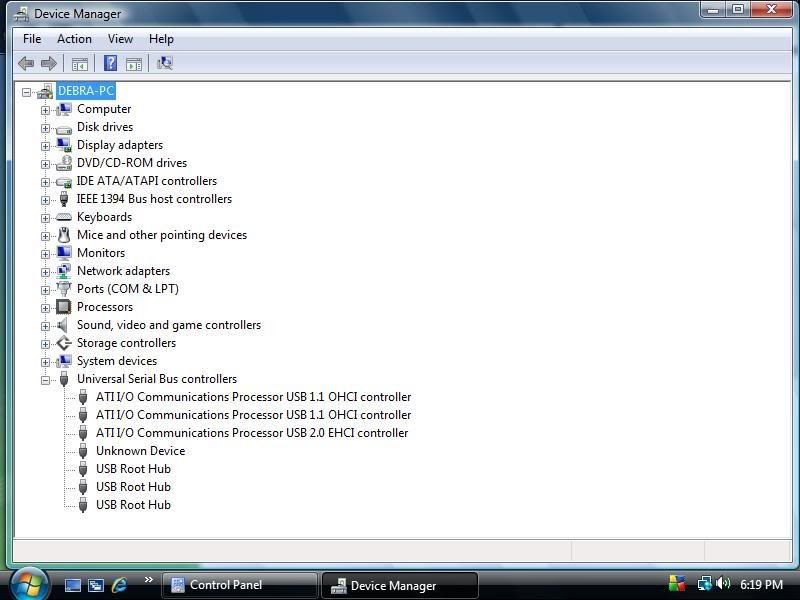
intel Q6600 3GB ram 640 GB hard drives
EVGA 7900GT super OC'D 256MB pci express
|
|
nate2005
Member
|
2. August 2008 @ 21:37 |
Link to this message

|
|
no i havent cleared the cmos i dont belive so atleast. Im not too sure how to even do that?
intel Q6600 3GB ram 640 GB hard drives
EVGA 7900GT super OC'D 256MB pci express
|
AfterDawn Addict
1 product review
|
2. August 2008 @ 21:42 |
Link to this message
|
Quote:
no i havent cleared the cmos i dont belive so atleast. Im not too sure how to even do that?
When you first post and you see letter on your screen you will be given information as to which button to hit to go into setup. It might say hit delete, or F10 to enter setup. Once you've done that then look at the menu choices in the right towards the bottom. There should be one that says something to the effect of "restore default settings." Chose it, hit F10, and let the system reboot.
" Please Read!!! Post your questions only in This Thread or they will go unanswered:
Help with development of BD RB: Donations at: http://www.jdobbs.com/. |
|
nate2005
Member
|
2. August 2008 @ 22:08 |
Link to this message
|
|
ok i cleared the cmos that didnt do anything for it either.
intel Q6600 3GB ram 640 GB hard drives
EVGA 7900GT super OC'D 256MB pci express
|
AfterDawn Addict
1 product review
|
2. August 2008 @ 22:12 |
Link to this message
|
Nate
Then coast through the bios and look for lines of info that point to USB and see if they're turned on or off. If you find one then hit F10 and save. The only thing I can think of that is left is if you update your systems bios. Go back to the same site that I left you links to and look for a bios update.
If none of that works then I will have to be there to help you provided Vista can be made to work with your system.
" Please Read!!! Post your questions only in This Thread or they will go unanswered:
Help with development of BD RB: Donations at: http://www.jdobbs.com/. |
|
nate2005
Member
|
2. August 2008 @ 23:07 |
Link to this message
|
|
ok tried that actually already did update the bios, could it be possibly the bios update got messed up?? i tried the other thing searching in the bios and still nothing.
intel Q6600 3GB ram 640 GB hard drives
EVGA 7900GT super OC'D 256MB pci express
|
|
nate2005
Member
|
2. August 2008 @ 23:08 |
Link to this message
|
|
I know the pc is able to have vista running on it because I had it on that pc for almost 6 months without any problems. So i know that its able to run it just fine.
intel Q6600 3GB ram 640 GB hard drives
EVGA 7900GT super OC'D 256MB pci express
|
AfterDawn Addict
1 product review
|
2. August 2008 @ 23:10 |
Link to this message
|
Quote:
ok tried that actually already did update the bios, could it be possibly the bios update got messed up?? i tried the other thing searching in the bios and still nothing.
In my view the problem is Windows Vista being incompatible with your hardware, but that's just a guess. When everything is working but one or two points then what's left?
" Please Read!!! Post your questions only in This Thread or they will go unanswered:
Help with development of BD RB: Donations at: http://www.jdobbs.com/. |
|
nate2005
Member
|
2. August 2008 @ 23:16 |
Link to this message
|
|
yeah thats what it seems, I just dont understand how i was able to have vista on their before without any problems. thats the only thing that has me stumped. Is there any way i can like go into regristry or anything like that to possibly try sumthen along those lines??
intel Q6600 3GB ram 640 GB hard drives
EVGA 7900GT super OC'D 256MB pci express
|
AfterDawn Addict
1 product review
|
2. August 2008 @ 23:28 |
Link to this message
|
Quote:
yeah thats what it seems, I just dont understand how i was able to have vista on their before without any problems. thats the only thing that has me stumped. Is there any way i can like go into regristry or anything like that to possibly try sumthen along those lines??
According to the screenshot that you posted there is no issue with the USB. They are all shown as working. There would be an error image at the left of each listed item that is not working.
" Please Read!!! Post your questions only in This Thread or they will go unanswered:
Help with development of BD RB: Donations at: http://www.jdobbs.com/. This message has been edited since posting. Last time this message was edited on 2. August 2008 @ 23:29
|
|
nate2005
Member
|
3. August 2008 @ 00:40 |
Link to this message
|
right it would have a yellow mark on it if it had an error. So why isnt the usb working correctly than if it shows no errors?
intel Q6600 3GB ram 640 GB hard drives
EVGA 7900GT super OC'D 256MB pci express
|
AfterDawn Addict
1 product review
|
3. August 2008 @ 08:42 |
Link to this message
|
There are a couple of things that might cause that but I think that we covered them.
1. If you are using a case port and it is not connected to the motherboard inside.
2. USB is disabled in bios.♠
" Please Read!!! Post your questions only in This Thread or they will go unanswered:
Help with development of BD RB: Donations at: http://www.jdobbs.com/. |
|
nate2005
Member
|
3. August 2008 @ 14:52 |
Link to this message
|
|
well i checked the bios but never checked if it was connected to the motherboard. I dont see how it could have got unplugged though and the card reader aswell. It was working fine up till it got the virus on the pc. So i doubt that is it
intel Q6600 3GB ram 640 GB hard drives
EVGA 7900GT super OC'D 256MB pci express
|
AfterDawn Addict
1 product review
|
3. August 2008 @ 15:39 |
Link to this message
|
nate2005
They were just thoughts. It gets increasingly difficult to analyze your issue when I only use Vista on my Laptop. So I'm trying to strip away any questions that I can. When you go into device manger and right click and hit properties on your USB drive, does it give the message that everything is working properly?
" Please Read!!! Post your questions only in This Thread or they will go unanswered:
Help with development of BD RB: Donations at: http://www.jdobbs.com/. |
|
scorpNZ
AfterDawn Addict
4 product reviews
|
3. August 2008 @ 16:44 |
Link to this message
|
Check the Mem card reader board for any ID: numbers,it more than likley is not from the mobo people but is instead a 3rd party,it may even be necessary to contact hp to find out who makes em,coz i can't find card reader drivers mentioned anywhere for the model comp,then again if they're not going to be used just unplug from the mobo,if it was going to be used for USB device connection you can get extention cables that have female & male ends,yeah not the best way.
I'd also advise as it's already been mentioned to seriously consider cloning
Free clone software
xxclone
or bought
ghost
acronis
For any help on cloning the guys at radafied can help
http://radified.com/cgi-bin/yabb2/YaBB.pl
Ghost & Acronis can also create images that you can plonk on DVD's it'll save the cost of buying another hdd.Put another way your creating a set of real recovery disks that when installed will be an exact mirror of the system before it all borked,make sure you make two copies,no not a copy of a finished imaged DVD,start another job,i don't trust verification
This message has been edited since posting. Last time this message was edited on 3. August 2008 @ 16:48
|
AfterDawn Addict
1 product review
|
3. August 2008 @ 16:58 |
Link to this message
|
Quote:
i can't find card reader drivers mentioned anywhere for the model comp,then again if they're not going to be used just unplug from the mobo,
Glad to see someone else pitching in. Unless there are proprietary drivers that generally come with the devices, windows Vista usually supplies all needed drivers. He originally had Windows XP installed on the PC which came with HP's usual restore disc, and if there were any undiscovered drivers then perhaps they were included on the disc. He has decided to upgrade the PC to Vista and since then he has been experiencing difficulties with his USB and card reader. A screen shot that he's provided shows that the USB drivers are in fact installed but yet he doesn't seem able to get them to work with USB items.
" Please Read!!! Post your questions only in This Thread or they will go unanswered:
Help with development of BD RB: Donations at: http://www.jdobbs.com/. |
|
nate2005
Member
|
3. August 2008 @ 17:38 |
Link to this message
|
Under the usb root hub all of those says it is properly installed and working. For the unknown device though it says there is no drivers installed for that device. Yea I do understand that this is a difficult problem to analyze especially not being infront of the pc yourself. It has got me stumped aswell due to it seems like all is correctly working. Yet at the same time no usb slots work? I cant call hp due to they wont even help me Because I guess once you take an os off and put a different one on than it came shipped with it voids all warranty's so they wont help unless you give them money. I went through that before with my current pc I have. well the memory card reader would infact be used, so I am trying to actually get that up and running aswell.
intel Q6600 3GB ram 640 GB hard drives
EVGA 7900GT super OC'D 256MB pci express
|
AfterDawn Addict
1 product review
|
3. August 2008 @ 17:50 |
Link to this message
|
|
nate2005
I learn more from threads like this one than countless others where the answers were easy, and the inexperienced tends to avoid these threads.:D
There is something that were missing that's going to make us all feel stupid. If your system says that thing are working fine then perhaps we are looking for a Windows setting that is causing this. Vista has a lot of protection measures and the question is are one of them causing this?
" Please Read!!! Post your questions only in This Thread or they will go unanswered:
Help with development of BD RB: Donations at: http://www.jdobbs.com/. |
|
nate2005
Member
|
3. August 2008 @ 18:02 |
Link to this message
|
exactly I always learn from the threads like this and its quite intrestesting aswell. when i right click on the unknown device up at the top that device says its unviersal serial bus controller that is the device type. Under manufactor it says standard usb host controller. So my guess is that is the one that controls my usb slots if im not mistaking. Since there is no drivers installed for it im guessing this would explain why there not working. Im not sure if it is a security feature on vista's part or what. All i know is this is something pretty complicated lol. the unknown device though doesnt say that it is properly working so that could be causing an issue there.
intel Q6600 3GB ram 640 GB hard drives
EVGA 7900GT super OC'D 256MB pci express
|
|
Advertisement
|
|
|
|
scorpNZ
AfterDawn Addict
4 product reviews
|
3. August 2008 @ 18:04 |
Link to this message
|
I missed the screeny.
No i don't believe it's a security issue doing a search for USB not working with vista brings up this very issue tho it was a printer,under normal circumstances the card readers will appear as extra hard drives & they will also appear in notification area of taskbar as tho you'd just attached a external device,perhaps if this goes onto long it might be better to take it to a shop as a last resort.
This message has been edited since posting. Last time this message was edited on 3. August 2008 @ 18:14
|


