|
Budget Gaming £500
|
|
Senior Member
5 product reviews

|
1. August 2008 @ 09:15 |
Link to this message

|
Hey,
The build:
Price:£496
Motherboard:
Gigabyte GA-EP35-DS3R iP35 Socket 775 8 channel audio ATX Motherboard £69.99
Processor:
Intel Core 2 Duo E8400 3GHz (1333MHz) Socket 775 6MB L2 Cache OEM Processor £102.10
GPU:
Sapphire HD 4850 512MB GDDR3 Dual DVI TV Out PCI-E Graphics Card £101.82
Memory:
OCZ 2GB Kit (2x1GB) DDR2 800MHz/PC2-6400 CL 4-4-4-15 PLATINUM XTC
with LIFETIME WARRANTY £26.37
Heatsink:
Arctic Cooling AC-FRZ-7P Freezer 7 Pro Socket 775 Processor Cooler £10.63
Harddrive:
Seagate ST3320620AS 320GB Hard Drive SATAII 7200RPM 16MB Cache - OEM £31.49
Case:
Casecom Black Mid Tower Case - Front Blue LED 120mm Fan - With Side Window £17.01
PSU:
Corsair 450W VX 450W PSU - ATX12V v2.2 £45.56
Fans:
AKASA 80mm Amber series 3 pin Ultra quiet case fan £3.39
Antec TriCool 120mm DBB Case Fan £7.57
Misc:
Extra Value 12" Blue Dual Cold Cathode Kit £2.54
OS:
Windows XP
Drives:
Generic burner
Generic Reader
It must be mentioned i already have both the OS and the Drive's so i haven't added this to the total. I think setting aside £80 for this should do it.
Ok, so this is basically a "budget gaming rig" but it will be used unfortunatly mainly to do work M$ Office for college / university. I know it wont struggle with any of theese things, and it will be able to run new games at decent settings. Not extreme settings i know but decent.
I've also designed this with overclocking in mind. The ASUS P5k-E is an extremly capable piece of kit including wifi and the Intel P35 Express chip. The Gigabyte GA-EP35-DS3R will not struggle to get a decent overclock, its known for its overclocking potential (Thanks Sam) . The E8400 is an extremly oc'able proc which should get some decent speeds with the Arctic Freezer pro although this could possibly be upgraded to a Tuniq Tower but i thought i'd save some money. The RAM is a bargain in my eyes and will definatly not hold the proc back from a decent overclock. 2gb is plenty and of course easy to upgrade to 4gb in time. And remember You cant go wrong with OCZ :)
The GPU in my eyes blows everything in the same price bracquet out the water! Its just an awesome bit of kit for £100! Maybe a HD4870 if you were more into the gaming side of this rig may be in order.
The PSU is a stable corsair and should'nt provide me with anything but clean power :) Again thanks sam!
The case is awfull agreed, but its basic and has a window, with a few cathodes and some well placed fans should get a good looking case with OK airflow. This has of course a lot of room to upgrade. In an ideal world i would have gone for the stunning Antec Nine hundred.
The harddrive is basic, but i dont need anything flash or bigger than 320gb. It'l do the job, and well at that. In an ideal world i'd install a 32gb Raptor to install the OS of choice onto and perhaps a few games.
So i think i've built a capable bit of kit, with room for overclocking and improvement! Its flashy but wont break the bank :-)
I'm half posting this for criticism's on the build / ideas for improvement and half posting this as i think its a great build and might help someone with the same needs as me.
Lecsiy
This message has been edited since posting. Last time this message was edited on 1. August 2008 @ 18:32
|
|
Advertisement
|
 |
|
|
AfterDawn Addict
4 product reviews
|
1. August 2008 @ 11:22 |
Link to this message
|
Use a Corsair VX 450W PSU. I'm not happy with any power supply that costs £20, no matter what reviews you might have read.
The P5K-E may be a good overclocker, but I can't remember whether it's one of Asus' unreliable models or not, I'm pretty sure one of the P5K series is, I just forget which. Gigabyte's EP35-DS3R is also a superb overclocker and is certainly reliable.
|
Senior Member
5 product reviews

|
1. August 2008 @ 11:32 |
Link to this message
|
Hey sam, long time no speak, hope all is well!
I personally haven't heard about one of the P5k-E's being unreliable? Have you got a link by any chance?
It's just that mobo has got the P35 / ICH9R chip + Wireless built in. This appeals to me as it was a bloody wireless card that shorted my old mobo and rendered the whole pc useles!
As for the PSU, its a risk agreed and the corsair does look nice. I think il go for it, consider it protecting my investment aye. Will have to edit the first post :)
|
AfterDawn Addict
4 product reviews
|
1. August 2008 @ 11:55 |
Link to this message

|
http://www.tomshardware.co.uk/forum/2442...et-boot-problem
Seems to sum it up quite well. Mainly seems to concern the P5K, not the P5K-E but I don't know if it will be any different for that board. Swathes of people use the P35-DS3R boards without major incident. I think on the forum we've had one DOA and that's about it.
|
Senior Member
5 product reviews
|
1. August 2008 @ 12:21 |
Link to this message
|
|
Ok so i've done my research. The p5k-E does not seem to suffer the same problems as the p5k.
So taking this apart the boards are basically identical. However:
The p5k has wireless.
The P35-DS3R has a max bus speed of 1600Mhz compared to the 1333 Mhz of the P5k-E.
Personally im going to go for the slower bus speed with wifi. However for anyone reading this that is intrested in my build the P35-DS3R is a real contender and would work great!
Thanks again sammoris.
Lecsiy
Any other suggestions, comments anyone?
|
AfterDawn Addict
4 product reviews
|
1. August 2008 @ 12:24 |
Link to this message
|
This message has been edited since posting. Last time this message was edited on 1. August 2008 @ 12:26
|
Senior Member
5 product reviews
|
1. August 2008 @ 18:29 |
Link to this message

|
|
Ok, after thinking about it, im gonna change it to the P35-DS3R. This is because:
Faster bus speed
Better reliabilty.
Thanks sam for all your help!
Anymore suggestions / comments welcome :)
|
Senior Member
5 product reviews
|
1. August 2008 @ 18:34 |
Link to this message
|
Haha, after doing the changes i dont think i can call this my build anymore.
If anything its mine / sam's :)
But, hell, its impossible to beat for £500.
|
AfterDawn Addict
4 product reviews
|
1. August 2008 @ 19:55 |
Link to this message
|
|
That seems very familiar... hehe
|
AfterDawn Addict
|
1. August 2008 @ 23:07 |
Link to this message
|
P5K-E user here i have got my E2140 from 1.6 to 3.2 stable,and now am pushing it to 3.3, no complaints what so ever, but really, the P35 is old news, IMO get a P5Q PRO. for abotu £85 you cant go wrong, and they are very reliable, have x8/x8 CF support, (better then x16/x4) and the P45s are currently the holding world record holders for highest FBS. to put it simply, they are stunning esp for the prices. and the P5Q PRO is a very good one.
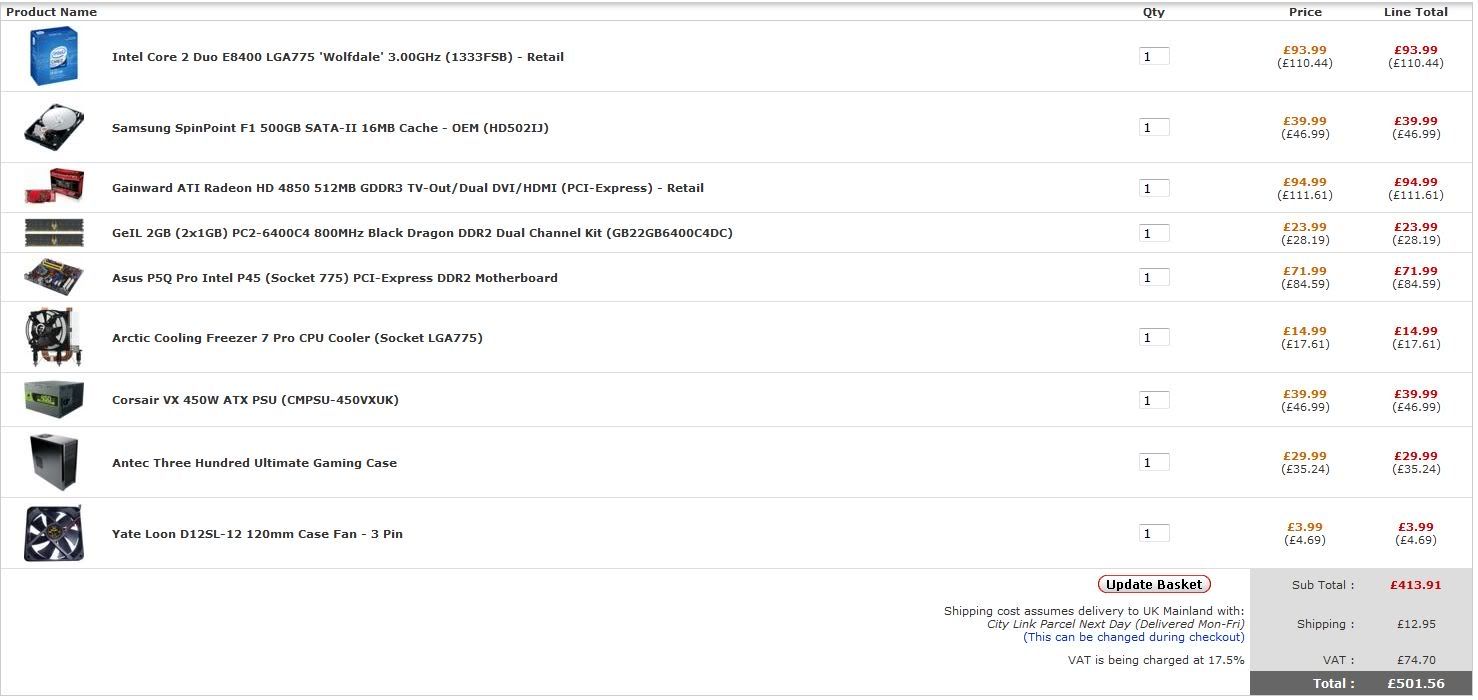
this is from http://overclockers.co.uk
btw sam the links you gave are very old, all of those probelms have been sorted via BIOS updates.
 MGR (Micro Gaming Rig)
 .|. Intel Q6600 @ 3.45GHz .|. Asus P35 P5K-E/WiFi .|. 4GB 1066MHz Geil Black Dragon RAM .|. Samsung F60 SSD .|. Corsair H50-1 Cooler .|. Sapphire 4870 512MB .|. Lian Li PC-A70B .|. Be Queit P7 Dark Power Pro 850W PSU .|. 24" 1920x1200 DGM (MVA Panel) .|. 24" 1920x1080 Dell (TN Panel) .|. This message has been edited since posting. Last time this message was edited on 1. August 2008 @ 23:11
|
AfterDawn Addict
4 product reviews
|
2. August 2008 @ 08:24 |
Link to this message
|
BIOS updates that worked?
Anyhow, good as it may be, what is the P5Q Pro gaining you? A few more mhz on the overclock? With a 45nm chip I wouldn't want that anyway. With split lane bandwidth it's not going to be any good for crossfire, so what are you getting for your extra £15?
|
AfterDawn Addict
|
2. August 2008 @ 11:15 |
Link to this message
|
|
all bios updates i have had work fine.
more sata ports, a better board, x8/x8 CF is VASTLY better than x16/x4, its not just a few MHz, the P45s are a clockers dream. plus they are newer tech aswell.
as a clocker, for me, any extra help in getting a further OC is always good :)
MGR (Micro Gaming Rig) .|. Intel Q6600 @ 3.45GHz .|. Asus P35 P5K-E/WiFi .|. 4GB 1066MHz Geil Black Dragon RAM .|. Samsung F60 SSD .|. Corsair H50-1 Cooler .|. Sapphire 4870 512MB .|. Lian Li PC-A70B .|. Be Queit P7 Dark Power Pro 850W PSU .|. 24" 1920x1200 DGM (MVA Panel) .|. 24" 1920x1080 Dell (TN Panel) .|.
|
AfterDawn Addict
2 product reviews
|
3. August 2008 @ 01:55 |
Link to this message
|
|
|
AfterDawn Addict
|
3. August 2008 @ 07:48 |
Link to this message
|
MGR (Micro Gaming Rig) .|. Intel Q6600 @ 3.45GHz .|. Asus P35 P5K-E/WiFi .|. 4GB 1066MHz Geil Black Dragon RAM .|. Samsung F60 SSD .|. Corsair H50-1 Cooler .|. Sapphire 4870 512MB .|. Lian Li PC-A70B .|. Be Queit P7 Dark Power Pro 850W PSU .|. 24" 1920x1200 DGM (MVA Panel) .|. 24" 1920x1080 Dell (TN Panel) .|.
|
Senior Member
5 product reviews
|
3. August 2008 @ 08:28 |
Link to this message
|
|
@Shaf
Thats a great build man, might have to pick and mix between mine and yours.
@Abuzzar
I'm not planning on doing any encoding or anything that would benefit from quad core, besides at present i dont realy see the point in quads compared to the dual cores you can get at the moment.
Thanks for all your suggestions though
|
AfterDawn Addict
2 product reviews
|
3. August 2008 @ 12:01 |
Link to this message
|
Why must people be so short sighted? How long do you plan on keeping your computer? If it's more than a year or two than the quad core WILL come in handy.
|
AfterDawn Addict
|
3. August 2008 @ 12:28 |
Link to this message
|
|
IMO higher clock>2 more cores.
id say untill more games are Qcore intensive, we dont need them
MGR (Micro Gaming Rig) .|. Intel Q6600 @ 3.45GHz .|. Asus P35 P5K-E/WiFi .|. 4GB 1066MHz Geil Black Dragon RAM .|. Samsung F60 SSD .|. Corsair H50-1 Cooler .|. Sapphire 4870 512MB .|. Lian Li PC-A70B .|. Be Queit P7 Dark Power Pro 850W PSU .|. 24" 1920x1200 DGM (MVA Panel) .|. 24" 1920x1080 Dell (TN Panel) .|.
|
|
Advertisement
|
|
|
AfterDawn Addict
4 product reviews
|
3. August 2008 @ 12:52 |
Link to this message
|
To be quite frank, I was saying this a year ago, and I'm still waiting. The vast majority of the games I play still don't use dual cores properly, let alone quads. For gaming alone, it is going to be a long wait before quad cores become useful, and by that time, it's probably worth using Nehalem. For all out CPU power and anything solely CPU-intensive, quad core for the win, but for gaming PCs, really, especially on a budget, duals are still better value.
|


