|
Another new build advice thread
|
|
Moderator

|
28. March 2008 @ 14:38 |
Link to this message

|
|
ouch, i'm sure the last Netgear i bought was the same model, i find them lacking personally, much prefer Linksys & Buffalo's. However i didn't have to do any special setup on my Netgear, AT&T are having you on (if they're saying you need software to install for the Netgear i mean)..
As i say, i have 2 Buffalo's linked up via 'WDS' and i even got all nerdy and put DD-WRT on them; WDS is serving both upstairs and downstairs (huge Victorian house so it's hard to get a decent range usually but by using WDS i get a much better 'reach'). But even i'm scaling down the amount of PC's i use, just threw out another 3 today.
edited due to usual crap spelling

Main PC ~ Intel C2Q Q6600 (G0 Stepping)/Gigabyte GA-EP45-DS3/2GB Crucial Ballistix PC2-8500/Zalman CNPS9700/Antec 900/Corsair HX 620W
Network ~ DD-WRT ~ 2node WDS-WPA2/AES ~ Buffalo WHR-G54S. 3node WPA2/AES ~ WRT54GS v6 (inc. WEP BSSID), WRT54G v2, WRT54G2 v1. *** Forum Rules ***This message has been edited since posting. Last time this message was edited on 28. March 2008 @ 15:02
|
|
Advertisement

|
|
|
|
Member

|
28. March 2008 @ 14:48 |
Link to this message
|
|
Sorry I havent replied till now got called out to an SDSL fault lol.
You say you now cant communicate with the router either. If you factory reset the router and connect just that to your PC/laptop does it give you an IP address by DHCP.
As for the modem - have you done what that page says and set it to bridging mode.
Also is it not possible to ignore the modem and just configure the netgear to be your modem and router - which is how standard DSL works in the UK.
GA-P35C-DS3R Rev 2.0 F6 - E8200 @ 3.2Ghz - 2x1GB Corsair XMS2 800Mhz@4-4-4-12 - Sapphire 2600XT 512mb GDDR3 - CM690 Dominator - Arctic Cooling Freezer 7 Pro - 250GB Maxtor and 500GB WD internal SATA HDD - 500GB Seagate eSATA and 500GB Maxtor One Touch III USB External HDD - 2 x Pioneer DVR-215DBK - Windows XP SP2 - Logitech X-540 5.1 70W RMS Speakers - Polaroid FLU-2632 Monitor
|
AfterDawn Addict
4 product reviews
|
28. March 2008 @ 15:49 |
Link to this message

|
|
Not necessarily. A lot of routers come with modems, but not all, you can do it either way round. Personally I've found that all modem-router combinations make for crap routers, and it has to be done using the two-part approach. The D-Link DSL-G604T, mediocre, the Netgear DG814 - appalling, unusable, The Linksys WRT54GL&ADSL2MUE, an "ideal match" - not compatible, the Speedtouch HomeHub/Bebox dire, the Speedtouch Bebox combined with the WRT54GL, much better.
|
Member
|
28. March 2008 @ 16:02 |
Link to this message
|
|
My company (telecomms company reselling ADSL amongst its many prongs) ships out Zyxel 600 series modem routers to all our customers who have internet with us and they are fantastic for doing both jobs. We have many companies running their networks simply off a switch connected to these routers.
Id highly recommend them to anyone looking for a reliable all in one package.
GA-P35C-DS3R Rev 2.0 F6 - E8200 @ 3.2Ghz - 2x1GB Corsair XMS2 800Mhz@4-4-4-12 - Sapphire 2600XT 512mb GDDR3 - CM690 Dominator - Arctic Cooling Freezer 7 Pro - 250GB Maxtor and 500GB WD internal SATA HDD - 500GB Seagate eSATA and 500GB Maxtor One Touch III USB External HDD - 2 x Pioneer DVR-215DBK - Windows XP SP2 - Logitech X-540 5.1 70W RMS Speakers - Polaroid FLU-2632 Monitor
|
AfterDawn Addict
|
28. March 2008 @ 18:09 |
Link to this message
|
Originally posted by creaks:
edited due to usual crap spelling
Glad i ain't the only one creating grammar and sppellin mistakes!!! hehehe. ;P
LOCO your troubles are teaching others as you go. :)
...gm
|
Moderator
1 product review
|
28. March 2008 @ 22:01 |
Link to this message
|
|
When in doubt reinstall XP....what a PITA.
|
AfterDawn Addict
|
28. March 2008 @ 22:35 |
Link to this message

|
|
Are you kidding me LOCO? I've had to do that a few times... I don't understand the reason either. lol. varnull you stay away.... hehehe..
So has this finally fixed the issues you were dealing with??
....gm
|
Moderator
1 product review
|
29. March 2008 @ 07:19 |
Link to this message
|
Yep, it all appears to be working now. I've had two major obstacles and the fixes were stupid to say the least.
Mouseware drivers fixed BSOD
Reinstall XP fixed connectivity issues.
TBH I think that AT&T blocked my PC after I failed to install it's software. I their program is just another form of malware and there doesn't appear to be a way around it.
http://www.dslreports.com/forum/r2017684...alling-software
I'm not the only one with problems regarding this service, however the thread above isn't about my problem exactly...just shows how AT&T tries to make you put their malware on your PC for their service to work. At the end of installing it last night there was a satisfaction survey and I think it's the first time I've ever submitted negatives and I actually ran out of room to finish my comments.
|
|
varnull
Suspended permanently
|
29. March 2008 @ 13:56 |
Link to this message
|
|
Have you tried running a different OS on that machine? My ISP says they only support XP and vista, and provide a disk with a keylogger and some odd traffic tracking software embedded in it. I have never used it myself.. no need as I just connect.
Your router should be taking care of your ppoe settings, so installing anything on your desktop pc should make no difference whatsoever.
If they are forcing you to install their software.. which implies that they are forcing you to use a certain OS then they are probably breaking a few FCC anti-trust regulations along the line.
We have taken that line with a certain public service broadcaster over here and it is starting to pay dividends. Anyway.. hit me up on irc soon and we will have a further investigate and a little isp hidden service discovery session ;)
|
|
PacMan777
AfterDawn Addict
|
31. March 2008 @ 00:27 |
Link to this message
|
I've been dealing with Bellsouth and AT&T and have had few problems. Installing their software so far has been optional. It saves the service reps a lot of time when it works, so that's the reason they suggest it. I can go in and log into the DSL account using the IP address for AT&T and log in and then the XP wizard makes the connection. After that it's always on. That's why good internet security software is needed or a router for a hardware firewall.
LOCO
I ran into a problem similar to yours not long ago. I had to reinstall Vista for a router setup for one friend. Someone had already tried setting up the wireless router and had things in sad shape. It was easier to reinstall Windows than try to troubleshoot the problem. It was a new laptop, so I didn't have to worry about backing anything up. I got with an AT&T service rep on the phone and they told me the specific settings to change for the model router being used. The setup for XP and Vista appear almost identical. Actually all my friend needed was a wireless modem, which AT&T can supply. That's what I set up for another friend. They both have laptops and like to use them in the family room, usually chatting or watching TV.
This message has been edited since posting. Last time this message was edited on 31. March 2008 @ 00:31
|
Moderator
1 product review
|
1. April 2008 @ 09:07 |
Link to this message
|
My problem now appears to be the DHCP losing it's lease, that is the problem with the dropouts....
Event Type: Warning
Event Source: Dhcp
Event Category: None
Event ID: 1007
Date: 4/1/2008
Time: 8:17:59 AM
User: N/A
Computer: WALKTHEPLANK
Description:
Your computer has automatically configured the IP address for the Network Card with network address 001D7D00FFE1. The IP address being used is 169.254.134.194.
For more information, see Help and Support Center at http://go.microsoft.com/fwlink/events.asp.
Data:
0000: 00 00 00 00 ....
Event Type: Error
Event Source: Dhcp
Event Category: None
Event ID: 1000
Date: 4/1/2008
Time: 8:16:58 AM
User: N/A
Computer: WALKTHEPLANK
Description:
Your computer has lost the lease to its IP address 192.168.1.1 on the Network Card with network address 001D7D00FFE1.
For more information, see Help and Support Center at http://go.microsoft.com/fwlink/events.asp.
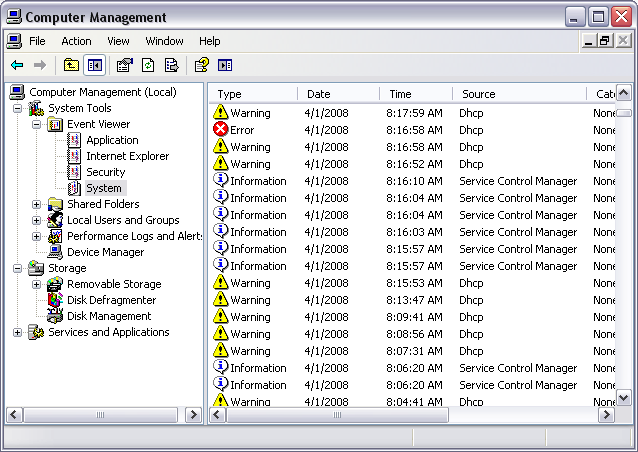
All the googling comes to problems with a router...I am not using a router yet. Most of the information I find is from 2003-2004 and isn't very clear. I'm wondering if my Realtek NIC card is bad?
|
AfterDawn Addict
4 product reviews
|
1. April 2008 @ 09:19 |
Link to this message
|
|
I've never heard of losing the DHCP lease other than when it usually expires. Perhaps try a PCI Network card and see if that cures it? I have had faulty network adapters before, but they didn't generate those errors, they just appeared and disappeared in device manager as and when they pleased.
|
Moderator
1 product review
|
1. April 2008 @ 10:50 |
Link to this message
|
|
I just swapped out the DSL data cable with a shorter one and it's been up for almost an hour now. I couldn't believe they sent me a cable that was 20' long, I thought there were only supposed to be so long?
|
AfterDawn Addict
4 product reviews
|
1. April 2008 @ 10:57 |
Link to this message
|
|
A 20ft DSL cable? I've never owned a DSL cable longer than 6ft.
|
Moderator
1 product review
|
1. April 2008 @ 11:07 |
Link to this message
|
|
I spoke too soon, it crapped out right after I made the last post. I'm about at the end of my rope.
Going to go play a round of golf and forget about the PC for a few hours.
|
AfterDawn Addict
|
1. April 2008 @ 12:03 |
Link to this message
|
Originally posted by LOCOENG:
I spoke too soon, it crapped out right after I made the last post. I'm about at the end of my rope.
Going to go play a round of golf and forget about the PC for a few hours.
That's what I need to do but it's frikkin cold here and the wind's blowing 20-30 mph!!! That combo isn't golf weather in MHO!! ;)
@sammy,
Just because you haven't or don't use anything longer than 6' doesn't mean they don't make them or use them. :P My step-mom uses a 100' cable regularly on her job. :)
LOCO,
If you can try another NIC card that will at least remove the old one from the equation. You may have bogus drivers as well. I've found out with such items the drivers are very important and cause 6 kinds of hell when they don't work correctly. Like I said in an earlier post I've had to re-install Winblows a few time because I couldn't find a driver issue. :P
good luck as usual buddy!!!
...gm
|
|
PacMan777
AfterDawn Addict
|
1. April 2008 @ 15:05 |
Link to this message
|
|
LOCO
I'd give the service techs at AT@T a call. The ones I've worked with are knowledgable about their setup and how it works with different hardware. (Maybe I've been lucky.) If they can't help, nothing lost except the time for the call.
|
Moderator
1 product review
|
1. April 2008 @ 19:07 |
Link to this message
|
Originally posted by PacMan777:
LOCO
I'd give the service techs at AT@T a call. The ones I've worked with are knowledgable about their setup and how it works with different hardware. (Maybe I've been lucky.) If they can't help, nothing lost except the time for the call.
The three or four I've talked to at AT&T can't get past any problems found in ipconfig and their only solution was to send me a new modem. I think the NIC is bad. I searched for drivers today and couldn't find any for the adapter listed on the board. If the NIC is bad wouldn't that mean RMA to Gigabyte?
Quote:
That's what I need to do but it's frikkin cold here and the wind's blowing 20-30 mph!!! That combo isn't golf weather in MHO!! ;)
It was the first hot day here, around 80 with 200% humidity....after a quick afternoon shower it got hot as hell. Turns out I can't build PC's or play golf, maybe I should stick to railroading?
I've actually got bigger problems now anyway as my PC is in some sort of boot cycle where it posts and then shuts down and repeats....I let it go 10X's and I've just shut it down all together. I guess I'll just start pulling stuff out and see if I can track down the problem. I can't even boot from my ROM. I've loaded safe settings in BIOS and no dice.
|
AfterDawn Addict
4 product reviews
|
1. April 2008 @ 19:10 |
Link to this message
|
RMAing a motherboard is a pain in the ass. For a similar cost to that of shipping your motherboard back to Gigabyte you can almost certainly get a PCI network card to test your hypothesis with. It's what I'd do before going to all that trouble.
|
AfterDawn Addict
|
1. April 2008 @ 19:22 |
Link to this message
|
|
LOCO if the mobo is less than 30 days from the EGG you can just do a RMA with very little effort at all. It'll be disappointing if your mobo is "bad" too. rob just sent his off last week for different reasons tho. Just to make sure your ethernet connection from your mobo is what you're talking about?
If it's an actual NIC card you should be able to take it back to the store you bought it from and get another assuming it's under warranty still. ;) I think sammy brought up a good point too. For simplicities sake you can buy a cheapy NIC card and see if that's actually your issue before you send it off BUT that won't guarantee that's your issue because again it could be drivers. :D Sucks when something doesn't work correctly. I bet that's what the RR says about you. hehehehe. :P j/k Mr. MOD!!! ;)
...gm
|
Moderator
1 product review
|
1. April 2008 @ 19:55 |
Link to this message
|
Quote:
Sucks when something doesn't work correctly. I bet that's what the RR says about you.
Nah, they just say "I love it when a plan comes together"
The only ethernet I have is the onboard from the gigabyte board. I can run to the store and pick up another one for shits and giggles, but it won't do me any good if I can't even boot up. I've reset CMOS, and pulled all drives but my master boot drive as well as changing ram etc.
I downloaded Realteck's troubleshooting GUI this afternoon when everything is working, but it's pretty useless and reports about the same information that you get in ipconfig....it doesn't troubleshoot anything in other words, only monitors.
|
AfterDawn Addict
|
1. April 2008 @ 21:00 |
Link to this message
|
|
Geez LOCO it seems you do have "other issues". ;) Have you ran any other tests to check your components? Stress tests for your RAM, cpu, mobo, and HDD if needed. ;)
Orthos, OCCT, Prime95, Memtest, SiSoft Sandra, and many more but those are the most used I believe. Of course if you can't get up and running then you're SCREWED. lol. You've already installed Winblows again? You tried Debian Linux yet?? hehehe. Thought that I would have a JanRocks moment!!!! :P
You need to find something stable so you can run these tests if you haven't already. You bought the cpu used?? I doubt it's the problem but it does happen. With your Ethernet going out if it is it makes me think you may have mobo issues. If that's the case it bothers me actually. Did you get the P35-DS3R model?? If so cincyrob had to send his back last week. Think I already mentioned that but there it is again.....
again good luck buddy.......
....gm
|
|
PacMan777
AfterDawn Addict
|
1. April 2008 @ 23:58 |
Link to this message
|
|
LOCO
Have you tried resetting the mobo to default settings and then trying to boot up? I'm not sure about your board, but usually all you have to do is disconnect the power, remove the battery and cross a jumper, then replace the battery, hook up the power and go. Instructions should be in the manual. To be on the safe side, disconnect the peripherals and let the PC pick them up with Plug & Play (one at a time). Unless you have a really messed up board, the ethernet/LAN circuit shouldn't prevent boot, but just in case, don't have it hooked to the modem when trying to boot after resetting the board. Greensman is right, if you've not had the board too long, RMA to the Egg would be the best bet.
You've found out one of the truths in building PCs. Putting the thing together isn't all that hard, getting it to work is sometimes the trick. I regret your having the bad luck. Over 90% of the time the parts go together and there's not a single problem. I've had more good luck than bad, but I know what it feels like having a new build head south.
|
Moderator
1 product review
|
2. April 2008 @ 08:00 |
Link to this message
|
|
I have reset CMOS and set BIOS to "load fail-safe options" neither of which helped. When the PC was running I did run OCCT the other day and it came back with error code 2 which is user powered off PC. I think I forgot to disable the power saving in windows and it went to sleep or something.
I'm going to take everything out of the case and start from scratch just in case I have something shorting out in there somewhere.
|
|
Advertisement
|
|
|
Moderator
1 product review
|
2. April 2008 @ 08:01 |
Link to this message
|
|
The CPU wasn't used for anything other than testing to see that it wouldn't DOA according to the auction, otherwise it should have been new.
|




