|
Video Card Thread (Mostly Gecube x1950xt)
|
|
Member

|
20. July 2007 @ 08:20 |
 Link to this message

|
Originally posted by sammorris:
Glued?
This cooler is sounding more and more crap the more I hear about it. It may have been attached using thermal epoxy. I'd say it's very dangerous to remove the cooler by force, If it really isn't possible to remove the cooler and you've checked all the fittings are off, the only option I can think of is to put the fittings back, return the card and get your money back. Try and find an X1950XT without that awful cooler on it.
Nah, the cooler came off by just loosening the screws on the backplate.
That's why I also found it weird to read that it was glued.
Like I said, I think he meant the power-cables for the cooler are glued.
I've also read a lot that this cooler is useless, I'll first try to see if I can take everything off to replace it with another, it's in use now.
The only X1950XT for AGP I can find it the GeCube :( .
Do you perhaps know another website like Newegg or GPUReview that can find a lot of cards?
I'd be more than happy to buy one from ASUS, Sapphire or anything like that.
But I don't feel much like even going 1 step lower to like the X1950Pro or something.
This message has been edited since posting. Last time this message was edited on 20. July 2007 @ 08:21
|
|
Advertisement

|
|
|
|
AfterDawn Addict
4 product reviews
|
20. July 2007 @ 08:24 |
Link to this message
|
Unfortunately no such product exists. I'm beginning to think it's an artificial model generated by Gecube as an overclocked version of another variant like the Pro. That would explain why it only has 256MB of RAM rather than 512MB like the proper ones. try fitting a Zalman VF900 heatsink to it, if you managed to get the Gecube one off. The fan can be plugged in anywhere you can power it, Motherboard header, Molex to 3 pin adapter or even a front bay or software fan controller.
|
Member
|
20. July 2007 @ 08:28 |
Link to this message
|
Originally posted by sammorris:
Glued?
This cooler is sounding more and more crap the more I hear about it. It may have been attached using thermal epoxy. I'd say it's very dangerous to remove the cooler by force, If it really isn't possible to remove the cooler and you've checked all the fittings are off, the only option I can think of is to put the fittings back, return the card and get your money back. Try and find an X1950XT without that awful cooler on it.
Edit: Ok, the Gecube cooler is the only one available for the X1950XT AGP, so perhaps you should try an RMA and hope you get one where the cooler's properly attached.
Oh, no Zalman replacements?
They say they fit on the Radeon X.... Series.
But yeah, I could get another one, but I think the chance is bigger to get one with the same problem.
Maybe I could call the store or maybe GeCube or ATi, but I live in The Netherlands though, don't know if they receives calls from here.
And I also saw someone else saying GeCube didn't know what the problem was.
That's so messed up on their own products :S .
|
Member
|
20. July 2007 @ 08:41 |
Link to this message

|
Originally posted by sammorris:
Unfortunately no such product exists. I'm beginning to think it's an artificial model generated by Gecube as an overclocked version of another variant like the Pro. That would explain why it only has 256MB of RAM rather than 512MB like the proper ones. try fitting a Zalman VF900 heatsink to it, if you managed to get the Gecube one off. The fan can be plugged in anywhere you can power it, Motherboard header, Molex to 3 pin adapter or even a front bay or software fan controller.
Alright.
And, when I cleaned the core, I found it was an X1950XT PCI-e, with the sort of official PCI-Express logo.
It was engraved on the dark mirror-like surface of the GPU.
So I guess it's actually the PCI-E on a card with an AGP-interface.
I don't know if they always do that lately when making special AGP-versions?
If not, that might also be giving problems...
|
AfterDawn Addict
4 product reviews
|
20. July 2007 @ 13:32 |
Link to this message
|
|
That's why nobody but Gecube makes it. There is no official AGP X1950XT, Gecube just modded it to work with AGP.
|
Member
|
20. July 2007 @ 13:46 |
Link to this message
|
Originally posted by sammorris:
That's why nobody but Gecube makes it. There is no official AGP X1950XT, Gecube just modded it to work with AGP.
Ah, I see, and then they can't even create one right.
But then, if even GeCube can do it, why doesn't one those other great companies that also create the best VGA-cards, also create a new great AGP-card?
I'm sure they can do it right and create a great one.
Because they will sell, cause everybody that right now wants the best AGP-card will buy the GeCube.
It's got the best numbers technically under the AGP-cards.
I also saw somewhere very vaguely that there would be a 512mb X1950XT soon by another brand or something, but I'm not sure.
What do you think of this one:
http://www.xfxforce.com/web/product/list...ationId=1006114
It's the next best one I can find unless you can find a better one.
I like that it has 512MB, that's pretty much the new lowest standard instead of 256 I feel.
Or is it getting a bit old for the time being?
It's like 2 months newer than the X1950XT, but yeah:
http://www.gpureview.com/show_cards.php?card1=503&card2=511#
I'm not sure...
This message has been edited since posting. Last time this message was edited on 20. July 2007 @ 13:50
|
Senior Member
|
20. July 2007 @ 13:53 |
Link to this message

|
Well I lowered all the specs in BF2 to mostly low, some high and am playing at 1024/768.
Big improvment with the fps. On wake island I now get about 40 (lowest) to about 85 (highest) fps...
One problem... When I play Sharqi, I go down to 25-35fps. Why is this?
Also, when I try to record something, the fps go to 20, even when I play wake at 70?
Why is that too?
|
Member
|
20. July 2007 @ 14:01 |
Link to this message
|
Originally posted by Waymon3X6:
Well I lowered all the specs in BF2 to mostly low, some high and am playing at 1024/768.
Big improvment with the fps. On wake island I now get about 40 (lowest) to about 85 (highest) fps...
One problem... When I play Sharqi, I go down to 25-35fps. Why is this?
Also, when I try to record something, the fps go to 20, even when I play wake at 70?
Why is that too?
Some maps just need more "power", I think because of more objects or something like that, or the layout of the map.
Like Wake Island is an island, it doesn't have to do that much for it, especially since it's all water around the pretty thin island.
Like I would notice maps like ahm... I think it's Daqing Oilfields, would stutter a LOT more than most other maps.
Just try the worst map and put the settings so it will work good on that map and it will work the same at least or better on other maps.
But this card should probably do it on higher settings anyways, so it's not fair...
You could get my 6800XT for 50 bucks and play it on Medium to Low too.
Oh yeah, about the settings, don't put anything on High if you want to have smoother gameplay.
Try everything on 'Medium', 'Dynamics' on 'Low', AA and AA on lowest or 'Off'.
That's about it, if this card can't handle that, like it can't over here, it's just not right.
And any high setting will hit a card hard, but the high-ends ones should be able to take it.
And of course, the rest of your system should be able to take it too.
This message has been edited since posting. Last time this message was edited on 20. July 2007 @ 14:05
|
AfterDawn Addict
4 product reviews
|
20. July 2007 @ 14:01 |
Link to this message
|
What are you recording? If you're using something like Fraps to record your game, unless you have a dual core, your frame rates will plummet because there's not enough processing power to go around.
|
Senior Member
|
20. July 2007 @ 14:30 |
Link to this message
|
Yup, its fraps...
I was hoping to film something like dBs's sniper video, but I guess not...
Also, I am going to try Sharqi again on all low settings, 1024/768 @60hrz
Ill try that and tell you what I get
|
Member
|
20. July 2007 @ 14:34 |
Link to this message
|
Originally posted by Waymon3X6:
Yup, its fraps...
I was hoping to film something like dBs's sniper video, but I guess not...
Also, I am going to try Sharqi again on all low settings, 1024/768 @60hrz
Ill try that and tell you what I get
If it's still low performance, it's probably something else of your computer.
And if you want you can just pick a higher frequency (Hz) for your resolution.
I don't think it's got anything to do with performance, just the refreshing of your monitor.
However, do first see what you monitor can handle.
But I recommend the highest frequency possible because it's easier on your eyes, won't wear you out as much and it doesn't flicker as much.
You don't really see it, but you will notice it when you go back from a higher to a lower frequency.
What kind of a change it makes I mean...
|
Senior Member
|
20. July 2007 @ 14:37 |
Link to this message
|
Yea, just played it and got a shitty 20 fps high... I was at the TV station, and alot of stuff was happening to (maybe that was the problem for the bad frames?)
|
Member
|
20. July 2007 @ 14:39 |
Link to this message
|
Originally posted by Waymon3X6:
Yea, just played it and got a shitty 20 fps high... I was at the TV station, and alot of stuff was happening to (maybe that was the problem for the bad frames?)
No way man, I can get more with 6800XT, we're being ripped off.
What's the rest of you system?
|
AfterDawn Addict
4 product reviews
|
20. July 2007 @ 14:49 |
Link to this message
|
|
2048x1536 max detail, Anti-aliased, Anisotropic filtered,
X850XT: 30.6fps.
Something's wrong!
|
Member
|
20. July 2007 @ 14:51 |
Link to this message
|
Originally posted by sammorris:
2048x1536 max detail, Anti-aliased, Anisotropic filtered,
X850XT: 30.6fps.
Something's wrong!
Yeah, and what the hell is?! 8|
|
AfterDawn Addict
4 product reviews
|
20. July 2007 @ 14:51 |
Link to this message
|
An identical thread at tom's hardware contains:
Quote:
I fixed it. I was about to RMA my VGA and Mobo when I thought I would try one more thing, and that was to flash my BIOS back to v.1.5 from v.1.6 and it actually worked. I just run 3Dmark06 and got 5880 with the catalyst control center set to balanced not even performance. I am so happy.
Thank you everyone for your help.
|
AfterDawn Addict
4 product reviews
|
20. July 2007 @ 14:56 |
Link to this message
|
|
UPDATE, FOR ALL WHO ARE INTERESTED IN THE X1950XT AGP
It seems that a lot of AGP motherboards, due to their age, have difficulty dealing with the bandwidth involved. This seems to be fixable with a BIOS update. If that fails, try a BIOS downgrade.
|
Senior Member
|
20. July 2007 @ 15:14 |
Link to this message
|
|
Ok, will try that...
Only thing is that I dont know how... I have the same BIOS version from when I got this computer 4 years ago, so there is definetly new versions out there...
Can someone help me out?
THanks
|
AfterDawn Addict
4 product reviews
|
20. July 2007 @ 15:16 |
Link to this message
|
|
What's the motherboard?
(I'm off to bed now, so I won't be able to reply any more until tomorrow)
|
Senior Member
|
20. July 2007 @ 15:18 |
Link to this message
|
|
(in my sig)
P4P800-E Deluxe
|
Member
|
20. July 2007 @ 15:27 |
Link to this message
|
Originally posted by sammorris:
UPDATE, FOR ALL WHO ARE INTERESTED IN THE X1950XT AGP
It seems that a lot of AGP motherboards, due to their age, have difficulty dealing with the bandwidth involved. This seems to be fixable with a BIOS update. If that fails, try a BIOS downgrade.
So when you would update the BIOS it could take more bandwidth all of a sudden?
That's a bit weird since it seems like the bandwidth it can take is in the hardware itself.
But yeah, Everest says my BIOS is more than 2 years old (probably from 2004 or something) and I should update it I think it said.
But I've also read a bunch of times I shouldn't do that if I don't have problems.
So I mean, could I get problems with things that work fine right now when I update?
This message has been edited since posting. Last time this message was edited on 20. July 2007 @ 15:29
|
Senior Member
|
20. July 2007 @ 16:22 |
Link to this message
|
Well I just updated mine... Works fine
I am on the Beta version though, since ASUS didnt have a final product out yet...
Ill try BF2 on low 1024/768 60mhz and get back in about ten minutes to tell you the results..
|
Senior Member
|
20. July 2007 @ 16:42 |
Link to this message
|
|
Ok, just played it and what an improvment!!!
Now I get about 50-70fps!!!!
It stutters once in a great while (like 2 times in 20 minutes)
That was on low though, so I think I'll try to crank up the settings..
Oh yea, 100% view distance too... (Im a sniper...)
|
Senior Member
|
20. July 2007 @ 16:45 |
Link to this message
|
PS, what do you guys think of the Thermaltake Tide Water cooler?
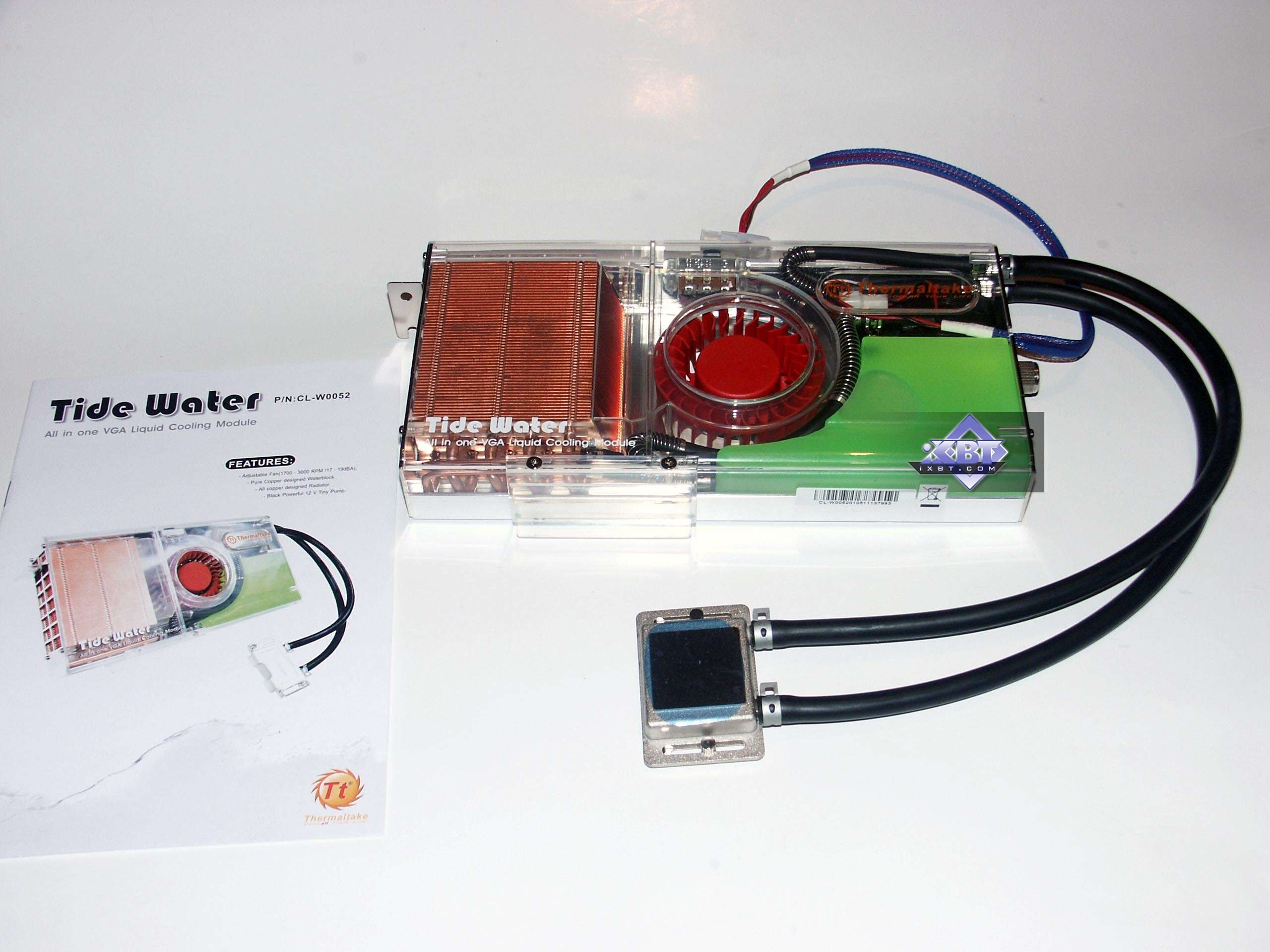
Looks good, good reviews...
I dont want a fan cooler anymore, to loud...
I was thinkin about mounting it on the outside of my case... (since temps inside get to about 86F)
|
|
Advertisement
|
|
|
Member
|
20. July 2007 @ 18:24 |
Link to this message
|
|
Oh yeah, the view distance...
You should always keep that at 100% so you can see enough.
Sure it would probably cut down stress on the graphics, but it will put you at disadvantage in gameplay.
Even some other settings will also make you not able to see certain things when on Low or even Medium sometimes.
I can you that you want Geometry on High since it will make you see things like vehicles sooner/farther.
But Medium is still ok, I can play with it anyways and I don't even zoom that much cause I'm not a Sniper much.
For the cooler, you mean for a GPU or CPU?
Well, either way, Zalmans seem good to me.
The cooling, but also the low noise, the most noise you'll hear from it is the wind an a slightly fan-noise.
But you can set the speed balancing performance and noise.
The balance between price and performance is good too, not too expensive.
Depends on the store of course...
I'm not familiar with water-cooling, I don't think it's really easy to build into your system?
Well, unless you already have partial water-cooling, I guess you can add more for other devices and you already know how it works then.
|



