|
dvd shrink error
|
|
|
oSyl2uS
Newbie

|
13. January 2005 @ 12:59 |
 Link to this message

|
|
for some reason every time i get this error i see a guy running for a split second on the window where you can see the movie. then a few seconds later it says an error has happend. this has happend on a few other dvds i have tried to copy any idea what this is or how i can fix this problem?
|
|
Advertisement

|
|
|
|
Senior Member
1 product review
|
14. January 2005 @ 01:07 |
Link to this message

|
|
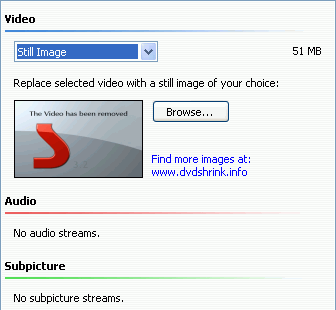
when you open the dvd in shrink it breaks it down into folders: menus, main movie, extras, and in this case unreferenced material. The little running guy should be in the last one. You'll either have to check each file in that folder to find him and insert a still image in that file or just insert a still image in the whole folder.
|
Senior Member
1 product review
|
14. January 2005 @ 23:45 |
Link to this message

|
From our forum rules....
Quote:
11. Don't abuse private messages -- if your post CAN be posted to public forums, POST IT to public forums. Some of our knowledgeable members receive hundreds of private messages daily and might abandon the site if asking questions through private messages continues.
the PM I recieved......
oSyl2uS
_ 15. January 2005 @ 04:14
thanks for your reply. im still having some problems i was able to see the titles of the files in the last file but i cant tell which one is the running guy. if there is any other tips you could recomend that would be great or point me in the right direction that would be great thanks in advance
sean
if your not sure which thread im talking about here is the link
http://forums.afterdawn.com/thread_view.cfm/147206
OK, when you open shrink, in the bottom left, there's a little black rectangle. Above it are play, and stop buttons. Highlight the individual files and play each one until you find him. My personal preference is to put a still image in the whole folder.
|
|
oSyl2uS
Newbie
|
15. January 2005 @ 10:50 |
Link to this message
|
|
thanks zippy my bad about the pm. i was able to find him but how do i put a still image in there to get rid of him? thanks
sean
|
|
oSyl2uS
Newbie
|
15. January 2005 @ 10:53 |
Link to this message
|
|
its giving me this error when i try to drag a pic on to the file "DVD Shrink encountered an error and cannot continue. Invalid filename"
|
Senior Member
1 product review
|
16. January 2005 @ 04:40 |
Link to this message
|
|
|
oSyl2uS
Newbie
|
16. January 2005 @ 12:08 |
Link to this message
|
|
thanks zippy you have been a huge help. i was able to rip it on shrink and it didnt give me any problems then i burned it with decripter and it worked fine and when i tried to watch it the movie is just a blank white screen. the menus are fine and the previews are fine but the movie it self if just a blank white screen. could that be because i put images in for each of the three images in the file that was give me trouble?
sean
|
Senior Member
1 product review
|
17. January 2005 @ 07:50 |
Link to this message
|
|
hmmm....
Puzzling. That should have worked. There are a couple of other options that I can think of....
One would be to do just the movie only in reathor mode. That should keep you from another coaster, but you won't have menus or extras.
The other would be to try to put the still image in the Unreferenced materials folder instead of the individual files inside. No guarantees about this one.
Yet another possibility is to usr the trial versions of clone dvd/any dvd. No guarantees there either.
|
|
oSyl2uS
Newbie
|
17. January 2005 @ 11:52 |
Link to this message
|
|
thanks zippy i will have to try that. sucks that was my last dvd you know a good place to get some for a good deal i go to best buy but they are expensive for good dvds
|
|
Advertisement
|
|
|
Senior Member
1 product review
|
17. January 2005 @ 23:07 |
Link to this message
|
|
Well if you've got a credit or debit card then my paypal account number is..... Oh wait, nevermind.
Really though, if you have either of those then your best bet is to shop online. Best Buy actually comes up with some really good deals online that you won't see in the store. But I usually shop newegg.com. Best bet is to get Ritek or Verbatim (Data Life I think).
|