|
|
|
plagued by DVD burning troubles
|
|
|
dametony
Junior Member

|
5. June 2005 @ 00:14 |
Link to this message

|
|
hello,
first off, sorry if this question's been covered a million times -- i searched the archives, but didn't find anything specific enough, seemingly, to solve my problems. so here i am.
here's the deal:
(i have an NEC ND 1000-A, btw)
some time ago, my sonic recordnow! stopped burning DVD data discs of the movies i would rip with DVDshrink. it worked for a long time, and then, poof. so, after spending some time messing around, i started using nero and burning at 2.4x. and that solved my problems. now, that won't work, either. poof again. also, i have recently tried doing a disc-to-disc copy with both nero and sonic (i've got a DVD player in addition to the burner), and now THAT won't work. so i'm thinking it's not the software.
however, i can still burn CD's from things on my hard drive with no problems at all, and i've barely ever had a coaster.
i've updated firmware on my burner...i've tried compressed air...i bought a cleaning disc (memorex...system won't play it for some reason, though, so that was a bust -- should i try again?)...i've tried different media...haven't tried defragging -- i'm sorta afraid to, for fear of losing my files...
i can't remember if i've done other stuff to try and solve the problem.
so...do i need a new DVD burner? i've had my computer (dell dimension 4600) for about two years or so, and i've used it a lot (probably burned 300 or so discs on it over time). is there a way to check the burner for crappiness or broken-ness? or is it just some intangible thing?
any hints, guesses, ideas, or shots in the dark are welcomed with open arms. thanks for your time and knowledge.
best,
tony
|
|
Advertisement

|
 |
|
|
AfterDawn Addict
|
5. June 2005 @ 01:37 |
Link to this message

|
|
If you had never defrag. your HD for two years, it's probably the right time to do so, for whatever purpose. Also, make sure you have a lot of memory.
Try attend to the basics, then we'll see what it leads from there.
Good luck!
|
AfterDawn Addict
|
5. June 2005 @ 01:37 |
Link to this message

|
|
whats actually happening?,
are you getting burn failures,or is it not burning at all
do the basics,
you should really do a de-frag,at least once a week to avoid data bottlenecking
is DMA turned on?,check this in device manager
what software have you got
are aspi layers installed and working
you have nero,so run a full scan in the tool kit,and post the log
This message has been edited since posting. Last time this message was edited on 5. June 2005 @ 01:38
|
|
dametony
Junior Member
|
5. June 2005 @ 13:15 |
Link to this message
|
|
is defragging totally safe? i won't lose any files, will i?
also, is having only 4GB free out of 111GB a bad thing?
i'm getting various errors. most of the "power calibration error" variety. both sonic and nero are failing at various times.
This message has been edited since posting. Last time this message was edited on 5. June 2005 @ 13:18
|
|
paztelu
Member
|
5. June 2005 @ 13:36 |
Link to this message
|
|
Actually Defragmenting the disc is TOTALLY SAFE, what is done in the process is organizing the files so that the HD can access then faster, well actually is recommended to have at least 1gb of space in the disk so I dont think 4gb of free space is not a problem, you should check the hardware which seems to be the problem
By: Paztelu
 |
|
dametony
Junior Member
|
5. June 2005 @ 14:37 |
Link to this message
|
|
well, that's the thing -- how do i "check" the hardware? is there a diagnostic test, or are you thinking i should physically remove the burner and clean it or something?
just keep in mind i'm a total computer novice, but i'm learning ;)
|
Moderator
|
5. June 2005 @ 15:38 |
Link to this message
|
here's a start -
download Nero info-tool from here - http://www.snapfiles.com/get/neroinfo.html
Run it, note down the following, and paste here. Here's what mine shows -
click on the drive tab, note down the firmware version
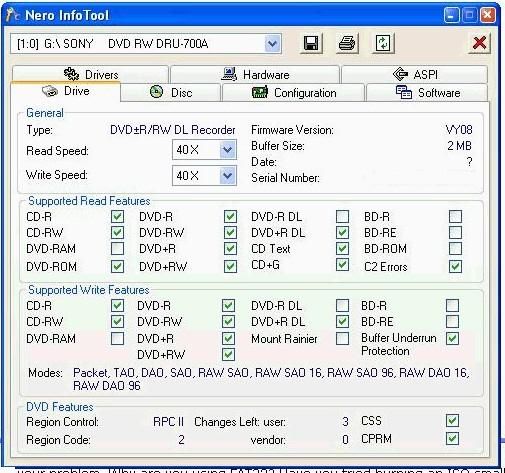
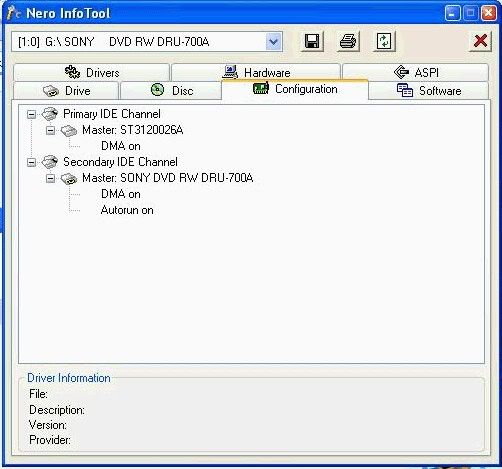
click on configuration tab, note down the DMA fields, ie on or off
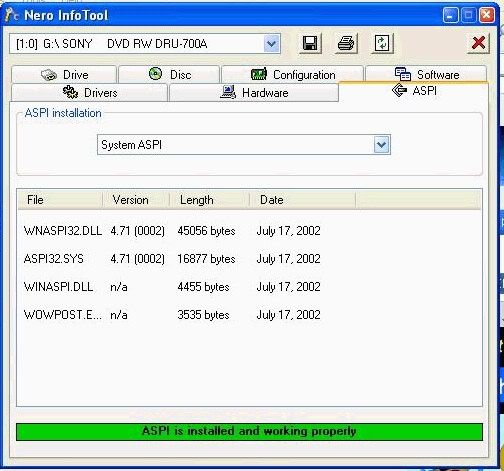
it may be worth clicking on the aspi tab, and note down anything that might be missing

Main PC ~ Intel C2Q Q6600 (G0 Stepping)/Gigabyte GA-EP45-DS3/2GB Crucial Ballistix PC2-8500/Zalman CNPS9700/Antec 900/Corsair HX 620W
Network ~ DD-WRT ~ 2node WDS-WPA2/AES ~ Buffalo WHR-G54S. 3node WPA2/AES ~ WRT54GS v6 (inc. WEP BSSID), WRT54G v2, WRT54G2 v1. *** Forum Rules ***This message has been edited since posting. Last time this message was edited on 6. June 2005 @ 10:38
|
|
dametony
Junior Member
|
5. June 2005 @ 16:07 |
Link to this message
|
|
hmmm...don't know how to take screenshots of the windows, but the one thing i did notice is that i got a yellow "ASPI is not installed" result when i clicked the system (not nero) "aspi" tab.
dma = on (and autorun on, too). firmware = 10GE.
what does this all mean, and how does it apply? i could burn DVD's fine until a little bit ago -- this is why i'm just wondering if the burner is shot. how would i know?
|
AfterDawn Addict
6 product reviews
|
5. June 2005 @ 17:52 |
Link to this message
|
Quote:
also, is having only 4GB free out of 111GB a bad thing?
Yes, it is recommended that you have 10-15 gb free space. I would say this is your problem. Clean up your hdd and get rid of some unneeded junk.
Rig #1 Asus Rampage Formula Mobo, Intel Core2Quad Q9450 CPU @ 3.55ghz, 2gb Corsair DDR2 1066 Dominator Ram @ 5-5-5-15, TR Ultra 120 Extreme w/ Scythe 9 blade 110 cfm 120mm Fan HSF, HIS Radeon 512mb HD3850 IceQ TurboX GPU, Corsair 620HX P/S, CM Stacker 830 Evo Case, Rig #2 Asus P5W DH Deluxe Mobo, Intel C2D E6600 CPU @ 3.6ghz, 2gb Corsair XMS2 DDR2 800 Ram @ 4-4-4-12-2t, Zalman CNPS9500LED HSF, Sapphire Radeon X850XT PE GPU, Corsair 620HX P/S, Cooler Master Mystique Case, Viewsonic 20.1" Widescreen Digital LCD Monitor, Klipsch Promedia Ultra 5.1 THX Desktop Speakers, http://valid.x86-secret.com/show_oc.php?id=348351 http://valid.x86-secret.com/show_oc.php?id=236435 |
Moderator
|
6. June 2005 @ 00:01 |
Link to this message
|
|
ARGH!!.. how could i have missed the 4GB clue, doh!. i blame the alcohol :)
Main PC ~ Intel C2Q Q6600 (G0 Stepping)/Gigabyte GA-EP45-DS3/2GB Crucial Ballistix PC2-8500/Zalman CNPS9700/Antec 900/Corsair HX 620W
Network ~ DD-WRT ~ 2node WDS-WPA2/AES ~ Buffalo WHR-G54S. 3node WPA2/AES ~ WRT54GS v6 (inc. WEP BSSID), WRT54G v2, WRT54G2 v1. *** Forum Rules ***
|
|
dametony
Junior Member
|
6. June 2005 @ 14:52 |
Link to this message
|
okay, i cleared a bunch of stuff off my hard drive (i now have 17.4GB left), did disk cleanup, defragged, and tried to burn a disc with Nero.
power calibration error, could not perform end of disc-at-once.
same crap as before.
here's the log for good measure:
***
Windows XP 5.1
IA32
WinAspi: -
ahead WinASPI: File 'C:\Program Files\Ahead\nero\Wnaspi32.dll': Ver=2.0.1.68, size=160016 bytes, created 7/28/2004 5:51:12 PM
Nero version: 6.6.0.1 (Nero Express)
Recorder: <_NEC DVD+RW ND-1100A> Version: 10GE - HA 0 TA 1 - 6.6.0.1
Adapter driver: <atapi> HA 0
Drive buffer : 2048kB
Bus Type : default (0) -> ATAPI, detected: ATAPI
CD-ROM: <JLMS DVD-ROM XJ-HD166>Version: DD05 - HA 0 TA 0 - 6.6.0.1
Adapter driver: <atapi> HA 0
=== Scsi-Device-Map ===
CdRomPeripheral : JLMS DVD-ROM XJ-HD166 atapi Port 0 ID 0 DMA: On
CdRomPeripheral : _NEC DVD+RW ND-1100A atapi Port 0 ID 1 DMA: On
DiskPeripheral : ST3120026AS atapi Port 1 ID 0 DMA: On
=== CDRom-Device-Map ===
JLMS DVD-ROM XJ-HD166 D: CDRom0
_NEC DVD+RW ND-1100A E: CDRom1
=======================
AutoRun : 1
Excluded drive IDs:
WriteBufferSize: 83886080 (0) Byte
ShowDrvBufStat : 0
BUFE : 0
Physical memory : 1022MB (1047536kB)
Free physical memory: 626MB (641132kB)
Memory in use : 38 %
Uncached PFiles: 0x0
Use Static Write Speed Table: 0
Use Inquiry : 1
Global Bus Type: default (0)
Check supported media : Disabled (0)
6.6.2005
ISO compilation
5:06:58 PM #1 Text 0 File Isodoc.cpp, Line 6165
Iso document burn settings
------------------------------------------
Determine maximum speed : FALSE
Simulate : FALSE
Write : TRUE
Finalize CD : TRUE
Multisession : FALSE
Burning mode : DAO
Mode : 1
ISO Level : 1 (Max. of 11 = 8 + 3 char)
Character set : ISO 9660
Joliet : TRUE
Allow pathdepth more than 8 directories : TRUE
Allow more than 255 characters in path : TRUE
Write ISO9660 ;1 file extensions : TRUE
5:06:58 PM #2 Text 0 File Reader.cpp, Line 127
Reader running
5:06:58 PM #3 Text 0 File Writer.cpp, Line 122
Writer _NEC DVD+RW ND-1100A running
5:06:58 PM #4 ISO9660GEN -11 File geniso.cpp, Line 3286
First writeable address = 0 (0x00000000)
5:06:58 PM #5 Text 0 File Burncd.cpp, Line 3117
Turn on Disc-at-once, using DVD media
5:07:26 PM #6 Text 0 File DlgWaitCD.cpp, Line 256
Last possible write address on media: 2295103 (510:01.28, 4482MB)
Last address to be written: 2142223 (476:02.73, 4184MB)
5:07:26 PM #7 Text 0 File DlgWaitCD.cpp, Line 268
Write in overburning mode: NO (enabled: CD)
5:07:26 PM #8 Text 0 File DlgWaitCD.cpp, Line 2309
Recorder: _NEC DVD+RW ND-1100A, Media type: DVD+R
5:07:26 PM #9 Text 0 File DlgWaitCD.cpp, Line 430
>>> Protocol of DlgWaitCD activities: <<<
=========================================
Insert empty disc to write to.
(Medium in drive: Unknown. Medium required by compilation: DVD+R/RW.)
5:07:26 PM #10 Text 0 File ThreadedTransferInterface.cpp, Line 844
Setup items (after recorder preparation)
0: TRM_DATA_MODE1 ()
2 indices, index0 (150) not provided
original disc pos #0 + 2142224 (2142224) = #2142224/476:2.74
relocatable, disc pos for caching/writing not required/ required, no patch infos
-> TRM_DATA_MODE1, 2048, config 0, wanted index0 0 blocks, length 2142224 blocks [_NEC DVD+RW ND-1100A]
--------------------------------------------------------------
5:07:26 PM #11 Text 0 File ThreadedTransferInterface.cpp, Line 1047
Prepare recorder [_NEC DVD+RW ND-1100A] for write in CUE-sheet-DAO
DAO infos:
==========
MCN: ""
TOCType: 0x00; Session Closed, disc fixated
Tracks 1 to 1:
1: TRM_DATA_MODE1, 2048/0x00, FilePos 0 0 4387274752, ISRC ""
DAO layout:
===========
__Start_|____Track_|_Idx_|_RecDep_|_CtrlAdr_
0 | lead-in | 0 | 0x00 | 0x41
0 | 1 | 0 | 0x00 | 0x41
0 | 1 | 1 | 0x00 | 0x41
2142224 | lead-out | 1 | 0x00 | 0x41
5:07:26 PM #12 Phase 24 File dlgbrnst.cpp, Line 1853
Caching of files started
5:07:26 PM #13 Text 0 File Burncd.cpp, Line 4003
Cache writing successful.
5:07:26 PM #14 Phase 25 File dlgbrnst.cpp, Line 1853
Caching of files completed
5:07:26 PM #15 Phase 36 File dlgbrnst.cpp, Line 1853
Burn process started at 2.4x (3,324 KB/s)
5:07:26 PM #16 Text 0 File ThreadedTransferInterface.cpp, Line 2497
Verifying disc position of item 0 (relocatable, disc pos, no patch infos, orig at #0): write at #0
5:07:26 PM #17 SCSI -1066 File Cdrdrv.cpp, Line 1178
SCSI Exec, HA 0, TA 1, LUN 0, buffer 0x037A5000
Status: 0x04 (0x01, SCSI_ERR)
HA-Status 0x00 (0x00, OK)
TA-Status 0x02 (0x01, SCSI_TASTATUS_CHKCOND)
Sense Key: 0x05 (KEY_ILLEGAL_REQUEST)
Sense Code: 0x24
Sense Qual: 0x00
CDB Data: 0xAD 0x00 0x00 0x00 0x00 0x00 0x00 0x00 0x08 0x04 0x00 0x00
Sense Data: 0x70 0x00 0x05 0x00 0x00 0x00 0x00 0x0A
0x00 0x00 0x00 0x00 0x24 0x00
5:07:26 PM #18 SCSI -1065 File Cdrdrv.cpp, Line 1178
SCSI Exec, HA 0, TA 1, LUN 0, buffer 0x037A7000
Status: 0x04 (0x01, SCSI_ERR)
HA-Status 0x00 (0x00, OK)
TA-Status 0x02 (0x01, SCSI_TASTATUS_CHKCOND)
Sense Key: 0x05 (KEY_ILLEGAL_REQUEST)
Sense Code: 0x20
Sense Qual: 0x00
CDB Data: 0xFA 0x10 0x00 0x00 0x00 0x00 0x00 0x00 0x06 0x00 0x00 0x00
Sense Data: 0x70 0x00 0x05 0x00 0x00 0x00 0x00 0x0A
0x00 0x00 0x00 0x00 0x20 0x00
5:07:27 PM #19 Text 0 File dlgbrnst.cpp, Line 1711
Set remaining time: 22:19,536 (1339536ms) -> OK
5:07:27 PM #20 Text 0 File DVDPlusRW.cpp, Line 632
Start write address at LBA 0
DVD high compatibility mode: Yes
5:29:14 PM #21 Text 0 File WriterStatus.cpp, Line 116
<_NEC DVD+RW ND-1100A > start writing Lead-Out at LBA 2142224 (20B010h), lenght 0 blocks
5:29:14 PM #22 Text 0 File ThreadedTransfer.cpp, Line 229
all writers idle, stopping conversion
5:29:27 PM #23 SCSI -1106 File Cdrdrv.cpp, Line 1178
SCSI Exec, HA 0, TA 1, LUN 0
Status: 0x04 (0x01, SCSI_ERR)
HA-Status 0x00 (0x00, OK)
TA-Status 0x02 (0x01, SCSI_TASTATUS_CHKCOND)
Sense Key: 0x03 (KEY_MEDIUM_ERROR)
Sense Code: 0x73
Sense Qual: 0x03
CDB Data: 0x5B 0x01 0x01 0x00 0x00 0x01 0x00 0x00 0x00 0x00 0x00 0x00
Sense Data: 0x70 0x00 0x03 0x00 0x00 0x00 0x00 0x0A
0x00 0x00 0x00 0x00 0x73 0x03
5:29:27 PM #24 SCSI -1176 File Cdrdrv.cpp, Line 1178
SCSI Exec, HA 0, TA 1, LUN 0
Status: 0x04 (0x01, SCSI_ERR)
HA-Status 0x00 (0x00, OK)
TA-Status 0x02 (0x01, SCSI_TASTATUS_CHKCOND)
Sense Key: 0x05 (KEY_ILLEGAL_REQUEST)
Sense Code: 0x72
Sense Qual: 0x03
CDB Data: 0x5B 0x01 0x06 0x00 0x00 0x00 0x00 0x00 0x00 0x00 0x00 0x00
Sense Data: 0x70 0x00 0x05 0x00 0x00 0x00 0x00 0x0A
0x00 0x00 0x00 0x00 0x72 0x03
5:29:27 PM #25 Text 0 File dlgbrnst.cpp, Line 1711
Set remaining time: 0:00,000 (0ms) -> OK
5:29:27 PM #26 SCSI -1065 File Cdrdrv.cpp, Line 1178
SCSI Exec, HA 0, TA 1, LUN 0, buffer 0x037A5000
Status: 0x04 (0x01, SCSI_ERR)
HA-Status 0x00 (0x00, OK)
TA-Status 0x02 (0x01, SCSI_TASTATUS_CHKCOND)
Sense Key: 0x05 (KEY_ILLEGAL_REQUEST)
Sense Code: 0x20
Sense Qual: 0x00
CDB Data: 0xFA 0x10 0x00 0x00 0x00 0x00 0x00 0x00 0x06 0x00 0x00 0x00
Sense Data: 0x70 0x00 0x05 0x00 0x00 0x00 0x00 0x0A
0x00 0x00 0x00 0x00 0x20 0x00
5:29:27 PM #27 CDR -1106 File ThreadedTransferInterface.cpp, Line 1800
Power calibration error
_NEC DVD+RW ND-1100A\H0 T1
5:29:27 PM #28 TRANSFER -24 File ThreadedTransferInterface.cpp, Line 1800
Could not perform end of Disc-at-once
5:29:38 PM #29 SCSI -1106 File Cdrdrv.cpp, Line 1178
SCSI Exec, HA 0, TA 1, LUN 0
Status: 0x04 (0x01, SCSI_ERR)
HA-Status 0x00 (0x00, OK)
TA-Status 0x02 (0x01, SCSI_TASTATUS_CHKCOND)
Sense Key: 0x03 (KEY_MEDIUM_ERROR)
Sense Code: 0x73
Sense Qual: 0x03
CDB Data: 0x5B 0x01 0x01 0x00 0x00 0x01 0x00 0x00 0x00 0x00 0x00 0x00
Sense Data: 0x70 0x00 0x03 0x00 0x00 0x00 0x00 0x0A
0x00 0x00 0x00 0x00 0x73 0x03
5:29:38 PM #30 SCSI -1176 File Cdrdrv.cpp, Line 1178
SCSI Exec, HA 0, TA 1, LUN 0
Status: 0x04 (0x01, SCSI_ERR)
HA-Status 0x00 (0x00, OK)
TA-Status 0x02 (0x01, SCSI_TASTATUS_CHKCOND)
Sense Key: 0x05 (KEY_ILLEGAL_REQUEST)
Sense Code: 0x72
Sense Qual: 0x03
CDB Data: 0x5B 0x01 0x05 0x00 0x00 0x00 0x00 0x00 0x00 0x00 0x00 0x00
Sense Data: 0x70 0x00 0x05 0x00 0x00 0x00 0x00 0x0A
0x00 0x00 0x00 0x00 0x72 0x03
5:29:38 PM #31 Phase 127 File dlgbrnst.cpp, Line 1853
Generating DVD high compatibility borders
5:29:38 PM #32 Text 0 File dlgbrnst.cpp, Line 1711
Set remaining time: 0:00,000 (0ms) -> OK
5:29:38 PM #33 SCSI -1065 File Cdrdrv.cpp, Line 1178
SCSI Exec, HA 0, TA 1, LUN 0, buffer 0x037A5000
Status: 0x04 (0x01, SCSI_ERR)
HA-Status 0x00 (0x00, OK)
TA-Status 0x02 (0x01, SCSI_TASTATUS_CHKCOND)
Sense Key: 0x05 (KEY_ILLEGAL_REQUEST)
Sense Code: 0x20
Sense Qual: 0x00
CDB Data: 0xFA 0x10 0x00 0x00 0x00 0x00 0x00 0x00 0x06 0x00 0x00 0x00
Sense Data: 0x70 0x00 0x05 0x00 0x00 0x00 0x00 0x0A
0x00 0x00 0x00 0x00 0x20 0x00
5:29:38 PM #34 CDR -1106 File WriterStatus.cpp, Line 167
Power calibration error
_NEC DVD+RW ND-1100A\H0 T1
5:29:38 PM #35 TRANSFER -24 File WriterStatus.cpp, Line 167
Could not perform end of Disc-at-once
5:29:38 PM #36 Text 0 File dlgbrnst.cpp, Line 1711
Set remaining time: 0:00,000 (0ms) -> OK
5:29:38 PM #37 Phase 38 File dlgbrnst.cpp, Line 1853
Burn process failed at 2.4x (3,324 KB/s)
Existing drivers:
File 'Drivers\ADPU160M.SYS': Ver=v3.60a (Lab01_N(johnstra).010529-2218), size=101888 bytes, created 8/17/2001 3:07:32 PM
File 'Drivers\CDRALW2K.SYS': Ver=5.3.2.34, size=23420 bytes, created 11/11/2003 8:46:14 PM
File 'Drivers\PXHELP20.SYS': Ver=2.03.28a, size=20640 bytes, created 3/11/2005 5:28:09 PM (Prassi/Veritas driver for win 2K)
File 'Drivers\atapi.sys': Ver=5.1.2600.2180 (xpsp_sp2_rtm.040803-2158), size=95360 bytes, created 8/4/2004 12:59:42 AM (Adapter driver for rec)
Registry Keys:
HKLM\Software\Microsoft\Windows NT\CurrentVersion\WinLogon\AllocateCDROMs : 0 (Security Option)
|
|
squizzle
AfterDawn Addict
|
6. June 2005 @ 15:43 |
Link to this message
|
Quote:
WinAspi: -
ahead WinASPI: File 'C:\Program Files\Ahead\nero\Wnaspi32.dll': Ver=2.0.1.68, size=160016 bytes, created 7/28/2004
ASPI may be your issue. Here's an excerpt from another thread explaining ASPI:
<11>What is ASPI and do I need it?
The term 'ASPI' is an acronym that stands for: Advanced SCSI Programming Interface. All the following terms are synonymous: ASPI layer, ASPI drivers, ASPI interface. The term 'SCSI' [scuzzy] is an acronym that stands for Small Computer Systems Interface. An ASPI layer consists of four files that 'lie between' various programs [software] and certain devices, such as CD/DVD-ROM drives and CD/DVD burners/writers [hardware]. Software programs such as CD digital audio extractors [commonly known as 'Rippers'] and CD-writing utilities such as CDRWin use/require ASPI drivers to 'communicate with' SCSI devices. Many people don't realize however, that the files contained in an ASPI layer are also used in systems that *don't* contain a SCSI adapter, or SCSI devices .. for things such as ripping CD audio and burning CD/DVDs.
ASPI DOWNLOAD http://www.adaptec.com/worldwide/support/driverdetail.jsp?cat=/Pr...
Same thread, this covers power calibration errors:
<9>I have a Power calibration error?
Options you can try with "power calibration errors"
o Try another brand of DVD-/+R or DVD-/+RW media. This is the most common cause of OPC errors.
o "Slow down your burning speed".
o Update the firmware of your recorder. Check the manufacturer's website for the latest version.
o Check your power connectors, loose connections do occur. Don't share power with other devices. It needs its own power connector. If the errors occurs with an external recorder, Check the USB cable and connections.
o Try different configurations, such as taking the DVD-ROM to the primary IDE bus as slave and have only the recorder connected to the secondary IDE bus as master.
o Clean or have your DVD burner serviced. There are cleaning kits available. Sometimes just a gentle appplication of canned air can remove dust blocking the laser.
o Replace the DVD burner.
lets hope we don't need to do the last one :-)
There's a link to this thread in my sig, the one that says newbies.
Convert PAL to NTSC or NTSC to PAL------>http://forums.afterdawn.com/thread_view.cfm/167922
ScubaPete's guides------>http://www.dvdplusvideo.com/tutorial007.html
Bbmayo's guides------>http://home.comcast.net/~bbmayo/index.html
My ever-growing movie collection------>http://www.intervocative.com/dvdcollection.aspx/squizzle
This message has been edited since posting. Last time this message was edited on 6. June 2005 @ 15:44
|
AfterDawn Addict
6 product reviews
|
6. June 2005 @ 18:24 |
Link to this message
|
Rig #1 Asus Rampage Formula Mobo, Intel Core2Quad Q9450 CPU @ 3.55ghz, 2gb Corsair DDR2 1066 Dominator Ram @ 5-5-5-15, TR Ultra 120 Extreme w/ Scythe 9 blade 110 cfm 120mm Fan HSF, HIS Radeon 512mb HD3850 IceQ TurboX GPU, Corsair 620HX P/S, CM Stacker 830 Evo Case, Rig #2 Asus P5W DH Deluxe Mobo, Intel C2D E6600 CPU @ 3.6ghz, 2gb Corsair XMS2 DDR2 800 Ram @ 4-4-4-12-2t, Zalman CNPS9500LED HSF, Sapphire Radeon X850XT PE GPU, Corsair 620HX P/S, Cooler Master Mystique Case, Viewsonic 20.1" Widescreen Digital LCD Monitor, Klipsch Promedia Ultra 5.1 THX Desktop Speakers, http://valid.x86-secret.com/show_oc.php?id=348351 http://valid.x86-secret.com/show_oc.php?id=236435 |
|
dametony
Junior Member
|
6. June 2005 @ 18:43 |
Link to this message
|
i will try these things.
why would this just start happening, though? like, it all worked fine when i got the computer, and now i can't get a DVD to complete. CD's are all fine, though (although i can't do disc-to-disc copying now for some reason - this is a recent development). also, why would sonic stop working, then Nero works for a while, and then Nero stops working?
i've been using the same media that i've used all along: verbatim DVD+R.
also, i think that bit with "Insert empty disc to write to.
(Medium in drive: Unknown. Medium required by compilation: DVD+R/RW.)" is just because i usually hit "burn" before i put a disc in. just my habit, to hit burn, have the tray pop out, put a disc in, and go.
|
|
dametony
Junior Member
|
6. June 2005 @ 18:57 |
Link to this message
|
|
i'm trying to do this ASPI thing, but i get as far as the black windows system32 box thingy, and then i don't understand what to type in. the directions tell me to hit "space," and i do that, but the box disappears.
man, i don't know what i'm even doing...
|
AfterDawn Addict
6 product reviews
|
6. June 2005 @ 19:06 |
Link to this message
|
I'm not sure what you've got. They're just drivers and you should be able to just download them. I never got the Force ASPI to take and used Adaptec ASPI. When your ASPI layers are upto date the box on the bottom of nero's ASPI check screen will be green for both system and Nero.
Rig #1 Asus Rampage Formula Mobo, Intel Core2Quad Q9450 CPU @ 3.55ghz, 2gb Corsair DDR2 1066 Dominator Ram @ 5-5-5-15, TR Ultra 120 Extreme w/ Scythe 9 blade 110 cfm 120mm Fan HSF, HIS Radeon 512mb HD3850 IceQ TurboX GPU, Corsair 620HX P/S, CM Stacker 830 Evo Case, Rig #2 Asus P5W DH Deluxe Mobo, Intel C2D E6600 CPU @ 3.6ghz, 2gb Corsair XMS2 DDR2 800 Ram @ 4-4-4-12-2t, Zalman CNPS9500LED HSF, Sapphire Radeon X850XT PE GPU, Corsair 620HX P/S, Cooler Master Mystique Case, Viewsonic 20.1" Widescreen Digital LCD Monitor, Klipsch Promedia Ultra 5.1 THX Desktop Speakers, http://valid.x86-secret.com/show_oc.php?id=348351 http://valid.x86-secret.com/show_oc.php?id=236435 |
Moderator
|
6. June 2005 @ 23:40 |
Link to this message
|
Quote:
File 'Drivers\CDRALW2K.SYS': Ver=5.3.2.34, size=23420 bytes, created 11/11/2003 8:46:14 PM
- Packet writing software, this doesn't play ball with standard Nero very well..
Main PC ~ Intel C2Q Q6600 (G0 Stepping)/Gigabyte GA-EP45-DS3/2GB Crucial Ballistix PC2-8500/Zalman CNPS9700/Antec 900/Corsair HX 620W
Network ~ DD-WRT ~ 2node WDS-WPA2/AES ~ Buffalo WHR-G54S. 3node WPA2/AES ~ WRT54GS v6 (inc. WEP BSSID), WRT54G v2, WRT54G2 v1. *** Forum Rules ***
|
|
squizzle
AfterDawn Addict
|
7. June 2005 @ 08:58 |
Link to this message
|
|
ahhh yes, forgot all about that. If you have InCD or DLA installed, uninstall them. This causes serious issues when trying to burn dvds.
Convert PAL to NTSC or NTSC to PAL------>http://forums.afterdawn.com/thread_view.cfm/167922
ScubaPete's guides------>http://www.dvdplusvideo.com/tutorial007.html
Bbmayo's guides------>http://home.comcast.net/~bbmayo/index.html
My ever-growing movie collection------>http://www.intervocative.com/dvdcollection.aspx/squizzle
|
|
dametony
Junior Member
|
7. June 2005 @ 23:01 |
Link to this message
|
|
well, uninstalled DLA, tried to burn, got "could not perform end of disc-at-once."
log:
***
Windows XP 5.1
IA32
WinAspi: -
ahead WinASPI: File 'C:\Program Files\Ahead\nero\Wnaspi32.dll': Ver=2.0.1.68, size=160016 bytes, created 7/28/2004 5:51:12 PM
Nero version: 6.6.0.1 (Nero Express)
Recorder: <_NEC DVD+RW ND-1100A> Version: 10GE - HA 0 TA 1 - 6.6.0.1
Adapter driver: <atapi> HA 0
Drive buffer : 2048kB
Bus Type : default (0) -> ATAPI, detected: ATAPI
CD-ROM: <JLMS DVD-ROM XJ-HD166>Version: DD05 - HA 0 TA 0 - 6.6.0.1
Adapter driver: <atapi> HA 0
=== Scsi-Device-Map ===
CdRomPeripheral : JLMS DVD-ROM XJ-HD166 atapi Port 0 ID 0 DMA: On
CdRomPeripheral : _NEC DVD+RW ND-1100A atapi Port 0 ID 1 DMA: On
DiskPeripheral : ST3120026AS atapi Port 1 ID 0 DMA: On
=== CDRom-Device-Map ===
JLMS DVD-ROM XJ-HD166 D: CDRom0
_NEC DVD+RW ND-1100A E: CDRom1
=======================
AutoRun : 1
Excluded drive IDs:
WriteBufferSize: 83886080 (0) Byte
ShowDrvBufStat : 0
BUFE : 0
Physical memory : 1022MB (1047536kB)
Free physical memory: 613MB (628268kB)
Memory in use : 40 %
Uncached PFiles: 0x0
Use Static Write Speed Table: 0
Use Inquiry : 1
Global Bus Type: default (0)
Check supported media : Disabled (0)
8.6.2005
ISO compilation
1:28:00 AM #1 Text 0 File Isodoc.cpp, Line 6165
Iso document burn settings
------------------------------------------
Determine maximum speed : FALSE
Simulate : FALSE
Write : TRUE
Finalize CD : TRUE
Multisession : FALSE
Burning mode : DAO
Mode : 1
ISO Level : 1 (Max. of 11 = 8 + 3 char)
Character set : ISO 9660
Joliet : TRUE
Allow pathdepth more than 8 directories : TRUE
Allow more than 255 characters in path : TRUE
Write ISO9660 ;1 file extensions : TRUE
1:28:00 AM #2 Text 0 File Reader.cpp, Line 127
Reader running
1:28:00 AM #3 Text 0 File Writer.cpp, Line 122
Writer _NEC DVD+RW ND-1100A running
1:28:00 AM #4 ISO9660GEN -11 File geniso.cpp, Line 3286
First writeable address = 0 (0x00000000)
1:28:00 AM #5 Text 0 File Burncd.cpp, Line 3117
Turn on Disc-at-once, using DVD media
1:28:29 AM #6 Text 0 File DlgWaitCD.cpp, Line 256
Last possible write address on media: 2295103 (510:01.28, 4482MB)
Last address to be written: 2142223 (476:02.73, 4184MB)
1:28:29 AM #7 Text 0 File DlgWaitCD.cpp, Line 268
Write in overburning mode: NO (enabled: CD)
1:28:29 AM #8 Text 0 File DlgWaitCD.cpp, Line 2309
Recorder: _NEC DVD+RW ND-1100A, Media type: DVD+R
1:28:29 AM #9 Text 0 File DlgWaitCD.cpp, Line 430
>>> Protocol of DlgWaitCD activities: <<<
=========================================
Insert empty disc to write to.
(Medium in drive: Unknown. Medium required by compilation: DVD+R/RW.)
1:28:29 AM #10 Text 0 File ThreadedTransferInterface.cpp, Line 844
Setup items (after recorder preparation)
0: TRM_DATA_MODE1 ()
2 indices, index0 (150) not provided
original disc pos #0 + 2142224 (2142224) = #2142224/476:2.74
relocatable, disc pos for caching/writing not required/ required, no patch infos
-> TRM_DATA_MODE1, 2048, config 0, wanted index0 0 blocks, length 2142224 blocks [_NEC DVD+RW ND-1100A]
--------------------------------------------------------------
1:28:29 AM #11 Text 0 File ThreadedTransferInterface.cpp, Line 1047
Prepare recorder [_NEC DVD+RW ND-1100A] for write in CUE-sheet-DAO
DAO infos:
==========
MCN: ""
TOCType: 0x00; Session Closed, disc fixated
Tracks 1 to 1:
1: TRM_DATA_MODE1, 2048/0x00, FilePos 0 0 4387274752, ISRC ""
DAO layout:
===========
__Start_|____Track_|_Idx_|_RecDep_|_CtrlAdr_
0 | lead-in | 0 | 0x00 | 0x41
0 | 1 | 0 | 0x00 | 0x41
0 | 1 | 1 | 0x00 | 0x41
2142224 | lead-out | 1 | 0x00 | 0x41
1:28:29 AM #12 Phase 24 File dlgbrnst.cpp, Line 1853
Caching of files started
1:28:30 AM #13 Text 0 File Burncd.cpp, Line 4003
Cache writing successful.
1:28:30 AM #14 Phase 25 File dlgbrnst.cpp, Line 1853
Caching of files completed
1:28:30 AM #15 Phase 36 File dlgbrnst.cpp, Line 1853
Burn process started at 2.4x (3,324 KB/s)
1:28:30 AM #16 Text 0 File ThreadedTransferInterface.cpp, Line 2497
Verifying disc position of item 0 (relocatable, disc pos, no patch infos, orig at #0): write at #0
1:28:30 AM #17 SCSI -1066 File Cdrdrv.cpp, Line 1178
SCSI Exec, HA 0, TA 1, LUN 0, buffer 0x037A5000
Status: 0x04 (0x01, SCSI_ERR)
HA-Status 0x00 (0x00, OK)
TA-Status 0x02 (0x01, SCSI_TASTATUS_CHKCOND)
Sense Key: 0x05 (KEY_ILLEGAL_REQUEST)
Sense Code: 0x24
Sense Qual: 0x00
CDB Data: 0xAD 0x00 0x00 0x00 0x00 0x00 0x00 0x00 0x08 0x04 0x00 0x00
Sense Data: 0x70 0x00 0x05 0x00 0x00 0x00 0x00 0x0A
0x00 0x00 0x00 0x00 0x24 0x00
1:28:30 AM #18 SCSI -1065 File Cdrdrv.cpp, Line 1178
SCSI Exec, HA 0, TA 1, LUN 0, buffer 0x037A7000
Status: 0x04 (0x01, SCSI_ERR)
HA-Status 0x00 (0x00, OK)
TA-Status 0x02 (0x01, SCSI_TASTATUS_CHKCOND)
Sense Key: 0x05 (KEY_ILLEGAL_REQUEST)
Sense Code: 0x20
Sense Qual: 0x00
CDB Data: 0xFA 0x10 0x00 0x00 0x00 0x00 0x00 0x00 0x06 0x00 0x00 0x00
Sense Data: 0x70 0x00 0x05 0x00 0x00 0x00 0x00 0x0A
0x00 0x00 0x00 0x00 0x20 0x00
1:28:30 AM #19 Text 0 File dlgbrnst.cpp, Line 1711
Set remaining time: 22:19,536 (1339536ms) -> OK
1:28:30 AM #20 Text 0 File DVDPlusRW.cpp, Line 632
Start write address at LBA 0
DVD high compatibility mode: Yes
1:50:16 AM #21 Text 0 File WriterStatus.cpp, Line 116
<_NEC DVD+RW ND-1100A > start writing Lead-Out at LBA 2142224 (20B010h), lenght 0 blocks
1:50:16 AM #22 Text 0 File ThreadedTransfer.cpp, Line 229
all writers idle, stopping conversion
1:50:26 AM #23 SCSI -1106 File Cdrdrv.cpp, Line 1178
SCSI Exec, HA 0, TA 1, LUN 0
Status: 0x04 (0x01, SCSI_ERR)
HA-Status 0x00 (0x00, OK)
TA-Status 0x02 (0x01, SCSI_TASTATUS_CHKCOND)
Sense Key: 0x03 (KEY_MEDIUM_ERROR)
Sense Code: 0x73
Sense Qual: 0x03
CDB Data: 0x5B 0x01 0x01 0x00 0x00 0x01 0x00 0x00 0x00 0x00 0x00 0x00
Sense Data: 0x70 0x00 0x03 0x00 0x00 0x00 0x00 0x0A
0x00 0x00 0x00 0x00 0x73 0x03
1:50:26 AM #24 SCSI -1176 File Cdrdrv.cpp, Line 1178
SCSI Exec, HA 0, TA 1, LUN 0
Status: 0x04 (0x01, SCSI_ERR)
HA-Status 0x00 (0x00, OK)
TA-Status 0x02 (0x01, SCSI_TASTATUS_CHKCOND)
Sense Key: 0x05 (KEY_ILLEGAL_REQUEST)
Sense Code: 0x72
Sense Qual: 0x03
CDB Data: 0x5B 0x01 0x06 0x00 0x00 0x00 0x00 0x00 0x00 0x00 0x00 0x00
Sense Data: 0x70 0x00 0x05 0x00 0x00 0x00 0x00 0x0A
0x00 0x00 0x00 0x00 0x72 0x03
1:50:26 AM #25 Text 0 File dlgbrnst.cpp, Line 1711
Set remaining time: 0:00,000 (0ms) -> OK
1:50:26 AM #26 SCSI -1065 File Cdrdrv.cpp, Line 1178
SCSI Exec, HA 0, TA 1, LUN 0, buffer 0x037A5000
Status: 0x04 (0x01, SCSI_ERR)
HA-Status 0x00 (0x00, OK)
TA-Status 0x02 (0x01, SCSI_TASTATUS_CHKCOND)
Sense Key: 0x05 (KEY_ILLEGAL_REQUEST)
Sense Code: 0x20
Sense Qual: 0x00
CDB Data: 0xFA 0x10 0x00 0x00 0x00 0x00 0x00 0x00 0x06 0x00 0x00 0x00
Sense Data: 0x70 0x00 0x05 0x00 0x00 0x00 0x00 0x0A
0x00 0x00 0x00 0x00 0x20 0x00
1:50:26 AM #27 CDR -1106 File ThreadedTransferInterface.cpp, Line 1800
Power calibration error
_NEC DVD+RW ND-1100A\H0 T1
1:50:26 AM #28 TRANSFER -24 File ThreadedTransferInterface.cpp, Line 1800
Could not perform end of Disc-at-once
1:50:34 AM #29 SCSI -1106 File Cdrdrv.cpp, Line 1178
SCSI Exec, HA 0, TA 1, LUN 0
Status: 0x04 (0x01, SCSI_ERR)
HA-Status 0x00 (0x00, OK)
TA-Status 0x02 (0x01, SCSI_TASTATUS_CHKCOND)
Sense Key: 0x03 (KEY_MEDIUM_ERROR)
Sense Code: 0x73
Sense Qual: 0x03
CDB Data: 0x5B 0x01 0x01 0x00 0x00 0x01 0x00 0x00 0x00 0x00 0x00 0x00
Sense Data: 0x70 0x00 0x03 0x00 0x00 0x00 0x00 0x0A
0x00 0x00 0x00 0x00 0x73 0x03
1:50:34 AM #30 SCSI -1176 File Cdrdrv.cpp, Line 1178
SCSI Exec, HA 0, TA 1, LUN 0
Status: 0x04 (0x01, SCSI_ERR)
HA-Status 0x00 (0x00, OK)
TA-Status 0x02 (0x01, SCSI_TASTATUS_CHKCOND)
Sense Key: 0x05 (KEY_ILLEGAL_REQUEST)
Sense Code: 0x72
Sense Qual: 0x03
CDB Data: 0x5B 0x01 0x05 0x00 0x00 0x00 0x00 0x00 0x00 0x00 0x00 0x00
Sense Data: 0x70 0x00 0x05 0x00 0x00 0x00 0x00 0x0A
0x00 0x00 0x00 0x00 0x72 0x03
1:50:34 AM #31 Phase 127 File dlgbrnst.cpp, Line 1853
Generating DVD high compatibility borders
1:50:34 AM #32 Text 0 File dlgbrnst.cpp, Line 1711
Set remaining time: 0:00,000 (0ms) -> OK
1:50:34 AM #33 SCSI -1065 File Cdrdrv.cpp, Line 1178
SCSI Exec, HA 0, TA 1, LUN 0, buffer 0x037A5000
Status: 0x04 (0x01, SCSI_ERR)
HA-Status 0x00 (0x00, OK)
TA-Status 0x02 (0x01, SCSI_TASTATUS_CHKCOND)
Sense Key: 0x05 (KEY_ILLEGAL_REQUEST)
Sense Code: 0x20
Sense Qual: 0x00
CDB Data: 0xFA 0x10 0x00 0x00 0x00 0x00 0x00 0x00 0x06 0x00 0x00 0x00
Sense Data: 0x70 0x00 0x05 0x00 0x00 0x00 0x00 0x0A
0x00 0x00 0x00 0x00 0x20 0x00
1:50:34 AM #34 CDR -1106 File WriterStatus.cpp, Line 167
Power calibration error
_NEC DVD+RW ND-1100A\H0 T1
1:50:34 AM #35 TRANSFER -24 File WriterStatus.cpp, Line 167
Could not perform end of Disc-at-once
1:50:34 AM #36 Text 0 File dlgbrnst.cpp, Line 1711
Set remaining time: 0:00,000 (0ms) -> OK
1:50:34 AM #37 Phase 38 File dlgbrnst.cpp, Line 1853
Burn process failed at 2.4x (3,324 KB/s)
Existing drivers:
File 'Drivers\ADPU160M.SYS': Ver=v3.60a (Lab01_N(johnstra).010529-2218), size=101888 bytes, created 8/17/2001 3:07:32 PM
File 'Drivers\CDRALW2K.SYS': Ver=5.3.2.34, size=23420 bytes, created 11/11/2003 8:46:14 PM
File 'Drivers\PXHELP20.SYS': Ver=2.03.28a, size=20640 bytes, created 3/11/2005 5:28:09 PM (Prassi/Veritas driver for win 2K)
File 'Drivers\atapi.sys': Ver=5.1.2600.2180 (xpsp_sp2_rtm.040803-2158), size=95360 bytes, created 8/4/2004 12:59:42 AM (Adapter driver for rec)
Registry Keys:
HKLM\Software\Microsoft\Windows NT\CurrentVersion\WinLogon\AllocateCDROMs : 0 (Security Option)
***
still not sure how to do that ASPI thing. i get the black box, but then i don't know what to do. any time i hit a key, the box goes away.
also, i should reiterate that neither my sonic recordnow! or nero will burn CD's (so i feel like just focusing on nero-related stuff might be a kind of mistake), and neither one will do disc-to-disc (exact copy) of CD-R's, anymore, either. but i can still burn regular CD's with no troubles. this has all been a gradual process, which is why i'm wondering if my drive is going bad. i wish i knew how to tell...
This message has been edited since posting. Last time this message was edited on 7. June 2005 @ 23:05
|
|
dametony
Junior Member
|
7. June 2005 @ 23:38 |
Link to this message
|
okay, here's an update. i figured out how to install the ASPI stuff. so now the Nero checker tool thing shows the color green for Nero and system ASPI.
i just tried to burn a disc, and got a power calibration error at 100%. it also shows "could not perform end of disc-at-once" and then "generating high compatibility borders," "generating DVD borders completed successfully," and then "burn process failed at 2.4x."
what now?
|
|
dametony
Junior Member
|
7. June 2005 @ 23:41 |
Link to this message
|
|
okay, here's one more update before i hit the hay:
i just tried the last disc that supposedly "failed," and it plays just fine. what's THAT about?!?
|
|
squizzle
AfterDawn Addict
|
7. June 2005 @ 23:44 |
Link to this message
|
|
change your media choice, your burner doesn't seem to agree with it. If that doesnt solve it, try a firmware upgrade. Avoid hacked firmware, I read that some hacked firmware for this drive is bad. Clean the burner and check all cable connections. If none of that does it, your burner may be going out on you.
Convert PAL to NTSC or NTSC to PAL------>http://forums.afterdawn.com/thread_view.cfm/167922
ScubaPete's guides------>http://www.dvdplusvideo.com/tutorial007.html
Bbmayo's guides------>http://home.comcast.net/~bbmayo/index.html
My ever-growing movie collection------>http://www.intervocative.com/dvdcollection.aspx/squizzle
|
|
kcnew
Newbie
|
8. June 2005 @ 09:17 |
Link to this message
|
|
I know nothing, but I too have the _NEC DVD+RW ND-1100A burner, and mine also just stopped working. Thus, I'm searching afterdawn for the answer to my problem, saw your post, and thought that perhaps - from one newb to another - this may help, or maybe give one of the experts out there a Eureka! moment and they can help you w/ your problem.
First, is what you're trying to record the correct size? Sounds stupid, but I just encountered the exact same 'end-of-disc' error and yet the resultant DVD played beautifully. My problem was that the file I was burning was just a sneeze (7,319,808 bytes) over the limit. 4.7 is not 4.7 but rather 4.3772161 GB (4,589,843.75 KB).
Secondly, did you just open a new spindle of discs? You say you're using the same as always - Verbatim DVD+R - but my problem began with a new spindle of Memorex 8x (more on that under "Lastly..." below). I'm a believer that there are faulty groups of discs distributed. I bought 4 identical spindles of CD's at the same store on the same day; 3 worked perfectly, and the 4th has given me nothing but bad pixels or whatever it is when big squares show up all over the screen instead of the picture, the audio sounds like a robot whose circuitboard shorted out, and ultimately the movie freezes even though the counter keeps ticking.
Lastly, you say that you upgraded your firmware, which makes us sisters, or brothers, or at least two pretty sorrowful people whose DVD burner no longer works. At the very top of the new spindle of Memorex 8x DVD's I opened was an insert cautioning that I may need a firmware upgrade in order for my burner to work w/ these discs. Even though I'd used TEON 8x and Maxell 8x in the past w/o a problem (I too have had maybe two coasters during the life of my burner), I researched Memorex' advice and (unfortunately) heeded the warning, got the firmware upgrade, and the rest is history ... here I am. There's some development? improvement? that suggests burns by older/slower hardware might not play, all data might be lost, and your dog might develop furballs.
While I'm not getting the same errors as you (I'm not getting any errors), none of the DVD discs I now burn are recognized by my stand-alone player (though, like you, the CD burns are fine). Now, the DVD player (and I've tried two) 'loads' forever then returns 'BAD DISC.' Everything plays beautifully on the computer (of course).
Hope these comments will tweak someone's thoughts and they'll help you find an answer!! Good luck.
PS: Re: Screenshots. Just press the PRNT SCRN button (next to F12), and then open up whatever graphics program you use (MS PAINT, for a quickie), and PASTE. Crop the image so it shows just what you wanted to capture. And there you have it - one of my all-time favorite computerings and perhaps the ONLY one that has never let me down.
|
Moderator
|
8. June 2005 @ 12:43 |
Link to this message
|
@kcnew - I obviously mis-read your post and mistakenly put emphasis on the Memorex. Hell i'm human and was responding to a few posts at once and obviously completely missed the point re the Memorex. I too have re-read your post and even i don't know what i was thinking. Anyway i'm grown up enough to admit i was having a blonde moment hence have edited my reply to you.
@dametony - i've started from the beginning as a few of us have been offering help and you haven't addressed anything yet, and the entire thread is danger of confusing you, and us. So....
Quote:
Recorder: <_NEC DVD+RW ND-1100A> Version: 10GE
- download and install latest (version 1.93) of your burner's firmware here - http://support.necsam.com/OEM/downloads/FlashFirmware
make sure you read up on what do do first, or if you're not confident, then sort out the other things below for now, maybe that will get you burning long enough to find the time to look into firmware upgrade. Basically, the longer you put this off, the more problems you may encounter with current or newer (or different brands) of media as your dvd burner won't recognise media correctly/or at all.
click on the drive tab, note down the firmware version
- this is an easy way to show us what types of media your drive can read/write too. It also helps you to be able to choose media.
Quote:
Last possible write address on media: 2295103 (510:01.28, 4482MB)
Last address to be written: 2142223 (476:02.73, 4184MB)
- this means that the current disc is 4482MB in size. the 4184MB is the amount of data this particular burn is attempting to write to this disc. Please alter DVD Shrink's target size to 4300MB, ie further away from the edge of the disc. This will affect all future movies you prepare using DVD Shrink -
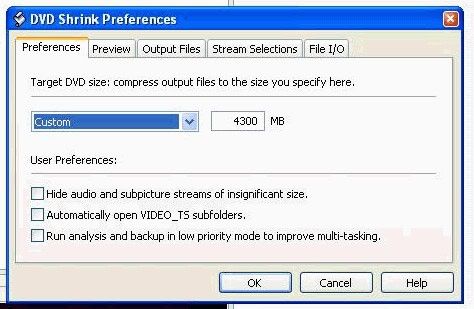
This is especially important if you are using crap media. I use top quality media and i still have 4300MB set permanently.
Quote:
Insert empty disc to write to.
(Medium in drive: Unknown. Medium required by compilation: DVD+R/RW.)
- your burner doesn't recognise your blank discs
Quote:
Sense Key: 0x03 (KEY_MEDIUM_ERROR)
- as i said already, your burner doesn't recognise your blank discs
Quote:
Power calibration error
this is usually because, you guessed it, your burner doesn't recognise your blank discs; this could be due to crap quality media. we don't even know what media you're using, never mind that your drive doesn't know what media you're using.
download dvdinfopro and run a media info check (2nd icon from top left of dvdinfopro) of one of your blank discs.
Quote:
File 'Drivers\CDRALW2K.SYS': Ver=5.3.2.34, size=23420 bytes, created 11/11/2003 8:46:14 PM
- you've still got packet writing software installed - it causes problems with Nero
Quote:
still not sure how to do that ASPI thing. i get the black box, but then i don't know what to do. any time i hit a key, the box goes away.
- that's because you have to download the drivers, THEN run it to install it - http://www.afterdawn.com/software/cdr_software/cdr_tools/aspi.cfm
If you you want to post your own pictures - i do this the same way, but i copy/pasted this from one of the moderators' posts -
Step 1: push ctrl + PrintScreen (above the insert button)
Step 2: Open paint .. click start -> programs -> accessories -> paint
Step 3: push ctrl + v
Step 4: crop your image. I crop what I want to show -> cut it -> open new -> paste it. Crop only what you want to keep
Step 5: save as jpeg
Step 6: Host the jpeg here: http://imageshack.us/
Main PC ~ Intel C2Q Q6600 (G0 Stepping)/Gigabyte GA-EP45-DS3/2GB Crucial Ballistix PC2-8500/Zalman CNPS9700/Antec 900/Corsair HX 620W
Network ~ DD-WRT ~ 2node WDS-WPA2/AES ~ Buffalo WHR-G54S. 3node WPA2/AES ~ WRT54GS v6 (inc. WEP BSSID), WRT54G v2, WRT54G2 v1. *** Forum Rules ***
This message has been edited since posting. Last time this message was edited on 9. June 2005 @ 01:57
|
|
Advertisement
|
|
|
AfterDawn Addict
6 product reviews
|
8. June 2005 @ 13:03 |
Link to this message
|
|
Teons aren't any better. If you don't have playback problems at first, more than likely you will have when you try to play them in 6 months or later. Here's some teon codes.
Teon DVD+R 4x (CMC MAG E01)
Teon DVD+R 4x (CMC MAG.F01)
Teon DVD+R 4x (Philips C08)
Teon DVD-R 4x (CMC MAG. AF1)
Rig #1 Asus Rampage Formula Mobo, Intel Core2Quad Q9450 CPU @ 3.55ghz, 2gb Corsair DDR2 1066 Dominator Ram @ 5-5-5-15, TR Ultra 120 Extreme w/ Scythe 9 blade 110 cfm 120mm Fan HSF, HIS Radeon 512mb HD3850 IceQ TurboX GPU, Corsair 620HX P/S, CM Stacker 830 Evo Case, Rig #2 Asus P5W DH Deluxe Mobo, Intel C2D E6600 CPU @ 3.6ghz, 2gb Corsair XMS2 DDR2 800 Ram @ 4-4-4-12-2t, Zalman CNPS9500LED HSF, Sapphire Radeon X850XT PE GPU, Corsair 620HX P/S, Cooler Master Mystique Case, Viewsonic 20.1" Widescreen Digital LCD Monitor, Klipsch Promedia Ultra 5.1 THX Desktop Speakers, http://valid.x86-secret.com/show_oc.php?id=348351 http://valid.x86-secret.com/show_oc.php?id=236435 |
|


