|
Sudden Problem Writing with Decrypter
|
|
|
pnyklr3
Newbie

|
8. June 2005 @ 18:20 |
Link to this message

|
|
We are what most would call newbies, although we have been burning for quite awhile. We have now run into a problem while burning DVD-R. DVD Decrypter will complete the buffer, but will "stall out" when it is time to write. The time clicks away, but no writing occurs. The error message we get is (I hope this even helps anything)
"I/O Error!
Device: [0:0:0] LITE-ON DVDRW SOHW-8125 US01 (G:) (USB)
ScsiStatus: 0x02
Interpretation: Check Condition
CDB: 2A 00 00 00 1C 40 00 00 20 00
Interpretation: Write (10) - Sectors: 7232-7263
Sense Area: 70 00 02 00 00 00 0A 00 00 00 00 30 05 00 00 00 00
Interpretation: Cannot Write Medium - Incompatible Format"
We have changed nothing that I am aware of; same discs, same burner, same software. Any suggestions? Thanks in advance!
|
|
Advertisement
|
 |
|
|
|
Gringle
Suspended due to non-functional email address

|
8. June 2005 @ 23:36 |
Link to this message

|
|
I/O errors cover a multiude of things, basically they show a conflict.
Have you changed your media, or are you using a new pack of poor media?
poor media varies inside the same pack..
Have you downloaded any new programs?
Try unistalling DVD Decrypter, and re-installing it.
good luck
gringle
El gringle..
This message has been edited since posting. Last time this message was edited on 8. June 2005 @ 23:38
|
|
pnyklr3
Newbie
|
9. June 2005 @ 05:09 |
Link to this message
|
|
Media is exactly the same, and we've run through about 5-6 disks thinking that perhaps it was a problem with the disk, or with the origional movie. I re-install decrypter and see where it gets me. Thank you!
|
|
Gringle
Suspended due to non-functional email address
|
9. June 2005 @ 07:42 |
Link to this message
|
|
While agreeing in you guys in essence, I have this gut feeling a mixed bag of poor media...is the problem.
either way while we're talking we're thinking.
gringle
El gringle..
|
Moderator
|
9. June 2005 @ 13:35 |
Link to this message

|
|
i'm stumped, can't find anything on firmware info for this drive.. hmmmm...

Main PC ~ Intel C2Q Q6600 (G0 Stepping)/Gigabyte GA-EP45-DS3/2GB Crucial Ballistix PC2-8500/Zalman CNPS9700/Antec 900/Corsair HX 620W
Network ~ DD-WRT ~ 2node WDS-WPA2/AES ~ Buffalo WHR-G54S. 3node WPA2/AES ~ WRT54GS v6 (inc. WEP BSSID), WRT54G v2, WRT54G2 v1. *** Forum Rules *** |
AfterDawn Addict
|
9. June 2005 @ 14:01 |
Link to this message
|
|
Moderator
|
9. June 2005 @ 14:12 |
Link to this message
|
|
yup, arniebear, that's as far as i got too... but am retiring for the night so didn't progress further..
Main PC ~ Intel C2Q Q6600 (G0 Stepping)/Gigabyte GA-EP45-DS3/2GB Crucial Ballistix PC2-8500/Zalman CNPS9700/Antec 900/Corsair HX 620W
Network ~ DD-WRT ~ 2node WDS-WPA2/AES ~ Buffalo WHR-G54S. 3node WPA2/AES ~ WRT54GS v6 (inc. WEP BSSID), WRT54G v2, WRT54G2 v1. *** Forum Rules ***
|
AfterDawn Addict
|
9. June 2005 @ 14:14 |
Link to this message
|
|
I believe this is the same drive, if so the firmware is way behind.
|
|
sabtoo
Newbie
|
10. June 2005 @ 05:39 |
Link to this message
|
|
I have the same problem and same error messages. Usinig a sony DRX 710 ul with new firmware and the same -r media I had been using for months.
I hope someone has a solution for this problem.
I can burn using +r media just not -r
sabtoo
|
Moderator
|
10. June 2005 @ 06:08 |
Link to this message
|
@sabtoo - we need more to go on -
it seems your drive has the following spec -
Read Speed - 16x (DVD)
Write Speed 8x (DVD-R), 16x (DVD+R), 2.4x (DVD+R DL)
download Nero info-tool from here - http://www.snapfiles.com/get/neroinfo.html
Run it, note down the following, and paste here. Here's what mine shows -
click on the drive tab, note down the firmware version (i know you say you've got new firmware. The latest version is BYX4 dated 4th May 05), however it's still worth covering the obvious -
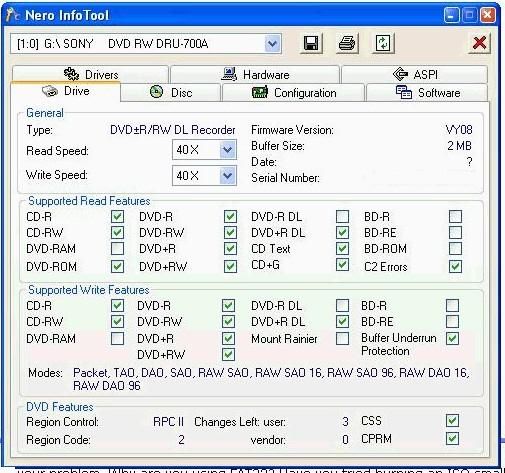
it may be worth clicking on the aspi tab, and note down anything that might be missing
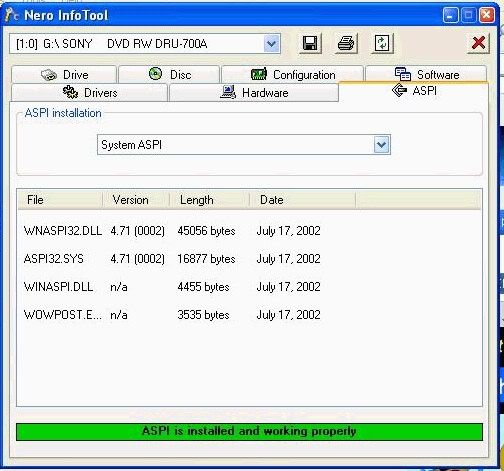
As to ASPI, i'm still not 100% whether it's needed in XP, no matter how many times i read up on it, i'm still none the wiser.
I've always installed it and it doesn't make things worse, plus i never read about installing it making problems so that's good enough for me.
As for the media, we need more info also. Download dvdinfopro (free) and run a media info check and paste info here.
You could post your own pictures - i do this the same way, but i copy/pasted this from one of the moderators' posts -
Step 1: push ctrl + PrintScreen (above the insert button)
Step 2: Open paint .. click start -> programs -> accessories -> paint
Step 3: push ctrl + v
Step 4: crop your image. I crop what I want to show -> cut it -> open new -> paste it. Crop only what you want to keep
Step 5: save as jpeg
Step 6: Host the jpeg here: http://imageshack.us/
Main PC ~ Intel C2Q Q6600 (G0 Stepping)/Gigabyte GA-EP45-DS3/2GB Crucial Ballistix PC2-8500/Zalman CNPS9700/Antec 900/Corsair HX 620W
Network ~ DD-WRT ~ 2node WDS-WPA2/AES ~ Buffalo WHR-G54S. 3node WPA2/AES ~ WRT54GS v6 (inc. WEP BSSID), WRT54G v2, WRT54G2 v1. *** Forum Rules ***
|
|
Shermdizz
Newbie
|
10. June 2005 @ 11:44 |
Link to this message
|
|
I have had the same problem for a week with the lite-on 1693s on a clients machine. Then just yesterday it happened to me also...i did the infocheck thing and it says aspi not installed....i think i'm on the right track here when i say this is a windows thing and not anything else i think it has something to do with an update because it doesn't matter what hardware or media you use....i am using ritek G05 and i have burned like 500 of them and now this
any help would be appreciated
|
|
Shermdizz
Newbie
|
10. June 2005 @ 11:58 |
Link to this message
|
|
decrypter doesn't use aspi by default it uses microsoft's spt1...i tryed changing it to the elaborate bytes .dll and it failed just the same..i have a little more insight because yesterday i re-installed windows on the first computer i mentioned because of this and some other problems and it still failed, BUT i did all the windows updates and didn't try it...so now i'm going to roll back to SP1 to see if that changes things and i'll let you know.
|
Moderator
|
10. June 2005 @ 12:05 |
Link to this message
|
|
OK, the whole ASPI thing just does my head in, 'fraid it's one thing i just don't get.
Main PC ~ Intel C2Q Q6600 (G0 Stepping)/Gigabyte GA-EP45-DS3/2GB Crucial Ballistix PC2-8500/Zalman CNPS9700/Antec 900/Corsair HX 620W
Network ~ DD-WRT ~ 2node WDS-WPA2/AES ~ Buffalo WHR-G54S. 3node WPA2/AES ~ WRT54GS v6 (inc. WEP BSSID), WRT54G v2, WRT54G2 v1. *** Forum Rules ***
|
AfterDawn Addict
|
10. June 2005 @ 12:23 |
Link to this message
|
@Shermdizz
You can only use the ElbyCDIO in Decrypter if you have CloneDVD installed. You can download the free trial version and this will install it, then choose this as your interface in Decrypter. I use the Patin-Couffin by VSO my setup seems to like it and I have not had any problems with a rip or burn. My two cents :~)
|
|
Shermdizz
Newbie
|
10. June 2005 @ 14:10 |
Link to this message
|
|
ok i'm back...i rolled back to sp1 and the burn completed but oddly didn't write at 8x and was jumpy in speed. So then i reinstalled sp2 tryed again, the burn failed. so then i got the aspi,patin couffin,asapi,and elaborate bytes drivers for decrypter and they all failed...since we were all burning in service 2 fine before, i think it has to do with a combo of sp2 and ?....btw..this is really pissing me off...i am just wasting media here like its water...i'm thinkin about reinstalling windows and not adding sp2
|
Moderator
|
10. June 2005 @ 14:14 |
Link to this message
|
|
@Shermdizz - any reason you're doing 8x ?. what happens if you do 4x ?
Main PC ~ Intel C2Q Q6600 (G0 Stepping)/Gigabyte GA-EP45-DS3/2GB Crucial Ballistix PC2-8500/Zalman CNPS9700/Antec 900/Corsair HX 620W
Network ~ DD-WRT ~ 2node WDS-WPA2/AES ~ Buffalo WHR-G54S. 3node WPA2/AES ~ WRT54GS v6 (inc. WEP BSSID), WRT54G v2, WRT54G2 v1. *** Forum Rules ***
This message has been edited since posting. Last time this message was edited on 10. June 2005 @ 14:14
|
|
Shermdizz
Newbie
|
10. June 2005 @ 14:20 |
Link to this message
|
|
that was the first thing i tried creaky...i have also called lite-on and they have their R&D team on it....because if i can't get it working i have to RMA like 12 drives that i've sold to customers. And the drive isn't the problem
|
Moderator
|
10. June 2005 @ 14:25 |
Link to this message
|
Main PC ~ Intel C2Q Q6600 (G0 Stepping)/Gigabyte GA-EP45-DS3/2GB Crucial Ballistix PC2-8500/Zalman CNPS9700/Antec 900/Corsair HX 620W
Network ~ DD-WRT ~ 2node WDS-WPA2/AES ~ Buffalo WHR-G54S. 3node WPA2/AES ~ WRT54GS v6 (inc. WEP BSSID), WRT54G v2, WRT54G2 v1. *** Forum Rules ***
|
|
Shermdizz
Newbie
|
10. June 2005 @ 14:33 |
Link to this message
|
|
i've basically proved that its not a drive,firmware or media issue. its a windows problem that i am not skilled enough to get to the bottom of.
|
Moderator
|
10. June 2005 @ 14:37 |
Link to this message
|
|
ok, i haven't comes across SP2-related burning problems for a while...
..but it does sound like there's too much going on with all those different drivers.... and the pre-SP2 partial sucess does look tempting...
Main PC ~ Intel C2Q Q6600 (G0 Stepping)/Gigabyte GA-EP45-DS3/2GB Crucial Ballistix PC2-8500/Zalman CNPS9700/Antec 900/Corsair HX 620W
Network ~ DD-WRT ~ 2node WDS-WPA2/AES ~ Buffalo WHR-G54S. 3node WPA2/AES ~ WRT54GS v6 (inc. WEP BSSID), WRT54G v2, WRT54G2 v1. *** Forum Rules ***
|
|
Shermdizz
Newbie
|
10. June 2005 @ 14:42 |
Link to this message
|
is there anyway i can send you all my screen shots form that Nero check program?
|
Moderator
|
10. June 2005 @ 14:44 |
Link to this message
|
|
...sure..the easiest way is to do what i asked sabtoo, above..
Main PC ~ Intel C2Q Q6600 (G0 Stepping)/Gigabyte GA-EP45-DS3/2GB Crucial Ballistix PC2-8500/Zalman CNPS9700/Antec 900/Corsair HX 620W
Network ~ DD-WRT ~ 2node WDS-WPA2/AES ~ Buffalo WHR-G54S. 3node WPA2/AES ~ WRT54GS v6 (inc. WEP BSSID), WRT54G v2, WRT54G2 v1. *** Forum Rules ***
|
|
Shermdizz
Newbie
|
10. June 2005 @ 14:45 |
Link to this message
|
|
nevermind my paint doesn't work
|
|
Shermdizz
Newbie
|
10. June 2005 @ 14:47 |
Link to this message
|
|
anyway...on yours you have like 4 different dll's i only have the wnaspi32.dll and it is much much larger than yours and a diff version number...but seriously i give up man
|
|
Advertisement
|
|
|
Moderator
|
10. June 2005 @ 14:57 |
Link to this message
|
well that might be something i s'pose... ASPI (remember i don't know much about ASPI) is s'posed to be something that's not always needed. However... when it's not installed correctly or the red bar at the bottom of that screenshot is displayed, i believe it then becomes a problem. At risk of buggering up more dll's, try downloading it from here - http://www.afterdawn.com/software/cdr_software/cdr_tools/aspi.cfm
Main PC ~ Intel C2Q Q6600 (G0 Stepping)/Gigabyte GA-EP45-DS3/2GB Crucial Ballistix PC2-8500/Zalman CNPS9700/Antec 900/Corsair HX 620W
Network ~ DD-WRT ~ 2node WDS-WPA2/AES ~ Buffalo WHR-G54S. 3node WPA2/AES ~ WRT54GS v6 (inc. WEP BSSID), WRT54G v2, WRT54G2 v1. *** Forum Rules ***
|




