|
[Tutorial] Load 1.5 from 2.71and load ISO's and CSO's
|
|
|
chuyo
Junior Member

|
29. October 2006 @ 19:21 |
 Link to this message

|
Hello:
Here is a quick tutorial to load FW 1.5 from 2.71, i know that there are others threads like this but i made this one with pictures ^_^
Basic terms used in the tutorial:
1.Hard reset
To hold the power switch up for 4-8 seconds.
2.ROOT menu
The ROOT menu of your psp memory stick is where your folder PSP and MP-ROOT is located.
3.MS
MS means memory stick.
4.FW
This means firmware which is another word for version.
REMINDER: THIS WILL NOT BRICK YOUR PSP OR YOUR TA-082 PSP.. THERE IS NOT EVEN A LITTLE CHANCE..THOUGH YOUR PSP HAS TO BE A 2.71 FOR THIS GUIDE TO WORK.
Ok lets start by checking your actual FW, make sure that you have the 2.71
- How can i check my FW? Follow the next steps:
1 ? Go to Settings > System Settings > System Information
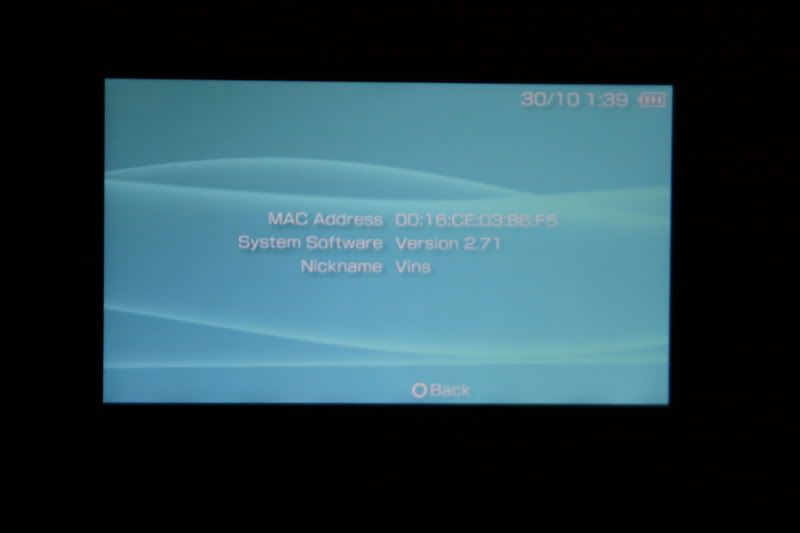
2 ? There should be all the information of your PSP (MAC Adress, System Software a.k.a FW, and Nickname)

- Ok, now that you know what FW you have on your PSP, you will need the ?All you need? .zip that i made.Quote:
(http://www.sendspace.com/file/f2slrs) Updated:Dec-04-2006
- What is inside this .zip? This package contain the following things:
- Devhook Launcher for 2.71
- HENC
- Update 2.71 ( use it only if you don?t have FW 2.71
STEPS TO INSTALL HENC AND DEVHOOK :
1 ? Download the package ?All you need? from here:(http://www.sendspace.com/file/f2slrs)Quote:
Updated:Dec-04-2006
2 ? Placethe .zip on your desktop

3 ? Click it with the right botton and then select ?Extract here?

4 ? It should create a new folder called ?All you need is here?
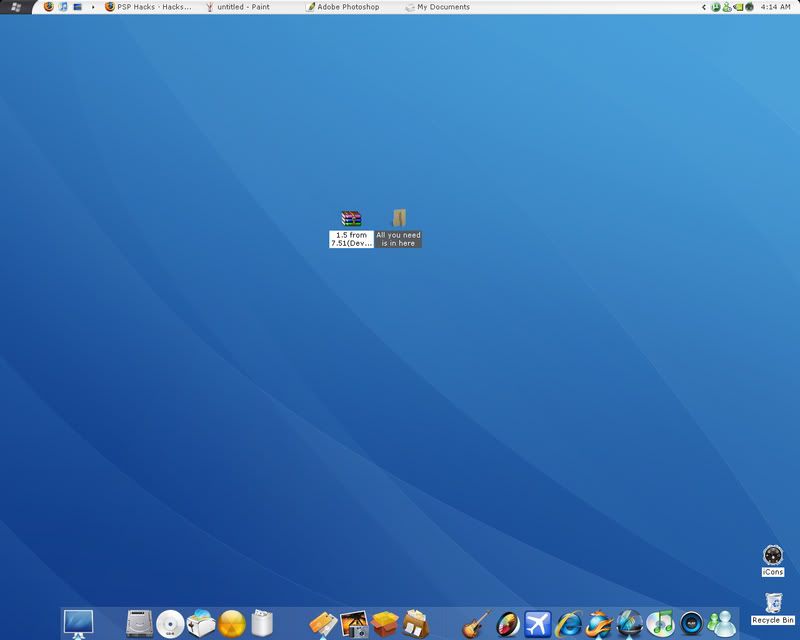
5 ? Open the folder and you should have 3 folders
- Devhook Launcher for 2.71
- HENC
- Update 2.71
6 - Open the Devhool folder and you should see 3 folders , copy the folders ?dh? and ?src?.

7 ? Now connect your PSP to your PC with the USB Cable, and then go to USB Connection on your PSP

8 ? Open your MS folder and there is should be 2 Folders, if not, format your MS and connect your PSPS again.
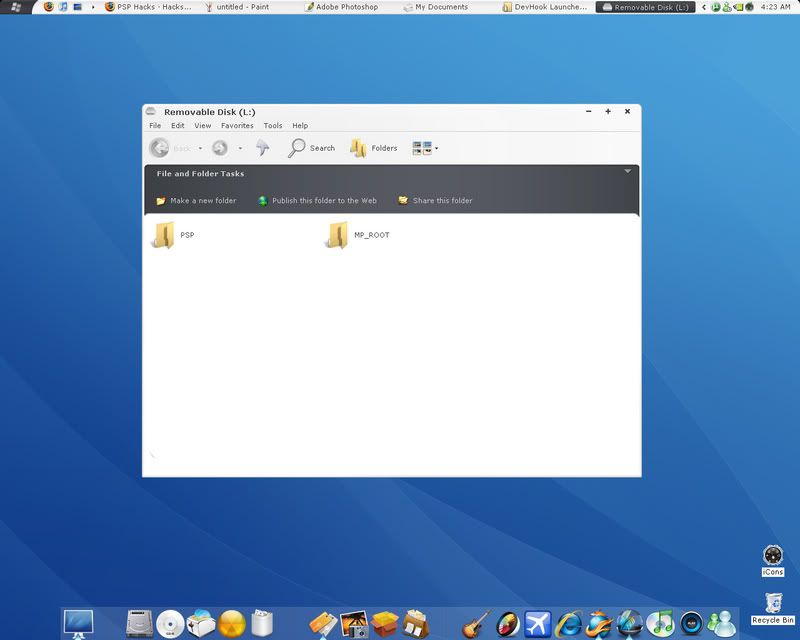
9 ? Paste the 2 folders you copy on the root of your MS , it shoukd now be like this:


10 ? Now go to GAME folder on your PSP folder (DevHook Launcher for 2.71\PSP\GAME) and copy the 3 folders.

11- Paste this 3 folders on your GAME folder on your PSP (MemoryStick\ PSP\GAME)

12 ? Now we are done whit DevHook, now we need to install HENC. Go to the HENC foder , open it and you shold see 1 folder and 6 files


13 ? Copy the Files and past it on your MS root folder, like this:


14 ? Now go to the PSP folder of the HENC folder, then open the PHOTO folder,and you shold see 1 folder called HENC, copy the folder and paste it on your PHOTO floder on your PSP (MemoryStick\PSP\PHOTO)


15 ? Now we have to make a new folder on your MS root folder called ISO, like this:

16 ? Now we are ready to lauch HENC and Devhook on the PSP. Click the ?O? botton to exit USB mode, MAKE SURE YOU DON?T HAVE ANY UMD ON YOUR PSP, then go to Photo > HENC and a blue screen should apear

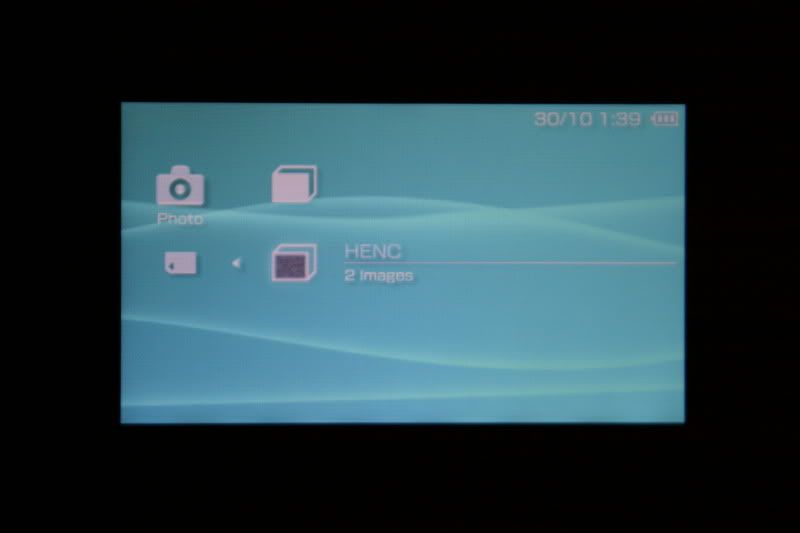

17 ? After about 5 -8 seconds your PSP will re-start , now we click on Game > Memory Stick , and there should be 2 files:
- DEVHOOK0.4X launcher for 2.71.
- DEVHOOK0.46 launcher.
Select the first one (DEVHOOK0.4X launcher for 2.71)

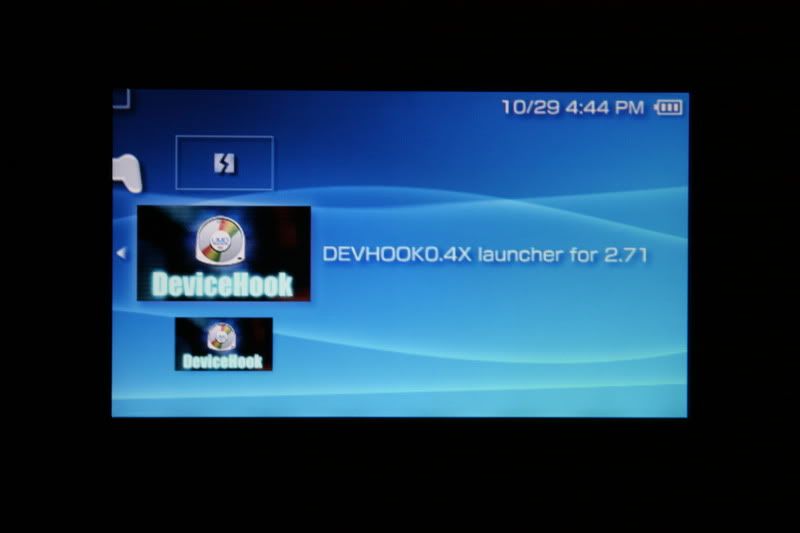
18 ? A menu should be in the screen, select Firmware and select it with ?o? botton, then select 1.50 and then select START on the very top.

19 ? Now the FW 1.50 will load, a problem will apear on the screen , just click ?X? botton.


20 ? And Finally we have emulated FW 1.51 on our PSP, go to System Information to check.

21 ? To set FW 2.71 back just make a Hard Reset holding the On/Off for about 5 seconds

And Wuala! now the PSPS will go back to FW 2.71.
HERE IS A VIDEO FROM pspjunior DOING THE STEPS 16 to 20 (http://www.youtube.com/watch?v=AzeAAdgVrRc)LOADING HENC AND DEVHOOK WITH FW 1.50
I hope this help you and thanks to pspjunior, i use his tutorial and it work!(http://forums.afterdawn.com/thread_view.cfm/401672), the only thing is missing are pictures ^_^
NOW, how to run my ISO's with devhook?
Is very easy just Fillow this steps:
1 - Hard Reset your PSP
2 - Connect your PSP to you PC and enable USB Mode
3 - Copy ypur ISO's or CSO's to the ISO foldr on your MS root Folder

4 - Now, im going to use the Socom ISO to set the Settings on Devhook, almost every ISO comes with a READ ME file, this is the Read me file of the Socom ISO:

As you can see, there are some settings that you have to put set on devhook before load it ,
5 - When my Iso is already in my "Iso" Folder of my MS, now run HENC , then DEVHOOK0.4x launcher for 2.71
6 - On the Devhook menu, just go through the settings to set what the read me file say,for example in the Socom the setings are:
umd select - on - (UMD) - Socom Navy Seals.cso
umd mount - on - iso anyumd
umd version- on - 2.xx -. 2.00
firmware - on - 2.70
cpu clock - on - 222mhz / 111mhz
boot select- on - reboot xmb
Here is a how my Devhook menu should be:
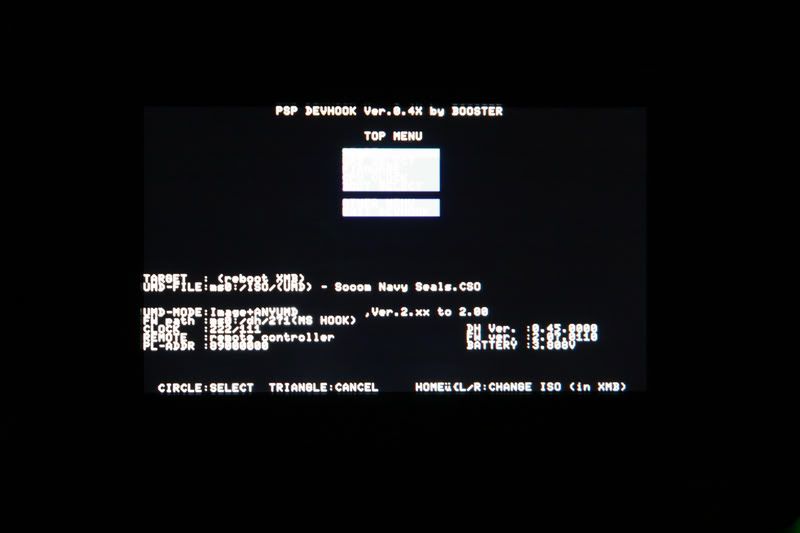
7 - Now we select Start and it will apear on the PSP menu,

8 - Insert a UMD (A GAME OR DEMO)

9 - Just wait until is load and there you go.


If you have more than 1 ISO's on your "ISO" folder of your MS, rite before selecting the game, Press and Hold "Home" Botton and the press "L" or "R" to switch ISO's, a little banner shold appear on the bottom with the name of the iso.


Again i hope this help you and thanks
This message has been edited since posting. Last time this message was edited on 4. December 2006 @ 13:30
|
|
Advertisement

|
|
|
|
Senior Member
|
29. October 2006 @ 21:11 |
Link to this message

|
|
great guide!!
|
Member
|
29. October 2006 @ 21:32 |
Link to this message
|
|
The pictures are still loading but greatt job!!!
I wish all newbies could participate as much as you do.
 "The real danger is not that computers will begin to think like men, but that men will begin to think like computers."
This message has been edited since posting. Last time this message was edited on 29. October 2006 @ 21:52
|
|
chuyo
Junior Member
|
30. October 2006 @ 14:11 |
Link to this message
|
|
thank you guys i glad you like it, maybe this will be a sticky thread
|
|
panesingh
Member
|
10. November 2006 @ 13:21 |
Link to this message

|
|
hey,
i'm having Hen C trouble on the dreaded motherboard.
I already have it installed and all that and have tried it out before and it worked. But today when i gave it to my friend (i installed hen c on his psp) it wouldn't turn to the green screen after i went to the photo menu and clicked hen c. The blue screen popped up but i think it froze their. I tried 4 more times and the same result. The only thing thats different from yesterday (when it worked) was that the battery was atleast half charged. This time the battery is pretty much dead and the only thing keeping it on is the charger. is this the problem or wat?
thanks alot!
Syphon filter: DM online is panesingh
|
|
gunot055
Suspended permanently
|
10. November 2006 @ 13:33 |
Link to this message
|
|
do u have to b ta-082
We loadin up clips Handin out slugs Out da 6 fo 5 sittin on dubs Wit some real crips n some real bloods
|
AfterDawn Addict
|
10. November 2006 @ 13:39 |
Link to this message
|
|
@gunot
no u dont. nice guide. it makes it fool, idiot, dumb, boob proof when you ad pictures. trylly one of the best guides!
|
|
chuyo
Junior Member
|
10. November 2006 @ 14:45 |
Link to this message
|
|
thank you touran22, i think that pictuers help a lot too.
and panesingh, i just bought my psp and i used pspjunior tutorial and it work perfectly (http://forums.afterdawn.com/thread_view.cfm/401672,
and then i create this tutorial with pictures, so the greenscreen stuff never happened to me, and maybe is the battery, maybe not but i just never hard reset my psp :), its been a while since i hardreset my psp.I just go to usb mode and change the isos in my folder, the press and hold "home" and then "L" or "R" to swith isos.
maybe someone with that problem could help you out.
and thanks again.
|
|
gunot055
Suspended permanently
|
10. November 2006 @ 15:03 |
Link to this message
|
|
so it is a downgrader in other words
PS i never read the whole thread because it is to long but im just wondering
We loadin up clips Handin out slugs Out da 6 fo 5 sittin on dubs Wit some real crips n some real bloods
|
|
thaoboi
Newbie
|
10. November 2006 @ 15:29 |
Link to this message
|
|
hey the YOUSENDIT link has expired can anybody repost it or send it to my email please thanks in advance
thaonguyen
|
|
chuyo
Junior Member
|
10. November 2006 @ 18:47 |
Link to this message
|
|
This message has been edited since posting. Last time this message was edited on 4. December 2006 @ 13:31
|
|
Revoltage
Newbie
|
13. November 2006 @ 09:31 |
Link to this message
|
|
Er i done everything with your guild. but after i go into the blue screen it don't reboot. anyone know why? running 2.71
|
AfterDawn Addict
|
13. November 2006 @ 09:58 |
Link to this message
|
|
hey is thre a way for henc to execute upon starup automaticly? i read it osmewere but cant remeber were. if so can u tell me how!
|
|
guestjobe
Newbie
|
13. November 2006 @ 13:42 |
Link to this message
|
Originally posted by Revoltage:
Er i done everything with your guild. but after i go into the blue screen it don't reboot. anyone know why? running 2.71
|
|
guestjobe
Newbie
|
13. November 2006 @ 13:46 |
Link to this message
|
Quote:
Originally posted by Revoltage:
Er i done everything with your guild. but after i go into the blue screen it don't reboot. anyone know why? running 2.71
hi wondering if any one out there can help me i did as the instruction showed only prob my psp scrren hangs in a blue screen and it doesnt reboot????any ideas will be gratefully appriciated thanks in advance guys.
|
|
chuyo
Junior Member
|
13. November 2006 @ 16:14 |
Link to this message
|
|
mmm never happend to me just keep trying until reboot
|
|
Sadheesh
Newbie
|
19. November 2006 @ 03:21 |
Link to this message
|
Originally posted by chuyo:
Hello:
Here is a quick tutorial to load FW 1.5 from 2.71, i know that there are others threads like this but i made this one with pictures ^_^
Basic terms used in the tutorial:
1.Hard reset
To hold the power switch up for 4-8 seconds.
2.ROOT menu
The ROOT menu of your psp memory stick is where your folder PSP and MP-ROOT is located.
3.MS
MS means memory stick.
4.FW
This means firmware which is another word for version.
REMINDER: THIS WILL NOT BRICK YOUR PSP OR YOUR TA-082 PSP.. THERE IS NOT EVEN A LITTLE CHANCE..THOUGH YOUR PSP HAS TO BE A 2.71 FOR THIS GUIDE TO WORK.
Ok lets start by checking your actual FW, make sure that you have the 2.71
- How can i check my FW? Follow the next steps:
1 ? Go to Settings > System Settings > System Information
2 ? There should be all the information of your PSP (MAC Adress, System Software a.k.a FW, and Nickname)
- Ok, now that you know what FW you have on your PSP, you will need the ?All you need? .zip that i made. (http://download.yousendit.com/915AA0D535C711C1)
- What is inside this .zip? This package contain the following things:
- Devhook Launcher for 2.71
- HENC
- Update 2.71 ( use it only if you don?t have FW 2.71
STEPS TO INSTALL HENC AND DEVHOOK :
1 ? Download the package ?All you need? from here:(http://download.yousendit.com/915AA0D535C711C1)
2 ? Placethe .zip on your desktop
3 ? Click it with the right botton and then select ?Extract here?
4 ? It should create a new folder called ?All you need is here?
5 ? Open the folder and you should have 3 folders
- Devhook Launcher for 2.71
- HENC
- Update 2.71
6 - Open the Devhool folder and you should see 3 folders , copy the folders ?dh? and ?src?.
7 ? Now connect your PSP to your PC with the USB Cable, and then go to USB Connection on your PSP
8 ? Open your MS folder and there is should be 2 Folders, if not, format your MS and connect your PSPS again.
9 ? Paste the 2 folders you copy on the root of your MS , it shoukd now be like this:
10 ? Now go to GAME folder on your PSP folder (DevHook Launcher for 2.71\PSP\GAME) and copy the 3 folders.
11- Paste this 3 folders on your GAME folder on your PSP (MemoryStick\ PSP\GAME)
12 ? Now we are done whit DevHook, now we need to install HENC. Go to the HENC foder , open it and you shold see 1 folder and 6 files
13 ? Copy the Files and past it on your MS root folder, like this:
14 ? Now go to the PSP folder of the HENC folder, then open the PHOTO folder,and you shold see 1 folder called HENC, copy the folder and paste it on your PHOTO floder on your PSP (MemoryStick\PSP\PHOTO)
15 ? Now we have to make a new folder on your MS root folder called ISO, like this:
16 ? Now we are ready to lauch HENC and Devhook on the PSP. Click the ?O? botton to exit USB mode, MAKE SURE YOU DON?T HAVE ANY UMD ON YOUR PSP, then go to Photo > HENC and a blue screen should apear
17 ? After about 5 -8 seconds your PSP will re-start , now we click on Game > Memory Stick , and there should be 2 files:
- DEVHOOK0.4X launcher for 2.71.
- DEVHOOK0.46 launcher.
Select the first one (DEVHOOK0.4X launcher for 2.71)
18 ? A menu should be in the screen, select Firmware and select it with ?o? botton, then select 1.50 and then select START on the very top.
19 ? Now the FW 1.50 will load, a problem will apear on the screen , just click ?X? botton.
20 ? And Finally we have emulated FW 1.51 on our PSP, go to System Information to check.
21 ? To set FW 2.71 back just make a Hard Reset holding the On/Off for about 5 seconds
And Wuala! now the PSPS will go back to FW 2.71.
HERE IS A VIDEO FROM pspjunior DOING THE STEPS 16 to 20 (http://www.youtube.com/watch?v=AzeAAdgVrRc)LOADING HENC AND DEVHOOK WITH FW 1.50
I hope this help you and thanks to pspjunior, i use his tutorial and it work!(http://forums.afterdawn.com/thread_view.cfm/401672), the only thing is missing are pictures ^_^
NOW, how to run my ISO's with devhook?
Is very easy just Fillow this steps:
1 - Hard Reset your PSP
2 - Connect your PSP to you PC and enable USB Mode
3 - Copy ypur ISO's or CSO's to the ISO foldr on your MS root Folder
4 - Now, im going to use the Socom ISO to set the Settings on Devhook, almost every ISO comes with a READ ME file, this is the Read me file of the Socom ISO:
As you can see, there are some settings that you have to put set on devhook before load it ,
5 - When my Iso is already in my "Iso" Folder of my MS, now run HENC , then DEVHOOK0.4x launcher for 2.71
6 - On the Devhook menu, just go through the settings to set what the read me file say,for example in the Socom the setings are:
umd select - on - (UMD) - Socom Navy Seals.cso
umd mount - on - iso anyumd
umd version- on - 2.xx -. 2.00
firmware - on - 2.70
cpu clock - on - 222mhz / 111mhz
boot select- on - reboot xmb
Here is a how my Devhook menu should be:
7 - Now we select Start and it will apear on the PSP menu,
8 - Insert a UMD (A GAME OR DEMO)
9 - Just wait until is load and there you go.
If you have more than 1 ISO's on your "ISO" folder of your MS, rite before selecting the game, Press and Hold "Home" Botton and the press "L" or "R" to switch ISO's, a little banner shold appear on the bottom with the name of the iso.
Again i hope this help you and thanks
|
|
Sadheesh
Newbie
|
19. November 2006 @ 03:26 |
Link to this message
|
|
Hi mate,
Read your illustrative procedure. Could you please resend the files. They have expired on "YouSendIt". Thanks.
cheers
|
|
mak67uk
Suspended permanently
|
19. November 2006 @ 03:28 |
Link to this message
|
|
Nice Guide
I have a 2.6 Factory Fw
Will this work if i upgrade to 2.71?
Can i upgrade to 2.71 from a Factory 2.6?
Cheers,
Mak
|
AfterDawn Addict
|
19. November 2006 @ 03:42 |
Link to this message
|
|
yes u can and are u Ta-082?
|
|
mak67uk
Suspended permanently
|
19. November 2006 @ 03:51 |
Link to this message
|
|
No, there is no serial number on the board !
Cheers,
Mak
|
|
iwannaps3
Suspended permanently
|
19. November 2006 @ 04:07 |
Link to this message
|
|
THAT SHOULD BE STICKIED!!! GREAT
This message has been edited since posting. Last time this message was edited on 20. November 2006 @ 10:39
|
AfterDawn Addict
|
19. November 2006 @ 05:02 |
Link to this message
|
|
if there is no number u can downgrade
|
|
isles81
Suspended due to non-functional email address
|
19. November 2006 @ 11:42 |
Link to this message
|
|
the link has expired can you please help
this is the excat tutorial i was looking for
thank you it is a great tutorial
|
|
Advertisement
|
|
|
AfterDawn Addict
|
19. November 2006 @ 12:37 |
Link to this message
|
|
yh best tut cuz it has pics!! an dthe instructions are great!
|


