|
How to: Update Eurovox Max V with Kuro 18.04.08 (R.I.P 28/11/2008)
|
|
Please note that the forum rules have changed. Posting of new codes is no longer allowed. See this thread for more information.
|
|
seanmac30
Newbie

|
19. April 2008 @ 10:49 |
 Link to this message

|
Hi,
Have had my eurovox max V 2008 for 3 months and this is my first firmware upgrade. I followed SG8's advise and got myself a correct null modem serial lead from maplins (code L71BT). I have downloaded the flash loader and managed to upload my favourites (cfd) file to my computer. Sound so far! Then I clicked on download and got the message 'Version 2.10 detected' in a message box with a start button. I then clicked on start and I get a progress bar saying 'Sending...0%' and it has not moved on from this for the last 20 minutes. On the Eurovox it is flashing 'dnld' but it doesn't seem to be downloading. As fasr as I can make out, there is no problem with the lead or the com port as I have been able to upload my favourites file to my computer. Can't see a problem like this after searching the forum. Has anyone got any bright ideas please.
|
|
Advertisement

|
|
|
|
|
jim1979
Newbie
|
19. April 2008 @ 11:02 |
Link to this message

|
Hi lads,
I have a eurovox red box and the code changes are driving me mad!!
Is there software I can download to fix this problem.I am new to this so if anyone has instructions for my version I would appreciate it.
Thanks
|
|
cena12
Newbie
|
19. April 2008 @ 11:04 |
Link to this message

|
Hi Guys,
Have followed the instructions and everything seems to be working UNTIL we get to the "Please wait, code being upadated...". Its been about 1 hour so far and nothing has changed. I have a Eurovox MaxV 2008 and im on Ch@rus (Lim3rick) The Box is Black in colour but im not sure what you mean by red or blue box, although the actual box it came in has a red dot (sticker) on it. Any ideas what i should do next?
|
|
keith72
Newbie
|
19. April 2008 @ 11:49 |
Link to this message
|
Originally posted by jim1979:
Hi lads,
I have a eurovox red box and the code changes are driving me mad!!
Is there software I can download to fix this problem.I am new to this so if anyone has instructions for my version I would appreciate it.
Thanks
Try "Update/Fixes" on BigMAQ toolbar. New firmware posted there which can be downloaded. You'll need to install toolbar first. I'm not sure as to whether it will cure code update prob
|
AfterDawn Addict
2 product reviews
|
19. April 2008 @ 12:41 |
Link to this message
|
Quote:
Originally posted by jim1979:
--------------------------------------------------------------------------------
Is there software I can download to fix this problem.I am new to this so if anyone has instructions for my version I would appreciate it.
Look here the firmware is available for the red box,
http://www.freewebs.com/tempfix/eurovox.htm
Quote:
cena12 12 Hi Guys,
Have followed the instructions and everything seems to be working UNTIL we get to the "Please wait, code being upadated...". Its been about 1 hour so far and nothing has changed. I have a Eurovox MaxV 2008 and im on Ch@rus (Lim3rick) The Box is Black in colour but im not sure what you mean by red or blue box, although the actual box it came in has a red dot (sticker) on it. Any ideas what i should do next?
When you downloaded the firmware on here it didnt work for chor*s as they was no firmware for chor*s at the time. now there is a new release which includes the fix for you area, linked below,
As SG8 has UPDATED on pg 1 http://www.mediafire.com/?dtmdycgdwqu So cena12 re download the new link and flash your box again!
Quote:
seanmac30
Have had my eurovox max V 2008 for 3 months and this is my first firmware upgrade. I followed SG8's advise and got myself a correct null modem serial lead from maplins (code L71BT). I have downloaded the flash loader and managed to upload my favourites (cfd) file to my computer. Sound so far! Then I clicked on download and got the message 'Version 2.10 detected' in a message box with a start button. I then clicked on start and I get a progress bar saying 'Sending...0%' and it has not moved on from this for the last 20 minutes. On the Eurovox it is flashing 'dnld' but it doesn't seem to be downloading. As fasr as I can make out, there is no problem with the lead or the com port as I have been able to upload my favourites file to my computer. Can't see a problem like this after searching the forum. Has anyone got any bright ideas please.
Go into device manager,
Under ports (coms)press the + symbol
right click the com port you are using the click properties.
In port settings change the bit rate to the max, apply then exit.
Then try again!
This message has been edited since posting. Last time this message was edited on 19. April 2008 @ 20:28
|
|
jim1979
Newbie
|
19. April 2008 @ 15:04 |
Link to this message
|
|
Thanks Keith72 and Hiteck I will give the updates a try.
|
Senior Member
|
19. April 2008 @ 17:19 |
Link to this message
|
Originally posted by seanmac30:
Hi,
Have had my eurovox max V 2008 for 3 months and this is my first firmware upgrade. I followed SG8's advise and got myself a correct null modem serial lead from maplins (code L71BT). I have downloaded the flash loader and managed to upload my favourites (cfd) file to my computer. Sound so far! Then I clicked on download and got the message 'Version 2.10 detected' in a message box with a start button. I then clicked on start and I get a progress bar saying 'Sending...0%' and it has not moved on from this for the last 20 minutes. On the Eurovox it is flashing 'dnld' but it doesn't seem to be downloading. As fasr as I can make out, there is no problem with the lead or the com port as I have been able to upload my favourites file to my computer. Can't see a problem like this after searching the forum. Has anyone got any bright ideas please.
Just start it again! Must have got itself in a twist over something.
Unplug the box from the mains and then plug it back in again after 10 seconds or so, and start the firmware download again
Whatever you say, say nothing when you talk about you know what for if you know who might hear you, you know what youll get. Youll be sent off to you know where for you would not know how long. Maybe I could search through the threads so you dont have to ??
|
Senior Member
|
19. April 2008 @ 17:23 |
Link to this message
|
Originally posted by realblock:
can anyone help me i've uploaded new firmware to my maxv08 and after factory default and powerscan, the screen just says service unknown.thanks in adavnce for any help.
What provider are you with and what area are you in?
Software now works with CH*R*S as well as other providers.
Whatever you say, say nothing when you talk about you know what for if you know who might hear you, you know what youll get. Youll be sent off to you know where for you would not know how long. Maybe I could search through the threads so you dont have to ??
This message has been edited since posting. Last time this message was edited on 19. April 2008 @ 18:00
|
AfterDawn Addict
2 product reviews
|
19. April 2008 @ 18:19 |
Link to this message
|
Originally posted by SG8:
Software now works with CH*R*S as well as other providers.
Sg8 When did this come about? Is it a recent thing as I have been out all day.
Cheers buddy!
|
Senior Member
|
19. April 2008 @ 18:32 |
Link to this message
|
|
There is a new release of software which does the Chorus as well, was out all day myself, so have changed the link to the NEWer software.
Not sure if everybodys queries have been sorted on this thread, but I am off to bed now and probably will not get on during the day tomorrow either (have boxes to swap !!)
Whatever you say, say nothing when you talk about you know what for if you know who might hear you, you know what youll get. Youll be sent off to you know where for you would not know how long. Maybe I could search through the threads so you dont have to ??
|
AfterDawn Addict
2 product reviews
|
19. April 2008 @ 18:56 |
Link to this message
|
Originally posted by cena12:
Hi Guys,
Have followed the instructions and everything seems to be working UNTIL we get to the "Please wait, code being upadated...". Its been about 1 hour so far and nothing has changed. I have a Eurovox MaxV 2008 and im on Ch@rus (Lim3rick) The Box is Black in colour but im not sure what you mean by red or blue box, although the actual box it came in has a red dot (sticker) on it. Any ideas what i should do next?
When you downloaded the firmware on here it didnt work for chor*s as they was no firmware for chor*s at the time. now there is a new release which includes the fix for you area, linked below,
As SG8 has UPDATED the link on pg 1 or download it here,
http://www.mediafire.com/?dtmdycgdwqu
So cena12 re download the firmware and flash your box again!
This message has been edited since posting. Last time this message was edited on 19. April 2008 @ 20:30
|
AfterDawn Addict
2 product reviews
|
19. April 2008 @ 20:16 |
Link to this message
|
|
Removed Sorry my mistake SG8
This message has been edited since posting. Last time this message was edited on 20. April 2008 @ 20:37
|
|
shelsfans
Junior Member
|
19. April 2008 @ 22:21 |
Link to this message
|
hey guyes i instealled the new update , (i am ch***s) anyway i guess its working i mean alot of the channels have flickering and static , and some are coming up no singal , ( my overall singal stength in like 75% now ) , any ideas or advice ? i use symbol rate 6875 which is what i used when i first got the box , should i try a different one or reflash or just leave it and wait ?.
|
AfterDawn Addict
|
19. April 2008 @ 22:28 |
Link to this message
|
|
Did you do a factory default and a fresh scan after you updated the b0x
|
|
markmu66
Junior Member
|
19. April 2008 @ 23:23 |
Link to this message
|
Originally posted by HiTeck:
SG8 Nice post just thought Id add if thats ok with you.
These are the cables you need to flash the firmware.
If you have a computer or a laptop with a 9 pin serial com port which is male on the back all you will need is this,
Female to Female Serial Null Modem Cable which looks like this,
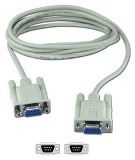
Make sure you do not buy a Serial RS232 9-Pin Female to Female cable as SG8 has stated below. they seems to be quite a few people buying this from mapl*ns, It has to be a SERIAL NULL MODEM CABLE Like the one above!!
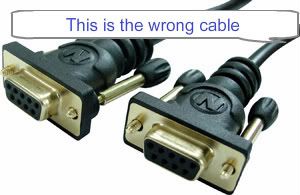
Serial RS232 9-Pin Female to Female
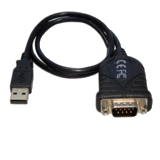
If you have a computer or laptop without a 9 pin serial socket you will still need the Female to Female Serial Null Modem Cable as above and this USB to Serial DB9 Adaptor Converter to make it fit into your USB port
If you have a pc and you are struggling with the usb adapter as above you could add a PCI serial card which is easily added to you PC and with this all you need is the null modem cable which gives you a direct link from your box to the pc.
[img]http://i242.photobucket.com/albums/ff95/synseal/
9pinserialcard.jpg[/img]
hi are these pics female to female?
they look like male to male, but then i don't know much about cables
I hope this helps.
markmu66
|
Newbie
|
20. April 2008 @ 02:13 |
Link to this message
|
Originally posted by kwackgt:
I bought a cable from maplins UK serial lead RS232 order code L68bt apparantly a NULL modem cable.
My computer is a Emachines 770. 2.4gb...
Only com1 works, may have a check in th ebios to make sure the com ports are all enabled.
Should i be seeing a folder or network place for the eurovox when conected?
I downloaded the latest update and when it runs i have Downlload at th etop , and then below the brouse button i have upload and own load- whihc when i click on allows me to search hard drives,floopies and cd's.. but i cant find a port for the box lol...
I thought it was gona be simple enough for me to do lol!.
|
Newbie
|
20. April 2008 @ 02:17 |
Link to this message
|
Originally posted by bp57:
Originally posted by kwackgt:
I bought a cable from maplins UK serial lead RS232 order code L68bt apparantly a NULL modem cable.
My computer is a Emachines 770. 2.4gb...
Only com1 works, may have a check in th ebios to make sure the com ports are all enabled.
Should i be seeing a folder or network place for the eurovox when conected?
I downloaded the latest update and when it runs i have Downlload at th etop , and then below the brouse button i have upload and own load- whihc when i click on allows me to search hard drives,floopies and cd's.. but i cant find a port for the box lol...
I thought it was gona be simple enough for me to do lol!.
kwackgt i dont think the maplins L68bt is a null cable i think you need a L71bt this is defo a null modem cable.
|
Senior Member
|
20. April 2008 @ 04:45 |
Link to this message
|
Originally posted by HiTeck:
http://forums.afterdawn.com/thread_view.cfm/169/506556#3976543
SG8 have a look at this link it was posted by vardius on another thred.
Hi guys in Afterdawn. Can you please remove this software from your site as it is unofficial software and will cause the boxes to fail.
The genuine software is in the form of a unified loader like all recent softwares and can be got here:
http://www.mediafire.com/?dtmdycgdwqu
So I have updated the link in my post before!
Please update urs!
The link I have on the first page is to the correct updated software, I had seen the Vardrus post before updating mine.
Whatever you say, say nothing when you talk about you know what for if you know who might hear you, you know what youll get. Youll be sent off to you know where for you would not know how long. Maybe I could search through the threads so you dont have to ??
|
|
iano131
Newbie
|
20. April 2008 @ 05:34 |
Link to this message
|
Originally posted by SG8:
Updating Eurovox Max V with Kuro 19.04.08 UPDATED (software now works with Chorus as well)
1. Hook up your Eurovox to your PC using a null modem cable. (9 pin female to 9 pin female). Null Modem Cable must be used, looks the same as a standard RS232 lead but it is wired differently.
2. Run the Kuro Unified Flash Loader (download it here: http://www.mediafire.com/?xynenwxvyjy )
2a (Optional step: Press the Upload button to save your channel set up favourites etc as they currently are) Save this to a folder on your PC for use later.
3. Click on the 'download' button at the top of the screen.
4. The program will say 'Version 2.10 detected' and restart your Eurovox, it will then go through the downloading process, when finished it
will display 'Downloading is successful' .
5 . Press the Menu button on your remote, and then go into 'Config' menu and select 'Clear Data'
6. It will then ask for your PIN (default is 0000)
7.Then select 'Factory Default'
8. It will then ask you to select the symbol rate (I use 6.887 as I am on NThell Dublin).not sure if this matters at this stage though.
9. Press OK when 'Reset to Factory Default Settings' comes up
10. It will then say 'Wait to Factory Settings' and will then start to do a Full Power Scan (using the Symbol rate you selected earlier or you can change the symbol rate here)
11. It will then search through for channels, Go and make a cup of tea while it works away, do not interrupt it until it finishes.
12. It wil then exit to allow you to view your programs, but the code being updated message will probably come up for a while,
13. Put the box onto Sky Sports and go make another cup of tea. It may only take a few mins but again do not interrupt it (even if you think it is not working!)
14. Sky Sports will come up and all your channels will be back and you won't have to manually enter your codes anymore.
15. If you did the optional step at 2a, then browse to where you saved your file (CDF file) and click download in the lower box on the Kuro program, and it will reload your favourites etc. as
you originally had them.
|
|
seanmac30
Newbie
|
20. April 2008 @ 07:21 |
Link to this message
|
Quote:
seanmac30
Have had my eurovox max V 2008 for 3 months and this is my first firmware upgrade. I followed SG8's advise and got myself a correct null modem serial lead from maplins (code L71BT). I have downloaded the flash loader and managed to upload my favourites (cfd) file to my computer. Sound so far! Then I clicked on download and got the message 'Version 2.10 detected' in a message box with a start button. I then clicked on start and I get a progress bar saying 'Sending...0%' and it has not moved on from this for the last 20 minutes. On the Eurovox it is flashing 'dnld' but it doesn't seem to be downloading. As fasr as I can make out, there is no problem with the lead or the com port as I have been able to upload my favourites file to my computer. Can't see a problem like this after searching the forum. Has anyone got any bright ideas please.
Go into device manager,
Under ports (coms)press the + symbol
right click the com port you are using the click properties.
In port settings change the bit rate to the max, apply then exit.
Then try again!
Cheers Hiteck. Took your advice and increased the bits per second to the max of 128000. No joy unfortunately. Still languishing on 0%. can you think of anything else that might be the problem?
|
AfterDawn Addict
2 product reviews
|
20. April 2008 @ 07:24 |
Link to this message
|
|
Below
This message has been edited since posting. Last time this message was edited on 21. April 2008 @ 20:53
|
|
seanmac30
Newbie
|
20. April 2008 @ 07:25 |
Link to this message
|
Originally posted by SG8:
Originally posted by seanmac30:
Hi,
Have had my eurovox max V 2008 for 3 months and this is my first firmware upgrade. I followed SG8's advise and got myself a correct null modem serial lead from maplins (code L71BT). I have downloaded the flash loader and managed to upload my favourites (cfd) file to my computer. Sound so far! Then I clicked on download and got the message 'Version 2.10 detected' in a message box with a start button. I then clicked on start and I get a progress bar saying 'Sending...0%' and it has not moved on from this for the last 20 minutes. On the Eurovox it is flashing 'dnld' but it doesn't seem to be downloading. As fasr as I can make out, there is no problem with the lead or the com port as I have been able to upload my favourites file to my computer. Can't see a problem like this after searching the forum. Has anyone got any bright ideas please.
Just start it again! Must have got itself in a twist over something.
Unplug the box from the mains and then plug it back in again after 10 seconds or so, and start the firmware download again
No luck unfortunately. Still not moving from 0% even when I increased the bit rate of my com port as Hiteck suggested. Do you know if there is anything else I can do?
|
AfterDawn Addict
2 product reviews
|
20. April 2008 @ 07:36 |
Link to this message
|
|
seanmac30
No sorry not come accross that before?
ILl do some searching around in the meantime ask either SG8 Karljd celtic or scouser they seem to be in the know!
If I find anything ill report back.
This message has been edited since posting. Last time this message was edited on 21. April 2008 @ 20:54
|
AfterDawn Addict
2 product reviews
|
20. April 2008 @ 07:58 |
Link to this message
|
Originally posted by seanmac30:
Originally posted by SG8:
Originally posted by seanmac30:
Hi,
Quote:
No luck unfortunately. Still not moving from 0% even when I increased the bit rate of my com port as Hiteck suggested. Do you know if there is anything else I can do?
Which firmware did you use and where and when did you get it?
|
|
Advertisement
|
|
|
|
vardrus
Member
|
20. April 2008 @ 08:01 |
Link to this message
|
Originally posted by HiTeck:
http://forums.afterdawn.com/thread_view.cfm/169/506556#3976543
SG8 have a look at this link it was posted by vardius on another thred.
Hi guys in Afterdawn. Can you please remove this software from your site as it is unofficial software and will cause the boxes to fail.
The genuine software is in the form of a unified loader like all recent softwares and can be got here:
http://www.mediafire.com/?dtmdycgdwqu
So I have updated the link in my post before!
Please update urs!
Just so there is no confusion get the official software here.
It is the same software on both links.
http://www.mediafire.com/?xynenwxvyjy
http://www.mediafire.com/?dtmdycgdwqu
|



