|
Big Problem with my Max V
|
|
|
W4H1D
Junior Member

|
17. February 2009 @ 08:37 |
Link to this message

|
I seem to have a problem with my Eurovox Max V. I was doing a normal scan and all of a sudden I got 3000 channel and then the box froze. Now when I switch the box on,you can't do anything. It is stuck on channel 266. There is no response when I use the remote and I can't even use the buttons on the box itself because the box is frozen.
Does anyone know what I should do? Thanks.
|
|
Advertisement

|
|
|
|
AfterDawn Addict
2 product reviews

|
17. February 2009 @ 09:07 |
Link to this message

|
|
Press the reset button inside the box on the board.
|
|
W4H1D
Junior Member
|
17. February 2009 @ 11:35 |
Link to this message
|
|
Would I have to open the box in order to reset it. Thanks.
|
AfterDawn Addict
2 product reviews
|
17. February 2009 @ 12:14 |
Link to this message
|
|
Yes you would as said Inside the box, if its still under warranty send it back.
|
|
W4H1D
Junior Member
|
18. February 2009 @ 08:20 |
Link to this message
|
|
Where would the reset button inside the box be cos I opened it but could not see it. Thanks.
|
|
malci
Suspended due to non-functional email address
|
18. February 2009 @ 08:44 |
Link to this message
|
|
|
W4H1D
Junior Member
|
18. February 2009 @ 08:58 |
Link to this message

|
|
Nice one malci
|
|
W4H1D
Junior Member
|
18. February 2009 @ 09:03 |
Link to this message
|
malci - once I've pressed the reset button, do I put the new firmware on.
|
|
papaq
Junior Member
|
18. February 2009 @ 12:09 |
Link to this message
|
|
Now you've used the reset, what is the response of the box?
|
|
malci
Suspended due to non-functional email address
|
18. February 2009 @ 12:11 |
Link to this message
|
No nor neccessary, just press it and see if it solves your problem, you only need to put new Firmware on if you are not up to date with AU firmware.
|
|
W4H1D
Junior Member
|
21. February 2009 @ 10:53 |
Link to this message
|
I've resetted it but it's still the same. Do you think I should download the firmware?
|
|
W4H1D
Junior Member
|
24. February 2009 @ 15:48 |
Link to this message
|
|
OK the reset button did not work. Now I'm trying to reflash it but I can't get the box to go on standby. There is no response from the remote nor the box when I try to put it on standby. Anyone know what I should do. Thanks
|
AfterDawn Addict
2 product reviews
|
24. February 2009 @ 20:25 |
Link to this message
|
|
Check replace the C14 cap on the PSU sounds like a hardware problem.
|
|
W4H1D
Junior Member
|
25. February 2009 @ 17:55 |
Link to this message
|
|
How do I check or replace the C14 cap. It seems the C14 cap (battery) is still on and looks fine. Would it not be better if I Jtagged it.
|
|
W4H1D
Junior Member
|
25. February 2009 @ 18:26 |
Link to this message
|
|
I've just checked the C14 and realised that it's slightly tilted to the left while the C13 is standing upright. Am I right in saying that the C14 needs replacing. Thanks.
|
|
malci
Suspended due to non-functional email address
|
26. February 2009 @ 08:58 |
Link to this message
|
It will do no harm replacing the C14 cap, it does tend to look okay at the best of times, it is not always the case that it is bulged or leaking, about 34/50p max at maplins. Have a look at the link for the solution on that particular problem/instance - as regards your query "JTag?" well no it is not, because your box is not dead is it. >>>>>>>
http://forums.afterdawn.com/thread_view.cfm/747263
Have a read of this page, good luck, it is worth a try for a small cost, and a little care at replacing and soldering (fitting/removal).
|
|
W4H1D
Junior Member
|
26. February 2009 @ 11:49 |
Link to this message
|
|
Thanks malci.
Regarding the C14 - it is a 1000uf 10V and the C13 is bigger and is 1000uf 16V.
Are all C14's the same cos they are in different colours or does that not matter. Thanks. If I replace the C14 and it doesn't work then I reckon I should Jtag it. Is that OK?
Thanks
|
|
W4H1D
Junior Member
|
26. February 2009 @ 17:51 |
Link to this message
|
|
I'm going to buy some 1000uf 16v (c14) tomorrow and I've ordered my soldering iron. By Saturday I should know whether or not this is causing me the problem. Thanks for all your help.
|
|
W4H1D
Junior Member
|
28. February 2009 @ 13:48 |
Link to this message
|
|
I'm having some issues. Firstly, I want to know whether or not I can take the PSU board out cos it is really difficult to desolder the C14 because of the wires that are connected to the other parts of the box and the power supply.
Secondly I've noticed that part of my C10 is also hanging out. One part is soldered in, the other part is loose and out of place. Does that need replacing too?
Also when I received my C14 (1000uf 16v), they were the exact same size as the C13 while the original C14 that I am replacing is 1000uf 10v. Is this OK?
Thanks.
|
AfterDawn Addict
2 product reviews
|
28. February 2009 @ 13:57 |
Link to this message
|
|
Unplug the ribbon from the main board which goes to the PSU, unplug the 2 pin plug from the PSU then undo the 4 screws and take out the PSU. the C10 only needs replacing if its not connected properly or looks blown or leaking, C14 the new one should be (1000uf 16v) rather than 1000uf 10v.
|
|
W4H1D
Junior Member
|
28. February 2009 @ 14:07 |
Link to this message
|
Thanks HiTeck. I'll see what I can do. Sorry but I have posted on your other site too (again)
I'll let you know how I can get on. Thanks
|
|
W4H1D
Junior Member
|
28. February 2009 @ 14:18 |
Link to this message
|
There is no ribbon. There are wires which are linked to each other on a clip that has been soldered on from the back and have glue (some brown substance) one top of them.
I can't even unpulg the pins from the PSU as its the same situation with the above mentioned.
The only thing I've done is unscrewed the four screws from the PSU that was being held on the Eurovox but again it's uncomfortable to desolder due to the space and other wires that are connected.
Regarding the C10, it is disconnected from one end. Thanks and sorry for keep on asking you.
|
AfterDawn Addict
2 product reviews
|
28. February 2009 @ 14:37 |
Link to this message
|
As said it will unplug from the MAIN BOARD not from the PSU, if the C10 has broken away try and resolder that before attempting to change the C14, it may be faulty due to the fact its not connected and maybe nothing to do with the C14.
Look at the arrows in the picture which shows the cables unpluged from the exact same box as yours.
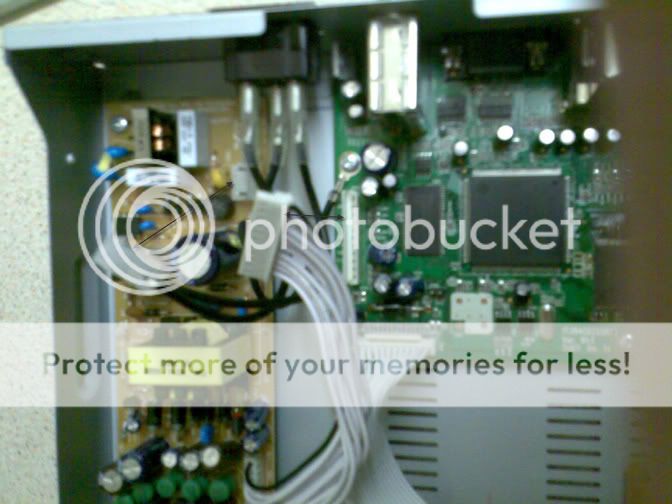
|
|
W4H1D
Junior Member
|
28. February 2009 @ 15:26 |
Link to this message
|
|
Thanks HiTeck. Your a gem mate. The picture really helps. The idiot that put this box together has glued all connections that I need to take off so I'm slowly working through the glue by taking it off. thanks again.
|
|
Advertisement
|
|
|
|
W4H1D
Junior Member
|
28. February 2009 @ 16:22 |
Link to this message
|
|
Finally got one of them off (the PSU one) and I'm leaving the other one on. You were saying to solder the C10 as that may be the problem, should I solder from the front because I can only see a bit of silver line from the top, so would it be best to solder from the front as both ends (of C10) behind the PSU are already soldered.
|


