|
Problem with Xbox 360 Softmodding (VIA RAID Controller)
|
|
Junior Member

|
19. February 2009 @ 06:03 |
Link to this message

|
Okay i have an Xbox 360 Professional with a Toshiba Samsung DVD-ROM Drive, the model is TS-H943.
Also i have a VIA VT6421 RAID Controller and a VIA VT8237A RAID Controller apparentlyy ;/
A SATA cable
and the power lead and video lead are plugged into the Xbox 360 while the SATA cable is plugged into the back of the DVD Drive and then into the back of my VIA RAID Controller which is plugged into one of the PCI Buses.
everything is fine and i have the firmware (extreme52, which i got off xbins FTP server and used "Xtreme Boot Maker V0.5.3 (RC3)") on my santek 4gb USB stick and i've enabled the USB Drive to load up in the drive priorities.
So when i finaly let the USB load up into dos... NOTHING HAPPENS! :'(!
all i see is the flashing underscore appear once, then carries on flashing forever just underneath where it was before.
But i think now it just stays in the top left hand corner and carries on flashing.
the xbox 360 is on and whirring away like none other but nothing seems to happen ;/
i have tried so many different tutorials
am i doing something wrong?
thanks loadss guys!
any advice is much appreciatedd! (:
|
|
Advertisement

|
|
|
|
|
evnflow
Suspended due to non-functional email address
|
19. February 2009 @ 06:58 |
Link to this message
|
can't really remember xtreme bootmaker that much(i use Iprep for all of mine)..is there a "make drive bootable" or similar option? i know on iprep there is a box to make the drive you are formatting and putting the xtreme firmware on, bootable..seems like it's not making your usb bootable..just placing the files onto your usb..could give iprep a try..liked it a lil' better when i first started out, stuck with it ever since..

Dolla Dolla Bill Ya'll
 |
Junior Member
|
19. February 2009 @ 08:12 |
Link to this message

|
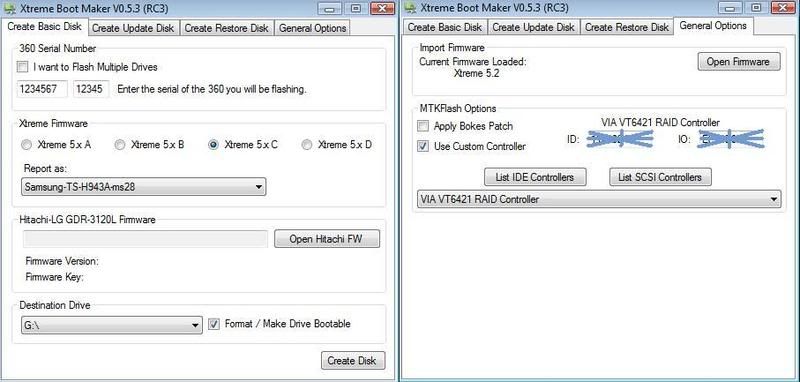
well heres what Xtreme Boot Maker looks like when i use it.
The tutorial i followed used exactly Everything i used and it worked find for them.
This message has been edited since posting. Last time this message was edited on 19. February 2009 @ 08:16
|
|
evnflow
Suspended due to non-functional email address

|
19. February 2009 @ 09:11 |
Link to this message

|
aaahh gotcha..for the samsung ms28 drive you have to apply the bokes patch..check that box and try
also are you using Xtreme firmware(non-stealthed) or iXtreme? looks like you have an older version..the newest is iXtreme firmware 1.5(stealthed)
Dolla Dolla Bill Ya'll
This message has been edited since posting. Last time this message was edited on 19. February 2009 @ 09:28
|
Junior Member
|
19. February 2009 @ 10:07 |
Link to this message
|
gahh i just tried the bokes patch and same problem! :[
do you think its the files on my bootable USB?
heres the imagee

also do you think i should try the newest thing of everything?
oh and yes im just using 'Xtreme52'
it came in a .rar archive and the contents was:
a 'fw' folder
a 'Make Xtreme firmware.cmd' command
'ReadMe.txt' file
& a 'X360SAM.EXE' app
|
Junior Member
|
19. February 2009 @ 10:24 |
Link to this message
|
okay i've just downloaded 'iPrep 008.8' (the newest version according to xbins)
it looks fair enough, i uploaded the iextreme 1.5 firmware and i was ready to create it.
But i noticed something in the 'Lite-on Drives only' section.
It said '(Com Port can not be a USB based device)'
Does this mean i can't boot from a USB?
but it did say 'Lite-on Drives only' and i have a Toshiba Samsung.
But in that section it had a drop down list of SATA controllers to use.
So i didn't know whether to choose from it or not.
|
Senior Member
|
19. February 2009 @ 11:39 |
Link to this message
|
ok first of all it is booting to a cursor and nothing else cause that usb stick is 4gb and some older motherboards will not boot to any usb stick over 1gb. i had the same problem my first time trying to flash i had a 2gb stick and did the samething, so i bought a nother stick the same size and it did the samething, then i got a 128MB stick and it worked like a charm. so get yourself a smaller stick.
BUT why are u using xtreme52 firmware instead of the newest ixtreme?????
If you send me questions on Live about modding or anything related i will block you. Dont be an idiot.
|
Junior Member
|
19. February 2009 @ 11:46 |
Link to this message
|
ah are you serious? :|
well luckily i have a 512mb memory stick i use for my course work so i'll just swap them around ^_^
oh and its because i found that everytime i used newer firmware i would get an error copying the firmware to my USB ;/
|
Senior Member
|
19. February 2009 @ 11:48 |
Link to this message
|
|
oh well i would try the newest fw again
cause it is much better and if u go on live i would definetly say use the newest ixtreme 1.5 for whatever drive type u have.
If you send me questions on Live about modding or anything related i will block you. Dont be an idiot.
|
Junior Member
|
19. February 2009 @ 11:50 |
Link to this message
|
great! i'll bare that in mind. Just about to make a bootable USB :]
so should i use iPrep for booting iXtreme 1.5?
and if so, which iPrep? the latest?
and i can get on xbl? amazing!
|
Senior Member
|
19. February 2009 @ 12:04 |
Link to this message
|
personally i have had the best results with iprep v006. make sure u get the updated def file for iprep or it wont accept the new ixtreme 1.5 u can find that on xbins or it should be anywhere u can find the fw itself.
and yes iprep is the easiest to use for flashing a samsung i think.
it will boot up to iprep and ask what drive type. then ask for serial.
u can find a tut for it very easily, even textbooks was written with 006 i beleive. textbooks http://www.360mods.net/tutorial/Textbook.pdf it is a bit outdated so it will reference v1.4 and multiple drive speeds which arent available now.but it will show u basic setup of iprep and how to use it.
also make sure u have newest version of .net framework for iprep to run properly
and yes live will still work but the possiblity is there that your box can get banned, but if that happens it is only the box. the HDD doesnt get banned or the gamertag. just make sure u learn how to use ABGX to stealth ur games before playing them at all.
If you send me questions on Live about modding or anything related i will block you. Dont be an idiot.
|
Junior Member
|
19. February 2009 @ 12:13 |
Link to this message
|
oo well i had just copied the firmware onto my usb using iPrep 008.8 and it booted up fine in dos!
hurrayy!! :]]
but one problemmm ;/
it comes up with an error about internal stacking?
and that they need to be minimized.
so then i try booting it up again without the DVD drive plugged in (Molex cable unplugged).
and it comes up with another error in red text in dos. Saying the program has been aborted and 'SamOFW.bin' could not be found.
eep, what do i do? :|!
|
Junior Member
|
19. February 2009 @ 12:19 |
Link to this message
|
wow! i have just tried using iPrep 101 v006.2 and i couldn't upload iXtreme 1.5 ;/
it gave me an error saying 'no firmware loaded'.
but then i tried a version just below it (1.4)
and then recieved this error!

gahh :/
|
|
evnflow
Suspended due to non-functional email address
|
19. February 2009 @ 12:31 |
Link to this message
|
you can hack your firmware(one in the Backups folder..ALSO MAKE A COPY OF YOUR ORIGINAL FIRMWARE AND PLACE SOMEWHERE SAFE) with FW Toolbox..save on the USB drive as
Sam-CFW
Dolla Dolla Bill Ya'll
This message has been edited since posting. Last time this message was edited on 19. February 2009 @ 12:42
|
Junior Member
|
19. February 2009 @ 12:43 |
Link to this message
|
okay iPrep has a problem with me ;/
everytime i try to upload firmware onto version v006 it will give me this error:

and the problem is with the config.sys thing is, there is no config.sys file in my USB! :[
omg whats happeningg? ;/
|
Senior Member
|
19. February 2009 @ 12:49 |
Link to this message
|
ok , uninstall iprep and make sure both versions are uninstalled befoer reinstalling.
i found than when installing/uninstalling different versions of iprep they were overwrite eachother and cause problems. so completet uninstall and check the program files folder for iprep folder and delete. also before u install iprep again go run windows update and look for .net framework and get any versions/updates u do not have for it. then install iprep again and also make sure u get the idef file for new 1.5 fw to use with iprep or it will not accept v1.5. format the usb stick in mycomputer and then prepare it again with iprep and see what happens
If you send me questions on Live about modding or anything related i will block you. Dont be an idiot.
|
Junior Member
|
19. February 2009 @ 12:55 |
Link to this message
|
|
oo okay i'll go and try that now!
i'll come back with a current update (:
|
Junior Member
|
19. February 2009 @ 13:13 |
Link to this message
|
Okay im still getting the same error while trying to install iPrep 101 version 06 ;/
like in the last picture i posted on here.
"Access to the path 'C:\Program Files (x86)\X-Projects\iPrep 101\tmp\' is denied."
my current Operating System is Windows Vista Ultimate 64bit.
I do have the choice to continue in the error but i find it just comes with a pack full of the same errors showing me debugs ;s
|
Senior Member
|
19. February 2009 @ 13:17 |
Link to this message
|
|
sorry im not a visat user. other than what i suggested earlier im not sure what to do
If you send me questions on Live about modding or anything related i will block you. Dont be an idiot.
|
Junior Member
|
19. February 2009 @ 13:19 |
Link to this message
|
well i do have another SATA hard drive with XP on it.
Should i plug it in and try and run everything on that?
thanks!
|
Senior Member
|
19. February 2009 @ 13:31 |
Link to this message
|
unless someone else has another idea that is what i would do. if u do that then just follow the directions i put earlier thread on how to install iprep and stuff.
also i just found a nice tut on using v008 if u want to give it a try
it is a detailed video http://www.klutsh.com/page.php?5
If you send me questions on Live about modding or anything related i will block you. Dont be an idiot.
|
|
evnflow
Suspended due to non-functional email address
|
19. February 2009 @ 13:43 |
Link to this message
|
right click on the Install .exe and select run as administrator..and use the most current iprep(with up to date defintions) newest Iprep(HERE)
Dolla Dolla Bill Ya'll
This message has been edited since posting. Last time this message was edited on 19. February 2009 @ 13:46
|
Junior Member
|
19. February 2009 @ 14:16 |
Link to this message
|
thanks evnflow!
but i think the real problem is now in dos..
i have the xbox 360's DVD drive plugged into the back of my pc (the VIA SATA Controller).
But it keeps telling me about the progam having to halt and to change the stacks in the config.sys file.
but there is no config.sys file!
im using the newest iPrep and the newest firmware 1.5
Where is this config.sys file im not up to date with?
|
Junior Member
|
19. February 2009 @ 14:57 |
Link to this message
|
okay GREAT news everybody!
i got it to work! :]]
and i feel a little more smarter!
big thanks to everyone who contributed to helping me! (:
really appreciate it guys!
so one more thing.
I have the latest iXtreme firmware installed on my DVD drive now (i'm assuming this comes with stealth).
Will xbox live be able to detect me, well, ever?
and any ideas on where to download the xbox 360 games from?
i'm having no luck with torrent sites ;/
thanks again! :]
|
|
Advertisement
|
|
|
Senior Member
|
19. February 2009 @ 15:01 |
Link to this message
|
|
cant discuss torrents and such here or u will get banned so shhhh on that. but as far as the stealth goes if u did use 1.5 then yes u are stealth. as for being detected do some research on stealth patching games using an app called ABGX. www.360patches.com is the forums for support on that, but u can ask here also. however please search and try to find urself first, look in the ultimate sticky on these boards main view of the 360 general forum it has many many tuts and guides in there.
also if u see reference to xdvdmulleter do not use it, it used to be good app but is not supported anymore so stay away from it as the database for it is no longer updated.
If you send me questions on Live about modding or anything related i will block you. Dont be an idiot.
|


