|
Please close this thread
|
|
|
krazhy
Newbie

|
21. July 2009 @ 12:53 |
Link to this message

|
|
can someone help i have no ios249 what should i do? thanks
|
|
Advertisement

|
 |
|
|
|
krazhy
Newbie
|
21. July 2009 @ 13:41 |
Link to this message

|
hi ty for the thread but i have no ios249 i dnt get it have i done something wrong could u help
|
AfterDawn Addict
|
21. July 2009 @ 15:24 |
Link to this message
|
Originally posted by krazhy:
can someone help i have no ios249 what should i do? thanks
Have you softmodded the system yet?
If not follow this guide HERE first.
After you softmod the system then USB Loader GX should work.
|
|
akk555
Newbie
|
21. July 2009 @ 17:45 |
Link to this message
|
I have followed the new and improved soft mod guide and the usb loader gx guide
I had been having trouble with my verbatim drive so i bought the tb Western Digital my book (which had 13 confimations on the compatibility list). It's recognizing the usb but I first put it in unformatted and it had incorrect partition sizes, I tried formatting but it didn't work (originally fat32). I do have multiple partitions. Having 500gb fat32 as "primary" for wii games. So I formatted the 500gb in WBFS manager, loaded games. Now and before, if I plug in the usb before I start wii, then it's a black screen when I start the usb loader. If I plug it in after i hit the cios249 button, it just loads to a white screen.
Not sure what to do now.
Lastly, with my old drive I tried to change to an older than cIOS38_rev13a to see if it would better recognize my drive. It didn't make a difference but now I get a flash of a green screen when I load my game cube games (oringal copies) Possibly wii games too but I haven't checked. I'm assuming this is because I changed the cios incorrectly. Any remedy?
I'm new at all this but I've come a long way...hopefully I'll get it figured out eventually.
akk
|
|
ronnie917
Newbie
|
23. July 2009 @ 03:15 |
Link to this message
|
Im using the usb fowarder. I can't load the wii sport resort, it will only show a blank screen after selecting it from the USB loader. all other games are working including Conduit and Ghostbuster.
What do i need to do.
|
AfterDawn Addict
|
23. July 2009 @ 11:16 |
Link to this message
|
Originally posted by ronnie917:
Im using the usb fowarder. I can't load the wii sport resort, it will only show a blank screen after selecting it from the USB loader. all other games are working including Conduit and Ghostbuster.
What do i need to do.
If you do not have the Wii Motion Plus Hardware the game will not boot.
If you got Wii Motion Plus Hardware then follow the below steps.
Enable #002 fix in settings before launching the game.
Enable boot alt_dol (follow the below steps on using an alt_dol file).
To get the alt_dol you will need to load the ISO into Wii Scruber and then go to...
Partion2-DATA> sys> mpls_movie> and save player.dol
After you save player.dol rename it to RZTP.dol and place it in the root of the SD Card.
After you watch the movie and play the game for the first time you can then disable the boot alternate.dol file but keep the #002 error enabled.
This message has been edited since posting. Last time this message was edited on 23. July 2009 @ 11:24
|
|
domyue
Junior Member
|
23. July 2009 @ 21:27 |
Link to this message
|
Do we have to follow the above complex process for all games that require the wii motion plus (such as Grand slam tennis and PGA Golf)??
Thanks
|
|
hobomojo
Newbie
|
24. July 2009 @ 02:13 |
Link to this message

|
Again larry thanks for the great guide.
I did have a couple of issues and thought I would mention them here.
I was having some issues with the included DL of the front loader where it would give me crash dumps or hanging even after using the autoupdate.
After doing some research I ended up grabbing what seems to be a newer version here: http://usbloadergx.koureio.net/downloads/forwarders
After booting up with that I then did the "Update DOL" option and everything has been working great including disk covers. The key for me seemed to be unlocking GX and if a game wouldn't start going into the "settings" from the spinning disk start menu (only shows if unlocked) and checking the fix error 02 option and choosing save.
The only issue I have left now is that I have to shut the wii off and then back on before loading up another game otherwise I get just a black screen and have to pull the plug to restart. Which is not really a big deal since I can just shut it down with the wii remote from the couch and turn it back on :)
Since I have seen people in various posts/threads having issues with the USBloaderGX wanting to format even if you have already done so through GUI etc....as mentioned elsewhere the WBFS partition needs to the the "active partition".
Several ways of performing/checking this but here is what I did:
Quick reformat the drive using NTFS or Fat32
Then goto Control panel->administrative tools->computer management-> then under "storage" click "disk management"
Here you will see your drives and partitions. Find the drive you want to use: if its not already showing (Active) in the description right-click and choose "Mark partition as Active".
Now you can format it using WBFS manager and add any games you might have. Now when you connect it to the wii (left side USB port on mine) USBLoaderGX should start right up.
|
|
Dombo
Junior Member
|
24. July 2009 @ 14:18 |
Link to this message
|
hi guys,
im confused as to what files the games should be in, as i downloaded a usbloader game pack and ALL the games are .wad files.
does the usb loader accept wads from a usb storage device?
i have everything installed im just stuck as to how to load the games.
any help would be appreciated
Thanks
|
|
Banshii
Newbie
|
24. July 2009 @ 20:42 |
Link to this message
|
Hey, this is a great tutorial. I've had experience modding old xboxes and psp's, so after reading through I picked up what was going on with no problem.
Anyway, everything went smoothly and is mostly running well. The only problem I'm having is a little weird and I can't figure out why it's happening. Sometimes USBloader will see my hard drive and load no problem, and other times it gives me the "no hard drive found" message with options to wait or restart. I've tried switching usb ports, and shutting down and restarting the wii and the hard drive but it will still give me the error message. Then out of the blue, a few hours later it'll work no problem on the first try.
I was thinking it could be the brand of hard drive. Maybe the drive is going into a sleep mode that the wii can't wake it from? something like that? It's a 1TB iomega thak37c814.
Any advice or suggestions would be great, or if anyone else is having this problem let me know what solutions you've come up with.
Thanks
~Johno
|
|
Vokal
Newbie
|
24. July 2009 @ 23:06 |
Link to this message
|
Originally posted by Banshii:
Hey, this is a great tutorial. I've had experience modding old xboxes and psp's, so after reading through I picked up what was going on with no problem.
Anyway, everything went smoothly and is mostly running well. The only problem I'm having is a little weird and I can't figure out why it's happening. Sometimes USBloader will see my hard drive and load no problem, and other times it gives me the "no hard drive found" message with options to wait or restart. I've tried switching usb ports, and shutting down and restarting the wii and the hard drive but it will still give me the error message. Then out of the blue, a few hours later it'll work no problem on the first try.
I was thinking it could be the brand of hard drive. Maybe the drive is going into a sleep mode that the wii can't wake it from? something like that? It's a 1TB iomega thak37c814.
Any advice or suggestions would be great, or if anyone else is having this problem let me know what solutions you've come up with.
Thanks
try the other usb port
1 works and 1 kinda dont - well at least in my case :)
Did any 1 figur out how to get Skate it workin on the usb loader ?
|
|
leo8013
Suspended due to non-functional email address
|
25. July 2009 @ 09:54 |
Link to this message
|
I have used larry's guide and they are great. I got though the soft mod guide and the gx loader w/o issue. The only issue I have is that after I loaded Mario Kart. This disc is original not a backup. It loaded to the hard drive no issues either. I was trying to put the the cover image and disc image and there was not one. I noticed that there was an update available so I update the gx loader and the images were there after the update but when I tried to load the game to test it out I got this error message 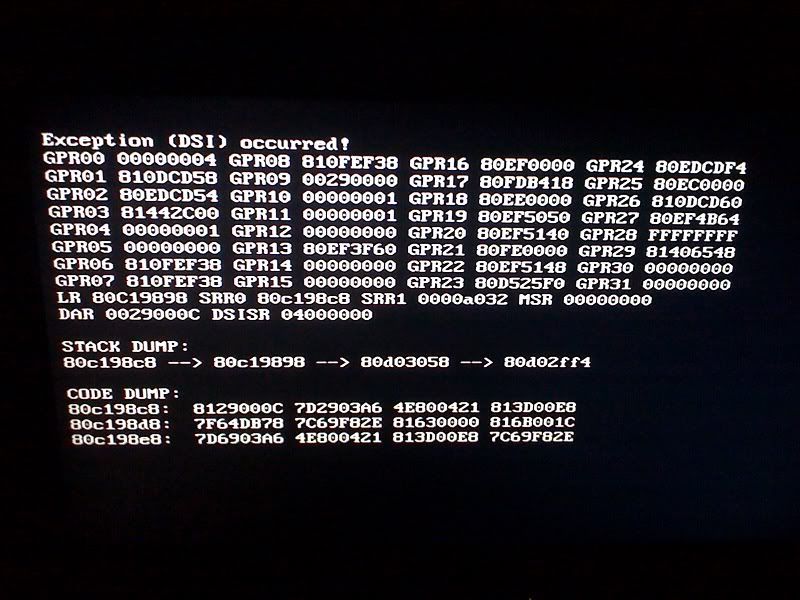
. I am new to the wii scene and have no clue what this it. I also have the gamma loader and it loads the wii game w/o issue but I do not like how it looks or works. I tried the gx loader again after I got the gamma loader to work and still get the same error. I unplugged the USB hard drive and tried the gx program with no error but of course couldn't find the hard drive. Then I plugged it back in and get the same error message again. any clues on what to do. I am trying to have this working before my kids get back from their g-parents so this way they cant scratch up their discs.
|
|
hobomojo
Newbie
|
25. July 2009 @ 16:41 |
Link to this message
|
Leo
Grab this and put it on the SD http://usbloadergx.koureio.net/downloads/forwarders
Then use the update dol.
After that unlock and go through all your games and make the changes needed to the settings.
The only time I got the DSI since doing that is when I tried to sort via favorite (star) when I hadn't actually favorited anything.
Read my above post for more info...good luck
|
|
jm0327
Newbie
|
25. July 2009 @ 20:35 |
Link to this message
|
Great write up!! I have a question.. I got everything working fine, EXCEPT the auto download box art. It says im missing 1 files, or 2 files, etc., depending on the game. I have not auto updated the usb loader gx in the settings menu because I have tried twice (once with the option update everything, and once with the option just the one file) and after that, the wii said it is not a valid application and I would reinstall. Any suggestions to help would be great! thanks !
|
|
hobomojo
Newbie
|
25. July 2009 @ 23:16 |
Link to this message
|
JM, I was having that same problem up until I updated the forwarder (see links above). If you have already done that then I'm not sure.
As far as the art, so far I have been able to get all of mine except for 1 cd cover which says its missing when I go to DL.
|
|
brptdoc1
Junior Member
|
27. July 2009 @ 08:43 |
Link to this message
|
|
does anyone know a guide like this one, on how to set up a channel to play the rockband games.
|
|
jm0327
Newbie
|
27. July 2009 @ 16:42 |
Link to this message
|
|
hobo, i got things working, i changed the CIOS to 12 instead of 13. someone suggested that and it seemed to do the trick!
|
|
faijufung
Suspended due to non-functional email address
|
27. July 2009 @ 19:36 |
Link to this message
|
hm, what settings do you recommend for each of the individual games? Im having the same dsi issue with my pal games, but for all my ntsc ones, perfectly fine.
|
|
leo8013
Suspended due to non-functional email address
|
27. July 2009 @ 20:31 |
Link to this message
|
I completely started over with my wii. i did a full format on it just to make sure there were no problems. I went ahead and sofmodded it again and put the GX loader on it as well. All is fine but still not Image art or cd art. it comes up unavailable. I know that if I update it might error again and I do not want that. How do I tell you what version that I have because I cant see it. this way you can tell what I am working with. Is it just better to load the images myself. I take it that if I load the images myself what file names do i use
|
|
leo8013
Suspended due to non-functional email address
|
27. July 2009 @ 20:42 |
Link to this message
|
sorry to be a pest. also since new for the wii scene I have one more question regarding the loader. Can the wii games play online with the loader or for that do you need the physical disc to play online. thanks again.
|
|
pmaknelho
Member
|
27. July 2009 @ 21:02 |
Link to this message
|
@leo
I had a similar problem and loaded all cover art manually. Look for covers in Documents in Vista after having installed WBFS manager. After copying the images to covers folder, you have to right click, edit, then click "image" dropdown and then attributes... make sure the height is 244, or USB loader wont read the image. Backed up isos will play on line too.
|
|
leo8013
Suspended due to non-functional email address
|
27. July 2009 @ 21:20 |
Link to this message
|
|
thanks for the help
|
|
brptdoc1
Junior Member
|
28. July 2009 @ 07:50 |
Link to this message
|
i have a couple questions,
A. can you back up from usb loader to computer. (Like the old way of backing up games threw the internet)
B. is there a way to play rockband games from usb loader..
c. has onyone figured out how to play "house of the dead 2, of house of the dead 2 and 3--house of the dead 3 works but cant get 2 to work)
|
|
whatelse
Junior Member
|
28. July 2009 @ 16:22 |
Link to this message
|
Originally posted by brptdoc1:
i have a couple questions,
A. can you back up from usb loader to computer. (Like the old way of backing up games threw the internet)
B. is there a way to play rockband games from usb loader..
c. has onyone figured out how to play "house of the dead 2, of house of the dead 2 and 3--house of the dead 3 works but cant get 2 to work)
A. yes (kind of). Use WBFS on a Windows PC. Select the game from your Wii formatted hard drive and choose "extract .iso". This will copy an .iso image of the game to your pc.
OR, format a second hard drive using WBFS. Simply copy from your main WBFS drive to the second WBFS drive
B. Yes, rockband works with USB loader (GX). You must have hermes cIOS 222/223 to support peripherals like the USB microphone. Install 249 with cIOS 222 using revision 37 merged with 36. Then go back and install 249 with cIOS 223 using revision 37 merged with 36 also. in USB loader, select the back up game and click on settings. Change cIOS to 222 and save.
C. Haven't tried yet. I imagine if you have the right cIOS installed you'll be ok. cIOS38_rev14 was just released. That should allow you to play just about every game avaialble right now.
|
|
Advertisement
|
|
|
|
jhebi
Newbie
|
28. July 2009 @ 20:24 |
Link to this message
|
Question,
I put the cover and disc on the sd/images, and after that I press ok and how do I retrieve the covers and disc that I just added on the sd card. I try to click on the game that doesn't has image and it just give me the option to download from online. Thanks
|


