|
Anydvd slowdown
|
|
|
bim123
Suspended due to non-functional email address

|
15. June 2005 @ 10:45 |
 Link to this message

|
|
Downloaded anydvd in order to copy Hitch and now DVD Decrypter will not write to dvds now. The buffer that once was always at 100% now jump all the way down to 7% and then up to 94% and then back down? I have had the device buffer go below 100% before but never the buffer, just started after installing anydvd. I use dvd43 and shrink also never had a problem. Anybody have any ideas? Thanks.
|
|
Advertisement
|
 |
|
|
Moderator
|
15. June 2005 @ 10:48 |
Link to this message
|
yep, turn off AnyDVD and use decrypter on it's own, decrypter can handle 'arccos protection' all on it's lonesome

Main PC ~ Intel C2Q Q6600 (G0 Stepping)/Gigabyte GA-EP45-DS3/2GB Crucial Ballistix PC2-8500/Zalman CNPS9700/Antec 900/Corsair HX 620W
Network ~ DD-WRT ~ 2node WDS-WPA2/AES ~ Buffalo WHR-G54S. 3node WPA2/AES ~ WRT54GS v6 (inc. WEP BSSID), WRT54G v2, WRT54G2 v1. *** Forum Rules *** |
|
bim123
Suspended due to non-functional email address
|
15. June 2005 @ 10:57 |
Link to this message

|
It wouldn't rip it. Stalled at 13%, It messed with dvds that I already ripped and burned yesterday, tried to burn one from yesterday and decrypter was real slow and the buffer was going crazy. After that it would cause an I/O Error and ruin the disk. Have since removed AnyDVD, was wondering if AnyDVD changed settings, reinstalled decripter this afternoon. Thanks.
|
Moderator
|
15. June 2005 @ 11:11 |
Link to this message

|
don't get me wrong, i'm not saying there's a conflict with AnyDVD, or that it's buggy, just that this film is not a problem for decrypter, plus it's always best to go back to basics when troubleshooting
Main PC ~ Intel C2Q Q6600 (G0 Stepping)/Gigabyte GA-EP45-DS3/2GB Crucial Ballistix PC2-8500/Zalman CNPS9700/Antec 900/Corsair HX 620W
Network ~ DD-WRT ~ 2node WDS-WPA2/AES ~ Buffalo WHR-G54S. 3node WPA2/AES ~ WRT54GS v6 (inc. WEP BSSID), WRT54G v2, WRT54G2 v1. *** Forum Rules ***
|
|
squizzle
AfterDawn Addict
|
15. June 2005 @ 11:48 |
Link to this message
|
so you have DVD43 and AnyDVD installed?? You must disable one or the other because they will fight each other.
Convert PAL to NTSC or NTSC to PAL------>http://forums.afterdawn.com/thread_view.cfm/167922
ScubaPete's guides------>http://www.dvdplusvideo.com/tutorial007.html
Bbmayo's guides------>http://home.comcast.net/~bbmayo/index.html
My ever-growing movie collection------>http://www.intervocative.com/dvdcollection.aspx/squizzle
|
|
bim123
Suspended due to non-functional email address
|
15. June 2005 @ 12:15 |
Link to this message
|
No. Uninstalled AnyDVD earlier. Would like to know what whould make my device buffer go from 99% down to 4% and then back up again. It seems that the recorder stops for a split second before the % jumps up to 94%. Then fails to write incompatable format. Have burned over 100 dvds no problem, have had nothing but trouble since installing AnyDVD. Thanks
|
|
squizzle
AfterDawn Addict
|
15. June 2005 @ 12:23 |
Link to this message
|
check over the options in AnyDVD and your burning software. I'm pretty sure AnyDVD has an option to lock in your drive's speed, other options may have something to do with this as well.
Convert PAL to NTSC or NTSC to PAL------>http://forums.afterdawn.com/thread_view.cfm/167922
ScubaPete's guides------>http://www.dvdplusvideo.com/tutorial007.html
Bbmayo's guides------>http://home.comcast.net/~bbmayo/index.html
My ever-growing movie collection------>http://www.intervocative.com/dvdcollection.aspx/squizzle
|
AfterDawn Addict
|
15. June 2005 @ 12:26 |
Link to this message
|
You can try downloading CloneDVD2 from slysoft and install. The go into DVDDecrypter settings and use the ElbyCDIO interface, open AnyDVD and rip. This is from Olli, developer of CloneDVD2 and CloneCD. You can also try new free programs that were on AD newspage
http://www.dvdidle.com/free.htm/
This message has been edited since posting. Last time this message was edited on 15. June 2005 @ 12:26
|
|
bim123
Suspended due to non-functional email address
|
15. June 2005 @ 12:31 |
Link to this message
|
I deleted AnyDVD and uninstalled shrink and decrypter and then reinstalled them with no avail. Can anybody tell me what the device buffer in decrypter is for and what will cause it to jump around?
|
AfterDawn Addict
6 product reviews
|
15. June 2005 @ 13:52 |
Link to this message
|
Rig #1 Asus Rampage Formula Mobo, Intel Core2Quad Q9450 CPU @ 3.55ghz, 2gb Corsair DDR2 1066 Dominator Ram @ 5-5-5-15, TR Ultra 120 Extreme w/ Scythe 9 blade 110 cfm 120mm Fan HSF, HIS Radeon 512mb HD3850 IceQ TurboX GPU, Corsair 620HX P/S, CM Stacker 830 Evo Case, Rig #2 Asus P5W DH Deluxe Mobo, Intel C2D E6600 CPU @ 3.6ghz, 2gb Corsair XMS2 DDR2 800 Ram @ 4-4-4-12-2t, Zalman CNPS9500LED HSF, Sapphire Radeon X850XT PE GPU, Corsair 620HX P/S, Cooler Master Mystique Case, Viewsonic 20.1" Widescreen Digital LCD Monitor, Klipsch Promedia Ultra 5.1 THX Desktop Speakers, http://valid.x86-secret.com/show_oc.php?id=348351 http://valid.x86-secret.com/show_oc.php?id=236435 |
|
squizzle
AfterDawn Addict
|
15. June 2005 @ 14:12 |
Link to this message
|
|
Also try uninstalling whatever IDE channel your burner is on, then restarting. Usually the burner is on the secondary if I'm not mistaken.
Convert PAL to NTSC or NTSC to PAL------>http://forums.afterdawn.com/thread_view.cfm/167922
ScubaPete's guides------>http://www.dvdplusvideo.com/tutorial007.html
Bbmayo's guides------>http://home.comcast.net/~bbmayo/index.html
My ever-growing movie collection------>http://www.intervocative.com/dvdcollection.aspx/squizzle
|
|
bim123
Suspended due to non-functional email address
|
15. June 2005 @ 19:07 |
Link to this message
|
|
by reboot do you mean restart?? The problem isn't with the ripping it's the burning that I am having a problem. Not sure what to do next but all the help has been great. Thanks.
|
AfterDawn Addict
6 product reviews
|
15. June 2005 @ 19:16 |
Link to this message
|
|
Yes restart. Let us know how it goes.
Rig #1 Asus Rampage Formula Mobo, Intel Core2Quad Q9450 CPU @ 3.55ghz, 2gb Corsair DDR2 1066 Dominator Ram @ 5-5-5-15, TR Ultra 120 Extreme w/ Scythe 9 blade 110 cfm 120mm Fan HSF, HIS Radeon 512mb HD3850 IceQ TurboX GPU, Corsair 620HX P/S, CM Stacker 830 Evo Case, Rig #2 Asus P5W DH Deluxe Mobo, Intel C2D E6600 CPU @ 3.6ghz, 2gb Corsair XMS2 DDR2 800 Ram @ 4-4-4-12-2t, Zalman CNPS9500LED HSF, Sapphire Radeon X850XT PE GPU, Corsair 620HX P/S, Cooler Master Mystique Case, Viewsonic 20.1" Widescreen Digital LCD Monitor, Klipsch Promedia Ultra 5.1 THX Desktop Speakers, http://valid.x86-secret.com/show_oc.php?id=348351 http://valid.x86-secret.com/show_oc.php?id=236435 |
|
bim123
Suspended due to non-functional email address
|
16. June 2005 @ 07:45 |
Link to this message
|
|
Uninstalled IDE channels, dvd drive decrypter and shrink, reinstalled al of them with no change. The problem is with Decrypter when I go to burn the dvd the buffer not device buffer is all over the place.. Just started yesterday? Burned over 100 with no problem, does anybody have any ideas.
|
Moderator
|
16. June 2005 @ 08:20 |
Link to this message
|
i think it might be time to change tack -
download dvdinfopro (free) and do a media info check (2nd icon from top left of dvdinfoprod, and paste details here.
Also, download Nero info-tool from here - http://www.snapfiles.com/get/neroinfo.html
Run it, note down the following, and paste here. Here's what mine shows -
click on the drive tab, note down the firmware version, so we can check if it's out of date
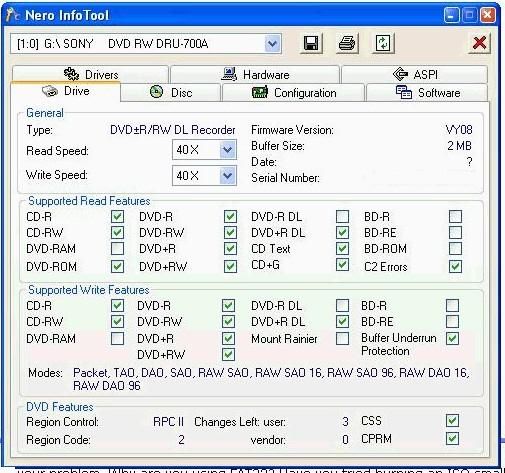
Main PC ~ Intel C2Q Q6600 (G0 Stepping)/Gigabyte GA-EP45-DS3/2GB Crucial Ballistix PC2-8500/Zalman CNPS9700/Antec 900/Corsair HX 620W
Network ~ DD-WRT ~ 2node WDS-WPA2/AES ~ Buffalo WHR-G54S. 3node WPA2/AES ~ WRT54GS v6 (inc. WEP BSSID), WRT54G v2, WRT54G2 v1. *** Forum Rules ***
|
|
bim123
Suspended due to non-functional email address
|
16. June 2005 @ 10:14 |
Link to this message
|
|
The Firmwire # is S-H552B the read speed is 16x but it dosen't have a write speed. It's grayed out. Don't know about that. Need to call gateway on it. Didn't have a serial # for dvdinfopro so I couldn't use it.
|
Moderator
|
16. June 2005 @ 10:17 |
Link to this message
|
|
you don't need a serial number, you got the wrong one, download the free one
Main PC ~ Intel C2Q Q6600 (G0 Stepping)/Gigabyte GA-EP45-DS3/2GB Crucial Ballistix PC2-8500/Zalman CNPS9700/Antec 900/Corsair HX 620W
Network ~ DD-WRT ~ 2node WDS-WPA2/AES ~ Buffalo WHR-G54S. 3node WPA2/AES ~ WRT54GS v6 (inc. WEP BSSID), WRT54G v2, WRT54G2 v1. *** Forum Rules ***
|
|
Advertisement
|
|
|
Moderator
|
16. June 2005 @ 10:20 |
Link to this message
|
Main PC ~ Intel C2Q Q6600 (G0 Stepping)/Gigabyte GA-EP45-DS3/2GB Crucial Ballistix PC2-8500/Zalman CNPS9700/Antec 900/Corsair HX 620W
Network ~ DD-WRT ~ 2node WDS-WPA2/AES ~ Buffalo WHR-G54S. 3node WPA2/AES ~ WRT54GS v6 (inc. WEP BSSID), WRT54G v2, WRT54G2 v1. *** Forum Rules ***
|




