|
Starview 3 The Box Super - Flash Update fail...
|
|
|
madger
Newbie

|
2. December 2008 @ 11:44 |
 Link to this message

|
I have just joined up and not very good with computers can someone help me. I can't find where the rs cable goes on the computer to download new firmware for starview 3 box.
|
|
Advertisement
|
 |
|
|
Junior Member
|
2. December 2008 @ 11:46 |
Link to this message

|
|
ok cheers
|
|
funkyfive
Junior Member
|
2. December 2008 @ 12:08 |
Link to this message

|
madger,
it gets connected on the back of the pc to the connection beside the blue and pink(on some pcs)or on the back near the bottom and is a mail connection with 5 pins above 4 pins with 2 lugs for screwing in the rs cable. Some laptops and new computers only have usb so you would need to buy another cable to download it.
|
|
akram786
Newbie
|
2. December 2008 @ 12:09 |
Link to this message
|
|
my computer doesnt recognise the box
|
|
madger
Newbie
|
2. December 2008 @ 12:13 |
Link to this message
|
Originally posted by funkyfive:
madger,
it gets connected on the back of the pc to the connection beside the blue and pink(on some pcs)or on the back near the bottom and is a mail connection with 5 pins above 4 pins with 2 lugs for screwing in the rs cable. Some laptops and new computers only have usb so you would need to buy another cable to download it.
Thanks for your help much appreciated, do you know the name of the other cable I need as my computer does not have the mail connection
|
Junior Member
|
2. December 2008 @ 12:17 |
Link to this message
|
Originally posted by chamid:
Hi
I got the new cable and tried again, but i am still getting the same problem. It comes up as flash update failed. I have tried restarting the box, switching it off from main power but no luck. Need some help please!!!
Are you making sure the box is in Standby mode when you're flashing it, not actually switched on?
Here's step by step guide. NOTE Only for THE BOX SUPER (i.e Starview 3....not 1 & 2 'The Box'):
1. Download firmware and unzip it with WinZIP/WinRAR or similar software (v8.02e firmware dated 30/11/2008 will fix the latest auto update issue for The Box Super, but this method applies to any all-in-one ROM loader firmware you wish to load)
2. Connect the Starview 3 box to your PC using the correct cable (Serial Null Modem Cable RS232...not any old serial cable).
3. Make sure your box is in standby mode.
4. Run the firmware exe file then click download (make sure App File Only is selected).
5. The progress bar will go from 0% up to 100%, and when this is complete you will get a message saying download complete ! MAKE SURE YOU SEE THE DOWNLOAD COMPLETE POP UP BEFORE YOU DISCONNECT! if you remove it before this pop up appears then it wont work and may kill the box !
6. Once the download is complete a pop up shows, you can then disconnect the box and hook it up to the TV and cable.
SCANNING FOR CHANNELS:
This is quite straight forward. After flashing with new firmware and connecting to the cable/TV, you will be presented with the installation screen.
Just select your language, then your provider ('ex C&W' for example) and finally autoscan. After autoscan has completed, exit all the way out. Press menu, type 1570 on your remote, (to enter CAS menu),
and enable key emu. Exit all the way out and put it on Sly Sports 1 to force the box to autoupdate (if you used the latest auto-update fix v8.02e that is, otherwise you'll have to manually add keys daily from Keymaster v1.2)
Slitheen
|
AfterDawn Addict
|
2. December 2008 @ 12:18 |
Link to this message
|
Originally posted by madger:
Originally posted by funkyfive:
madger,
it gets connected on the back of the pc to the connection beside the blue and pink(on some pcs)or on the back near the bottom and is a mail connection with 5 pins above 4 pins with 2 lugs for screwing in the rs cable. Some laptops and new computers only have usb so you would need to buy another cable to download it.
Thanks for your help much appreciated, do you know the name of the other cable I need as my computer does not have the mail connection
Have a look under my sig... starview updating>>>
|
|
akram786
Newbie
|
2. December 2008 @ 12:22 |
Link to this message
|
|
desb can u help me fix my box. iv got the cable got the software but when i try to update i get error message flash update failed. and also my computer doesnt recognise my box
|
AfterDawn Addict
|
2. December 2008 @ 12:25 |
Link to this message
|
Originally posted by akram786:
desb can u help me fix my box. iv got the cable got the software but when i try to update i get error message flash update failed. and also my computer doesnt recognise my box
Are you using Vista?? als oyou need a Null modem cable 9 pin female to 9 pin female available from Maplins..
|
|
akram786
Newbie
|
2. December 2008 @ 12:27 |
Link to this message
|
Quote:
Are you using Vista?? als oyou need a Null modem cable 9 pin female to 9 pin female available from Maplins
using xp and have the cable
|
Junior Member
|
2. December 2008 @ 12:30 |
Link to this message
|
Originally posted by DesB:
Originally posted by madger:
Originally posted by funkyfive:
madger,
it gets connected on the back of the pc to the connection beside the blue and pink(on some pcs)or on the back near the bottom and is a mail connection with 5 pins above 4 pins with 2 lugs for screwing in the rs cable. Some laptops and new computers only have usb so you would need to buy another cable to download it.
Thanks for your help much appreciated, do you know the name of the other cable I need as my computer does not have the mail connection
Have a look under my sig... starview updating>>>
Ignore the advice about "another cable", it's bad advice in this context as he means a Serial to USB adapter cable, and 99 times out of 100 people end up finding they don't work properly for this job. USB cannot handle the data properly. If your PC has no serial port, you need a Serial PCI extension card. You can get one eBay for about £5.
Slitheen
|
AfterDawn Addict
|
2. December 2008 @ 12:32 |
Link to this message
|
Originally posted by DesB:
Originally posted by akram786:
desb can u help me fix my box. iv got the cable got the software but when i try to update i get error message flash update failed. and also my computer doesnt recognise my box
Are you using Vista?? als oyou need a Null modem cable 9 pin female to 9 pin female available from Maplins..
god des i think its time for me and you to retire,experts crawling out of the woodwork everywere lol
|
|
forby69
Suspended due to non-functional email address
|
2. December 2008 @ 12:36 |
Link to this message
|
|
hi there all ,i have same prob but when i click download get error message cannot open serial port and the system cannot find the file specified .any ideas marras
|
AfterDawn Addict
|
2. December 2008 @ 12:37 |
Link to this message
|
|
Think your right Katrl... Bow out gracefully LOL
funny though he is telling people to use the RS232 cable ( The one that comes with the box... the one that doesnt work)
I suppose thousands of people before him who have used the NUll Modem must have been wrong!!
Siltheen ...its all yours!!!
|
|
forby69
Suspended due to non-functional email address
|
2. December 2008 @ 12:39 |
Link to this message
|
ps to you ,the lead is a usb to serial adaptor
|
|
bluetate
Junior Member
|
2. December 2008 @ 12:50 |
Link to this message
|
Originally posted by karljd:
Originally posted by bluetate:
Originally posted by karljd:
bluetate look in the eurovox folder under my pic to check and see if you have the right cables,
scotsbabe look in eamos library under my pic.
i ave the right cables as i have downloaded firmware once before!am
wondering is it anything to do with winzip as i have just purchased it online as my old one ran out of date/or is it because am using my lap top at a different address,thanks for your time and help karl.
no it would have nothing to do with any of them,check you cable is secure in your pc and box,also turn thr box off press download turn it back on and see if it moves.
tried that karl still the 0% still showing nothing else doing.
|
Junior Member
|
2. December 2008 @ 13:00 |
Link to this message
|
|
the RS232 cable...is it only maplin that sell them?, had 1 but broke
|
|
johncarlt
Newbie
|
2. December 2008 @ 13:09 |
Link to this message
|
|
I got my R32 from ebay.
|
|
johnny600
Junior Member
|
2. December 2008 @ 13:15 |
Link to this message
|
hi can somebody help i have downloaded the the firmware file for starview super when i open the file only the gtrom loader open up and theere is no other file
|
Junior Member
|
2. December 2008 @ 13:15 |
Link to this message
|
Originally posted by DesB:
Think your right Katrl... Bow out gracefully LOL
funny though he is telling people to use the RS232 cable ( The one that comes with the box... the one that doesnt work)
I suppose thousands of people before him who have used the NUll Modem must have been wrong!!
Siltheen ...its all yours!!!
Eh? I am telling people to use a serial null modem cable, as stated in my above guide. "Serial Null Modem Cable RS232...not any old serial cable)"
Oh, and 'scotsbabe' - Maplin aren't the only place that sell em, you can get one on eBay or many other places (£2 inc P&P on eBay is the cheapest, I'd bet). But like most places, there's usually more than one type of serial cable on sale...make sure what you buy says "null modem" somewhere in the product title/description.
Slitheen
This message has been edited since posting. Last time this message was edited on 2. December 2008 @ 13:30
|
|
gardener1
Newbie
|
2. December 2008 @ 13:16 |
Link to this message
|
Originally posted by mankugu:
I hope someone can help me PLZ.
I bought a genuine starview 3 box a week ago (25x7 vents). Hav managed to connect it to my pc through the com port. I have managed to change the API version of the software on the box to various ones such as GTRom_Super705e and 601e, i have checked this in system info and it has worked fine. BUT when i come to use GTRomV4.0 and run the software and specify the various api files and click on download, i get a pop up window showing zero progress, i have left it for 10, 20 and 30 mins and nothing happens.
Eventually when i click on download button and turn the power ON to the box i get a pop up window Quote:
Flash Update Fail..
Otherwise i get no message when the power is on to the box and the download button has been pressed.
The system info is API ver:7.05e, Boot ver:8.0 10.Apr.2008.
The nul cable and the port setting must be ok if i can change the API version of the software.
Any help greatly appreciated..
try this tutorial m8 http://www.freewebs.com/boxsuper/
|
AfterDawn Addict
|
2. December 2008 @ 13:59 |
Link to this message
|
Originally posted by slitheen:
Originally posted by DesB:
Think your right Katrl... Bow out gracefully LOL
funny though he is telling people to use the RS232 cable ( The one that comes with the box... the one that doesnt work)
I suppose thousands of people before him who have used the NUll Modem must have been wrong!!
Siltheen ...its all yours!!!
Eh? I am telling people to use a serial null modem cable, as stated in my above guide. "Serial Null Modem Cable RS232...not any old serial cable)"
Oh, and 'scotsbabe' - Maplin aren't the only place that sell em, you can get one on eBay or many other places (£2 inc P&P on eBay is the cheapest, I'd bet). But like most places, there's usually more than one type of serial cable on sale...make sure what you buy says "null modem" somewhere in the product title/description.
For your information>>>
These are the cables you will need to flash your box with the new Firmware,
If you have a computer or a laptop with a 9 pin serial com Male socket all you will need is this,
Female to Female Serial Null Modem Cable which looks like this,

Or this,
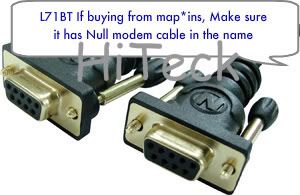
Make sure you do not buy just a Serial RS232 9-Pin Female to Female cable, they seems to be quite a few people buying these from mapl*ns, and they look exactly the same,
M@plins order numbers are,
L71BT Correct order code,
L68BT <-- This cable will not work!
Of course these cables can be bought allot cheaper from fleabay but this is for example.
If you have a computer or laptop without a 9 pin serial socket you will still need the Female to Female Serial Null Modem Cable as above and this USB to Serial DB9 Adaptor to make it fit into your USB port which looks like this.

You will need to install the Driver that came along with the USB adaptor above, If you dont have the Driver you can download it HERE. I would also advise that if you have a PC with Windows Vista to get to a PC with XP installed rather than trying to get the USB adaptor to work, there has been no end of problems regarding this all across the Forum.

If you have a PC and you are struggling with the usb adapter or you have Vista like me you could install a PCI serial card which is easily added to you PC and with this all you need is the null modem cable which gives you a direct link from your box to the pc.
Thanks Hiteck for the Pictures!!!
|
|
funkyfive
Junior Member
|
2. December 2008 @ 14:04 |
Link to this message
|
|
karljd,desb,scouser,malci,etc
this site couldn't survive without you guys and i apologise if i have stepped on anybody's toes. All the things I have posted have came from experiences I have read on this site or things that happened to me and thought I would save you repeating yourselves.My messages from page 2 of this link (sept) were answered in great depth and I see the problem might be appearing with others with flash failed coming up. Anybody getting this problem look back and check what malci and karljd posted as a reply to me from page 2 in september. There was quite a few things i had to try.
|
AfterDawn Addict
|
2. December 2008 @ 14:13 |
Link to this message
|
Originally posted by funkyfive:
karljd,desb,scouser,malci,etc
this site couldn't survive without you guys and i apologise if i have stepped on anybody's toes. All the things I have posted have came from experiences I have read on this site or things that happened to me and thought I would save you repeating yourselves.My messages from page 2 of this link (sept) were answered in great depth and I see the problem might be appearing with others with flash failed coming up. Anybody getting this problem look back and check what malci and karljd posted as a reply to me from page 2 in september. There was quite a few things i had to try.
Thanks for that ..and no need to apologise ... its just been a long few days, and when people who have posted less than 20 posts in 2 years come on and contradict you, its a pain... we are only giving out advice we have tried and tested!!!
|
|
Advertisement
|
|
|
|
handford
Suspended due to non-functional email address
|
2. December 2008 @ 14:33 |
Link to this message
|
hi , please help, i have a genuine starview box ruunning version 4 autoroll with v----n which has the no channel like many other people, is there a fix for the problem yet
|


